

Gantt Chart View in FluentBoards: See Every Deadline, Dependency, and Delay Before It Happens


Three weeks to launch. Your board looks busy, cards are moving, everyone is heads-down, and that feels like progress.
Here’s the gap. Kanban is brilliant at telling you where work is. It was never built to tell you when it ends. On a project with a hard date on it, that’s the one question you actually need answered.
That’s the job Gantt Chart View does. Switch to it and every task becomes a bar on a timeline:
- What starts when
- What finishes when
- What depends on what
All on the same board you already use, so one look tells you whether the schedule is holding or quietly slipping.
Break free from the “I think we’re on track” phase. Let’s get you reading a real timeline.
How to Switch to Gantt View
There’s no configuration needed. Gantt view reads directly from the tasks already on your board. If your tasks have start dates and due dates set, you’re ready to go.
Step 1: Open the board you want to work in
Any board works. You’re not creating a separate board for Gantt. You’re switching how you look at an existing one.
Step 2: Click the view switcher in the board header
You’ll see a dropdown listing all available views: Kanban, List, Table, Calendar, and Gantt. The button shows the name of the current view. If you’re in Kanban, it says “Kanban.” Table, Calendar, and Gantt show a “Pro” badge if you don’t have an active Pro license.
Step 3: Select “Gantt”
The board redraws. Tasks become horizontal bars stretching across a calendar timeline. Stage names appear as grouped rows on the left. The date header runs across the top.
That’s the entire setup. You’re in Gantt view.
Use the toolbar to switch between time scales: day, week, month, or quarter. Day gives you the most granular view; quarter gives you the widest lens. Click “Today” at any point to snap the timeline back to the current date.
One thing worth knowing: Gantt view also works on FluentRoadmap boards. If you’re using FluentRoadmap to track feature requests or a public product roadmap, switching to Gantt plots your ideas and features on the same kind of timeline. The view label changes from “Add Task” to “Add Idea” but the behavior is identical.
How to Read Your Gantt Chart
Before you configure anything, learn to read what’s already on the screen. That’s where most of the value sits.
Here’s what you’re looking at:
- The task bars: Each bar is one task. Its left edge is the start date, its right edge is the due date. A short bar is a quick task, a long bar is a heavy one, and you can see which is which without opening anything.
- Stage groupings: Tasks sit in rows by stage, the same stages you defined on your Kanban board. This shows you whether one phase is dominating the timeline while another is thin.
- Overlapping bars: Two bars covering the same days means two tasks running in parallel. If the same person is on both, you’ve just found a bottleneck nobody flagged. Sometimes that’s fine, sometimes it’s a resource conflict you didn’t know you had.
- Timeline position: Anything left of today is behind you, anything right is upcoming, and bars crossing today are active right now. Colour fills in the rest at a glance: white for on track, red for overdue, green for done.
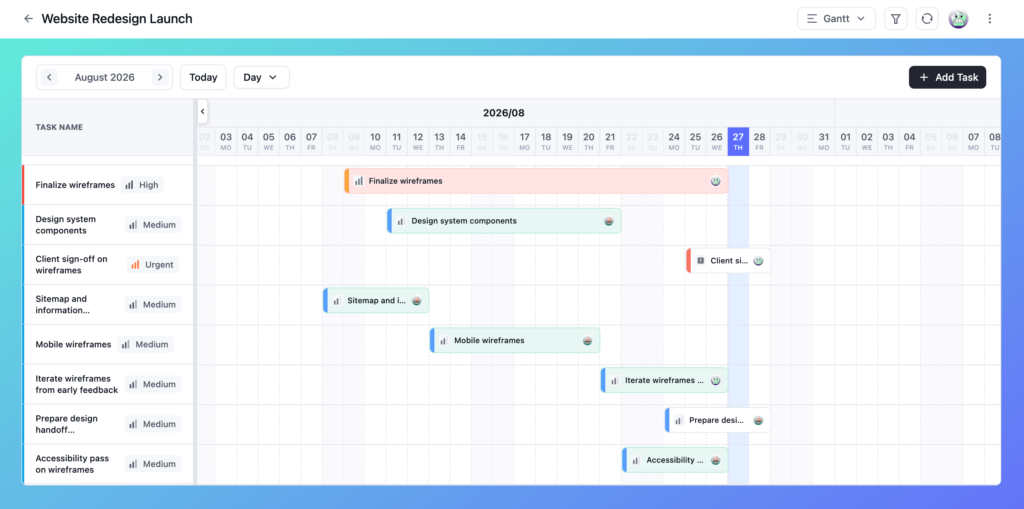
Reading this correctly is how you catch a project that’s quietly off track before it’s publicly off track.
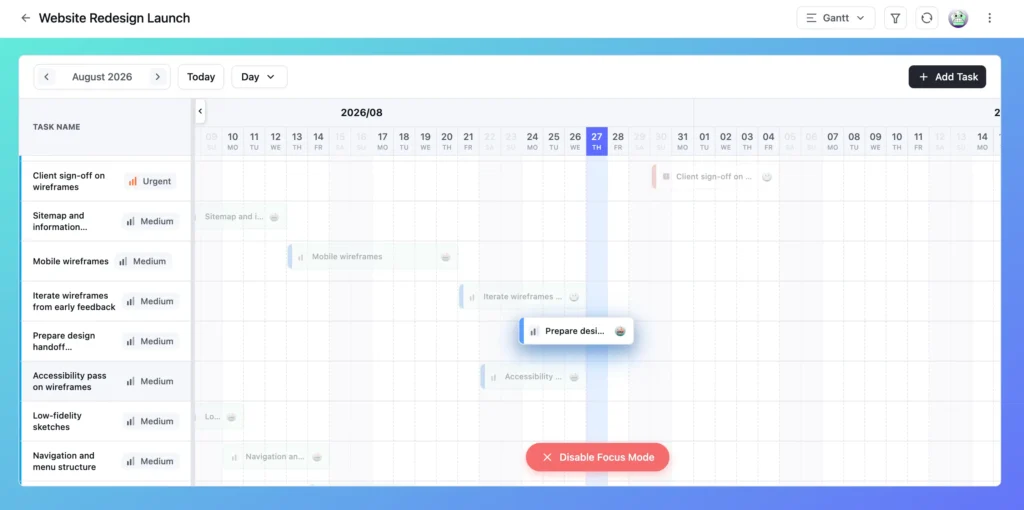
Pro Tip: Click and hold a bar and drag slightly upward to dim everything else. One task stays lit, which is the fastest way to trace its schedule when the chart is full.
Adjusting Task Timelines Directly in Gantt
You don’t have to open a task to reschedule it. You can do it directly on the chart, and the changes sync immediately to the task detail.
Drag to move: Click and drag a task bar left or right to shift its entire timeline. The start date and due date move together. Use this when a task needs to slip because something upstream was delayed.
Drag the edges to resize: Drag the left edge to change the start date only. Drag the right edge to change the due date only. Use this when the scope of a task changed and you need to give it more or less time.
Open the task detail afterward and the new dates are already there. Nothing gets out of sync.
Heads up: Editing is open to every board member who isn’t in a viewer-only role. If someone should see the schedule without changing it, set their role to viewer. That’s the right lever, rather than restricting the view itself.
Task Dependencies in Gantt View
This is where Gantt earns its place in your workflow.
A dependency connects two tasks: Task B can’t start until Task A is finished. Set it once and Gantt draws a line between the two bars, so the chain is visible on the chart.
To create one, hover over a task bar and use the link anchor that appears, then drag from the predecessor to the successor. A single task can hold several predecessors or successors.
Why this matters here specifically: you see the domino effect before it lands.
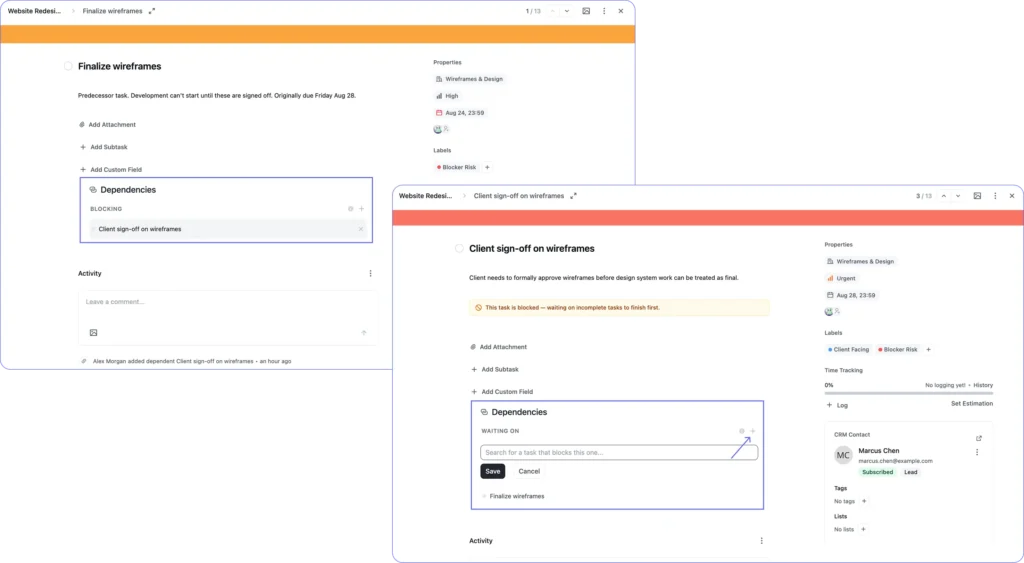
Say “Finalize wireframes” was due Friday, and “Client sign-off on wireframes” was set to begin Monday. Then the designer tells you wireframes will slip to Wednesday.
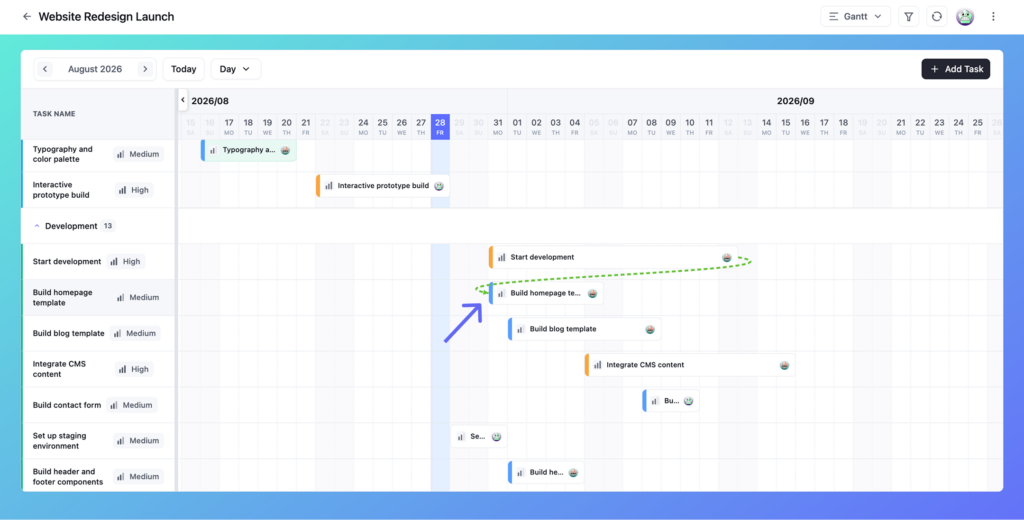
In Kanban, you’d change the date and hope someone notices the sign-off task has to move too.
In Gantt, the line shows you immediately. Sign-off is still sitting on Monday while wireframes now runs to Wednesday. You fix it today instead of finding out Thursday, when the client tries to review and can’t.
Once a dependency exists, both tasks show it, from different angles:
- Waiting On appears on the task that has to wait, naming what it’s stuck behind
- Blocking appears on the task other work depends on, naming what it’s holding up
That’s what turns a blocked task into something obvious instead of something you have to remember. Open a task with an incomplete predecessor and a banner sits right at the top:
This task is blocked - waiting on incomplete tasks to finish first.
Nobody has to ask if it’s ready to start, the task says so itself. Finish the predecessor and the banner clears on its own.
Need to add a second predecessor, or a second successor? The “+” next to the heading is still there. Click it, search, select.
One task can be waiting on several others, or blocking several others, at once. Closer to how real projects run than a clean one-to-one chain.
Gantt vs. Kanban vs. Calendar: Honest Answers
This question comes up every time someone discovers Gantt view. Should I use this instead of Kanban, or Calendar? The answer depends on the project, not on which view looks more impressive.
| View | Use it when | Example projects |
| Gantt | Your project has a hard deadline, tasks need to happen in a specific sequence, and you need to see whether the schedule is holding. Time is the primary constraint. | Client deliverables, development sprints with dependencies, event production |
| Kanban | Your work is ongoing and stage matters more than date. There’s no launch date, just tasks moving through stages. If you’re not running deadline-driven projects, Gantt adds visual complexity without adding value. | Content production, support queues, backlog grooming |
| Calendar | Your work is deadline-driven but not dependency-heavy. Due dates matter, but dependencies between individual items usually don’t. | Marketing content calendars |
If Kanban or Calendar sounds closer to how your team actually works, our guides on kanban board for project management and calendar view for project management go deeper on each.
FluentBoards gives you all three views on the same board. Switching costs nothing. They share the same task data. Some project managers use Kanban for daily task management and switch to Gantt for the weekly check-in with a client or stakeholder. Both views, same board.
For a deeper look at Table View and Calendar View in FluentBoards specifically, see Table View in FluentBoards and Calendar View in FluentBoards.
Who Can Use Gantt View?
Gantt view is available to any board member on a Pro plan. You don’t need admin access to open it or work in it.
Any member who is not assigned a viewer-only role can edit task dates directly in Gantt: dragging bars, resizing, adding dependencies. That covers most team members by default.
Viewer-only members can see the Gantt timeline but cannot make changes. If a stakeholder or client needs to check the schedule without modifying it, viewer-only is the right role.
See what else Pro unlocks: free vs Pro comparison
Frequently Asked Questions About Gantt Chart View
The questions that come up most once people start scheduling in Gantt.
Why doesn’t my task show up on the Gantt chart?
It’s missing a start date, a due date, or both. Gantt only renders tasks that have both set, a due-date-only task that works fine in Kanban simply won’t appear here until you give it a start date too.
If I move a task, do the tasks depending on it move too?
No. Dragging a bar only changes that task’s own dates. If it has a dependent task waiting on it, the dependency line and the blocked banner will show the new conflict, but nothing shifts automatically. You still have to go in and adjust the downstream task yourself.
Can I remove a dependency after adding one?
Yes. Open either task in the pair, hover over the dependency in the list, and a small × appears on the right. Click it and the link is gone, from both sides, immediately.
Is Gantt Chart View available on the free plan?
No. It’s a FluentBoards Pro feature.
Open Your First Gantt Chart Today
Switch the view. That’s the whole setup, with no configuration, no import, and no new board to build.
The first thing worth doing isn’t setting up dependencies or changing time scales. It’s reading the chart you already have. Look for bars that crossed today’s date without being marked complete, and for overlapping bars where two heavy tasks are running in the same stage at once. That information was already in your board. Gantt just makes it visible.
Then use it. Drag the bars that need to move, link the predecessors and successors, and if your project has a hard deadline, make Gantt the view you open every Monday morning. It’s the fastest way to know whether you’re on track before anyone has to ask.
If your board doesn’t have task dates set yet, start there. FluentBoards Templates gives you structured starting points with stages and tasks already defined, so you’re filling in dates rather than building from scratch.
Thanks for reading. Open Gantt on your closest deadline and see whether the schedule you think you have is the schedule you actually have.
Let’s redefine project management with FluentBoards!

Follow:


Get Tips, Tricks, & Updates
We won’t send you spam.





Add your first comment to this post