


How to Manage Multiple Projects When Every Project Has a Different Client


It’s Monday, 8:40 a.m.
Three clients emailed over the weekend, and each one expects their project to be the priority this week!
The dental practice wants homepage revisions. The coffee roaster wants a launch date confirmed. The law firm wants to know why nobody has replied yet.
And, by the time you start sorting through those requests, you are already comparing different deadlines, different levels of urgency, and different team workloads!
That is what makes managing multiple client projects difficult! It’s not just the number of projects, but having to decide what comes first when every client has a reason to believe their work matters most.
To make that decision without guessing, you need one clear view of everything: every project, every deadline, and each person’s workload.
And this part of our agency project management playbook shows how to build that view in four parts: one workspace, one priority rule, one queue per person, and a 20-minute Monday review.
Let’s dive in!
Why Multiple Client Projects Break Differently
Managing multiple client projects differs from managing multiple internal projects for one simple reason: the same team works for different clients at the same time!
Most advice on managing several projects assumes there is one boss, one team, and one shared set of priorities.
But agencies do not have that luxury!
Every client brings their own deadlines, requests, and definition of what matters most.
And that changes three things.
- First, the conflict is not just between tasks. It is between clients, and each client only sees their own project. They do not see the other deadlines your team is juggling at the same time.
- Second, your team constantly switches context. A designer might move from a dental practice’s booking form to a coffee roaster’s product pages before lunch, and every switch takes time and focus.
- Third, the same people often sit across several projects at once. So when one project slips, the delay rarely stays there. It quietly pushes the others back too.
None of this is fixed by working harder or by adding another to-do app. It is fixed by making the full workload visible in one place, then agreeing on clear rules for what happens when two clients want the same day.
Common Mistakes When Managing Multiple Projects
Most agencies that struggle with multiple projects aren’t short on effort. They’re running a system that hides problems until a client finds them first.
- A separate tool for each client: If one client insisted on their own Trello board and another on a shared spreadsheet, you now have three places to check, and the Monday review can’t see two of them.
- Different stage names on every board: “Review” on one board and “QA” on another make cross-project scanning impossible. Standardize once.
- Priority set by whoever shouts: The client who emails three times a day isn’t the one with the closest deadline. Let the written rule decide.
- Everyone on every board: Adding the whole team to every project floods My Tasks with mentions and notifications. Add people to the boards they actually work on.
- Skipping the review in busy weeks: The weeks you’re too busy for the Monday review are the weeks you need it most.
Put Every Project in One Workspace
The first rule for managing multiple projects is that every project lives in the same workspace, built the same way. If one client’s work sits in a spreadsheet, another’s in email and a third in a SaaS board, you can’t compare them, and you’ll always miss the one that’s slipping.
Here’s how to structure that workspace so it stays readable at nine projects or twenty.
One board per project, one folder per client
Give every project its own board, and group all of a client’s boards in a folder named after the client. When Brightwater Dental has a website rebuild board and a maintenance board, both sit in the “Brightwater Dental” folder, so your board list reads like your client list.
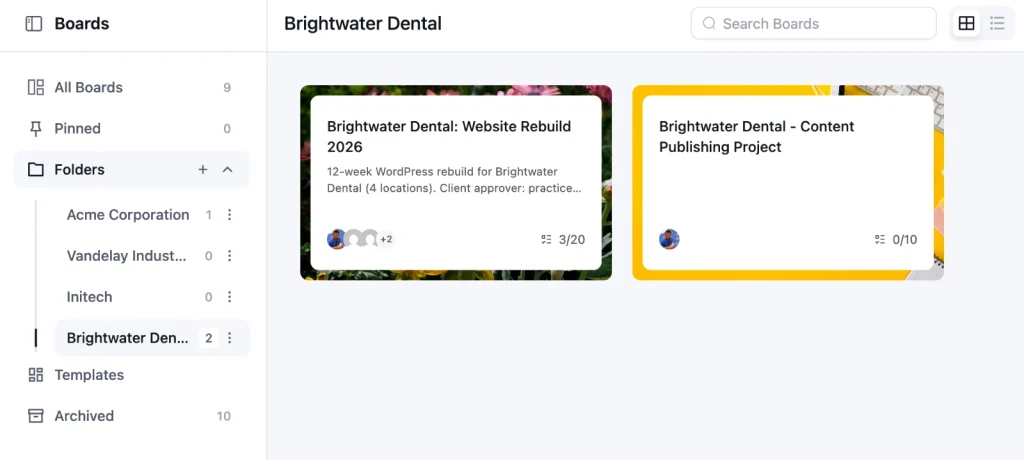
Keep project boards separate even for the same client. A finished rebuild and an ongoing retainer have different stages, owners, and rhythms, and mixing them on one board hides both.
Use the same stages everywhere
Every board should use the same stage names in the same order, like Briefing, In Progress, Internal Review, Client Review, Approved, and Live.
When the stages match, “three tasks in Client Review” means the same thing on every board, and you can scan nine projects in a few minutes without relearning each one.
If you haven’t set those stages yet, our guide to building an agency workflow walks through a seven-stage setup you can copy.
Pin what is live this week
Not every project needs your attention every week. Pin the boards that have a milestone, a review, or a launch in the next seven days, so they sit at the top of your board list. Inside those boards, pin the one or two tasks that decide whether the week goes well, like “Homepage design sent for approval.”
Set One Priority Rule for All Clients
When you manage multiple projects for different clients, priority has to come from a rule, not from whoever emails loudest. Write the rule down once and apply it to every board, and most Monday-morning conflicts settle themselves.
The rule has three parts: what “urgent” means, how tasks are labeled, and what breaks a tie.
Define Urgent Before a Client Does
Decide what qualifies as urgent before the first client uses the word. A good definition is narrow: a live site is down, a contracted launch date is less than 48 hours away, or a legal or payment deadline is at risk. A client being unhappy with a font isn’t urgent; however, the email is worded.
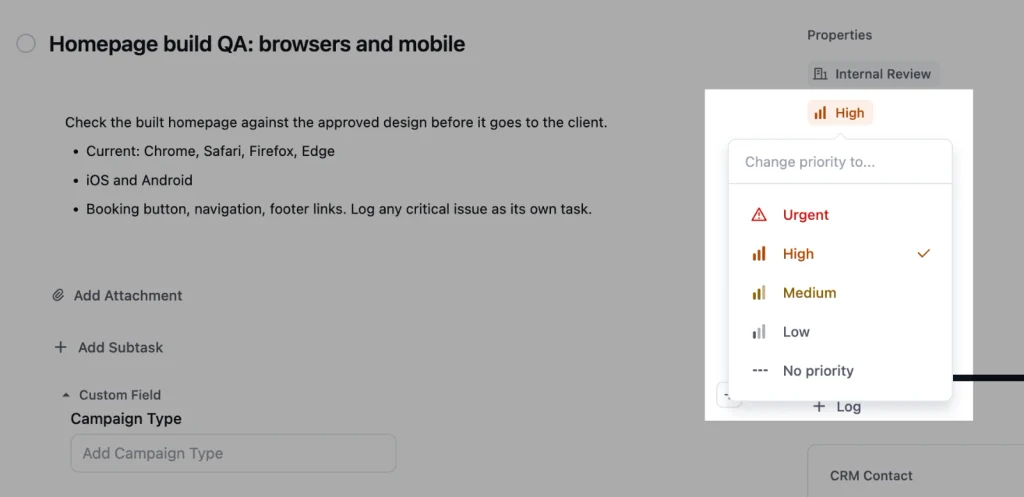
FluentBoards has five priority levels: None, Low, Medium, High, and Urgent. Use Urgent only for what your rule defines, and it stays meaningful. If a quarter of your open tasks are Urgent, nothing is.
Label by Client and Work Type
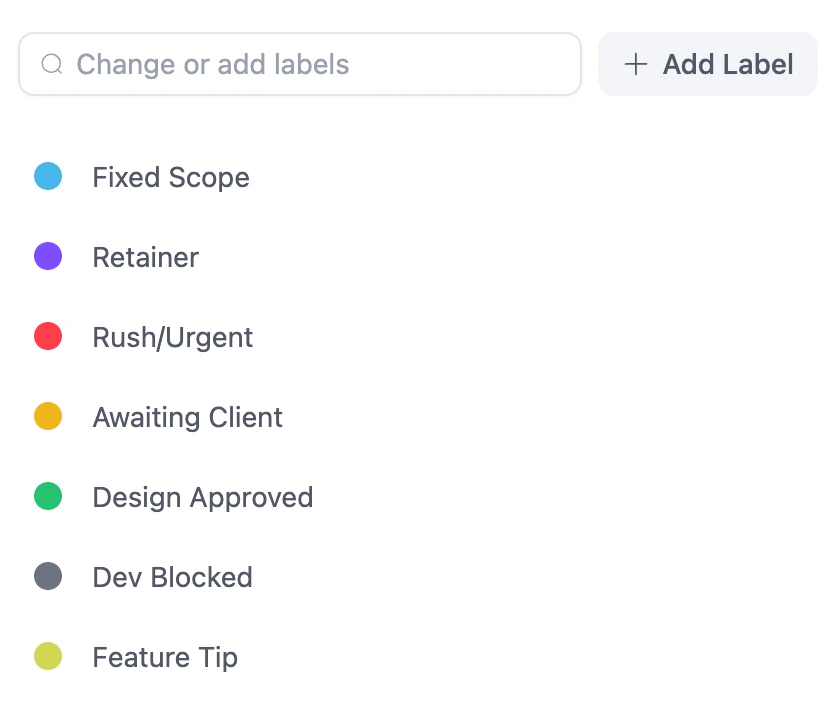
Use the same label set on every board, so a filter means the same thing everywhere. Work-type labels like “Design,” “Development,” and “Content,” plus status labels like “Waiting on Client” and “Change Request,” let you answer questions like “what’s blocked on clients this week?” across every project at once.
The Tie-Breaker When Two Clients Want the Same Day
When two clients need the same person on the same day, decide in this order.
Contract dates win first: a launch date written into a statement of work beats a request made by email.
Then blockers: work that unblocks other people, like a design the developer is waiting on, beats work that only affects itself.
Then size: if everything else is equal, finish the smaller task first so one client gets a complete result instead of two clients getting half of one.
You’ll see two other rules mentioned whenever people talk about managing multiple projects.
- The 80/20 rule, the idea that a small share of the work produces most of the results, is useful for deciding which tasks deserve your best hours
- The 1-3-5 rule, which plans one big, three medium, and five small tasks a day, is a personal planning habit, and it fits neatly into the single queue described next
Give Every Person a Single Queue
Every person on the team should have one list that shows everything assigned to them across every project. Without it, a designer working on four boards has to check four boards, and the task they forget is always the one with the tightest deadline.
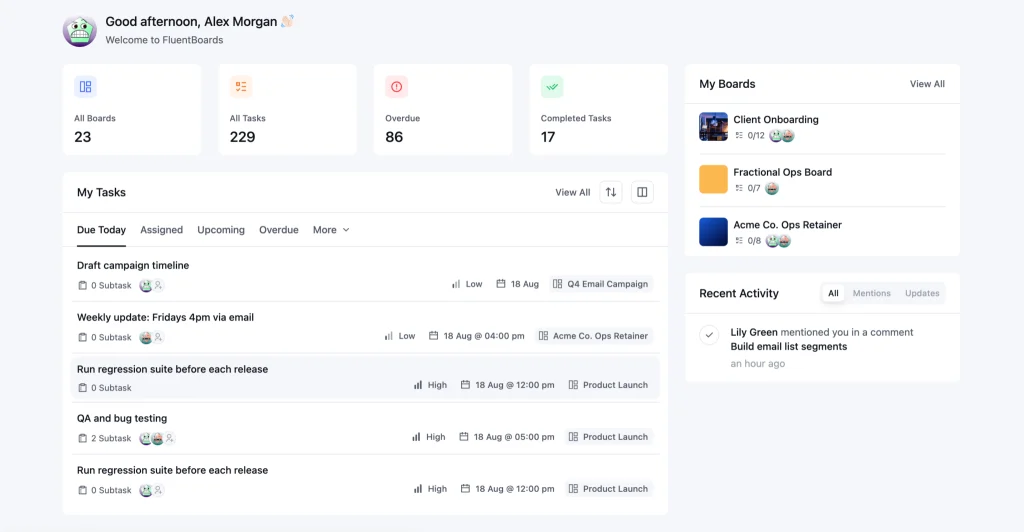
In FluentBoards, that list is the My Tasks dashboard. It pulls together every task assigned to you from every board, in one view. The Assigned tab shows your work. The Mentioned tab shows every task where someone tagged you in a comment, which is where most “quick questions” from teammates end up.
For the 1-3-5 habit, open My Tasks each morning and pick one big task, three medium, and five small, in that order.
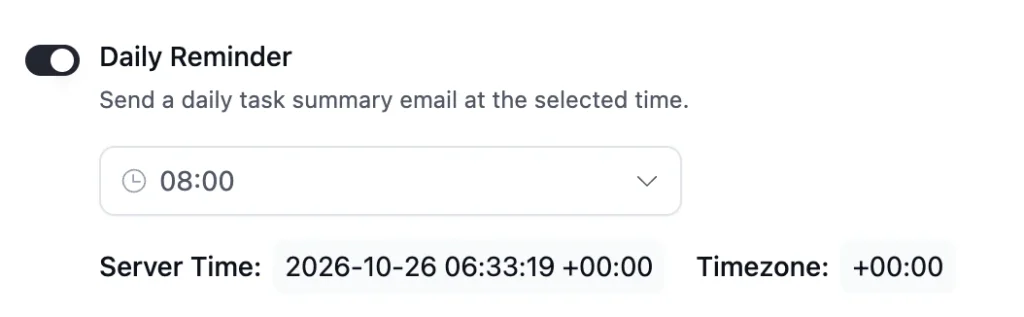
FluentBoards also has a Daily Reminder feature that emails each person a summary of their tasks at a time you choose, so their queue reaches them before they even open the dashboard.
Watchers vs Assignees
Assignees do the work. Watchers follow it. Add the project manager or account lead as a watcher on tasks they care about, like the final homepage design, so they get notified about changes without the task cluttering their own queue. Keeping the two separate stops My Tasks from filling up with work you’re only observing.
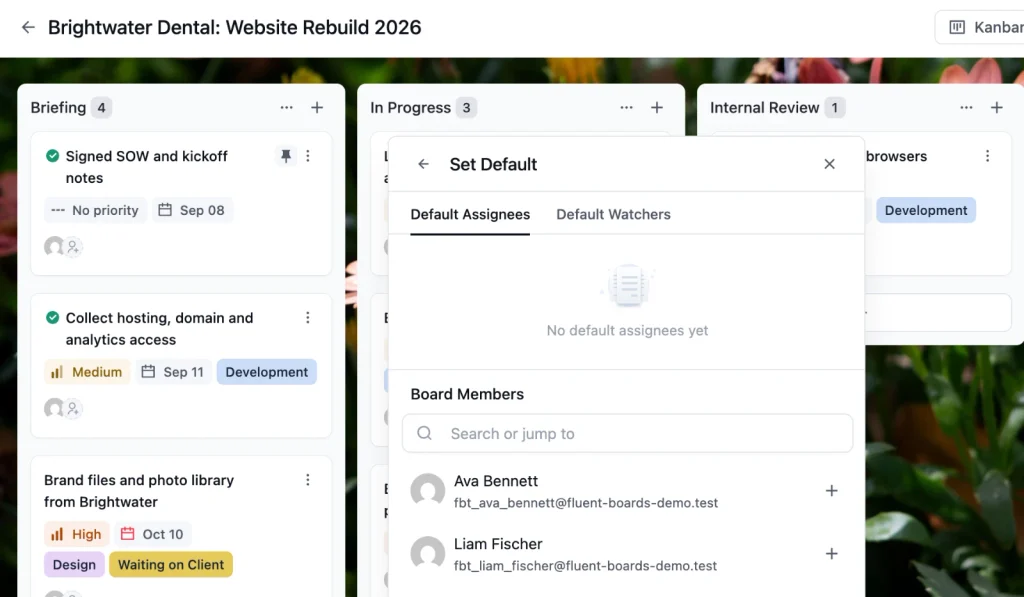
In FluentBoards, you can set default assignees and watchers for specific stages. When a task moves into that stage, the right people are assigned or added as watchers automatically.
Run a 20-Minute Monday Review
A Monday review is a fixed 20-minute check across every project, held at the same time each week, that tells you which projects need action before Friday. It replaces the habit of opening every board whenever a client emails.
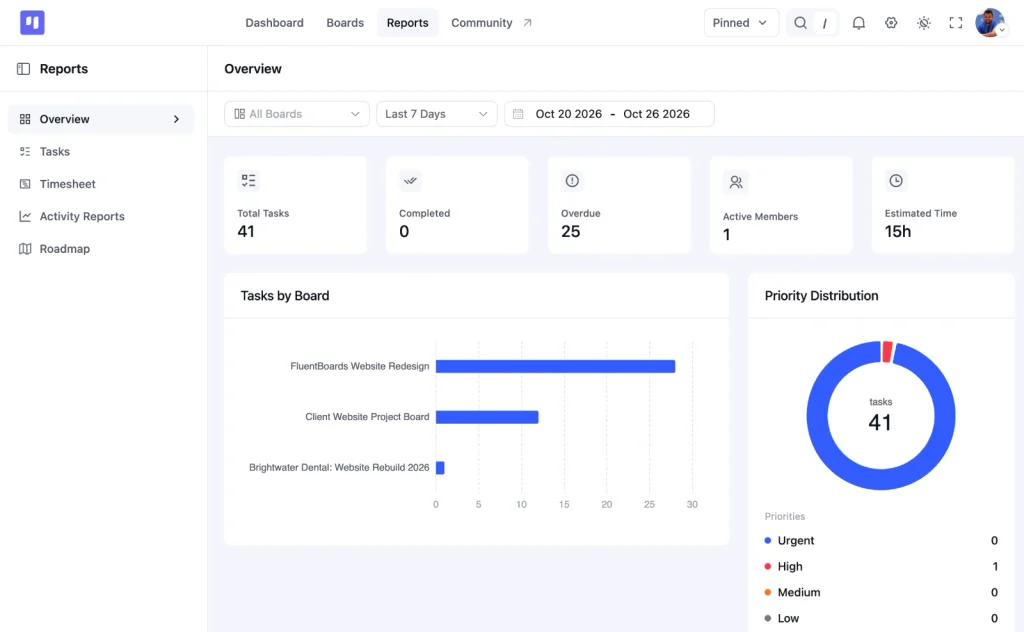
You can run the whole review from the Reports Overview in FluentBoards. Set the date range to the coming week and leave the board filter on all boards.
Step 1: Check overdue tasks by board
Start with the overdue count and the Tasks by Board chart. You’re not fixing anything yet, only spotting which boards carry the overdue work. One overdue task spread across the agency is normal. Six overdue tasks on one board are a project in trouble.
Step 2: Read the assignee workload table
The Assignee Workload table shows each person’s open, completed, and overdue tasks across every board. Look for the person whose open count is far above everyone else’s, like a developer carrying 22 open tasks while the rest of the team has eight. That person is where next week’s delays will come from. The full capacity math, like how many hours a person really has, belongs to agency resource planning, but this table tells you who to look at first.
Step 3: Look at this week’s due dates
The Due Date Distribution shows how much work is due today, this week, and later. If this week is heavy, check which tasks share an owner and a deadline, because those are the clashes your priority rule will need to settle.
Step 4: Decide what moves and tell people
Pick the two or three changes that matter most, like moving a non-contract deadline, reassigning a task, or asking a client for overdue content. Make the change on the board so it shows up in everyone’s queue, then send each affected client a short update.
Our guide to the project status report covers what that update should include. For a deeper tour of every chart, see our walkthrough of the Reports dashboard.
Templates Stop You Rebuilding the Same Project
When you manage multiple projects of the same kind, like website builds or monthly retainers, rebuilding each board from scratch wastes an hour per project and drifts away from your standard stages. A template fixes both.
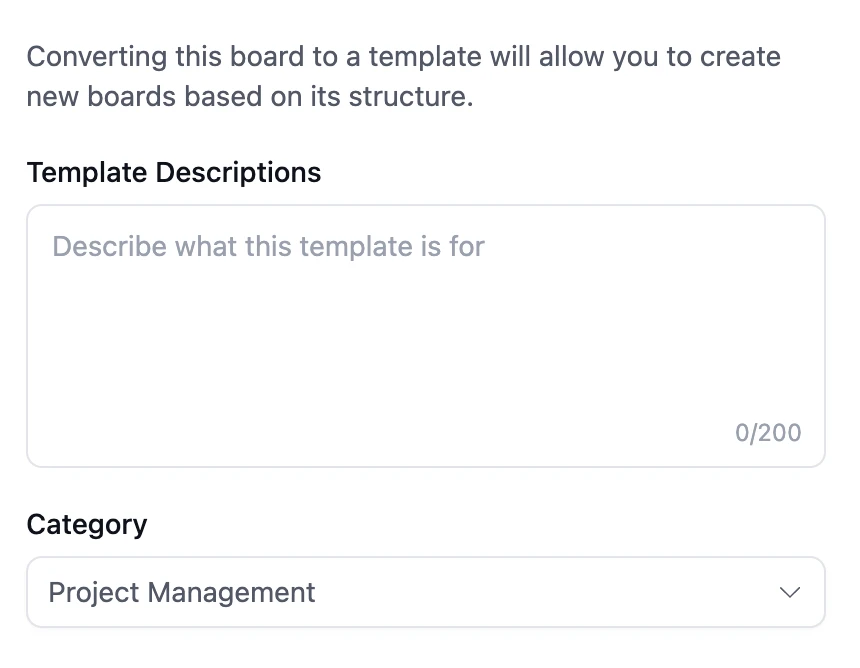
In FluentBoards, you can save any finished board as a template, with its stages, labels, and standard tasks, and start every new project of that type from it.
The built-in template gallery also includes ready-made boards for common agency work, like a Client Website Project and a Website Maintenance and Retainer board. On longer builds, the Gantt view in FluentBoards adds finish-to-start dependencies, so you can see that development can’t start until the design task is complete.
Follow this guide to automatically create a project from a template whenever a CRM trigger is fired
Frequently Asked Questions
These are the questions project leads ask most once they’re running more than a handful of client projects.
How do you manage multiple projects at the same time?
Put every project in one workspace with the same stages, set one written rule for priority, give each person a single queue of their tasks across all projects, and review every project together for 20 minutes once a week. That replaces checking each project whenever a client emails.
How many projects can one person manage at once?
It depends on project size, phase, and type rather than a fixed number. A project lead can handle far more small retainers than large website builds, and projects in quiet build phases need less attention than ones in client review or launch. A consistent workspace raises the limit for everyone.
What is the 1-3-5 rule for tasks?
The 1-3-5 rule means planning one big task, three medium tasks, and five small tasks for each day. It keeps a day realistic when you have work across several projects. Open your single task queue each morning, like My Tasks in FluentBoards, and pick the nine tasks in that order.
How do you prioritize when two clients both say it is urgent?
Use a fixed order. Contract dates come first, so a launch date in a signed statement of work beats an email request. Then work that unblocks other people. Then the smaller task, so one client gets a finished result. Write the rule down so it isn’t decided by whoever emails most.
Set Up Your Monday Review Before Next Monday
You don’t have to rebuild your whole workspace this week to feel the difference.
Book a recurring 20-minute slot for next Monday morning, put every active project into one folder structure before then, and write your priority rule in two or three sentences your team can repeat.
Then run the review once and see what it shows you. Most agencies find at least one overloaded person and one quietly slipping project in the first session, and catching those on a Monday is far cheaper than hearing about them from a client on a Thursday.
That’s all for today. Let’s redefine project management.
Let’s redefine project management with FluentBoards!

Follow:


Get Tips, Tricks, & Updates
We won’t send you spam.





Add your first comment to this post