


Client Reporting for Agencies: What to Send, How Often, and How to Build It Fast


Most client reports are too long and arrive too late.
When a client asks, “What did we pay for this month?” they usually do not want a 12-page deck. They want three clear answers: what you did, how much time or budget it took, and what happens next.
That is what good client reporting should do.
Client reporting is the regular update an agency sends to show the work delivered, the time or budget used, and the plan for the next period.
This part of our agency project management guide shows what to include in a client report, how often to send one, and how to build the delivery side from your project board in about 15 minutes.
What a Client Report Must Answer
A client report must answer three questions: what did we do, what did it cost in time, and what happens next. If your agency also runs the client’s marketing, there’s a fourth question: what did the work achieve, in traffic, leads, or sales.
The first three come from your project board. The fourth comes from analytics tools, like Google Analytics or an ad platform, and it’s a different kind of report. Agencies that build websites and run retainers mostly owe the first three, and those are the ones clients use to decide whether to renew.
| Report section | Question it answers | Where the data comes from |
| Work completed | What did we do? | Tasks completed on the client’s board this period |
| Time and budget | What did it cost? | Hours logged against the plan or the estimate |
| Next steps | What happens next, and what do you need from me? | Open tasks, upcoming milestones, items waiting on the client |
| Results (marketing clients only) | What did the work achieve? | Analytics and ad platforms, not the project board |
Types of Client Reports
There are five common types of client reports, and which one you send depends on the contract. Four of them come straight from your project board. The fifth needs marketing data.
- Progress report: what moved since the last update on a project that’s still in build, like “homepage and location templates approved, development started on services pages.”
- Retainer usage report: the work done in a month and the hours used against the plan, like “11 requests completed, 6.5 of 8 hours used.”
- Milestone report: sent when a milestone in the contract is reached, like design approval, with what was delivered and what the next milestone needs.
- Launch report: sent when a site goes live, covering what launched, what was checked, and where the support window starts and ends.
- Marketing performance report: traffic, rankings, leads, and ad results. This one comes from analytics tools rather than a project board, so it’s outside what this guide builds.
How Often to Send Client Reports
Send client reports on a rhythm that matches the contract: at milestones for fixed-fee builds, monthly for retainers, and monthly or quarterly for maintenance plans. A predictable cadence matters more than frequency, because clients notice when a report is late far more than when it’s short.
- For a fixed-fee build, report at each milestone in your statement of work, as agreed: designs approved, build complete, and launch. If a project runs longer than a few weeks between milestones, add a short fortnightly progress note so the client never goes a month without hearing from you.
- For a retainer, report monthly, on the same day each month, with the work done and the hours used.
- For a maintenance plan, monthly works best for stores and membership sites, while a simple brochure site might only need a quarterly summary with a monthly one-line check-in. Our guide to the website maintenance plan covers what that monthly report should prove.
Pro Tip: Put the report date in the contract, like “monthly report on the 3rd working day of each month.” It turns reporting from a favor into a deliverable, and it stops the “can you send me an update?” email before it starts.
A One-Page Client Report Template
A one-page client report has five short sections: a summary, work completed, time used, what’s next, and what you need from the client.
Here’s the outline with example content for a monthly retainer, using a fictional dental practice client.
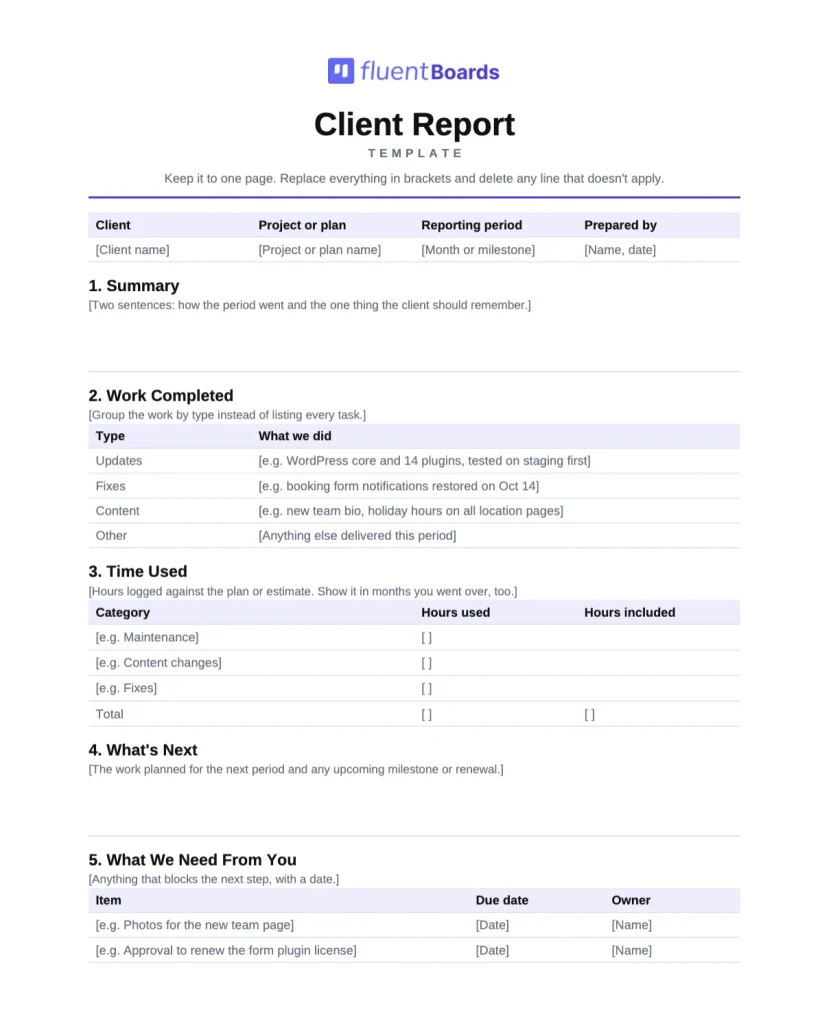
Editable in Word, Google Docs and Pages, or print the PDF
- Summary (two sentences): “October was a steady month. We completed all scheduled maintenance, fixed one booking form issue the same day it appeared, and finished 9 of your 11 content requests.”
- Work completed: a short list grouped by type, like “Updates: WordPress core and 14 plugins, all tested on staging first. Fixes: booking form notifications restored on October 14. Content: new hygienist bio, updated holiday hours on all four location pages.”
- Time used: “6.5 of 8 included hours used. Breakdown: maintenance 3 hours, content changes 2.5 hours, booking form fix 1 hour.”
- What’s next: “November: annual license renewals, the quarterly backup restore test, and the two remaining content requests.”
- What we need from you: “Photos for the new Riverside team page by November 14, and approval to renew the premium form plugin license.”
Keep it to one page. If the client wants more detail on a line, they’ll ask, and that conversation is far more useful than a section they skip.
Build the Delivery Report in 15 Minutes
You can build the delivery half of a client report from your project board in about 15 minutes, if every client has their own board and your team logs time as they go.
The steps below use FluentBoards. For a deeper tour of every chart these steps use, see our walkthrough of the Reports dashboard.
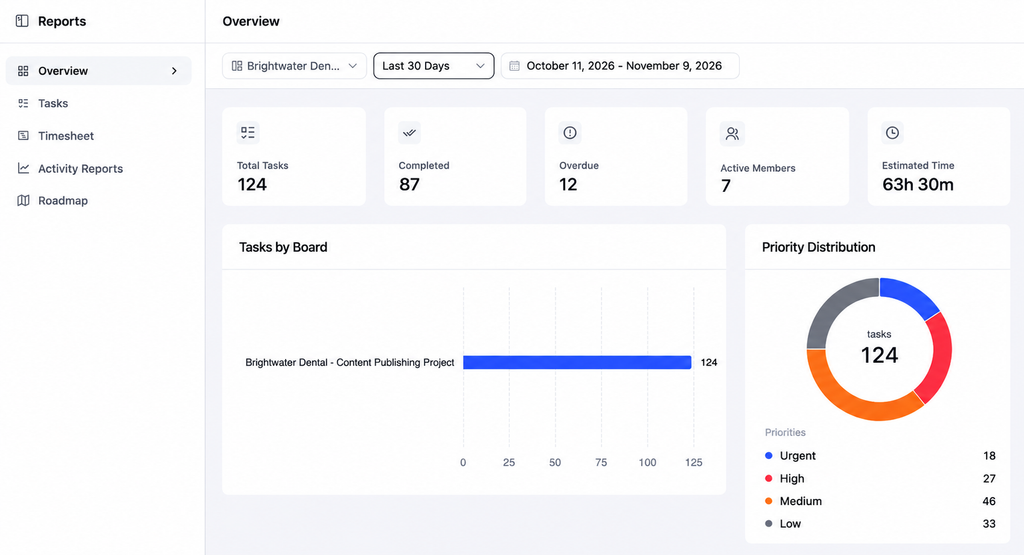
Step 1: Filter reports to the client and the month
Open Reports in FluentBoards, choose the client’s board in the filter bar, and set the date range to the reporting month. The board and date filters apply to every tab, so the numbers you see are the client’s alone.
Step 2: Pull the completed work
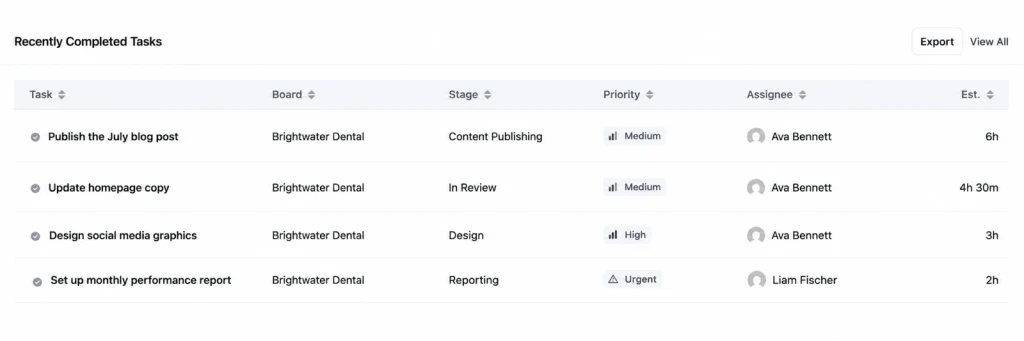
On the Tasks tab, the Recently Completed Tasks panel lists the latest tasks finished in that range, with their stage, priority, and assignee, and you can export it to CSV.
Step 3: Add the hours
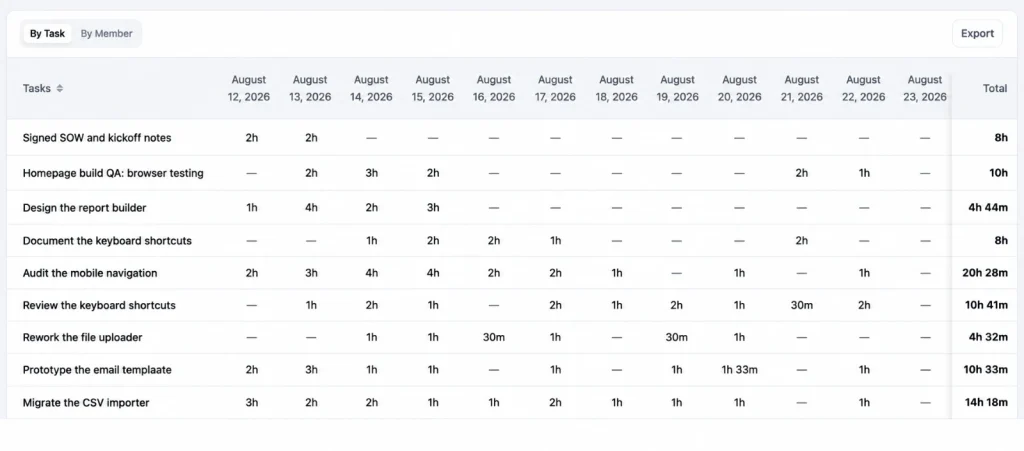
Open the Timesheet tab, still filtered to the client’s board and month, and view it by task. It shows the hours logged on each piece of work, giving you both the total for the “time used” line and a breakdown by work type. Export it to CSV if you invoice from a spreadsheet.
Our guide to project management time tracking is worth a read before the first report
Step 4: Draft what’s next with the built-in AI
Open the main open task for next month, like the license renewals, and ask the built-in AI to summarize the task and its comments into a status update. Treat the result as a first draft: read it, cut anything internal, and rewrite it in your own voice.
Step 5: Write the summary and send
Write the two-sentence summary last, once you can see the whole month, then paste the sections into your template and send it.
If your team needs its own version first, with risks and blockers that don’t belong in front of the client, that’s the internal project status report, which works best when it goes out a day before the client report.
Replace Some Reports With a Live View
Some clients don’t want a report. They want to look whenever they like. For them, a live view of the project replaces the progress report, while the monthly report still covers time used and the plan ahead.
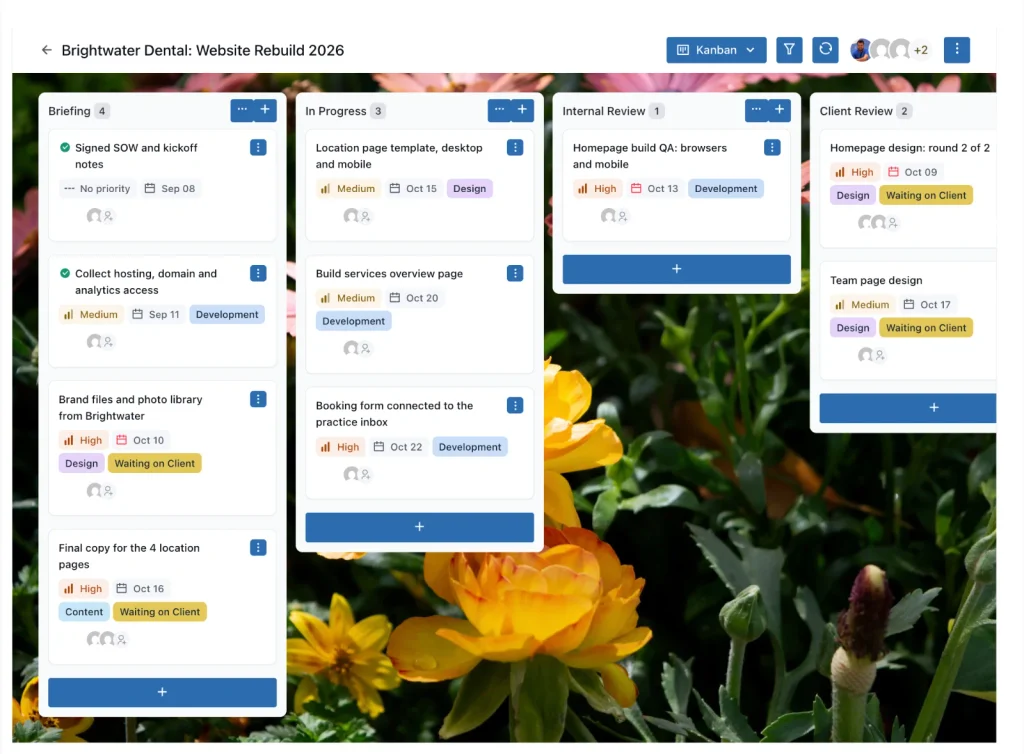
The Front Portal in FluentBoards shows each client only their own boards on a page of your website.
Give them the Viewer role if they should only follow along. You pick the role when you send the email invite, and the picker starts on Manager, so choose Viewer for clients. Clients need a WordPress login, which the invite creates.
Our guide to setting up a WordPress client portal walks through it
Be clear with clients about what the portal is: a live board, not a formatted report. It shows where every task stands, but it won’t add up the month for them.
For clients who will never log in, there are two lighter options.
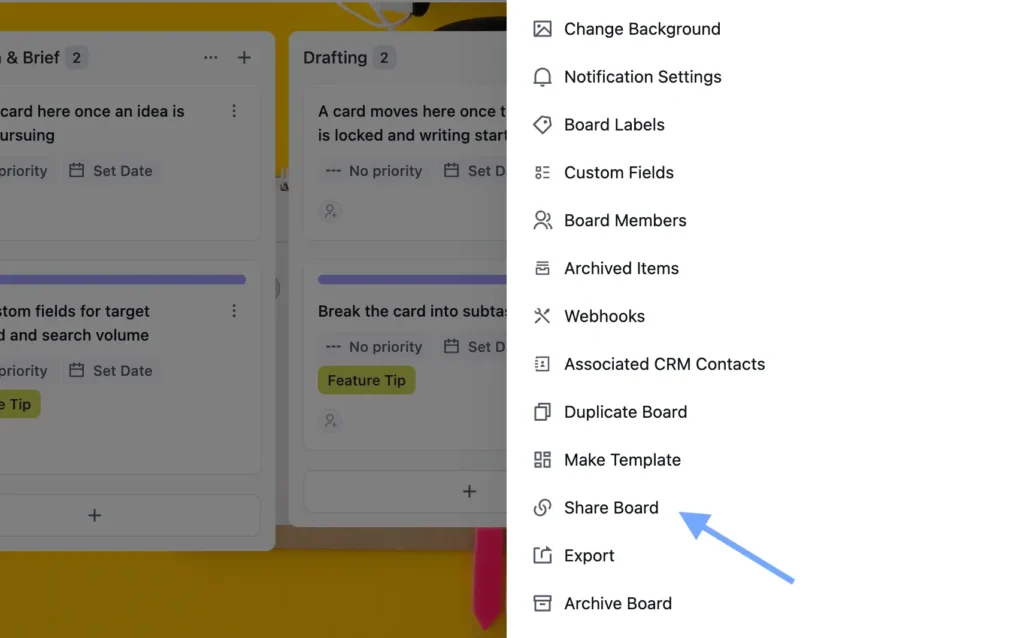
A public board link gives a read-only view to anyone who has the link, and you choose which stages and task details it shows. Anyone with that link can see the board, so don’t use it for confidential work.
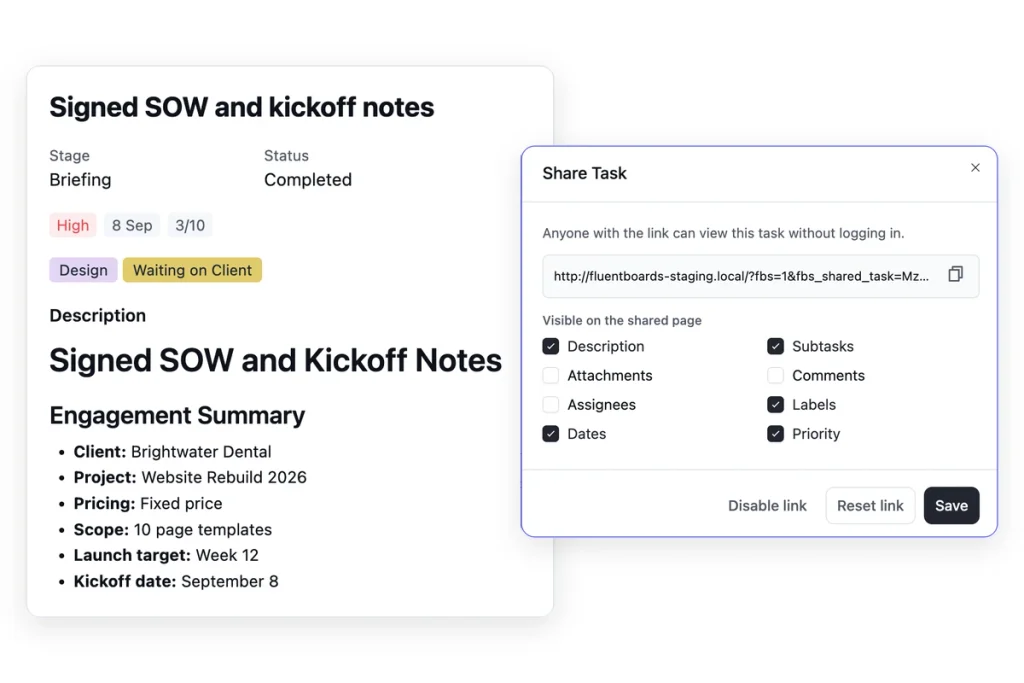
And a task share link, shares a single task, like the launch checklist, without any login.
Client Reporting Mistakes
Most client reporting problems come from reports that are too long, too late or written for the agency rather than the client.
- Sending activity instead of answers: A list of 40 completed tasks doesn’t tell the client what the month achieved. Group the work and lead with the summary.
- Hiding the hours: If the client pays for time, show the time, including months when you went over.
- Irregular timing: A report that arrives “sometime early in the month” trains the client to chase you.
- Burying what you need from them: If the next milestone depends on their content or approval, put it in its own section with a date.
- Promising marketing results from delivery data: If you don’t run their marketing, don’t pad the report with metrics you don’t own.
Frequently Asked Questions
These are the questions agency owners and account managers ask most about client reporting.
What should a client report include?
A client report should answer three questions: what you did, what it cost in time or budget, and what happens next. On one page, that means a short summary, the work completed, the time used against the plan, the next steps and anything you need from the client. Marketing clients also need a results section from their analytics.
How often should agencies send client reports?
Match the contract. Send milestone reports for fixed-fee builds, monthly reports for retainers and monthly or quarterly reports for maintenance plans. Whatever the rhythm, send the report on the same day each time.
What is the difference between a client report and a status report?
A client report is external and outcome-led: it tells the client what they got and what’s next. A status report is internal and task-led: it tells your team what’s on track, what’s at risk and who needs to act.
What tools do agencies use for client reporting?
Most agencies use two kinds of tools. Analytics dashboards report marketing results like traffic, leads, and ad performance. Project management tools report delivery: tasks completed, hours used and upcoming work. Website and maintenance agencies mostly need the second kind.
Send Your Next Report Before the Client Asks
The best client report is the one that arrives before the client thinks to ask for it. Pick a fixed report date for each client this week, copy the one-page outline and set a 15-minute calendar slot for the day before each report goes out.
Then build the first one from the board. A launch report is a good place to start if a site went live this month, because it closes the loop on the web design project management workflow and opens the conversation about what comes next.
That’s all for today. Let’s redefine project management.
Let’s redefine project management with FluentBoards!

Follow:


Get Tips, Tricks, & Updates
We won’t send you spam.




Add your first comment to this post