


Statement of Work: What to Include, a Website Project Example, and a Free Template


Three weeks into a website project, the client sends you an email:
“I assumed moving our old blog posts was included.”
You open the proposal. It says “website redesign,” but there is nothing about migrating blog content. Now you are stuck discussing extra work with a client you signed less than a month ago.
This is exactly the kind of situation a clear statement of work can prevent.
A statement of work (SOW) is a project document that clearly defines what a vendor will deliver, the scope of the work, timeline, pricing and payment terms, and the criteria both sides will use to agree that the project is complete.
When questions come up about what was included, what was promised, or whether the work is finished, the SOW is the document everyone comes back to.
In this chapter of our guide to agency project management, we will show you what a strong statement of work should include and how to create one that keeps projects clear from the start.
TL;DR: If you’re here looking for a free Statement of Work (SOW) template, you can download it here. And if you’re curious how we put this SOW together, keep reading.
Editable in Word, Google Docs and Pages, or print the PDF
What is a Statement of Work
A statement of work is the project-level agreement that turns “we’ll build you a website” into a list of specific deliverables, dates, prices, and approval rules that both sides sign. It usually comes after the proposal has been accepted and before any work starts.
Think of it as the contract’s working layer. The contract or master agreement covers the relationship: liability, confidentiality, and how either side can walk away. The statement of work covers the project: what gets built, when, for how much, and how you’ll both know it’s finished.
For most agencies, the practical approach is to have a lawyer review your master agreement and SOW template once, then reuse that approved structure for future projects.
What does SOW stand for?
SOW stands for statement of work. People sometimes use it interchangeably with “scope of work,” but they aren’t the same thing. The scope of work is one section inside a statement of work, the part that describes the work itself, while the SOW also covers timeline, payment, roles, and acceptance.
Is an SOW legally binding?
A signed SOW is generally treated as part of the agreement between both parties, especially when your contract or master services agreement refers to it. That said, whether a specific clause is enforceable depends on where you operate and how the agreement is written. This is not legal advice.
Statement of Work vs Scope of Work vs Proposal vs Contract
These four documents get mixed up constantly, and the mix-up is where most disputes start.
In short: a proposal sells the project, a statement of work commits to it, a scope of work describes the work inside it, and a contract or master agreement governs the relationship around it.
| Proposal | Statement of work | Scope of work | Contract or MSA | |
| What it does | Persuades the client to hire you | Commits both sides to one project’s deliverables, timeline, price, and acceptance | Describes the work itself, task by task | Sets the legal terms of the relationship |
| When it’s written | Before the sale | After the proposal is accepted, before work starts | Inside the SOW, or on its own for trades like construction | Once per client, often before the first SOW |
| Who writes it | Agency or vendor | Agency or vendor, reviewed by the client | Agency or vendor | Usually a lawyer for either side |
| Level of detail | Benefits, approach, ballpark price | Specific deliverables, dates, payments, exclusions | Specific tasks and methods | Liability, confidentiality, termination, IP |
| Signed | Sometimes, as acceptance | Yes, by both sides | As part of the SOW | Yes, by both sides |
Types of SOW
There are four common types of statement of work, and the right one depends on how certain the work is. The type decides how you price, so pick it before you write anything else.
- Fixed price: one price for a defined set of deliverables. This is what most agencies use for website builds, where the pages, features, and launch date can be named up front, like a 10-page site for a set fee.
- Time and materials: the client pays for hours worked at an agreed rate, usually with an estimate. It fits work you can’t fully define yet, like a discovery phase or untangling a site another agency built.
- Performance-based: payment is tied to measurable results rather than effort. It’s rare for agency builds, because results like conversions depend on things outside your control, such as the client’s pricing or ad spend.
- Retainer: a monthly fee for an agreed amount of ongoing work, like maintenance, updates, and small content changes. Retainer SOWs live or die on a clear monthly hours limit and a rule for what happens when a month runs over.
What to Include in a Statement of Work
A complete statement of work has ten sections: purpose, objectives, scope and exclusions, deliverables, timeline and milestones, roles, acceptance criteria, payment schedule, change process, and sign-off.
Each one answers a question that would otherwise turn into an argument later.
Here’s what goes in each, with a one-line example from a website project.
1. Goal or Purpose
One or two sentences on why the project exists and the problem it solves.
Example: “Replace the current site, which can’t be updated without a developer, with a WordPress site the client’s team can edit.”
Our guide covers project goals in detail
2. Objectives
The measurable outcomes the project is meant to support. Keep them to things the deliverables can actually influence.
Example: “Let patients book appointments online from every page” rather than “double appointments.”
We’ve covered project objectives in this guide
3. Scope and exclusions
What’s included, and just as important, what isn’t. The exclusions list is the most valuable paragraph in the whole document, because it answers the “I assumed” email before it’s written.
Example: “Includes 10 page templates. Excludes migration of existing blog posts, copywriting, and photography.”
For a deeper look, check out our guide on project scope
4. Deliverables
Every tangible thing you’ll hand over, named specifically enough to check off.
Example: “Homepage design on desktop and mobile, 10 built and tested pages, a contact form connected to the client’s email, a 30-minute recorded training video.”
See what counts as a project deliverable and how to define one clearly
5. Timeline and milestones
Start date, key milestones, and the launch date, with what each milestone depends on.
Example: “Design approval by week 4, build complete by week 9, launch in week 12, provided feedback arrives within five working days of each review.”
Explore how project milestones turn a long project into clear checkpoints
6. Roles and responsibilities
Who does what on both sides, including one named approver on the client side.
Example: “Agency: design, build, testing, launch. Client: content, brand assets, one approver for all feedback.”
Get a practical overview of project team roles and responsibilities
7. Acceptance criteria
How both sides will know a deliverable is done. Without these, “done” means whatever the client feels it means that day.
Example: “A page is accepted when it matches the approved design, passes the agreed browser and mobile checks, and has no open issues marked critical.”
8. Payment schedule
How much, when, and what triggers each payment. Tie payments to milestones rather than calendar dates, so delays on either side move the invoice with them.
Example: “40% on signature, 30% on design approval, 30% on launch.”
9. Change process
How a request outside the scope gets handled: who submits it, how it’s priced, and who approves it before work starts. This is the clause that protects your margin when the client asks for “one small thing,”.
Example: “Changes are quoted in writing within two working days and start only after written approval.”
Our guide to scope creep for agencies shows how to say yes to the request without saying yes to the free work
10. Sign-Off
Names, roles, signatures, and dates for both sides, plus a reference to the contract or master agreement the SOW sits under.
Example: “Signed by the agency director and the client’s practice manager, under the master services agreement dated March 3.”
The Clauses Most SOW Templates Leave Out
Most statement of work templates stop at the ten standard sections, and that’s exactly where website disputes begin. The five clauses below cover the questions that come up after launch, when the budget is spent, and goodwill is thinnest.
If you add only one thing from this guide to your next SOW, add these.
Revision rounds
Say how many rounds of revisions each deliverable includes and what counts as a round.
“Two rounds of revisions on the homepage design, where a round is one consolidated set of feedback from the named approver” stops the slow drip of single comments from five different people.
Then state what an extra round costs, so it reads as a menu option rather than a penalty.
Content and asset responsibility
Name who supplies the copy, images, logos, and videos, the format they should arrive in, and the deadline. Late content is the most common reason a web project slips, and when the SOW is silent, the delay looks like your fault.
Add what happens if content is late, for example, “the launch date moves by the same number of working days.”
Plugin, theme and hosting ownership
Premium plugins, themes and hosting accounts need an owner, and it should usually be the client.
Write down whose account each license sits in, who pays the renewal and what happens to agency-held licenses at handoff.
Without this, you’ll find yourself paying for a client’s plugin renewal two years after the project ended, or the client’s site will stop getting updates when you cancel your agency license.
Launch acceptance criteria
Launch needs its own definition of done, separate from page-by-page acceptance.
List the checks that must pass before go-live, like forms delivering to the right inbox, redirects from old URLs working, analytics firing and backups running, and say who signs off.
A clear launch gate also gives you a clean answer when the client wants to launch “now” with half the content missing.
Post-launch support window
Define how long you’ll fix problems after launch at no extra cost, what counts as a problem and what doesn’t.
“Thirty days of bug fixes for issues caused by our build, excluding content changes, new features, and problems caused by third-party plugin updates” is a sentence that saves a lot of awkward emails.
After the window closes, point to the maintenance retainer or a fresh quote.
Statement of Work Example for a Website Project
Here’s a filled statement of work for a website project, using the sections above.
It’s a fictional example: Northpine Studio, a six-person WordPress agency, is building a new site for Brightwater Dental, a practice with four locations. Swap in your own details.
- Project: Brightwater Dental website rebuild. Fixed price
- Purpose: Replace the current site, which only a developer can update, with a WordPress site the practice team can edit themselves
- Objectives: Let patients book an appointment from any page in two clicks, and show accurate hours and services for all four locations
- In scope: 10 page templates (home, about, services overview, 4 location pages, team, contact, booking), mobile-responsive build, contact and booking forms, basic on-page SEO setup, one training session
- Out of scope: Migration of the 140 existing blog posts, copywriting, photography, paid plugins beyond those listed below, ongoing maintenance after the support window. Any of these can be quoted separately.
- Deliverables: Homepage and inner-page designs (desktop and mobile), 10 built and tested pages, forms connected to the practice inbox, a 30-minute recorded training video, a handoff document with all logins
- Timeline: Kickoff in week 1, design approval by week 4, build complete by week 9, client content review in weeks 10 and 11, launch in week 12. Each date assumes feedback within five working days
- Roles: Northpine: design, development, testing, launch, training. Brightwater: all copy and photos, brand files, one named approver (the practice manager)
- Revision rounds: Two rounds on designs and one round on built pages. Extra rounds are quoted at the agency’s hourly rate
- Content responsibility: Brightwater supplies final copy and images for all 10 pages by the end of week 6. If content arrives late, the launch date moves by the same number of working days.
- Licenses and hosting: Hosting, domain, and the premium form plugin license are bought in Brightwater’s name and paid by Brightwater. Northpine holds no licenses after handoff.
- Acceptance: Each page is accepted when it matches the approved design, passes checks on the latest versions of the major browsers and on mobile, and has no critical issues open.
- Launch criteria: Forms deliver to the practice inbox, old URLs redirect to new ones, analytics is recording, daily backups are running, and the practice manager has signed off in writing.
- Payment: 40% on signature, 30% on design approval, 30% on launch.
- Change process: Requests outside this scope are quoted in writing within two working days. Work starts only after written approval of the quote.
- Support window: 30 days of free fixes for defects in Northpine’s build after launch. Content updates, new features, and issues caused by third-party updates are excluded.
- Sign-off: Northpine Studio director and Brightwater Dental practice manager, under the master services agreement signed on the same date.
Notice how many of those lines exist only to answer an “I assumed” email before it gets written. The blog migration from our intro shows up twice: once as an exclusion and once as something that can be quoted separately.
Free Statement of Work Template
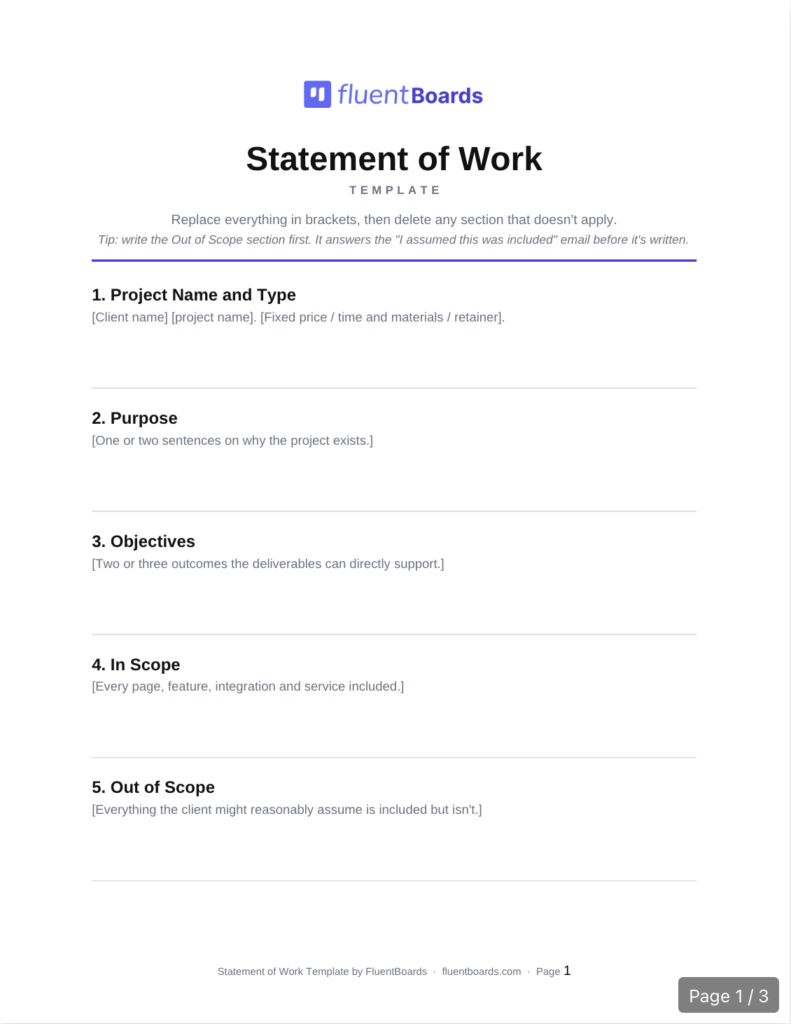
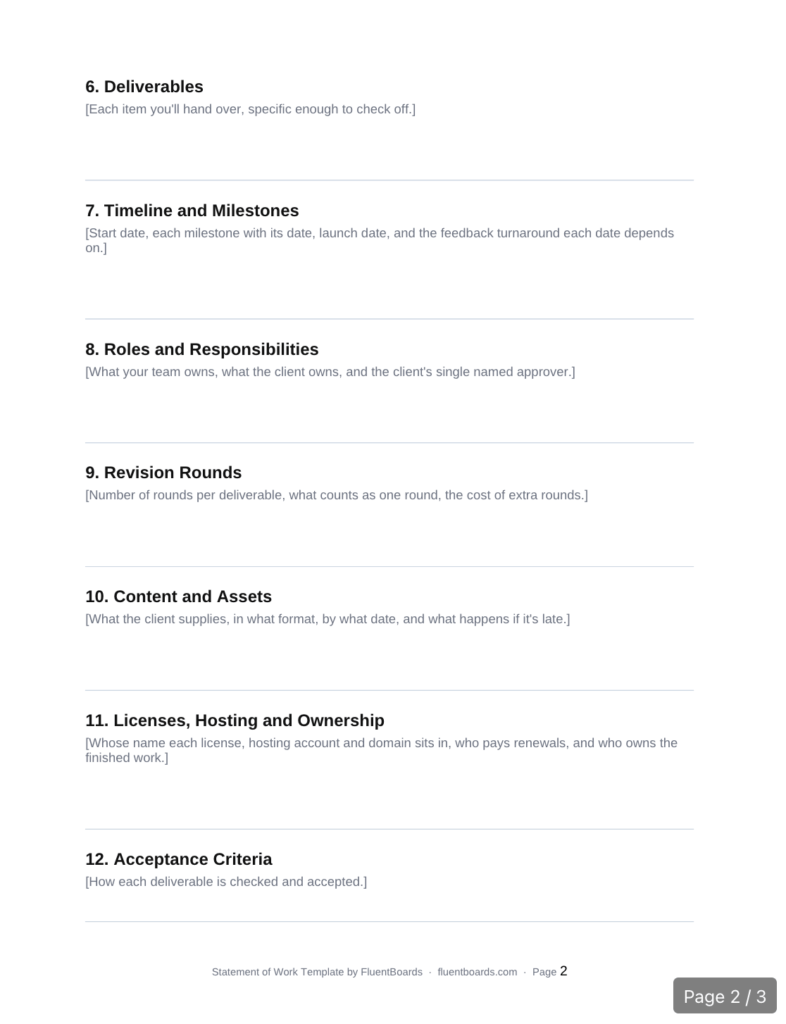
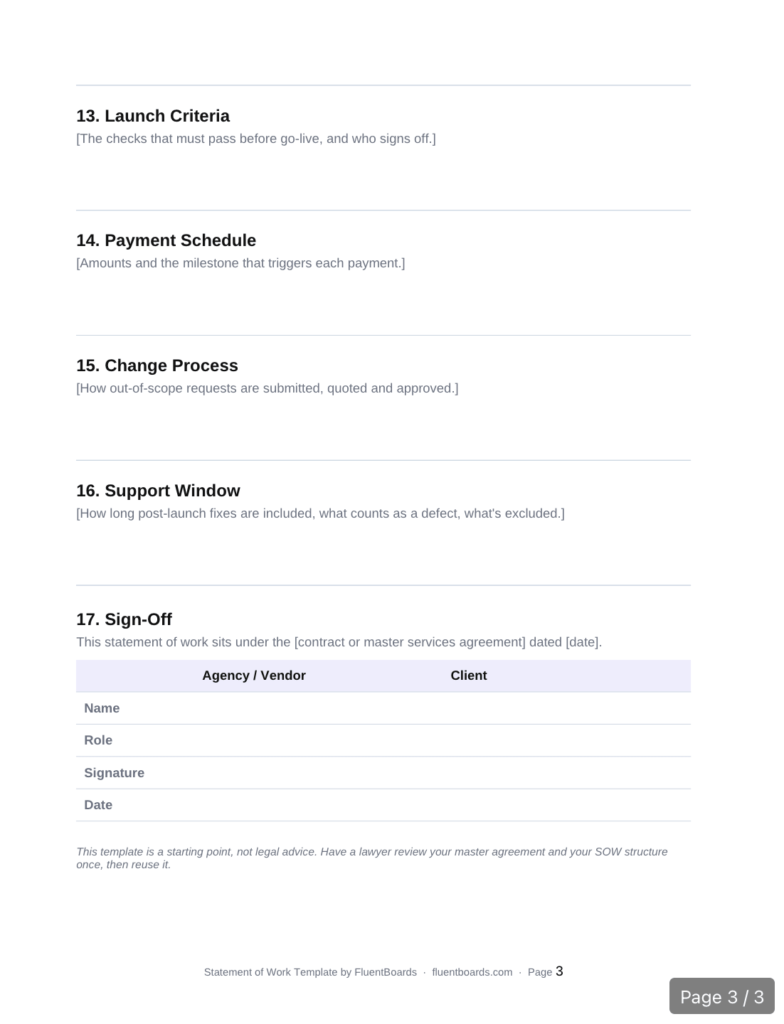
This statement of work template follows the same structure as the example above.
Editable in Word, Google Docs and Pages, or print the PDF
Or, copy it into your own document, replace everything in brackets, and delete any line that doesn’t apply to the project.
- Project name and type: [Client name] [project name]. [Fixed price/time and materials/retainer]
- Purpose: [One or two sentences on why the project exists]
- Objectives: [Two or three outcomes the deliverables can directly support.]
- In scope: [Every page, feature, integration, and service included.]
- Out of scope: [Everything the client might reasonably assume is included but isn’t.]
- Deliverables: [Each item you’ll hand over, specific enough to check off.]
- Timeline and milestones: [Start date, each milestone with its date, launch date, and the feedback turnaround each date depends on.]
- Roles and responsibilities: [What your team owns, what the client owns, and the client’s single named approver.]
- Revision rounds: [Number of rounds per deliverable, what counts as one round, the cost of extra rounds.]
- Content and assets: [What the client supplies, in what format, by what date, and what happens if it’s late.]
- Licenses, hosting and ownership: [Whose name each license, hosting account and domain sits in, who pays renewals, and who owns the finished work.]
- Acceptance criteria: [How each deliverable is checked and accepted.]
- Launch criteria: [The checks that must pass before go-live, and who signs off.]
- Payment schedule: [Amounts and the milestone that triggers each payment.]
- Change process: [How out-of-scope requests are submitted, quoted and approved.]
- Support window: [How long post-launch fixes are included, what counts as a defect, what’s excluded.]
- Sign-off: [Names, roles, signatures, dates, and the contract or master agreement this SOW sits under.]
How to Write an SOW in Six Steps
Writing a statement of work takes six steps, and most of the work happens before you open the template. Start from what was promised, write the exclusions early, and review the draft with the client rather than just sending it.
Step 1: Start from the proposal and your discovery notes
Pull together everything that was promised during the sale: the accepted proposal, call notes, and any emails where scope came up. If a salesperson said “that shouldn’t be a big deal” about anything, it belongs in the SOW, either as included work or as an exclusion.
Step 2: Write the exclusions before the inclusions
List what’s out of scope first, while the sales conversation is still fresh. It’s much easier to spot the assumptions a client might make when you’re deliberately looking for them, like content migration, copywriting, extra languages or ongoing SEO.
Step 3: Break the work into checkable deliverables
Turn every promise into a deliverable someone could tick off. “A modern website” can’t be checked. “10 built and tested pages matching the approved designs” can.
Step 4: Estimate, then set milestones and payments
Estimate the hours behind each deliverable, set milestones at the natural approval points, like design sign-off, and tie a payment to each one. Add the feedback turnaround each milestone depends on, so a slow client review moves the date instead of squeezing your team.
Step 5: Define acceptance and the change process
Write how each deliverable gets accepted, how the launch gets accepted and how changes get quoted. Then add the five clauses most templates leave out: revision rounds, content responsibility, license ownership, launch criteria and the support window.
Step 6: Walk the client through it, then sign
Don’t just email the SOW. Walk the client’s approver through it on a 20-minute call, section by section, and pay special attention to the exclusions and their responsibilities. Every question they ask now is a dispute you won’t have in week eight.
Turn a Signed SOW Into a Project Board
Once the SOW is signed, every deliverable should become a task with an owner, so the document your client signed and the work your team does stay the same thing. If the two drift apart, the SOW only gets opened again when something has already gone wrong.
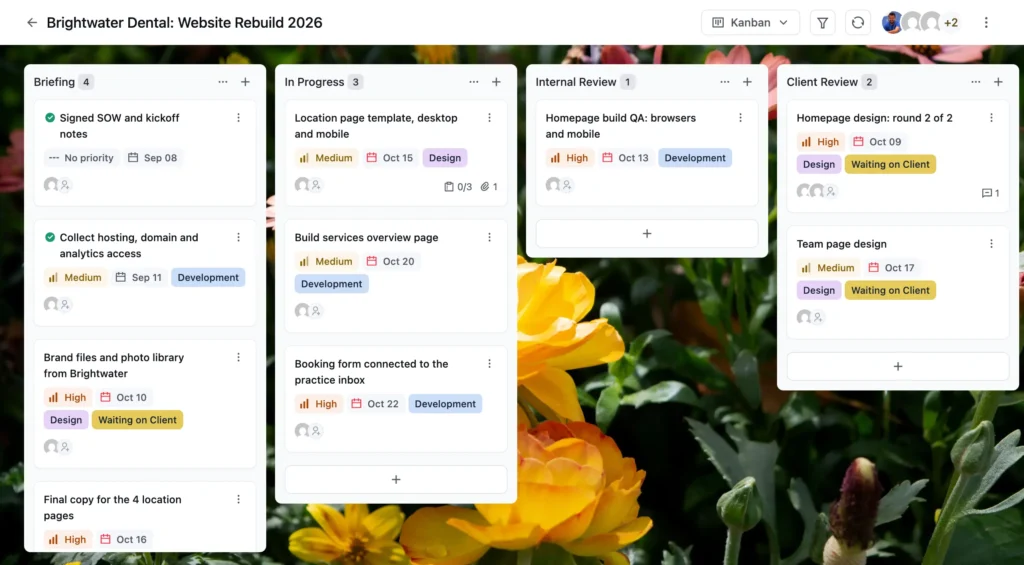
In FluentBoards, the translation is direct. Each deliverable becomes a task. Each milestone becomes a stage or a due date, like a “Design Approval” stage due at the end of week 4.
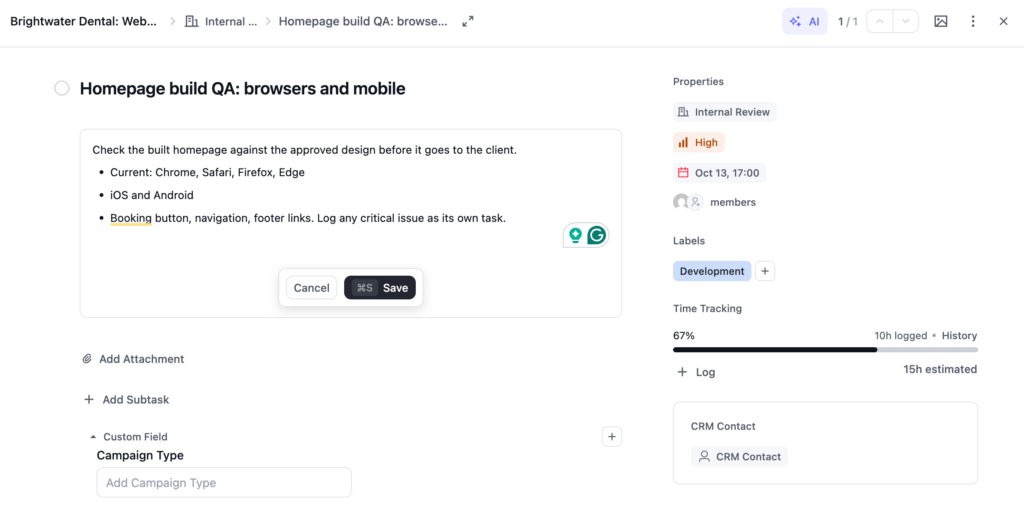
The acceptance criteria for a deliverable go into its task description, so whoever builds the page sees exactly how it will be judged.
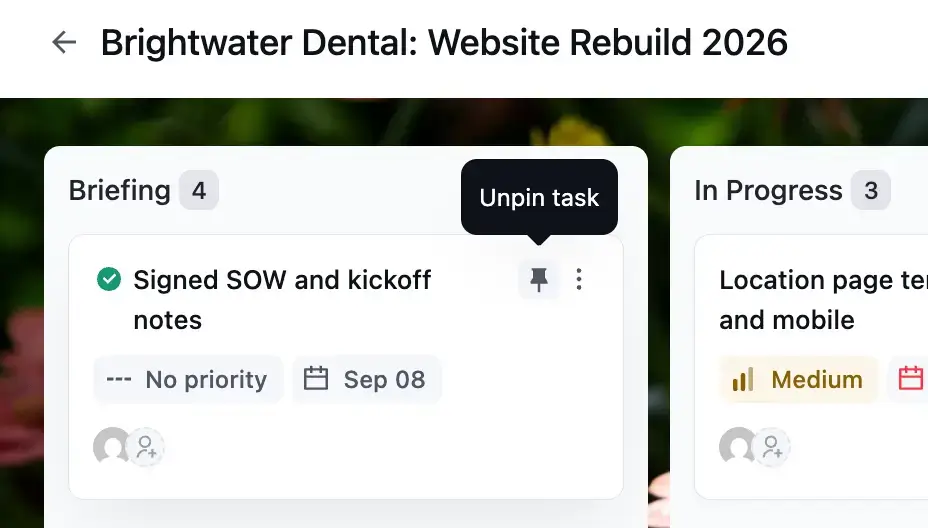
Attach the signed SOW to a kickoff task and pin it to the top of the board, and add a pinned task for each payment milestone so nobody forgets to invoice when design approval lands.
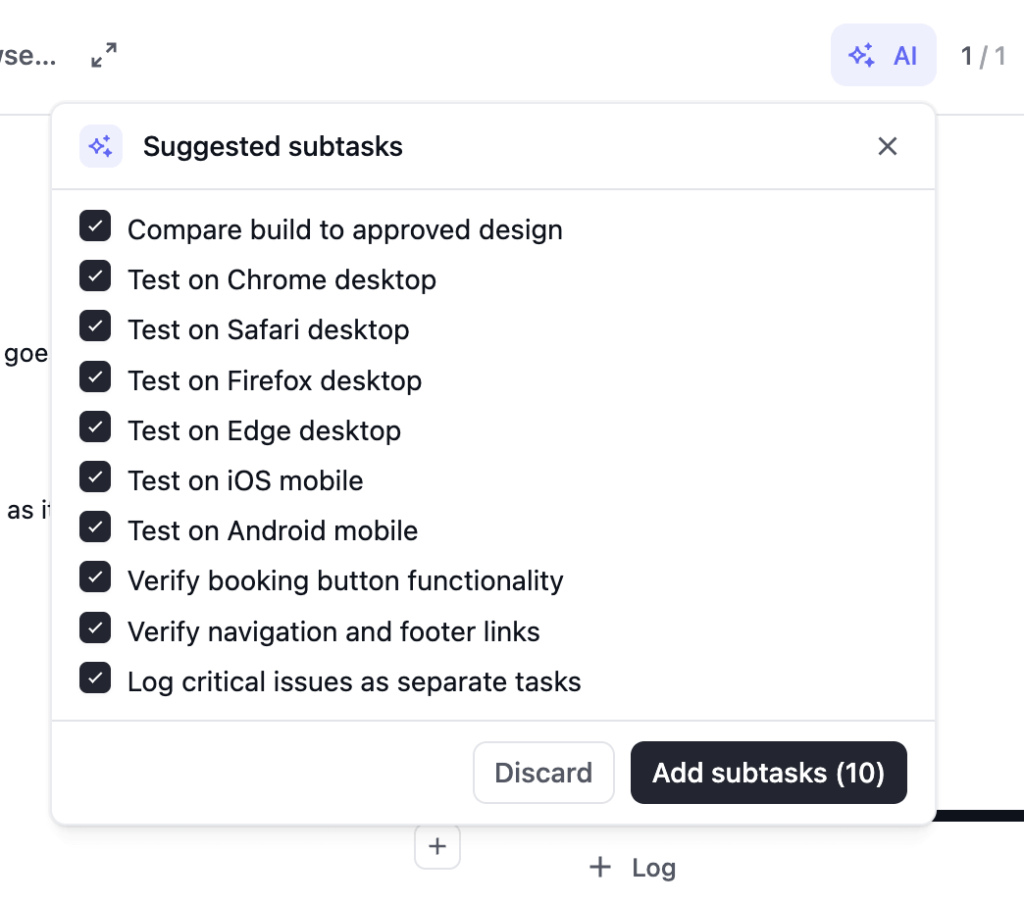
The built-in AI can turn a long deliverable description into a list of suggested subtasks, using the AI provider you connect.
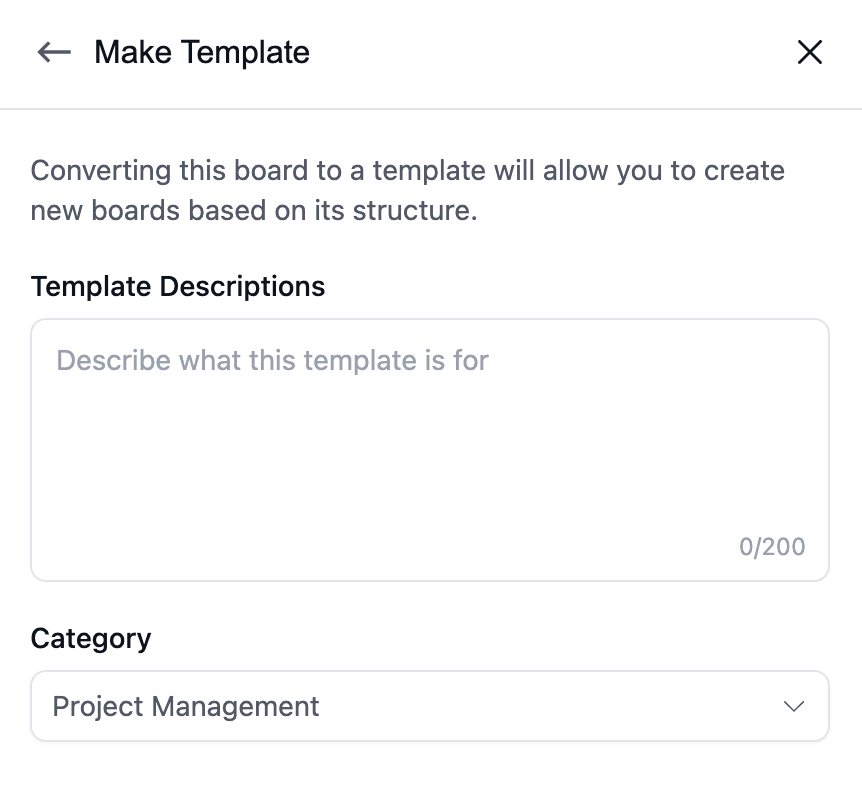
You can also save your standard website board as a template and start every new SOW from it, and with FluentCRM you can create the board automatically when a deal is signed.
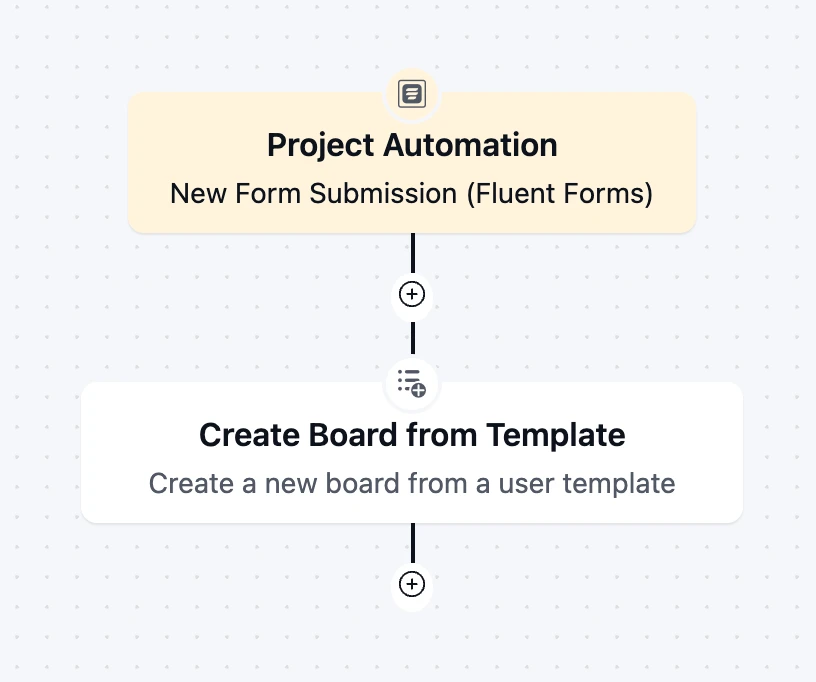
The SOW is signed, but the project hasn’t really started yet. Your next step is a client onboarding checklist to collect logins, assets, and approvals, and for design work, a creative brief template that captures what the client wants in their own words.
Common SOW Mistakes
Most SOW problems come from vague language and missing exclusions, not from bad clients. These are the mistakes that show up again and again in website projects.
- Writing goals instead of deliverables: “Improve the online booking experience” can’t be accepted or rejected. “A booking form on every page, connected to the practice’s booking system” can.
- Leaving out exclusions: If the SOW doesn’t say blog migration is excluded, the client will reasonably assume it’s included.
- Dates without dependencies: A launch date that doesn’t depend on the client’s content and feedback turns every client delay into your missed deadline.
- No named approver: Feedback from four people who disagree with each other isn’t feedback. Name one person whose word counts.
- Unlimited revisions by omission: If the number of rounds isn’t written down, it’s unlimited.
- Payment tied to calendar dates: If the client’s review takes three extra weeks, a date-based invoice arrives before the milestone it was meant to pay for.
- Filing it and forgetting it: An SOW that nobody reads after signature can’t protect anyone. Put the deliverables and acceptance criteria where your team works every day.
Frequently Asked Questions
These are the questions people ask most when they’re writing, or being asked to sign, their first statement of work.
What is the difference between a statement of work and a proposal?
A proposal sells the project and a statement of work commits to it. The proposal comes first and explains the approach, the benefits and a likely price. Once the client says yes, the SOW turns that into specific deliverables, dates, payments, exclusions and acceptance rules that both sides sign.
Is a statement of work legally binding?
A signed SOW is generally treated as part of the agreement between the parties, especially when a contract or master services agreement refers to it. How a specific clause is enforced depends on your jurisdiction and wording, so this isn’t legal advice. Have a lawyer review your master agreement and SOW template.
Who writes the statement of work?
The agency, freelancer or vendor usually writes the statement of work, because they know what the work involves. The client then reviews it, asks questions and requests changes before both sides sign. Some larger clients send their own SOW format, in which case you fill in their structure.
What is the difference between an SOW and an MSA?
A master services agreement (MSA) sets the terms of the whole relationship, like liability, confidentiality, payment terms and termination. A statement of work defines one project under that MSA. Agencies with repeat clients sign the MSA once and then a new SOW for each project.
How long should a statement of work be?
Long enough that nobody has to assume anything. A small fixed-price website project might fit on two or three pages, while a multi-phase build with integrations can run much longer. Length matters less than whether every deliverable, exclusion and acceptance rule is written down.
Send Your Next SOW With the Exclusions Written In
You don’t need a perfect statement of work to avoid most disputes. You need one that names what’s included, what isn’t, and how changes get handled, and that both sides actually read before signing.
Start with the next SOW you send. Copy the template above, write the exclusions first, add the five clauses most templates miss, and walk your client through it before they sign. Then turn every deliverable into a task the day it’s signed, so the SOW stays the plan your team works from instead of a PDF nobody opens.
That’s all for today. Thank you.
Let’s redefine project management with FluentBoards!

Follow:


Get Tips, Tricks, & Updates
We won’t send you spam.




Add your first comment to this post