


Website Maintenance Plan: How Agencies Package, Run, and Prove Monthly Care


The best website maintenance is almost invisible. Plugins update without breaking anything, backups run every night, contact forms keep delivering, and the site stays online.
And that is exactly the problem.
When everything works, clients rarely see the work behind it. Twelve months later, they look at the invoice, struggle to remember what was actually done, and start asking whether they still need the plan.
That is why a good maintenance service needs to do more than keep the website running. It also needs to make that value visible.
A website maintenance plan is a recurring agreement in which an agency keeps a client’s site updated, secure, backed up, and running for a monthly fee.
This part of our agency project management guide shows how to package that service, run it consistently across clients, and prove the work every month.
What a Website Maintenance Plan Includes
A website maintenance plan includes the recurring work that keeps a site safe and working: core, theme, and plugin updates, backups, security monitoring, uptime checks, performance checks, broken link fixes, form tests, and a set amount of small content changes. Most plans also include a response time for problems and a monthly report.
What a maintenance plan usually doesn’t include matters just as much, because that’s where disputes start!
New pages, new features, redesigns, copywriting, and third-party problems outside your control, like a payment gateway outage, normally sit outside the plan and get quoted separately.
Write both lists down, the included and the excluded, before the client signs. Write both lists down, the included and the excluded, before the client signs, the same way you’d write exclusions into a statement of work for a build.
For WordPress sites in particular, a good plan covers the things site owners rarely think about: testing updates on staging before they touch the live site, cleaning the database, testing that a backup can actually be restored, checking that emails still send, and removing old admin accounts.
Email deserves a special mention, because it fails silently. A plugin update or a host change can stop contact form and order emails from arriving, and nobody notices until a customer complains.
If the site sends through an SMTP plugin like FluentSMTP, check its email log as part of the monthly form test, so you see failed sends before the client’s customers do.
How to Package Maintenance Plans
Package maintenance plans by the kind of site and the risk it carries, then decide whether you sell fixed tasks, a block of hours, or both. A clear package makes the plan easy to sell at launch and easy to defend at renewal.
The decisions below shape every plan you sell, so make them once and reuse them for every client.
Tiers by site type
The simplest way to tier plans is by what breaks when the site goes wrong.
A brochure site for a dental practice needs updates, backups, and a monthly check.
A WooCommerce store loses money every hour checkout is broken, so it needs more frequent updates, transaction testing, and faster response.
A membership or course site adds logins, payments, and user data, so it needs user audits and closer security monitoring.
Three tiers built on site type are easier to explain than three tiers built on abstract features.
Included hours vs fixed tasks
You can sell maintenance as a fixed list of tasks, as a block of hours each month, or as a mix.
Fixed tasks are easy for clients to understand and easy for you to schedule.
A block of hours, which is closer to a retainer, covers the small requests clients always have, like “can you update the opening hours on the location pages?”
Many agencies combine the two: fixed care tasks plus one or two hours for small changes. Whatever you choose, say what happens to unused hours (most agencies don’t roll them over) and how extra hours are billed.
Response times
Write down how fast you respond, and separate response from resolution.
“We respond to a site-down report within two business hours and start work immediately” is a promise you can keep. “We fix everything within two hours” isn’t!
Define what counts as urgent, like the site being down, checkout failing, or the site being hacked, and give everything else a normal response time.
What is out of scope
List the exclusions in plain language: new pages and features, design changes, content writing, hosting problems on hosts you don’t manage, and recovery from changes the client made themselves.
Then say how out-of-scope work is quoted.
The best moment to sell the plan is at handoff, when the client has just seen how much work went into the site, which is why your client offboarding process should end with the maintenance plan on the table.
Plan terms: Length, notice, and price reviews
Decide how long the plan runs, how either side ends it, and when the price changes.
A monthly plan with 30 days’ notice is easy to sell, while a 12-month term with a small discount gives you predictable revenue to plan staff around.
Either way, write in an annual price review, so a plan you priced three years ago doesn’t quietly turn unprofitable as plugins multiply and the site grows. Tell clients about a price change at least a month before it applies, alongside a reminder of what the plan delivered that year.
Website Maintenance Checklist
A website maintenance checklist splits the work by how often it needs doing: weekly, monthly, quarterly, and yearly. The tables below are a starting point for a WordPress site.
Adjust the frequency for each tier, like weekly updates for a store and monthly updates for a brochure site.
Weekly
| Task | What to check |
| Backups | The latest backup is completed and stored off the server |
| Uptime and errors | No downtime alerts, no new errors in the server or PHP error log |
| Security scan | No malware flags, no unexpected new admin users |
| Store checks (WooCommerce tier) | A test order goes through and the order email arrives |
Monthly
| Task | What to check |
| Core, theme, and plugin updates | Updates tested on staging first, then applied to the live site, with a backup taken just before |
| Forms and email | Every form submits, and notification emails reach the right inbox |
| Broken links | No broken internal links or missing images |
| Speed check | Key pages load as fast as last month, with no new heavy scripts |
| Small content changes | Requests from the client completed within the plan’s hours |
| Monthly report | Work done, issues found, time used, and what’s coming next |
Quarterly
| Task | What to check |
| Backup restore test | Restore the latest backup to staging and confirm the site works |
| Database cleanup | Remove post revisions, spam comments and expired temporary data |
| User audit | Remove old accounts and confirm every admin still needs admin access |
| Plugin review | Replace abandoned plugins and remove inactive ones |
Yearly
| Task | What to check |
| Renewals | Domain, hosting, SSL, and premium plugin licenses renewed, in the client’s own accounts |
| Plan review | Whether the site has outgrown its tier, like a brochure site that now sells online |
| Content review | Pages with out-of-date prices, staff, or opening hours flagged to the client |
Run Maintenance for Many Clients Without Missing One
Running maintenance for many clients works when every recurring task is scheduled automatically, and every request lands in one place. Relying on memory and the 23rd client’s backup test is the one that slips.
Here’s a setup that scales from five maintenance clients to fifty.
One board per client, one folder for all of them
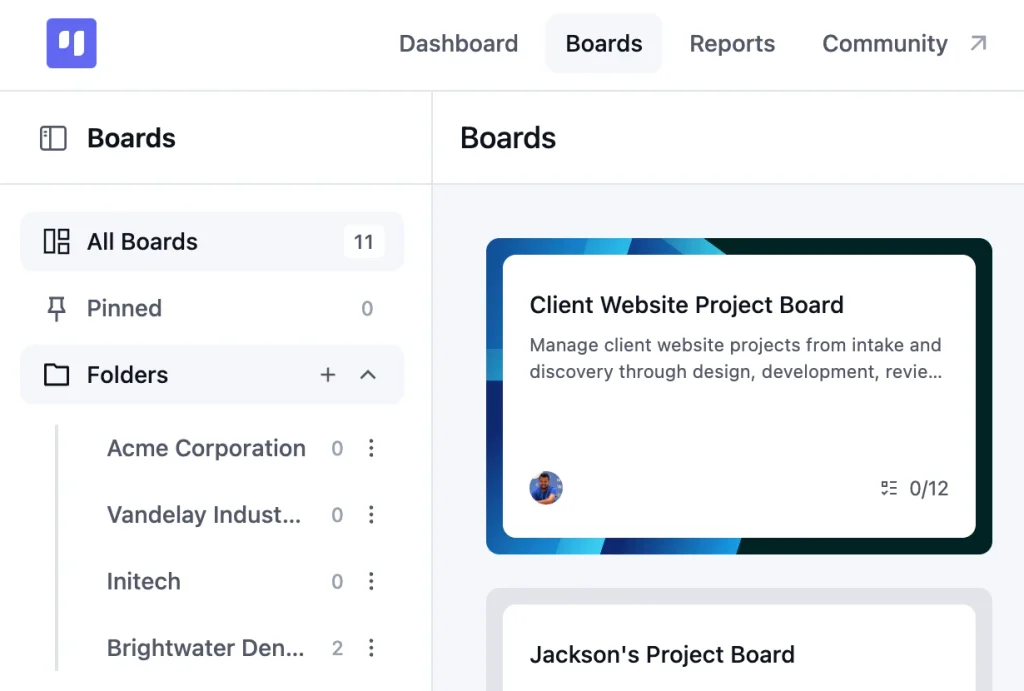
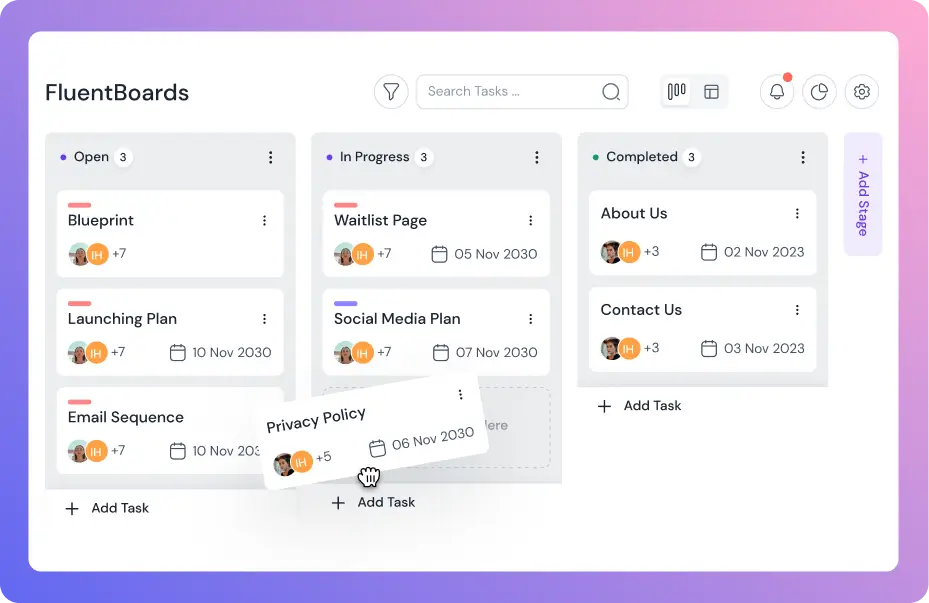
Give each maintenance client their own board and keep all of them in one “Maintenance Clients” folder.
One board per client keeps each client’s work, history, and hours separate, which matters the moment you need to report time for one client. The folder keeps the whole maintenance side of the agency in one place.
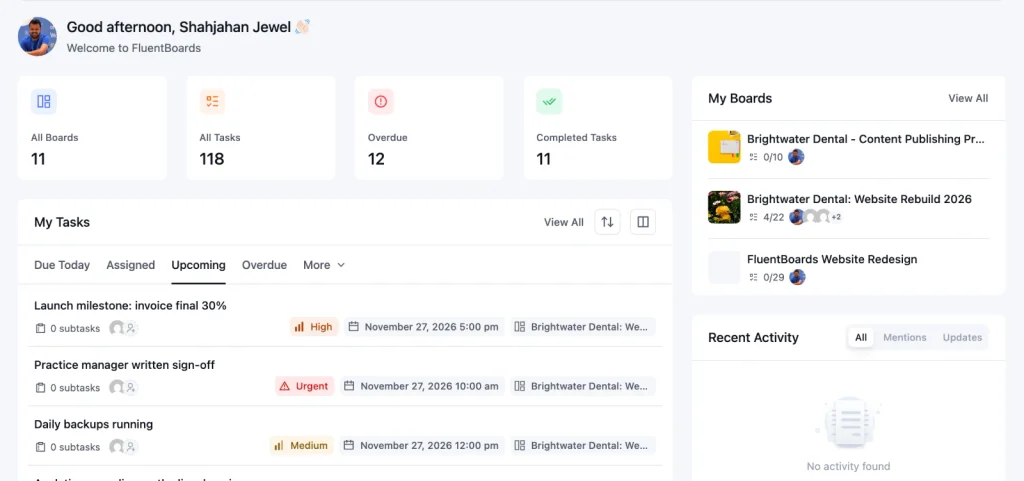
And the My Tasks view gives each team member a single list of what’s due across every client board.
Recurring tasks per site
Turn the checklist into recurring tasks on each client’s board, like “Monthly updates: test on staging, then apply to live” repeating every month.
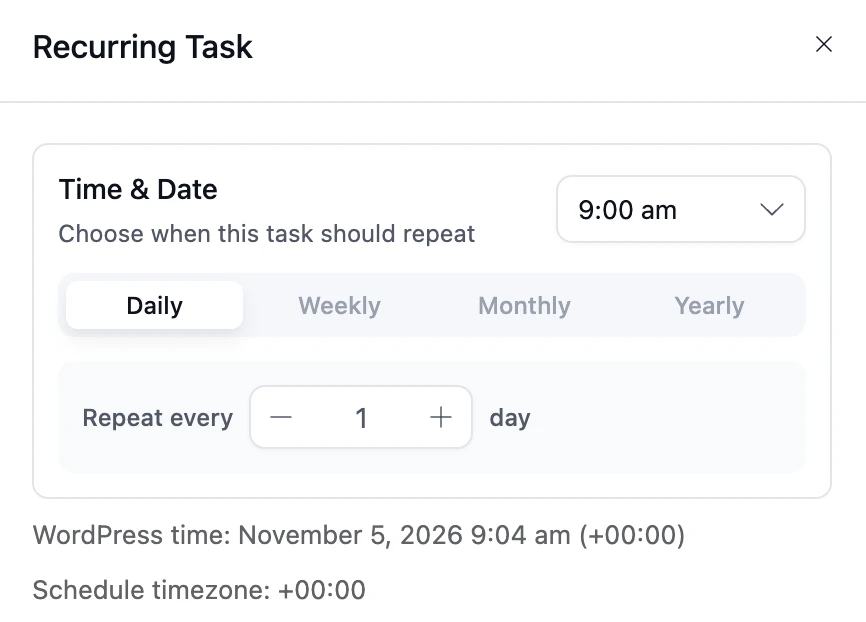
FluentBoards handles daily, weekly, and monthly repeats, shows the schedule on the task, and creates the next one automatically, so nobody has to remember.
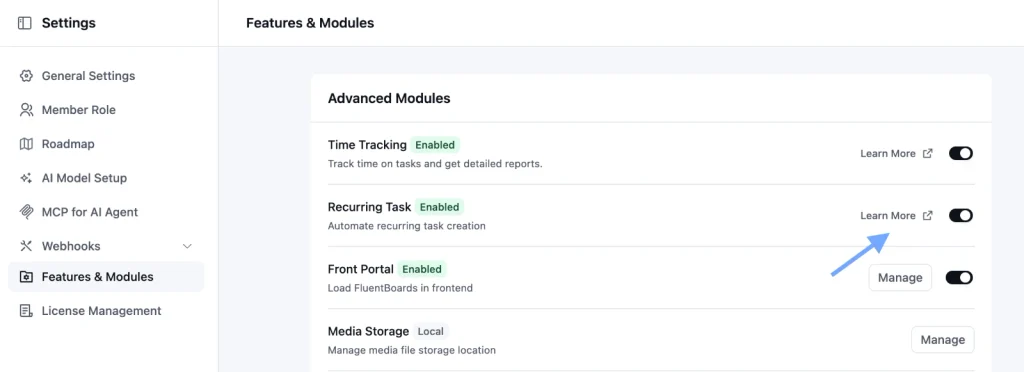
Recurring tasks are an advanced module, so switch it on in the FluentBoards settings first.
Requests through a form, not email
Client requests that arrive by email get lost, and requests that arrive by text get forgotten.
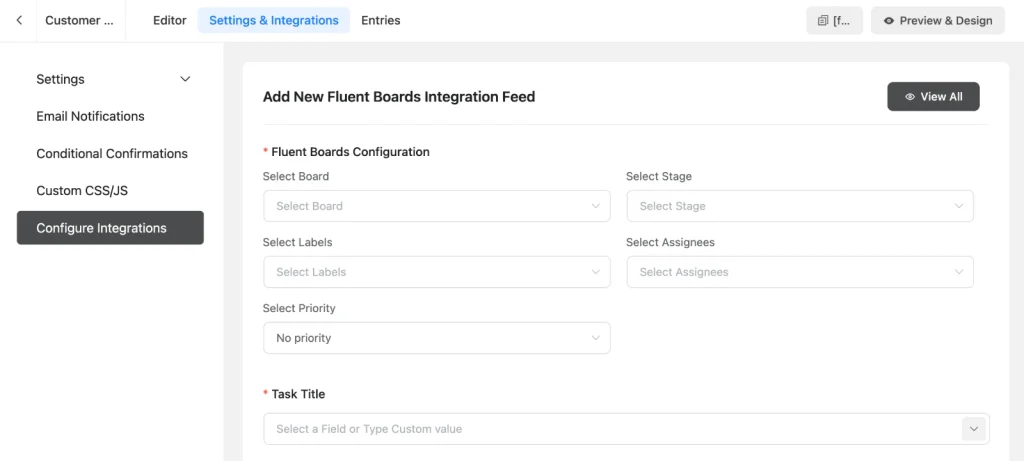
Give each client a short request form instead, built with Fluent Forms, that creates a task on their board with every submission.
The request lands on the board with the client’s details attached, ready to be labeled as included in the plan or out of scope.
Escalations without panic
Urgent problems need their own lane, so a site that’s down never sits in the same queue as a request to change a phone number.
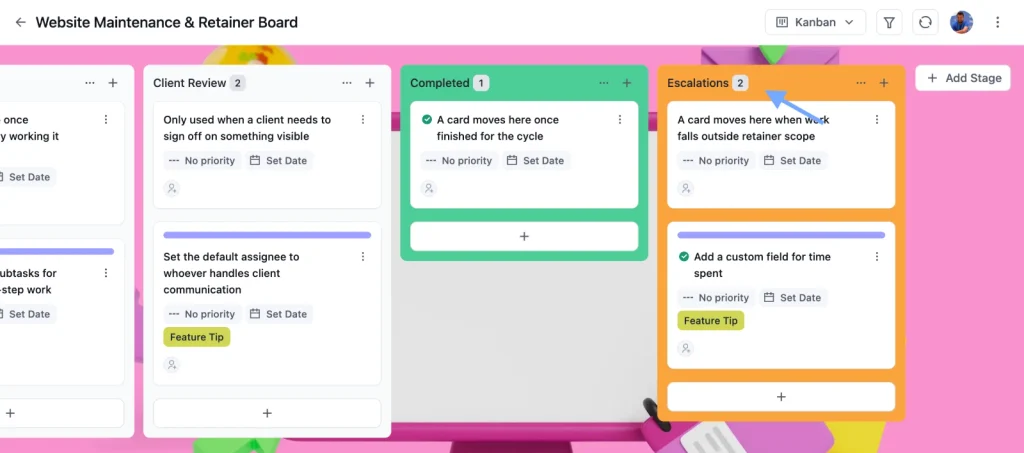
Keep an “Escalations” stage on every client board and an “Urgent/Downtime” label for anything that breaks the site, checkout, or forms.
When an escalation arrives, the person on maintenance that week drops the routine work, posts a first update to the client within your promised response time, and moves the task to Client Review once it’s fixed so the client can confirm.
Afterwards, add a line about it to the monthly report, because a problem you caught and fixed quickly is the strongest proof the plan is worth paying for.
Default assignee for the maintenance stage
Set a default assignee on the stage where new work arrives, so every request and every recurring task lands with the person who handles maintenance that week.
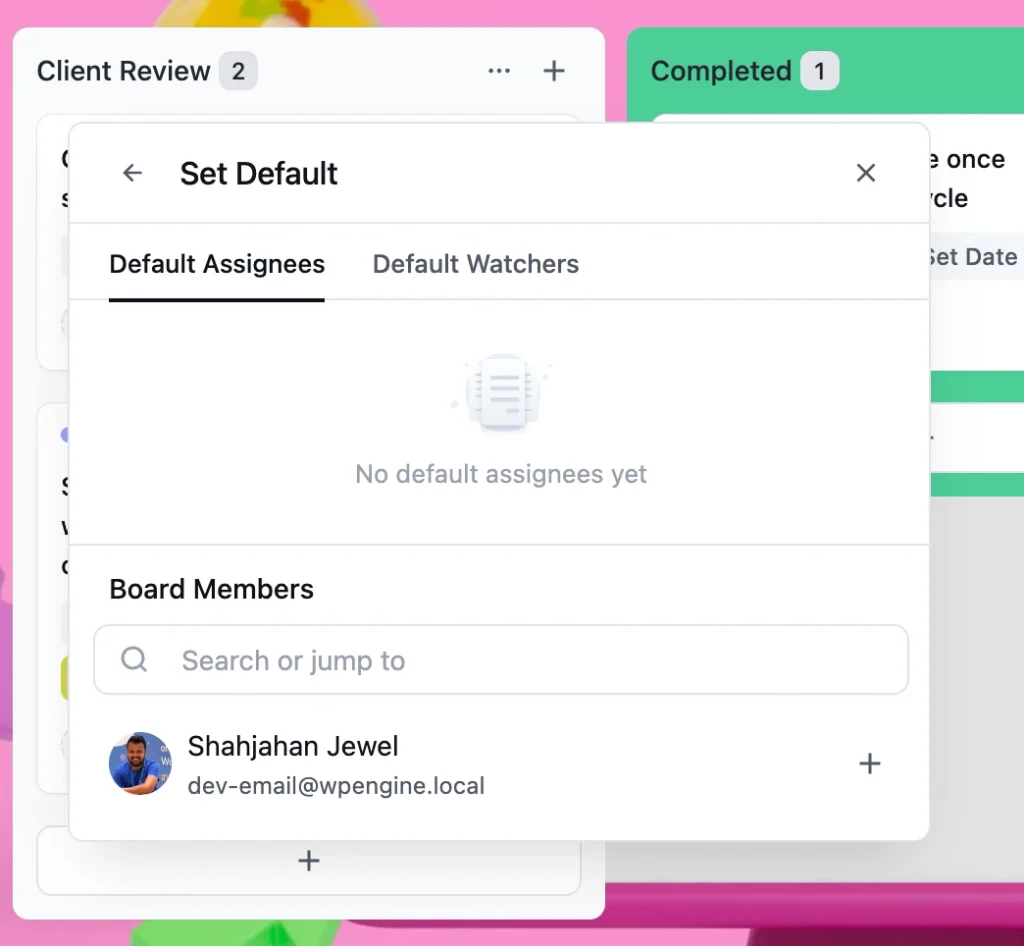
It stops the “I thought you had it” gap that leaves requests waiting for days.
To protect those hours across the team, so maintenance doesn’t get squeezed out by launches, see our guide to agency resource planning.
Pro Tip: Add two custom fields to each client’s board, a Select field for the plan tier and a Date field for the renewal date. Filtering by whether the renewal field is filled in shows you which clients still need a renewal date recorded.
Track Hours Against the Plan
Tracking hours against a maintenance plan means logging every piece of work, then comparing the month’s total with the hours the client pays for. Without that comparison, a plan can lose money for months before anyone notices.
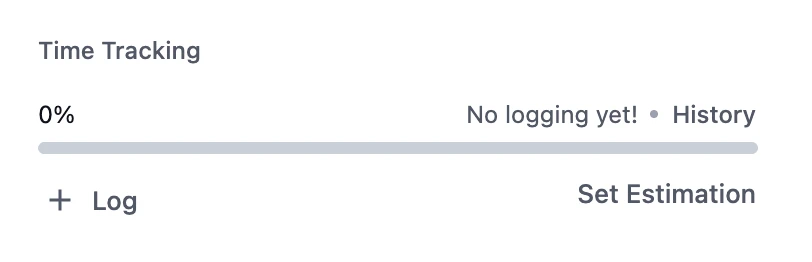
FluentBoards gives each recurring task an estimate, like 90 minutes for monthly updates, and logs the real time on the task when the work is done.
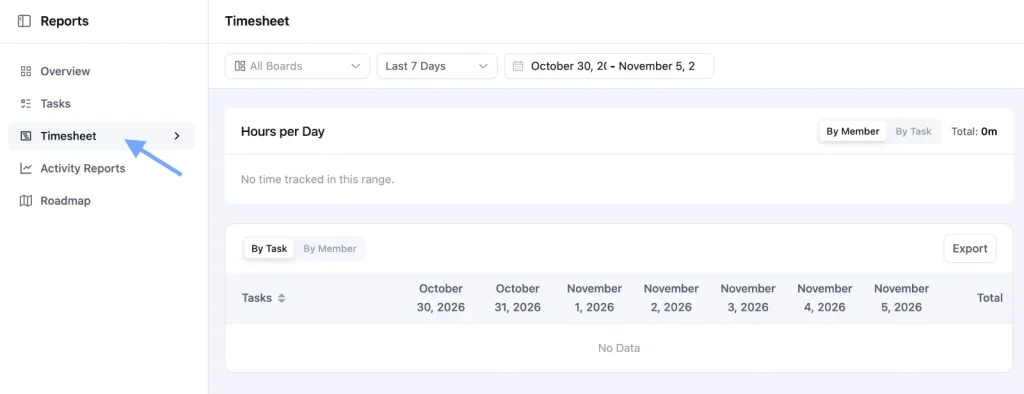
At the end of the month, open the Timesheet report, filter it to the client’s board and the billing month, and compare the total with the hours in their plan. Export it to CSV when you need the numbers for an invoice or the monthly report.
Be clear about what this setup doesn’t do:
- FluentBoards doesn’t keep a retainer balance, cap the hours on a board, or alert you when a client goes over, and time is logged manually rather than with a running timer.
The check is a habit, not an automation, so put it in your calendar for the last working day of each month. If a client goes over three months in a row, that’s not a scheduling problem. It’s a sign they need the next tier.
Raise it with numbers, not feelings. “Over the last three months we’ve averaged six hours against the four in your plan, mostly on content updates. Moving to the next tier covers that and gives you priority response” is a conversation most clients accept, because the Timesheet export shows exactly where the time went.
The alternative, absorbing the extra hours quietly, trains the client to expect more than they pay for.
Show Clients the Work Every Month
Clients renew maintenance plans when they can see what they paid for. A short monthly report turns invisible work into something the client can read in two minutes and forward to their boss.
A good monthly maintenance report covers five things:
- What was done: updates applied, backups confirmed, forms tested, like “WordPress core and 14 plugins updated, all tested on staging first.”
- Issues found and fixed: anything that would have broken without you, like “the booking form stopped sending after a plugin update, fixed the same day.”
- Requests completed: the client’s own changes, with dates.
- Time used: hours this month against the plan, so the client sees the value and you see the margin.
- What’s coming: renewals, upcoming plugin changes or a recommendation, like moving to the WooCommerce tier.
A quiet month still gets a report. Two lines like “Backups ran every night, 9 plugins updated after testing on staging, no issues found” remind the client that the site stayed safe because someone was looking after it.
Send it on the same day every month, so the client comes to expect it and notices when something in it changes.
Our guide to client reporting covers the format and cadence in more detail.
For clients who want to check in between reports, the Front Portal in FluentBoards shows them their own board on your site, and a read-only share link lets you send a single completed task, like a fixed form, without giving the client a login.
Frequently Asked Questions
These are the questions agency owners ask most when they start selling or fixing their maintenance plans.
What should a website maintenance plan include?
A website maintenance plan should include core, theme, and plugin updates tested on staging, regular backups with periodic restore tests, security and uptime monitoring, form and email tests, broken link checks, a defined amount of small content changes, a response time for problems, and a monthly report of the work done.
How often should a website be maintained?
Most sites need weekly checks on backups, uptime, and security, monthly updates and form tests, quarterly restore tests and user audits, and a yearly review of renewals and the plan itself. Stores and membership sites need updates and checks more often than brochure sites.
How much should agencies charge for website maintenance?
Price from the hours each tier really takes, not from a competitor’s price list. Add up the monthly time for the checklist and a typical month of small requests, multiply by your hourly rate, then add a margin for urgent work and risk. Stores and membership sites cost more because more can break and every hour of downtime costs the client money.
What is the difference between a maintenance plan and a retainer?
A maintenance plan sells a fixed set of care tasks, like updates, backups, and monitoring. A retainer sells a block of hours each month for whatever the client needs. Many agencies combine the two: fixed care tasks plus a small block of hours for changes.
Turn Your Next Launch Into a Maintenance Client
Your next launch is the best moment to sell a maintenance plan, because the client has just seen how much work goes into their site. Make it part of the handoff stage in your web design project management workflow, not an afterthought once the project is closed.
Have the plan ready before the handoff meeting, with the tiers, the checklist, and a sample monthly report, so the conversation is about which tier rather than whether.
Then set it up so the plan runs itself.
Start each client from our free website maintenance and retainer template, which comes with stages for recurring tasks, this month’s queue, client review and escalations, plus labels like “Monthly Retainer,” “Out of Scope,” and “Urgent/Downtime.” Import it on the Free plan or open it from the template gallery in FluentBoards Pro, add your recurring tasks, and the first report is already half written.
That’s all for today. Let’s redefine project management.
Let’s redefine project management with FluentBoards!

Follow:


Get Tips, Tricks, & Updates
We won’t send you spam.




Add your first comment to this post