


Project Handoff to Client: How to Deliver a Completed Project in FluentBoards


Imagine a five-person WordPress agency called Brinova Digital. The site was finished, tested, and approved. The handoff was a Loom video, a long email with the credentials, and a note saying to reach out with any questions.
Three days later the client emailed: “Where’s the staging login?”
It had been sent. It was in the email, paragraph four. But the client had watched the video, skimmed the email, and closed the tab, and now nobody was sure what else had been missed.
None of that changed the quality of the work. It changed how finished the work felt.
The truth is, most handoffs work exactly like this. The build phase runs on a board where everything is visible and tracked, and then the last step gets delivered in a format nobody can check against.
So the fix is not a better handoff email. It is giving the client one place to look and confirm, on their own, that everything promised actually shipped.
Here is how to set that up.
Why Project Handoffs Feel Improvised Even When the Work Is Done
Project handoffs feel improvised because most agencies have a repeatable process for building the work and no repeatable process for delivering it. The build phase runs on the board: staged, tracked, visible to everyone. The handoff runs on whatever the person closing the project happens to remember to send that day.
A connected onboarding-to-handoff board solves the beginning and the end of the relationship, but the specific moment of delivery, the part where the client actually reviews and accepts the finished project, still needs its own structure. That moment sits inside the wider project closure phase, and it is usually the least standardized part of it.
That gap shows up in two places.
No single place to review against
When a client receives a Loom video, an email summary, and a login spreadsheet as three separate deliverables, they have no single source to check items off against. They either trust that everything is there or they have to hunt across three formats to confirm it, and hunting is what turns a finished project into a slower, more uncertain one.
Loose ends surface after the client thinks it is over
A missing staging-site teardown, an unanswered training question, a login that was never actually sent, these show up after the client has already mentally closed the project. Each one reopens a conversation the agency thought was finished, and each one chips away at how clean the delivery actually felt, regardless of how good the underlying work was.
Step into the Future of Project Management!
What a Clean Handoff Actually Requires
A clean project handoff to the client requires three specific things: a stage on the board that clearly signals the project is complete, a visible list of completed items the client can verify against, and a single point where the client reviews and confirms everything without needing a call.
All three assume the project already lives on a properly structured agency project board, since the Delivered stage is only as trustworthy as the stages that came before it. Everything here runs on the board the project is already on.
A Delivered stage that signals completion
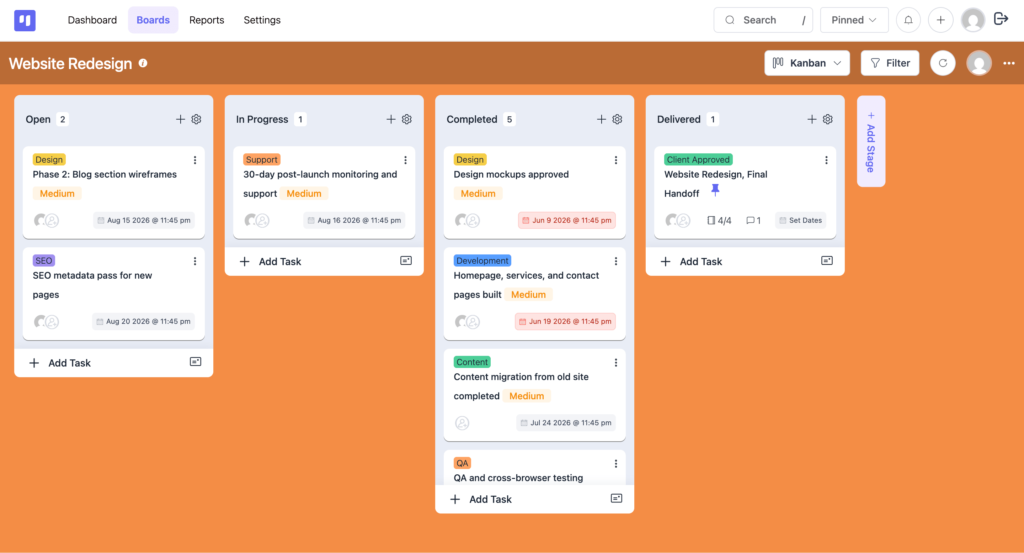
A dedicated “Delivered” stage on the board gives the handoff a clear moment instead of a fuzzy transition. Tasks only move into this stage once they are genuinely done, so the stage itself becomes a reliable signal, both for the internal team and for anyone glancing at the board, that the project has actually reached the finish line.
Read: Kanban board for how stages carry work across the board
A completion list the client can see
The list is not a new document. It is the original project deliverables list, restated as a set of subtasks on the Delivered task: login credentials handed over, staging site decommissioned, training video linked, final invoice sent. Building it from the deliverables that were already agreed at the start means there is nothing new to invent at delivery time, only to confirm.
A client-facing review point
The client needs somewhere to actually look at this, not just take the agency’s word for it. Without a shared view, the completion list above is just an internal note, and the client is back to trusting a summary email instead of seeing the finished state directly.
This is different from giving a client general access to the board throughout the project, which some agencies already do. A handoff review point is narrower and more deliberate: it points specifically at the Delivered task and its subtasks, so the client’s attention lands exactly where the confirmation needs to happen instead of getting lost scrolling through months of completed work in earlier stages.
All three pieces live on the same board. Here is how to put them there.
How to Build the Handoff in FluentBoards Step by Step
Setting up this project closure workflow takes three steps. Build the Delivered stage first, share it with the client second, and close the loop third. Do this once per board structure and reuse it on every project afterward.
Step 1: Create a Delivered stage and completion list
Add a new stage to the board called “Delivered,” positioned after the final active-work stage. Create a task inside it named after the project, for example “Website Redesign, Final Handoff,” and add a subtask group named “Handoff Completion Checklist” covering every item the client needs confirmed:
- Credentials transferred
- Staging environment removed
- Documentation or training linked
- Outstanding invoices settled
Pull each item directly from the original deliverables list agreed at kickoff so nothing gets invented at the last minute.
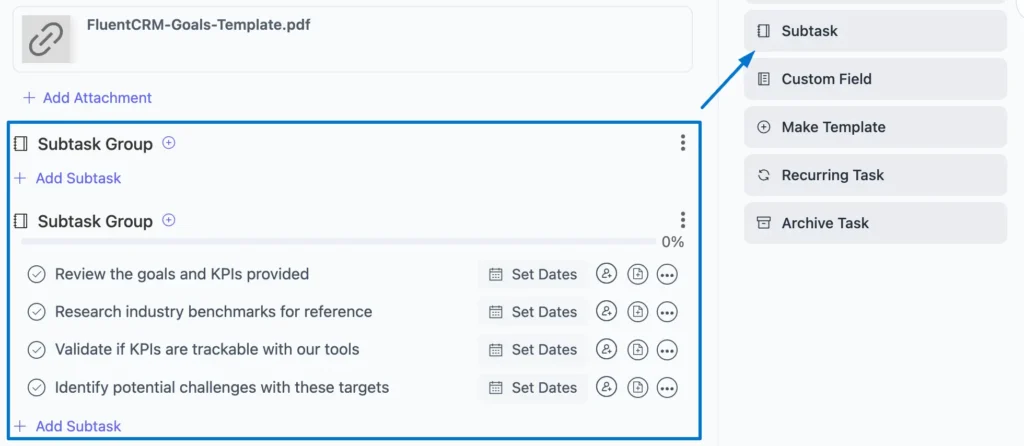
Keep each subtask specific rather than generic. “Site is live” tells a client almost nothing on its own, while “homepage, services page, and contact form live at the final domain, redirects from staging confirmed working” gives them something they can actually verify by clicking through it themselves. The more concrete each line is, the less the client has to take on trust.
Step 2: Share the board with the client via the Frontend Portal
Go to FluentBoards Settings and open Features and Modules. Click Settings next to Frontend Portal and check Enable Frontend Portal, then choose one access method:
- Standalone Front URL: enter a URL slug and the portal becomes available at that address on your site
- Pre-defined page via shortcode: add [fluent_boards] to any existing WordPress page instead
Both methods show every board the client has access to, so keep them a member of that single project board only.
Add the client as a member of their board, then send the portal link with a short note explaining what they are looking at: the Delivered stage, the completion list, and confirmation that every item is done. Add them as a Member rather than a Viewer, since Viewers get read-only access and cannot comment on the handoff task.
They review it on their own schedule instead of sitting through a call to hear the same information read out loud.
Step 3: Close the loop with a confirmation comment
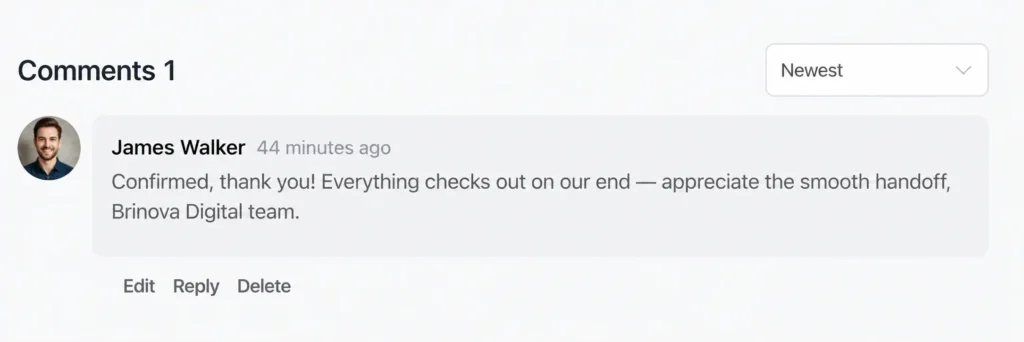
Ask the client to leave a comment on the Delivered task once they have checked everything, something as simple as “confirmed, thank you.”
Once that comment lands, apply a “Client Approved” label to the task. The label gives the team a clean, searchable record of exactly which projects have been formally confirmed as delivered, without introducing paperwork neither side actually needs.
Pro Tip: Save the Delivered stage and its subtasks as a board template once, and every future project starts with the same handoff structure already built in, so the last five minutes of a project take the same five minutes every time.
Frequently Asked Questions About Handing Off a Project
A few things come up every time an agency sets this up for the first time.
Do clients need a WordPress account to view the handoff?
Yes. The Frontend Portal moves the board onto the front end of your site, but the client still signs in with a WordPress user account, so set that up during onboarding.
Can I limit what the client sees to only the handoff stage?
No. Both portal methods show every board the client is a member of, so keep them on that one project board only.
What if the client never opens the portal and just replies by email?
Copy their email into the comments on the Delivered task and apply the Client Approved label as usual. The confirmation ends up on the board either way.
Can I do this on the Free plan?
Partly. The Delivered stage, comments, and labels run on Free. Subtasks, the Frontend Portal, and board templates are Pro features.
What Changes After the First Clean Handoff
At Brinova Digital, the Loom-video-and-email handoff eventually became a Delivered stage, a completion list, and one Frontend Portal link. The follow-up calls about missing logins stopped, not because the team got more careful, but because the client could finally check the work themselves instead of taking someone’s word for it.
A finished project that feels finished is worth as much as the work itself. The build phase already proves the agency can deliver; a repeatable client delivery process proves it can also close the loop without leaving the client wondering.
For the broader picture of how FluentBoards supports the full client relationship, the guide on how FluentBoards helps agencies manage projects covers the rest of that system.
Thanks for reading. Your next handoff can be the same five minutes every time.
Let’s redefine project management with FluentBoards!

Follow:


Get Tips, Tricks, & Updates
We won’t send you spam.






Add your first comment to this post