

Why Projects Miss Deadlines: The Hidden System Failures That Keep Teams Behind


According to the Standish Group’s CHAOS Report, only 31% of technology projects are delivered on time and on budget. WordPress development teams are not exempt from this pattern.
The striking detail is not the number itself. It is who fills the other 69%: experienced agencies, reasonable timelines, clients who have done this before. The team was not underqualified. The scope was not secretly unreasonable.
Something in the system failed them quietly, over the course of weeks, before anyone had the language to name what went wrong.
And this article names it.
Why Capable Teams Keep Finishing Late
When a project misses its deadline, the instinct is to look for the mistake:
- The underestimate
- The difficult client
- The developer who was slower than expected
Sometimes that is the right diagnosis. More often, it is not.
Most deadline failures are not one big error. They are a slow pile-up of small system failures, each one invisible on its own, but fatal to the timeline together.
The planning fallacy baked into every estimate
Back in 1979, psychologists Daniel Kahneman and Amos Tversky named something every team has lived through: the planning fallacy. It’s our tendency to underestimate how long a task will take, even when we’ve done the exact same task before and watched it run long.
It isn’t a beginner problem. It gets a little better with experience, and a lot worse with complexity.
A simple three-page WordPress build usually lands close to estimate. A twelve-page build with a custom theme, three integrations, and a client approval cycle almost never does. Not because twelve pages is hard, but because every dependency multiplies the fallacy at every step.
So this isn’t a character flaw. It’s a cognitive baseline, and knowing about it doesn’t make it go away. The only thing that reliably blunts it is a system that catches the slippage early, while it’s still fixable, instead of at the end when it’s already a two-week delay.
What “the team was fine” actually means
When a project finishes late and the postmortem says “the team was fine,” it usually means one thing: nobody made a gross error.
The developer built what was specced. The designer delivered on time. The project manager ran the meetings. And the project was still three weeks late.
That’s the part most teams can’t read, because we’re trained to look for the person who dropped the ball. When no one person did, the failure has to live somewhere else.
It lives in the system.
And the five failures below are all system failures. Not bad people, bad processes, ones with no way to catch these specific problems before they compound. Fixing them means changing the process, not the team.
The Five System Failures Behind Missed Deadlines
These five failures run quietly on almost every late project. One by one, here is what each looks like and the fix that stops it from compounding.
When Scope Grows, but the Timeline Does Not
Scope creep is the most named cause of project delays, and the most mishandled. Teams see it happening in real time, and still end up with a bloated scope and the same deadline.
So the useful question is not whether you can spot it. It is why spotting it is never enough.
How scope expands on WordPress projects without permission
Scope rarely expands in obvious ways. It expands through accommodation.
A client asks if the contact form can also send to a secondary email. The developer says yes, because it takes twenty minutes. A week later, the client asks to add a file upload field. Another yes.
Neither request is on the original scope document. And a precedent is now set: the answer is always yes.
On WordPress projects, these requests tend to cluster around four areas:
- Design revisions after the approval stage
- Plugin additions found necessary during the build
- Content changes that require template rework
- Integrations that surface during QA
Each one arrives as a small ask. None of them is labeled as a scope change. The team says yes because saying no feels disproportionate, and the timeline absorbs it because nobody is tracking what these small yeses add up to.
The missing conversation is always about time, not features
Here is the conversation teams avoid. It is not “can we add this feature?” The answer to that is almost always yes.
It is the harder one: “adding this moves the deadline by a few days. Do you want to proceed?”
That conversation only happens if you have the evidence for it. You need a record of what was originally agreed, what has been added since, and what each addition costs in time. Without that record, every yes looks free to the client, while the timeline quietly pays for all of them.
Good intentions do not prevent scope creep. A visible record does.
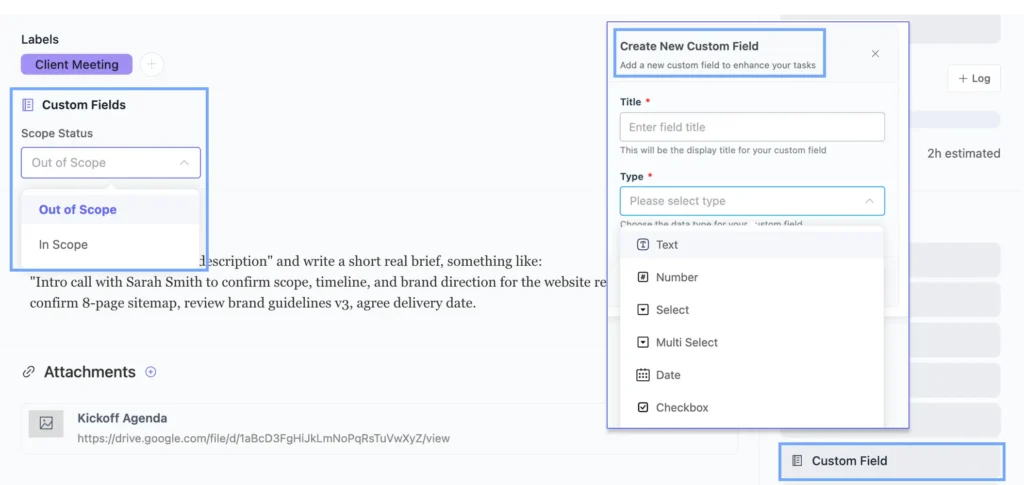
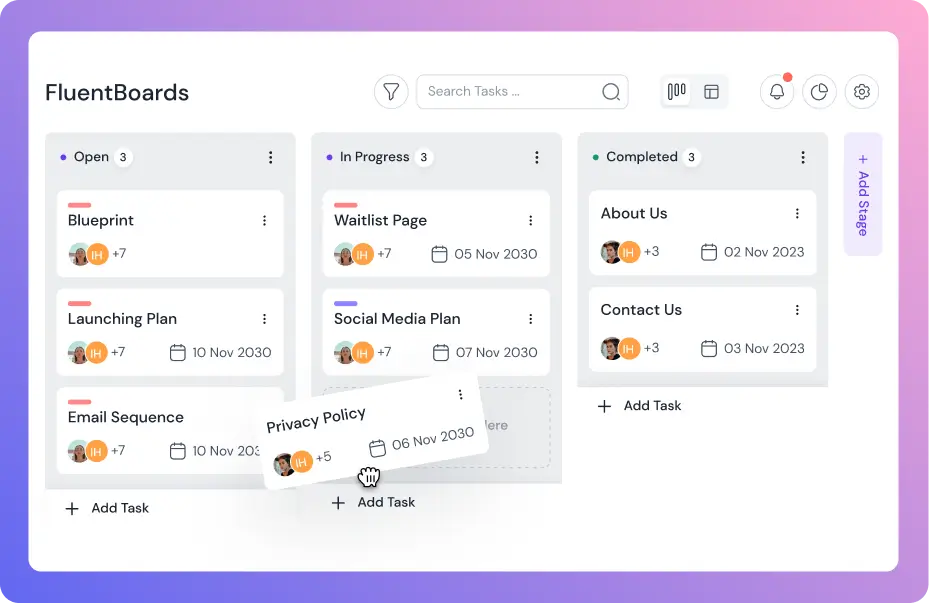
Pro Tip: Create a “Scope Changes” stage on every client board, and give each out-of-brief request a task there before any work begins, marked with a custom field (Pro) as out-of-scope. A board with eleven tasks sitting in “Scope Changes” is a board whose timeline conversation is already overdue, and anyone who looks can see it.
Tasks Without a Named Owner
A task exists on the board. Nobody owns it.
It happens more often than teams admit, and the fix is far simpler than the damage. A task gets added to the board faster than an owner can be assigned. The assignment never happens, and everyone assumes someone else has it.
The diffusion of responsibility on a shared board
There’s a known dynamic behind this. The more people who can see a task, the less any one of them feels responsible for it.
Picture a board shared by five people. An unassigned task is visible to all of them, owned by none. Each one figures someone else has it. The task sits untouched for five days, while the whole team looked right at it.
WordPress projects make this worse. Tasks get added during client calls, mid-sprint, after a QA session. Whoever adds it is focused on capturing it before it’s lost, not on picking the right owner. The task lands clearly described, but unassigned.
That’s where the trouble starts.
How an unowned task becomes a missed deadline
An unowned task usually follows the same path.
It sits in intake while everyone assumes ownership is settled. Two weeks later, a board review finds it right where it started. By then the work it was holding up has slipped too, because the person waiting never knew to ask.
The task itself? One day of work. The delay it caused? Ten.
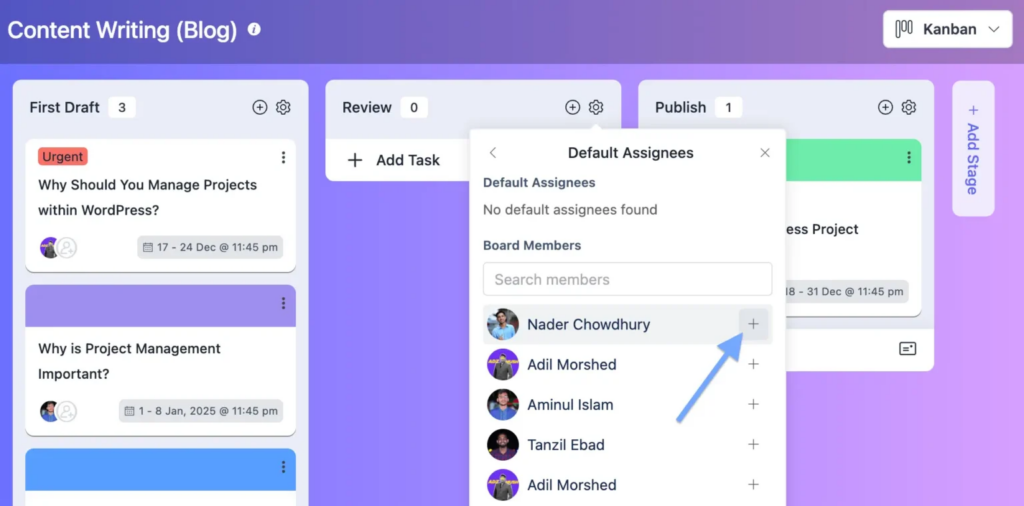
This is where Stage Default Assignee (Pro) earns its place. In FluentBoards, every task entering a stage gets assigned to a set team member automatically, before anyone notices it’s floating.
For intake and review stages, that means no task sits unowned, no matter when it got added. Whoever needs it already owns it the moment it lands.
Dependencies That Cascade in Silence
Dependencies are the hidden architecture of a project.
When they’re visible, a delay in one task throws an early warning: something connected is now at risk too. When they’re invisible, that delay spreads quietly through everything downstream, and you find out three tasks later, once the cascade has already happened.
The blocked task nobody was watching
Picture a WordPress build with this chain:
- Brand guidelines need to be finalized
- The homepage template needs those guidelines
- The inner page templates need the homepage approved
- Staging deployment needs all templates done
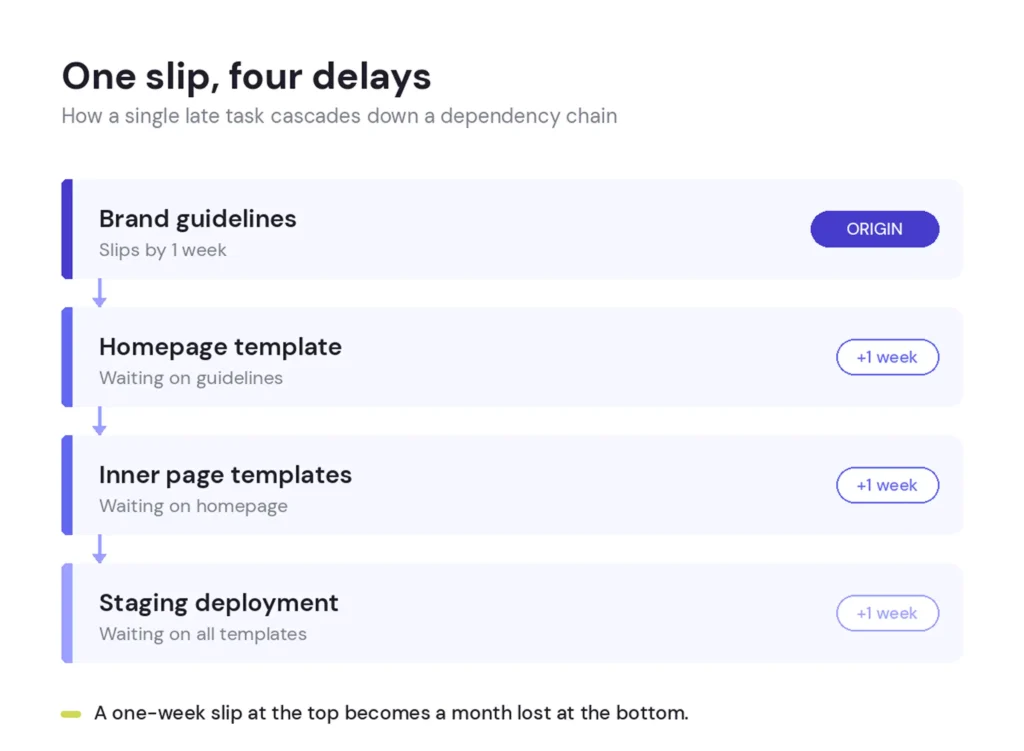
That’s four links. If the brand guidelines slip by a week, everything behind them slips by at least a week, usually more, because each handoff adds its own scheduling and context-switching time.
Now picture that board with no visible dependencies. The homepage developer marks their task blocked in a comment, moves to something else. The inner page developer checks the board, sees the homepage still in progress, and waits. Staging stays unscheduled.
The project manager sees tasks in progress and tasks waiting, but gets no signal that three of them are stuck behind one blocked item. The blockage finally surfaces in a standup, two weeks in, when someone says it out loud.
Why visibility is a structural fix, not a communication fix
The usual answer to hidden dependencies is “communicate better”, tighter standups, clearer handoff notes. That helps a little. But it doesn’t touch the real problem: memory and conversation are unreliable ways to carry dependency information once a project has more than a few moving parts.
The person who creates a dependency often isn’t the one who feels it break. The gap between those two people is exactly where information falls through.
Structural fixes work because they don’t wait on the right person remembering the right thing at the right moment.
In FluentBoards, Subtasks (Pro) create clear parent-child links between work items, so it’s visible at a glance that a subtask can’t be done until its parent is moving.
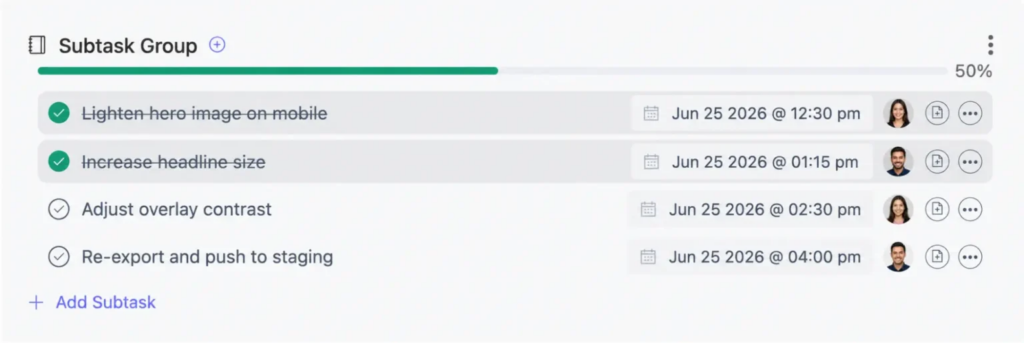
Task Dependencies take it further, letting you link a task to the one it’s waiting on, so downstream work stays blocked until the upstream task is done.
And Task Watchers (Pro) notify anyone following a task the moment it changes, without anyone having to ask.
The dependency lives in the system now, not just in someone’s head.
Status That Lives in Slack, Not the Board
Project status is accurate in exactly one moment: right after the person who knows a task’s state updates the board.
Every other moment, the board is behind reality. The team works around the gap by moving status into Slack, email, and the next standup, which only pushes the board further behind.
In most teams, this loop has a name. They call it normal operations.
What it costs to have to ask
Every status question is a small tax. “Where are we on the homepage template?” Thirty seconds to ask, thirty to answer.
Sounds like nothing. But on a project with eight active tasks, three people, and a client checking in twice a week, it compounds into hours of interruption. The person asking loses their flow. The person answering loses theirs. And the answer is going stale before the conversation even ends.
The bigger cost is what the question reveals. When people ask instead of checking the board, the board is no longer trusted as the source of truth. And that trust rarely recovers on its own, because nobody updates a board nobody relies on.
From there, the project runs on conversation-memory instead of recorded state. Which is exactly where dependencies get missed, ownership gaps go unnoticed, and scope changes pile up without a record.
What a live board prevents that status meetings cannot
A board updated in real time does two things a scheduled meeting can’t. It surfaces problems continuously instead of periodically, and it shows everyone the same state at once, no meeting needed to sync.
When the designer marks the homepage mockup “In Review,” every watcher on that task is notified right away. The developer waiting on it knows to check now, not in three days at the next standup.
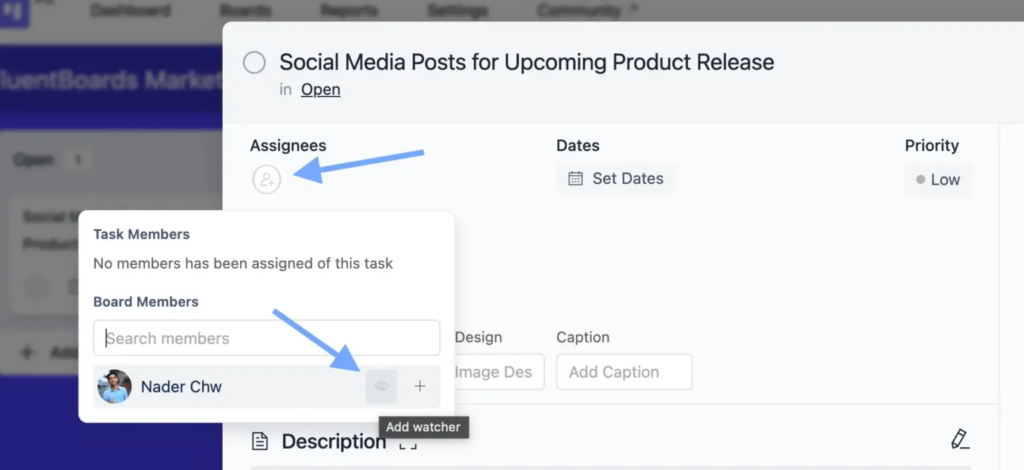
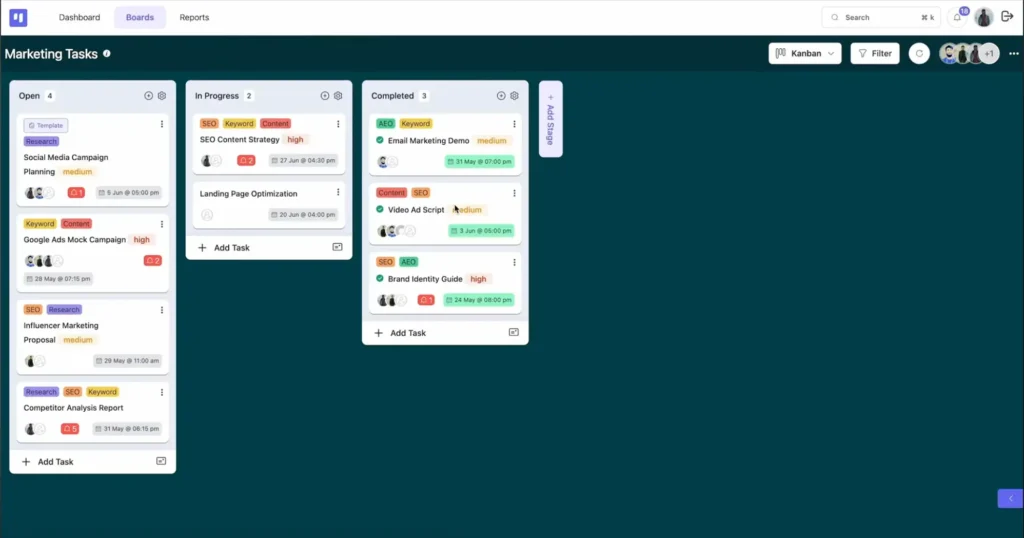
That’s what Task Watchers do in FluentBoards. The project manager watches the active tasks. The account manager watches the client-facing ones. The client, with Frontend Portal (Pro) access, sees the board update directly. Status isn’t pushed on a schedule. It’s pulled by the system as the work moves.
The Approval Phase Nobody Planned For
Every project has an approval phase. Almost no project plans for it.
Deliverables get built, checked internally, and handed off for sign-off. And right there, the project slips into a waiting state nobody put on the timeline. It might take two days. It might take ten. The team is done. The project is not.
So the missed deadline gets logged as a delivery failure, when it was really an approval-planning failure. And the same pattern shows up on the next project.
Done-but-waiting is still late
The clearest sign a team hasn’t planned for approvals is what the board looks like when the work is finished.
Tasks sit in “Done” or “In Review” for days with no movement. The developer marked it done and moved on. The project manager knows it’s waiting on the client. The client hasn’t replied to the email.
The board shows a project that looks 90% complete, and has looked that way for a week. That last 10% is all approval, and nobody estimated how long it would take.
Approval cycles are especially unpredictable on WordPress projects, because they pull in stakeholders outside the team who have their own priorities. A homepage approval that should take a day takes five when the decision-maker is buried in meetings or waiting on a second opinion.
You can’t control that. But you can plan for it. A timeline with no approval buffer isn’t a real timeline.
How approval stages work when they have real structure
Give approvals their own stage on the board, treated as seriously as any production stage, and the done-but-waiting problem stops hiding.
When a deliverable is finished, it moves to “Pending Approval” instead of “Done.” Now it has a stage, an assignee (the reviewer, via Stage Default Assignee), a clear spot in the flow, and a notification to whoever owns the sign-off. At any moment, you can see how many items are waiting and how long they’ve sat there.
It also makes the client conversation easier. When they ask why the project isn’t finished, the board has the answer.
“We’ve been waiting five days for your sign-off on the homepage and the pricing page” lands very differently from “we’re running behind.” One is a status update. The other has a clear owner and a clear next step.
If you’re building the board structure where this happens, here’s how to create an agency project board in WordPress with the stage architecture that supports it.
How to Fix These Failures Before the Next Project
Every one of these five failures has a structural fix. None of them needs a new tool, a new methodology, or a new team. They just need the board to carry the information that currently lives in people’s heads, Slack threads, and email.
Here’s the full set:
- Scope: a dedicated stage for out-of-brief requests, each flagged with a Custom Field (Pro), so scope growth has a running record to anchor the timeline conversation.
- Ownership: Stage Default Assignee (Pro) on every intake and review stage, so no task ever lands without an owner.
- Dependencies: Task Watchers (Pro) on anything other work waits on, so delays surface as notifications, not standup surprises.
- Status: treat the board as the single source of truth, and let Task Watchers replace the status-email cycle.
- Approval: a dedicated “Pending Approval” stage that makes waiting work visible and assigned.
None of this is advanced. Most of it takes under ten minutes per board. What actually makes it work is consistency, the structure has to be in place before the project starts, not bolted on after the first delay. A “Scope Changes” stage nobody uses helps exactly as much as no stage at all.
See FluentBoards Free vs Pro for the full feature breakdown
Give Every Deadline a System Behind It
Teams that consistently hit their deadlines aren’t made of people who never slip. They run on systems that catch the slip early enough to fix it.
The five failures here aren’t rare. They’re the normal state of any project without a structural answer to scope, ownership, dependencies, status, and approval. Most teams have at least three of them running right now, and they blame the delays on the wrong things.
But every one has a fix that costs less than the delay it prevents. A “Scope Changes” stage. An owner on every intake task. Watchers on every blocked item. A “Pending Approval” stage for finished work. None of it needs a certification or an offsite, just twenty minutes of setup and the discipline to use it.
The teams that deliver on time aren’t working harder than you. They’ve just put the structure in place before the project starts, not after the first delay.
If you’re running multiple client projects at once, the project management solution for agencies page shows how this scales, and FluentBoards pricing has the current plan details.
That’s all for today. Let’s redefine project management!
Let’s redefine project management with FluentBoards!

Follow:


Get Tips, Tricks, & Updates
We won’t send you spam.




Add your first comment to this post