

Turn Fluent Forms into FluentBoards Tasks: Discover a Unique Way of Task Management


Can you imagine creating a form to collect task information, and like magic, it transforms into a task right after submission? Sounds amazing, doesn’t it?
Your client fills out the form, and instantly, your team knows their next target. Well, guess what? With the Fluent Forms integration with FluentBoards, that’s not just imagination anymore. It’s the reality!
So, today we will introduce you to this integration and show you how to use FluentBoards x Fluent Forms to get the best output.
Let’s get started!
What is FluentBoards?
FluentBoards is the simplest solution for project management on WordPress. It’s developed to tackle your project management challenges in WordPress and will simplify project activities like a walk in the park.
However, if you are using any SaaS solutions for managing your projects, you should know that there are some strong and valid reasons to manage projects in WordPress.
Discover why managing projects in WordPress is more reliable
With FluentBoards, you can manage your projects seamlessly without leaving the dashboard, and there is almost zero possibility of accidental data leakage.
Here are some notable features of FluentBoards:
- Ensure the complete safety of your information within WordPress
- Run unlimited projects with unlimited team members
- Manage multi-stage workflows with a dynamic Kanban board
- Filter any task by assignee, stages, due date, priority, label, etc.
- Add CRM contacts to automatically manage with FluentCRM
- Set goals for your team and track project progress
- Easily identify project bottlenecks and resolve them
- Stay updated with your work through real-time communication
- Manage resources smartly for maximum utilization
Step into the Future of Project Management!
What is Fluent Forms?
Fluent Forms is a drag-and-drop contact form-building plugin for WordPress. It’s easy to use and has all the useful features to meet your day-to-day form creation needs. Whether you are a newbie or a tech expert, you’ll experience a no-code requirement for any form.
Here are some special features of Fluent Forms:
- Drag and drop fields to create forms
- Built-in templates to create any form with ease
- Conversational form-building support
- Numerous input fields for data collection
- Set conditional logic for user input
- Adjustable multi-column form layout
- Spam protection support with reCAPTCHA, hCaptcha & more
Well, these are the major features of Fluent Forms but the most important part is how Fluent Forms will play with FluentBoards for task management.
So let’s find it out!
Advantages of Fluent Forms Integration for Task Management
If you are already a Fluent Forms user, you can feel how valuable it has become for your personal or business use. However, in the case of project management with FluentBoards, you might have multiple questions in your mind right now, such as:
- What benefits does the integration offer?
- How will the integration impact my workflow?
- How does the integration work?
This integration is developed to make sure you save your time for productive efforts and reduce the possibility of scope creep.
It’ll bring a significant improvement in your workflow and you’ll enjoy many benefits, including:
- Reducing manual entry and saving time
- Allowing clients to easily share requirements and improve communication
- Getting immediately informed about client task
- Completing tasks within the deadline with less scope creep
How to configure Fluent Forms integration for your FluentBoards projects
Alright, now it’s time to enable and utilize the Fluent Forms integration to its fullest advantage for your FluentBoards projects.
Log into your WordPress dashboard and go to Fluent Forms > Integrations and ensure that you have enabled the FluentBoards integration.
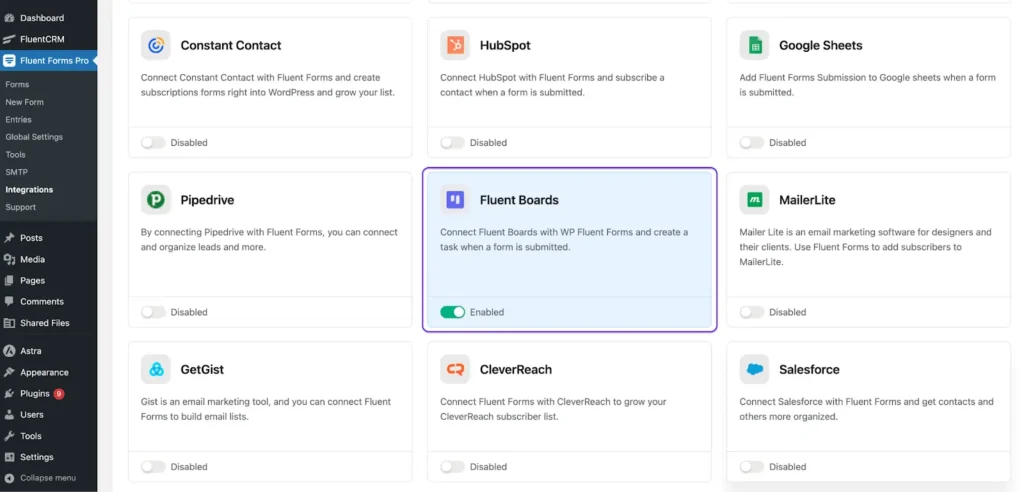
Next, you’ll need to configure the FluentBoards integration feed in Fluent Forms for the specific project.
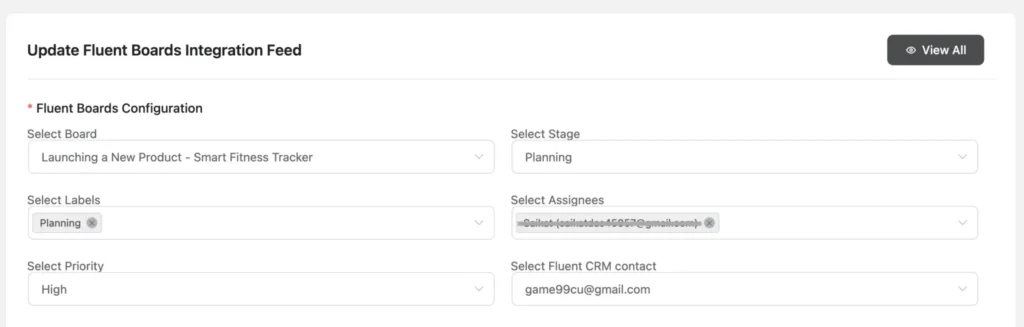
Here, you’ll find the following options:
- Select Board: Choose the board to which the form will be converted into a task
- Select Stage: Determine the stage of the submitted task
- Select Labels: Assign labels for the task
- Select Assignees: Choose the team members responsible for completing the task
- Select FluentCRM Contact: Associate the client with the task
- Select Priority: Set the priority level of the task
Plus, you need to configure the task title and description to receive your client input.
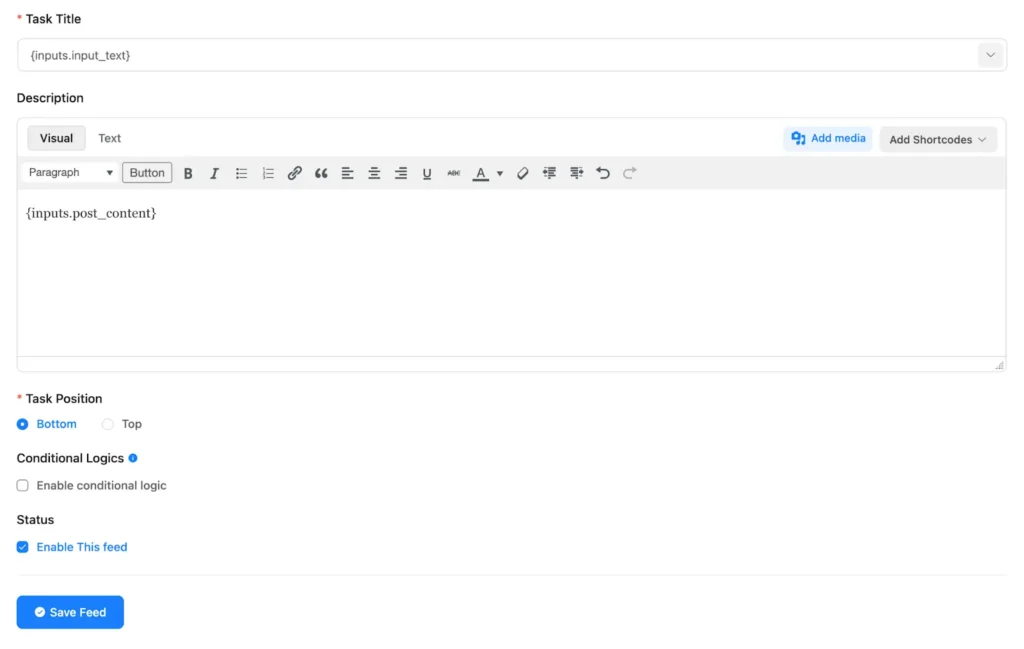
When you are done setting up everything then click Save Feed. Now it’s time to go live with your task form. This is how your task form will look to your clients and they can share their task details with you:
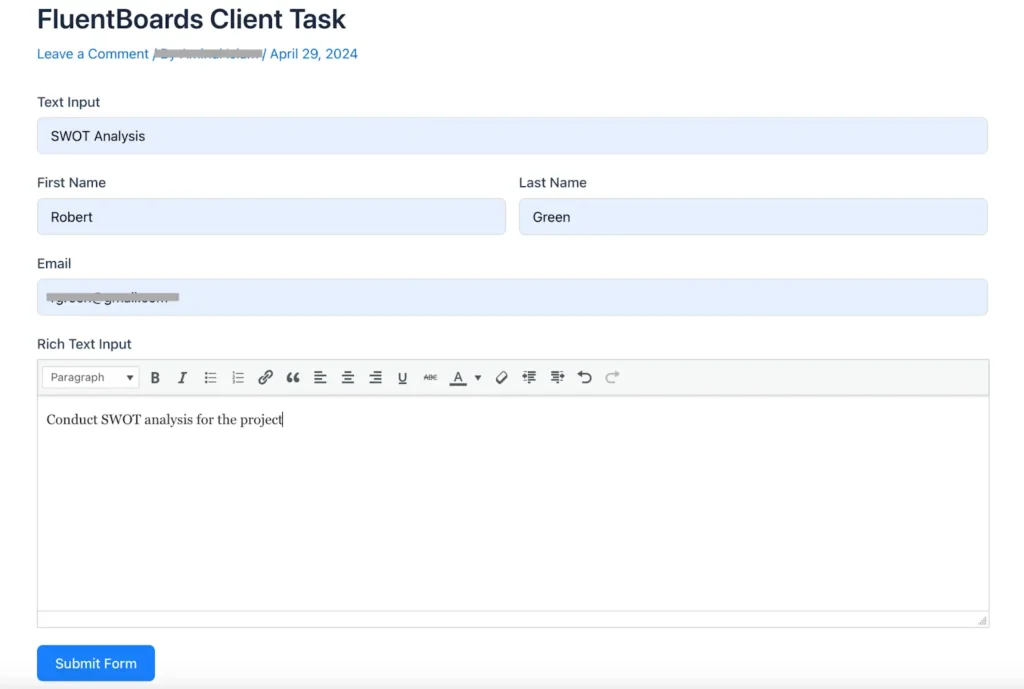
This form will be automatically converted into a task in FluentBoards when your client clicks Submit Form.
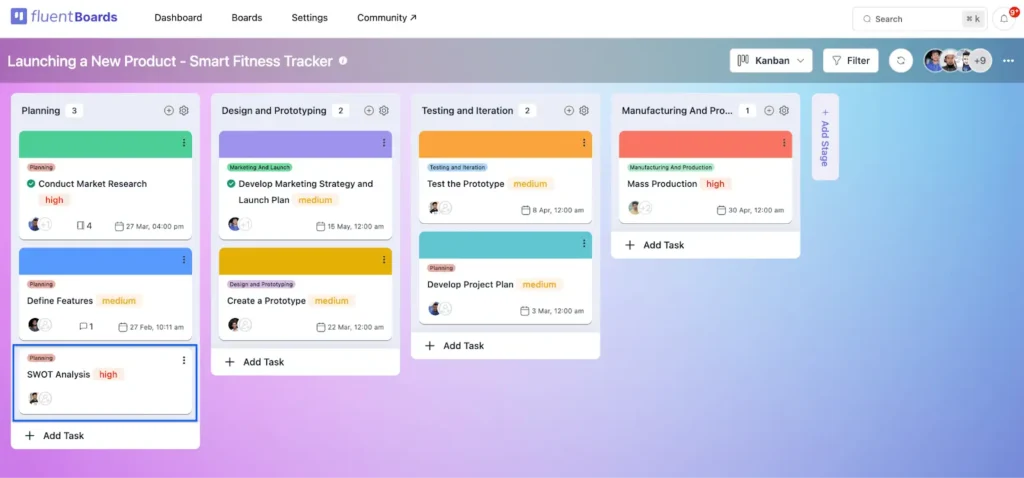
Now the task is ready to be managed in FluentBoards and your team will get a clear overview of their next target.
Save time and focus more!
In conclusion, the integration of Fluent Forms with FluentBoards delivers a straightforward solution for project management in WordPress. It will not only save time for both parties but also improve communication with less scope creep.
Your clients can simply hand over their requirements, and automatic task creation will significantly reduce the manual work of task management.
With Fluent Forms integration, you are ready to simplify task management, enhance communication, and boost productivity. Give it a try and experience the difference it can make!







This integration seems perfect for my upcoming online course launch! I’ll use Fluent Forms to create a feedback form asking students what they’d like to see in future sessions. The automatic task creation in FluentBoards will streamline managing these suggestions, ensuring we can promptly address their needs and improve the course. Thanks for the detailed guide!
Hi Michaël,
Glad to hear that it was helpful for you. Enjoy using FluentBoards with Fluent Forms.