


Creative Brief Template: A Free Template, a Website Example, and How to Use It


Every agency has a creative brief template. Yet projects still reach round two with someone saying, “That’s not what we meant.”
Usually, the template is not the problem. The problem is what happens around it: the client fills it out alone, half the answers are vague, nobody signs it off, and nobody turns it into actual project work.
That is where a better creative brief process makes the difference.
A creative brief is a short document that defines what the project needs to achieve, who it is for, and what will be delivered before any design work begins.
This part of our guide to agency project management gives you a free creative brief template, a web design version, a completed example, and a simple process for collecting the brief and turning it into tasks.
What Is a Creative Brief
A creative brief is the agreement between client and agency on what the work must do, written before the work begins. It’s usually one or two pages, and it becomes the reference point for every review: does this design do what the brief says?
A good brief answers three questions clearly: What should change because of this work? Who needs to see it? What exactly are we delivering, and by when?
If someone new joins the project, the brief should tell them enough to start.
Creative brief vs Design brief vs Marketing brief
The three terms overlap, and many teams use them interchangeably. The difference is scope.
| Brief | Covers | Typical example |
|---|---|---|
| Creative brief | The idea and message behind a piece of work, often across several deliverables | A website redesign, a campaign, a rebrand |
| Design brief | One design deliverable and its practical requirements | A homepage design, a logo, a set of social graphics |
| Marketing brief | The business goal, budget, and channels, before creative work is scoped | A product launch plan |
For a WordPress agency, a website project usually needs a creative brief for the overall direction and design brief details for the site itself. The template below covers both.
What to Include in a Creative Brief
A creative brief needs eight parts: background, objective, audience, key message, tone and brand, deliverables, timeline and budget, and the approver. Each one fits in a few sentences. Longer usually means less clear.
- Background: Two or three sentences on the client and why this project exists now. Example: “Harbor Dental has three clinics and a 2019 website that doesn’t work well on phones.”
- Objective: What should change, ideally as a number. Example: “Increase online bookings from 40 to 80 a month within six months of launch.”
- Audience: Who the work is for and what they need. Example: “Parents booking check-ups for their children, usually on a phone, often in the evening.”
- Key Message: The one thing the audience should take away. Example: “Booking a family appointment takes two minutes.”
- Tone and Brand: How it should feel, plus the brand rules that already exist. Example: “Warm and plain-spoken, not clinical. Use the existing logo and blue palette.”
- Deliverables: Exactly what you’ll hand over, in a list. Example: “Twelve page designs, built in WordPress, with an online booking form.”
- Timeline and Budget: Key dates and the agreed budget or range. If the launch date is fixed for a reason, like a new clinic opening, write the reason down.
- Approver: One named person who signs off the brief and the work. If three people can approve, nobody can.
The one-line version: Get, who, to, by
The GET/WHO/TO/BY formula, developed at BBDO New York, compresses a brief into one sentence: get [audience] who [current belief or behavior] to [new action] by [the idea that will change it]. For example: get busy parents who put off dental check-ups to book online by showing it takes two minutes.
If you can’t write that sentence, the brief isn’t finished.
Free Creative Brief Template
Copy the template below into a document, or download the Word and PDF versions. Replace everything in brackets and delete any line that doesn’t apply.
| Section | What to write |
|---|---|
| Client and project | [Client name, project name, date] |
| Background | [2 or 3 sentences: who the client is and why this project is happening now] |
| Objective | [What should change, with a number and a date if possible] |
| Audience | [Who it’s for, what they need, and how they’ll see it] |
| Key message | [The one thing the audience should remember] |
| Get / Who / To / By | [Get … who … to … by …] |
| Tone and brand | [How it should feel, plus links to logo, colors, fonts and brand guidelines] |
| Deliverables | [Itemized list of what will be delivered] |
| Out of scope | [What this project does not include] |
| Timeline | [Key dates, and why any fixed date is fixed] |
| Budget | [Agreed budget or range] |
| Approver | [One name, role and email] |
| Sign-off | [Approved by, date] |
Includes a web design brief page and 8 follow-up questions. Editable in Word, Google Docs and Pages
The “Out of scope” line isn’t in most templates, but it prevents more arguments than any other line on the page. It’s also the first draft of the scope section in your statement of work.
Web Design Brief Template
A web design brief adds the practical details a website needs on top of the creative brief. Add these fields when the project is a website:
| Field | What to write |
|---|---|
| Pages and sitemap | [List of pages, or a link to the draft sitemap] |
| Content that must stay | [Pages, text and URLs to keep, especially pages that get search traffic] |
| Content owner | [Who writes or supplies the copy and images, and by when] |
| Integrations | [Forms, booking, payments, CRM, email marketing, analytics] |
| Accessibility needs | [Any standard the site must meet, and known user needs] |
| Brand assets | [Logo files, fonts, colors, photography, where to find them] |
| Sites they like | [Links, and what specifically they like about each] |
| Sites they don’t like | [Links, and what to avoid] |
| Hosting and domain | [Who hosts the site, who controls the domain and DNS] |
| Launch date driver | [Why the launch date matters, for example an event or a campaign] |
“Sites they don’t like” is often more useful than “sites they like”. Clients find it easier to name what they dislike, and it rules out whole directions before the first design round.
Creative Brief Example for a Website Redesign
Here’s the template filled in for a fictional client, so you can see the level of detail that works.
| Section | Example (fictional client) |
|---|---|
| Client and project | Harbor Dental, website redesign, March 2027 |
| Background | Family dental practice with three clinics. The 2019 site is hard to use on phones and only takes bookings by phone call. |
| Objective | Increase online bookings from 40 to 80 a month within six months of launch. |
| Audience | Parents booking for the family, mostly on phones, often in the evening after the clinics close. |
| Key message | Booking a family appointment takes two minutes, any time. |
| Get / Who / To / By | Get busy parents who put off check-ups to book online by showing it takes two minutes. |
| Tone and brand | Warm and plain-spoken, not clinical. Keep the existing logo and blue palette. |
| Deliverables | Twelve page designs, WordPress build, online booking form for three clinics, staff training session. |
| Out of scope | Copywriting, photography, ongoing maintenance (quoted separately). |
| Timeline | Designs approved by April 15; launch by June 1, before the third clinic opens. |
| Budget | Fixed fee as agreed in the proposal. |
| Approver | Practice manager, one named person. |
Notice what the example avoids. The objective has a number. The audience includes how and when they visit. Out of scope is written down before anyone asks.
How to Get a Usable Brief From a Client
A usable brief comes from a process, not a document: collect it with a form, chase the blanks with follow-up questions, then get a written sign-off. Sending a template by email and waiting usually gets you half-filled boxes a week later.
Collect it with a form, not an email
A form makes every question required in the order you need it, and it can’t be skipped halfway. Put the brief questions in a form on your site and send clients the link.
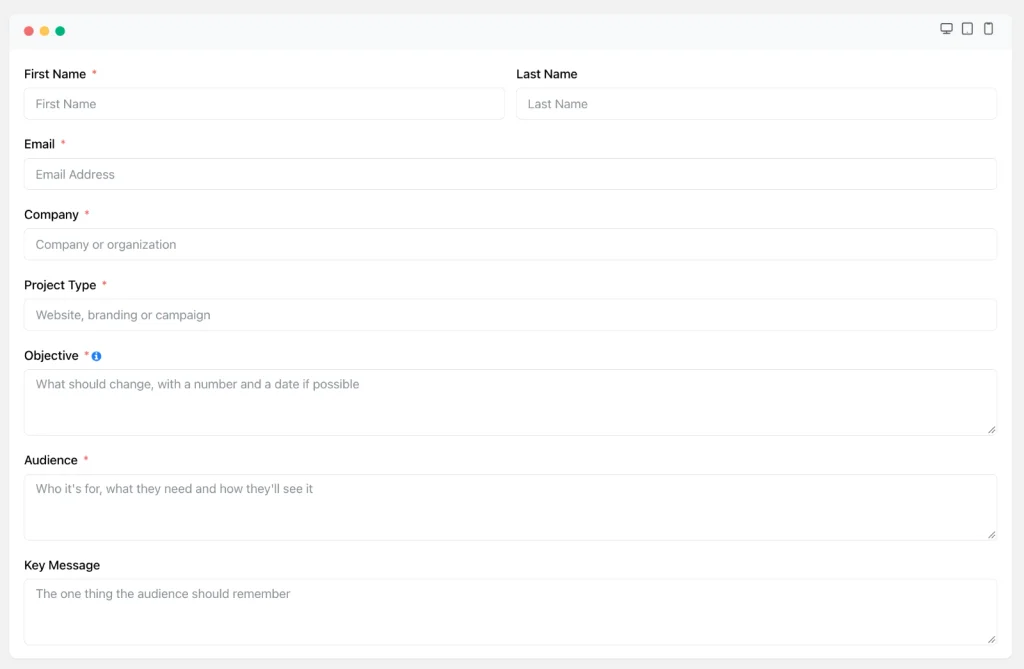
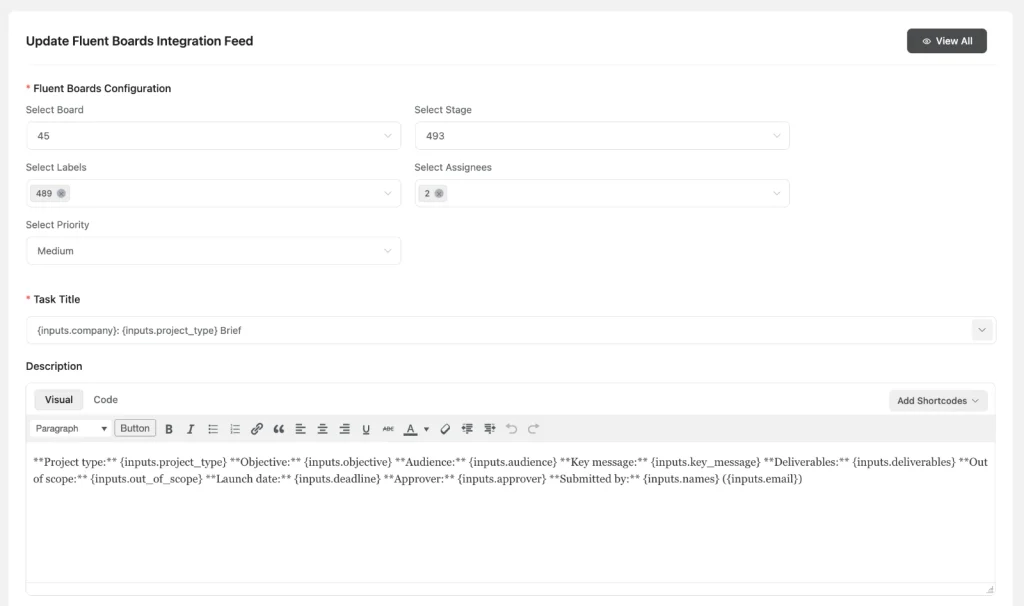
If you use Fluent Forms, its Fluent Forms integration with FluentBoards creates a task from every submission. You choose the board, stage, labels, assignees, and priority, map form fields into the task title and description, and set a due date a set number of days after submission.
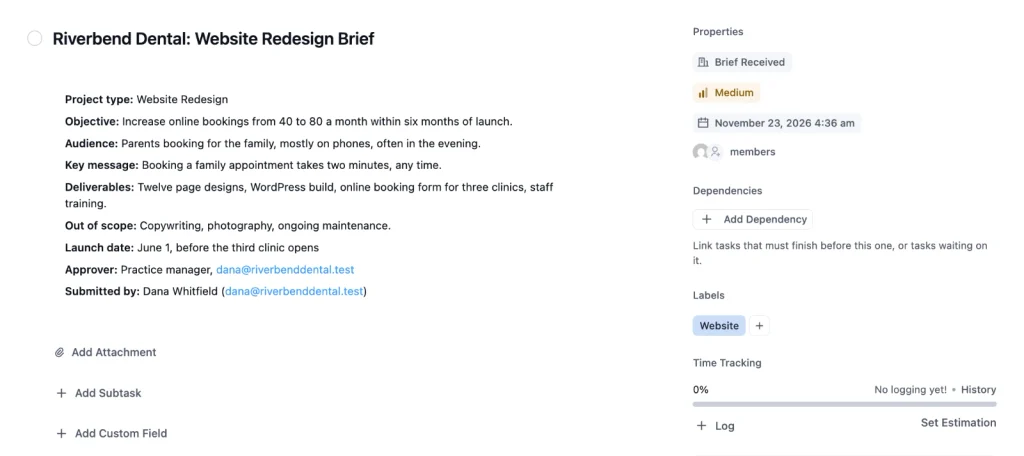
The brief arrives on your board with an owner, instead of in an inbox.
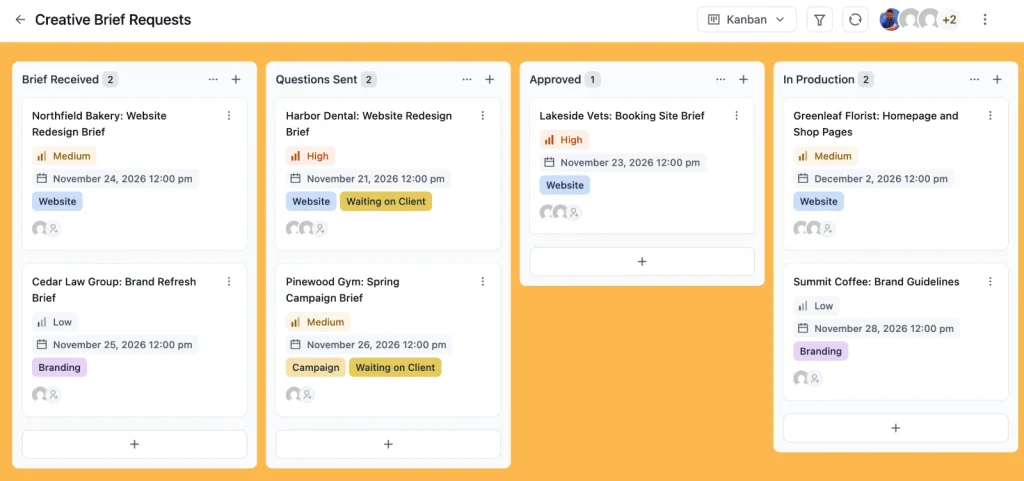
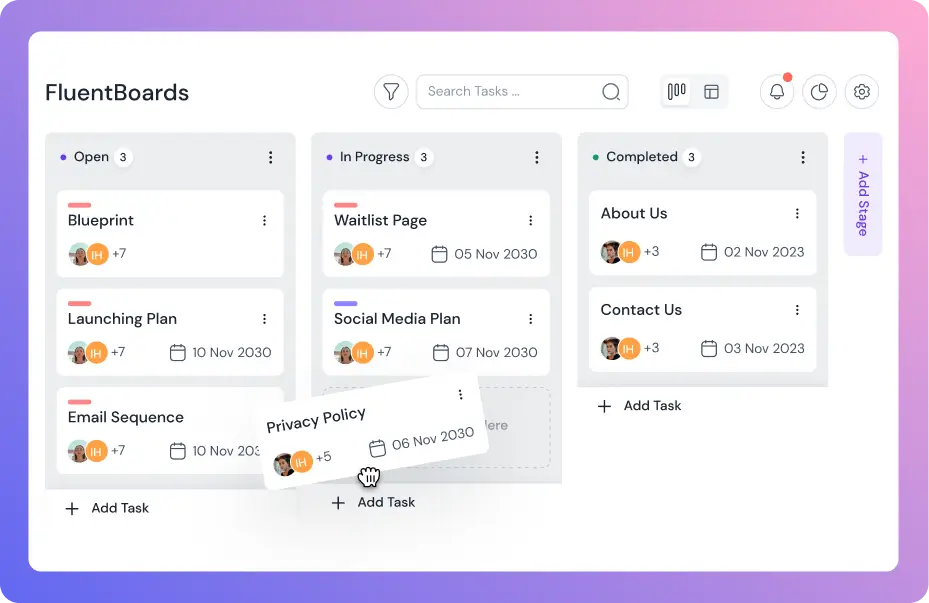
On a FluentBoards board, use stages for the brief itself: Brief Received, Questions Sent, Approved, and In Production. When the brief is approved, move the task to Approved and create one task per deliverable.
Ask the follow-up questions
Some answers will be vague, and the vague ones cause expensive revisions. These eight questions turn them into something you can design against:
- If this project works, what will be different in six months, and how will you know?
- If we can’t please everyone, who is the one audience that matters most?
- What should a visitor do first when they arrive?
- Which existing page or content gets the most traffic or enquiries?
- Who supplies the content, and when will it arrive?
- Who approves the work, and who else will want a say?
- What has gone wrong on past projects like this one?
- What would make you reject a design, even if it looked good?
Ask them on a call, not in writing, and add the answers to the brief yourself.
Get a sign-off before work starts
Sign-off means the named approver confirms in writing that the brief is correct. An email reply saying “approved” is enough, as long as it’s saved with the project. Make sign-off the last step of your client onboarding checklist, so design never starts on an unapproved brief.
Turn the brief into tasks
Turn a brief into tasks by giving every deliverable its own task, with an owner and a due date, linked back to the approved brief. That’s where most briefs fail: the document is approved, then sits in a folder while the work drifts.
FluentBoards adds two shortcuts. Use custom fields to store brief data as structured fields, like a select field for project type, a date field for the launch deadline, and a checkbox for “brand assets received”. Or, let the built-in AI help you.
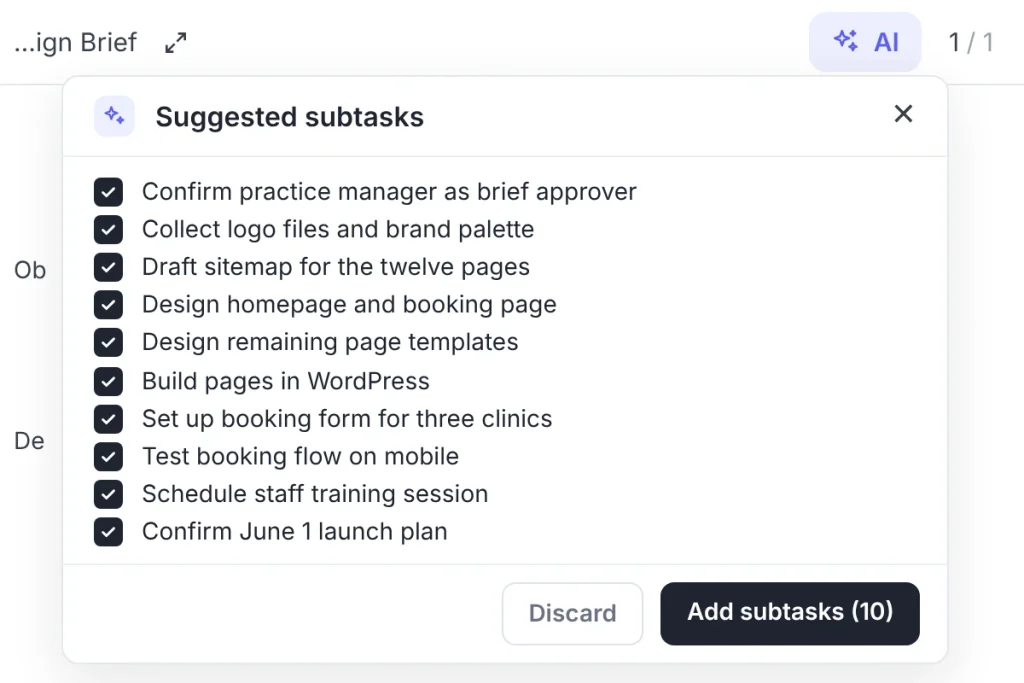
It runs on your own AI provider, can read the brief in the task description, and suggest subtasks for each deliverable.
From there, the website build follows your usual web design project management workflow, and every design review checks against the brief. When feedback arrives, run it through your client approval process, so each round of changes is compared with what the client signed off.
Common Creative Brief Mistakes
Most failed briefs fail in one of five ways:
- No number in the objective. “A modern website” can’t be measured, so it can’t be met.
- Everyone is the audience. A brief for everyone gives designers nothing to decide with.
- No out-of-scope line. Whatever isn’t excluded will be requested later.
- Several approvers. Feedback from three people who disagree is three projects.
- The brief ends at sign-off. If nobody checks reviews against the brief, it was only paperwork.
Frequently Asked Questions
These are the questions agencies and clients ask most about creative briefs.
What should a creative brief include?
A creative brief should include eight parts: background, objective, audience, key message, tone and brand, deliverables, timeline and budget, and one named approver. Adding an out-of-scope line and a one-sentence Get, Who, To, By summary makes it much harder to misread.
How long should a creative brief be?
One to two pages. A brief nobody reads isn’t a brief. If it runs longer, move detail like sitemaps and content lists into a separate web design brief and keep the creative brief to the decisions that matter.
Who writes the creative brief, the client or the agency?
The client supplies the inputs, usually through a form and a follow-up call, and the agency writes the final brief. The client’s named approver then signs it off before any design work starts.
What is the difference between a creative brief and a design brief?
The difference is scope. A creative brief sets the idea and message for a whole project, often across several deliverables. A design brief covers one design deliverable, like a homepage or a logo, and its practical requirements.
Send the Brief Form Before Your Next Kickoff
The brief only works if it exists before the kickoff meeting, not as the first item on its agenda. Build the form from the template this week, send it to your next client as soon as the contract is signed, and book the follow-up call for two days later.
Then walk into the kickoff with a signed brief, one approver, and a list of tasks already on the board. If the first design round comes back with “that’s not what we meant”, you’ll have a document that says what was meant.
That’s all for today. Let’s redefine project management.
Let’s redefine project management with FluentBoards!

Follow:


Get Tips, Tricks, & Updates
We won’t send you spam.





Add your first comment to this post