


Agency Project Management: How WordPress Agencies Run Client Work From Pitch to Retainer


Your agency already has a project tool. Every task has an owner, every board has columns, and the due dates are filled in.
Unfortunately, projects still slip!
A launch moves twice, a client disputes an invoice, and a retainer loses money for months before anyone notices. The tool tracks tasks, but agencies rarely lose money inside a task. They lose it between stages.
Agency project management is how an agency plans, delivers, and bills client work across many projects at once, with the client taking part in every one. Good agency project management software helps, but only when it’s built around those handoffs.
This guide maps all six handoffs, one stage at a time.
What Makes Agency Project Management Different
Agency project management differs from in-house project management in three ways: the client sits inside the project, your profit depends on hours rather than deliverables, and you run many projects at the same time instead of one.
Each of those changes how you plan, who you talk to, and what you measure!
An in-house team can get away with a loose process because everyone shares a boss, a budget, and a building. An agency can’t. Here’s why:
The Client is Inside the Project
In-house, the person who approves the work sits two desks away and shares your goals. At an agency, the approver is a client with their own calendar, their own boss, and a habit of answering on Thursday what you asked on Monday. That makes the client a dependency in your plan, not just an audience for it.
So every agency plan needs two things an in-house plan can skip: a clear record of what the client has approved, and a predictable place where the client sees progress and gives feedback. Without both, every review becomes a negotiation.
Margin Lives in Hours, Not Deliverables
An in-house team ships a website and the job is done. An agency ships the same website and only then finds out whether it made money, because the fee was fixed and the hours weren’t.
A homepage that was estimated at 12 hours and took 30 didn’t just run late. It quietly ate the profit on the whole project.
That’s why time sits at the center of agency project management. You need estimates per task, real logged hours against them, and a habit of comparing the two while there’s still time to act.
You Run Ten Projects, Not One
Most in-house project managers run one or two big projects. A typical agency project lead juggles eight, ten, or fifteen at once, each with a different client, stage, and deadline.
The challenge stops being “how do I run this project” and becomes “how do I see all of them at once without missing the one that’s on fire.”
This is where a consistent structure pays off. When every project uses the same stages, labels, and naming, you can scan ten boards in five minutes. When every project is built differently, you can’t.
| In-house project | Agency project | |
| Who approves the work | A manager on the same team | A client with their own priorities and calendar |
| How success is measured | The outcome was delivered | The outcome was delivered within the hours you priced |
| Active projects per lead | One or two | Often ten or more at once |
| Where scope changes come from | Internal priorities | Client requests, often mid-project and informal |
| Who sees the plan | The internal team | The team and the client, with different levels of access |
| What ends the project | Delivery | A handoff, then usually a retainer that starts the cycle again |
Read down the right-hand column and a pattern shows up. Almost every difference comes from the client being outside your team but inside your project. That’s why the six stages below are built around handoffs to and from the client, not around tasks.
The Six Stages of an Agency Project
Every agency project moves through six stages: set up, scope, onboard, deliver, launch and hand off, then report and retain.
The work inside each stage is usually fine. The damage happens at the handoff from one stage to the next, when information has to move from one person, document, or tool to another.
To make this concrete, we’ll follow one project through every stage.
Northpine Studio is a made-up but very typical six-person WordPress agency. It has just signed Brightwater Dental, a regional practice with four locations, for a 12-week website rebuild.
- Set up your agency workflow: The risk is that each project manager builds boards their own way, so nothing is comparable when Northpine has nine projects running.
- Scope the work: The risk is a sales promise that never makes it into the written scope, like the “quick blog migration” mentioned on the sales call.
- Onboard the client: The risk is starting work before you have the logins, the brand files, and a signed-off brief from Brightwater’s marketing lead.
- Deliver with the client in the loop: The risk is a design sitting in an inbox for nine days while the timeline keeps running.
- Launch and hand off: The risk is a Friday evening DNS switch with no checklist, and a client who can’t find their admin login a month later.
- Report, retain and repeat: The risk is a maintenance retainer that runs over its hours every month with nobody tracking it.
In practice, most agencies don’t break everywhere at once. One stage tends to hurt more than the rest: a studio with strong designers often loses money in scoping, while a studio with tight sales processes tends to lose it in approvals or retainers.
Knowing your weak stage is more useful than polishing the ones that already work.
The sections below take each stage in turn: what goes wrong, what to put in place, and where to read the full playbook for that stage.
Stage 1: Set Up Your Agency Workflow
Your agency workflow is the fixed path every client project follows, from the first task to the last, and it has to exist before the first client signs. A good workflow answers three questions the same way for every project:
- What stages does a task move through?
- What labels mark a task’s type or risk, like “Waiting on Client” or “Change Request”?
- And who owns each stage?
If Northpine builds Brightwater’s board from scratch, it will build the next one differently, and by the fifth project nobody can compare progress across clients!
Our guide to building an agency workflow walks through a full board structure you can copy
Two more decisions belong here.
The first is how your project leads keep ten boards in view without living in all of them, which our guide on managing multiple projects covers.
The second is capacity: whether you actually have the designer hours for the projects your sales team is closing. That’s agency resource planning, and skipping it is how a studio ends up with three launches in the same week.
In FluentBoards, folders keep this tidy.
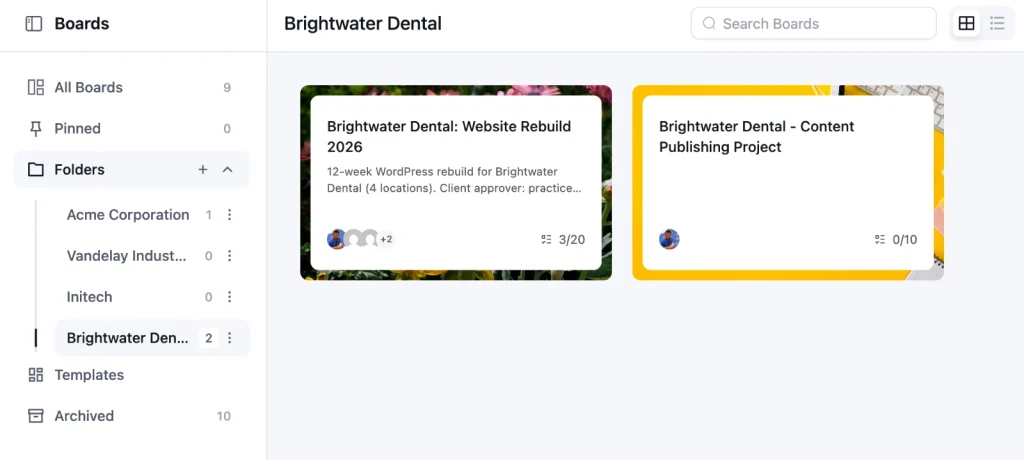
Northpine creates one folder per client and keeps every board for that client inside it, so the board list reads like a client list.
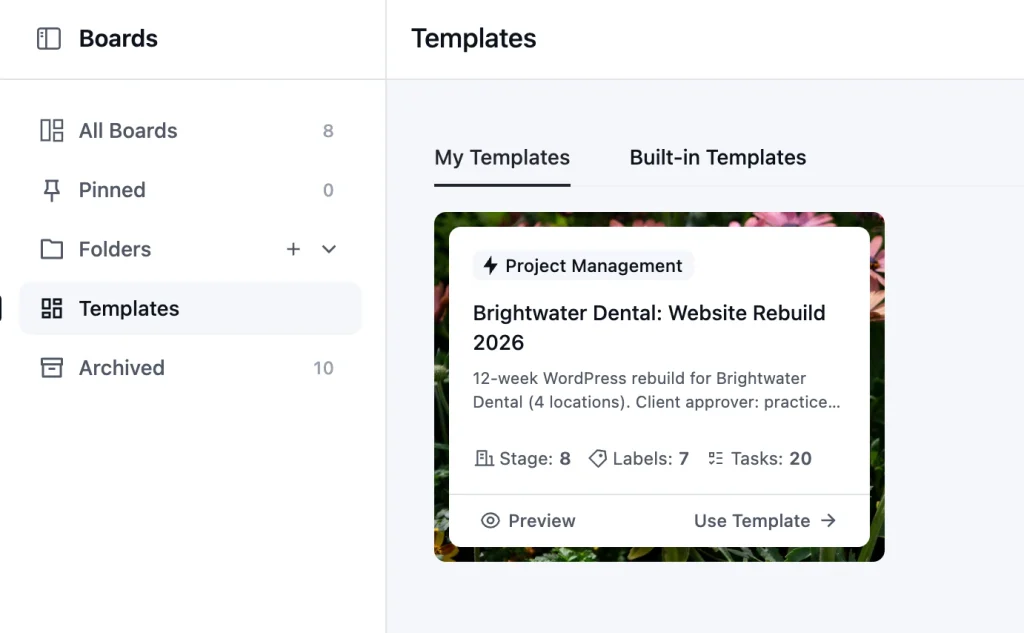
Once one board works well, save it as a template so every new project starts with the same stages and labels.
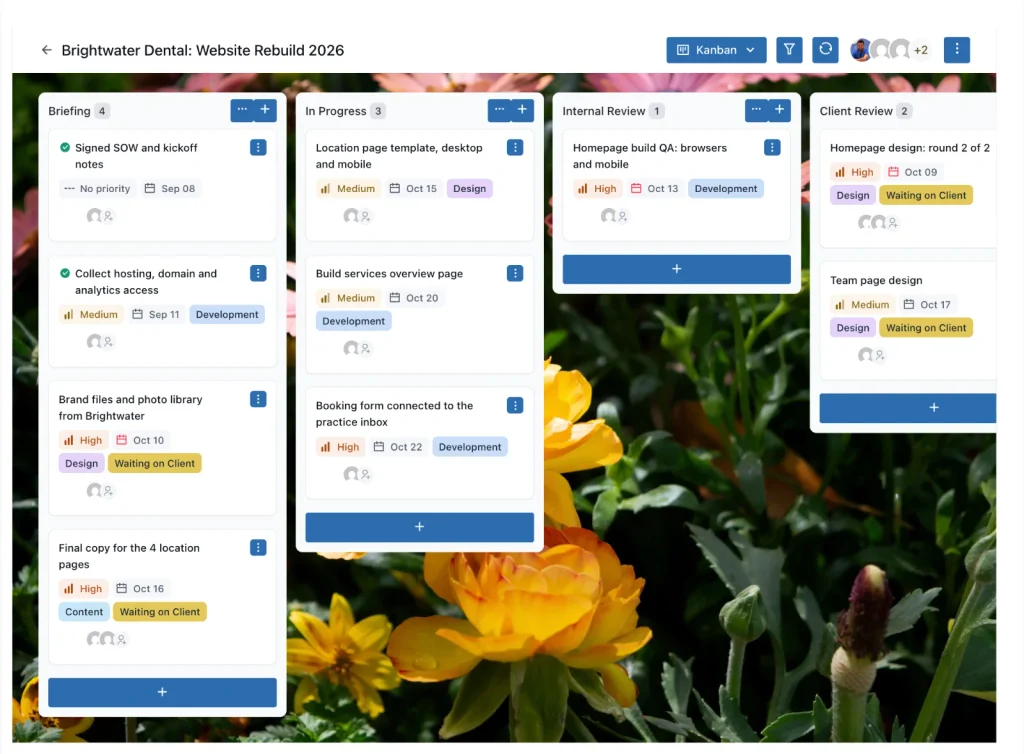
Pro Tip: Agree on one naming pattern for every board before you need it, like “Brightwater Dental: Website Rebuild 2026” or “Brightwater Dental: Maintenance.” When a client has three boards over two years, the name tells you which one is live without opening any of them.
Stage 2: Scope the Work Before it Scopes You
Scoping means writing down what’s included, what isn’t, and how you’ll price a change before any work starts.
And most scope fights aren’t about bad clients. They’re about a promise made on a sales call that nobody wrote down!
Back at Northpine, the salesperson told Brightwater that moving their old blog posts “shouldn’t be a big deal.” Nobody put it in the proposal. In week three, Brightwater asks when the 140 posts will be moved, and now the project lead has to choose between doing unpaid work and starting an argument with a client they’ve had for three weeks.
The fix is a statement of work that names deliverables, exclusions, the number of revision rounds, and the change process in plain language.
Our guide on scope creep for agencies shows how to say yes to the request without saying yes to the free work
Inside the project, make change requests visible.
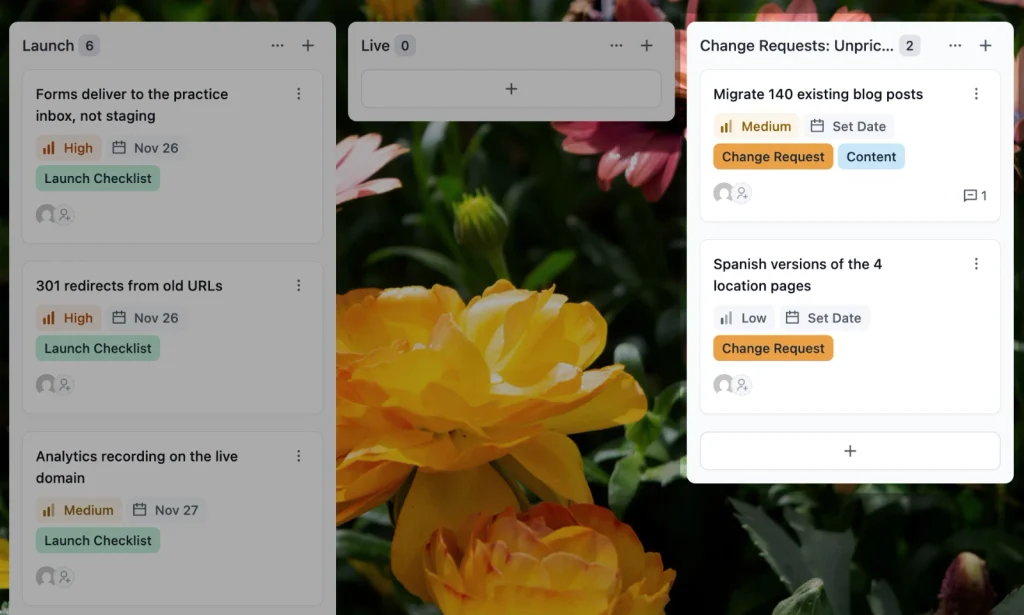
Give every request its own task with a “Change Request” label and park it in a dedicated “Change Requests: Unpriced” stage. Nothing moves into active work until the client approves the price!
Pro Tip: Count the tasks in your change request stage at the end of every project. If one client type produces twice as many as the rest, like multi-location practices with several decision-makers, raise your estimates for that client type in the next proposal.
Stage 3: Onboard the Client
Onboarding turns a signed contract into a project your team can start on day one: access, assets, a creative brief, a kickoff meeting, and a ready board. When onboarding is loose, the first two weeks of the timeline disappear into chasing logins and logo files.
Northpine’s usual pattern looks like this.
The contract is signed on Monday, the designer is booked from Wednesday, and on Wednesday nobody has the hosting login, the brand guidelines, or an answer to “which of the four location pages matter most?” The designer works on something else, and the 12-week timeline is already 11 weeks and three days.
Start with a client onboarding checklist that every new client goes through in the same order, with nothing left to memory.
Collect what you need to design against in a creative brief template, so the brief comes from the client in their own words rather than from your notes.
Then hold the kickoff with a fixed project kickoff meeting agenda, so roles, approvals, and communication rules are agreed in the first meeting instead of the fourth.
You can take most of the manual work out of this stage!
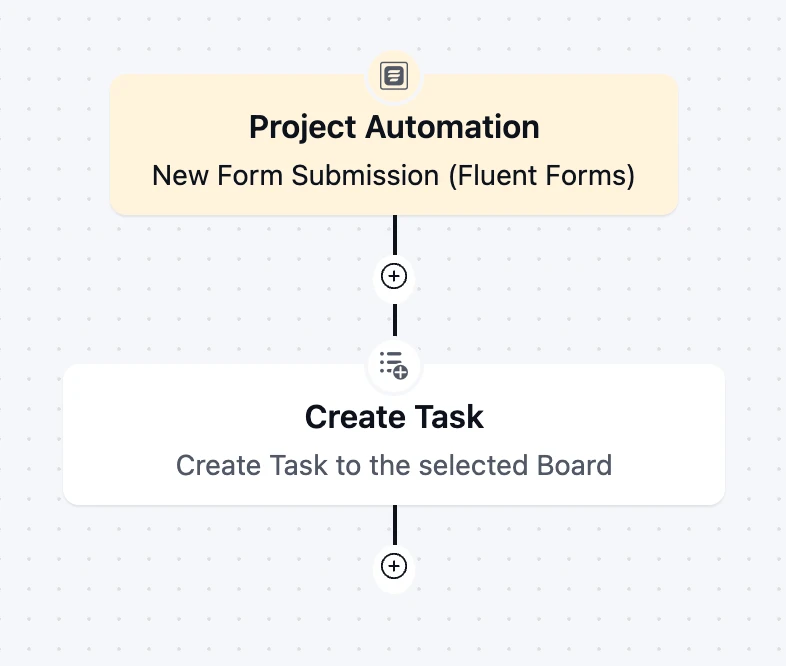
A Fluent Forms intake form can create a FluentBoards task from each submission, so the client’s answers land on the board without anyone copying them.
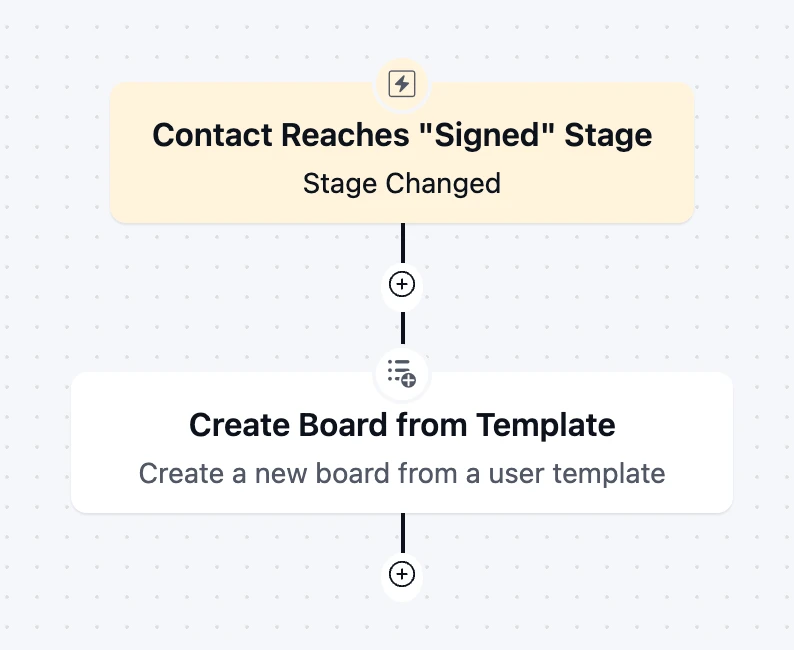
You can also create the project board automatically from a template the moment a contact reaches a status like “Signed,” with every stage and onboarding task already in place.
Stage 4: Deliver With the Client in the Loop
Delivery goes well when the client sees enough to approve on time and nothing more. Show them too little and approvals stall. Show them everything, and they start commenting on your internal task names.
And, here’s where Northpine loses the most time!
The homepage design goes to Brightwater’s marketing lead by email in week five. She forwards it to the practice owner, who is at a conference. Nine days later, the approval comes back with feedback from three people in three different threads, and the developer, who was booked for that week, has moved on to another client.
Web projects have their own delivery rhythm: design, build, content and QA, each with approvals in between. Our guide to web design project management lays out that rhythm stage by stage.
The approval itself needs a defined client approval process, with one approver, a deadline for feedback, and a clear rule for what counts as approved. And the client needs one place to see progress, which is what a WordPress client portal gives you.
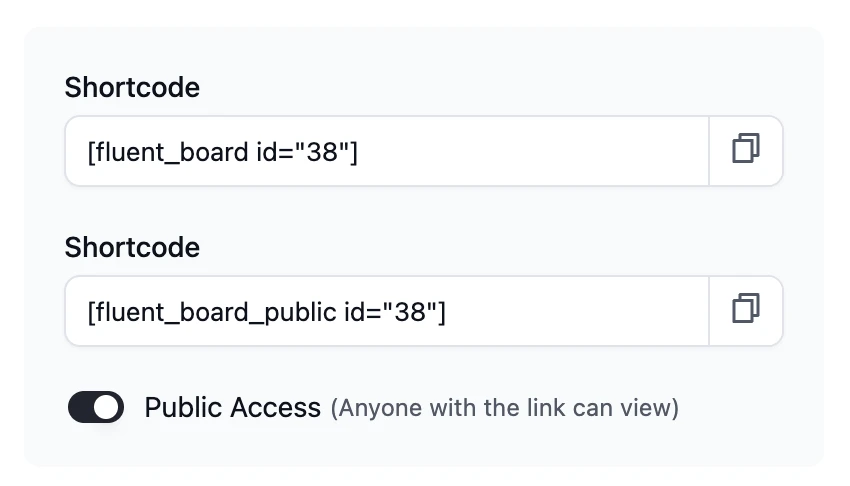
Clients see only their own boards on a page of your site.
Give them the Viewer role for read-only access, or the Member role so they can comment, upload files, and move tasks.
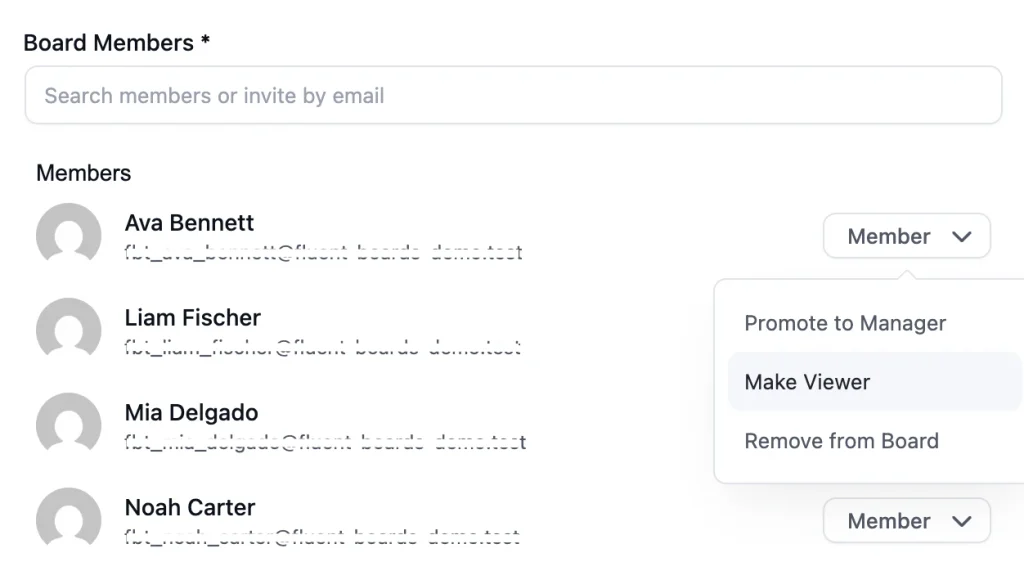
Email invites default to Member, so switch anyone who should only watch to Viewer. Clients still need a WordPress login, which FluentBoards creates as a Subscriber account when you invite them by email. The invite link expires after 48 hours, so send it when your client is ready to act on it.
Pro Tip: Put the feedback deadline in the same message as the deliverable, with a date rather than a duration. “Please send feedback on the homepage by Thursday, May 14” gets a reply. “Let us know what you think” gets a reply in two weeks.
Delivery is also where your margin is decided. Project management time tracking gives every task an estimate and logs real hours against it.
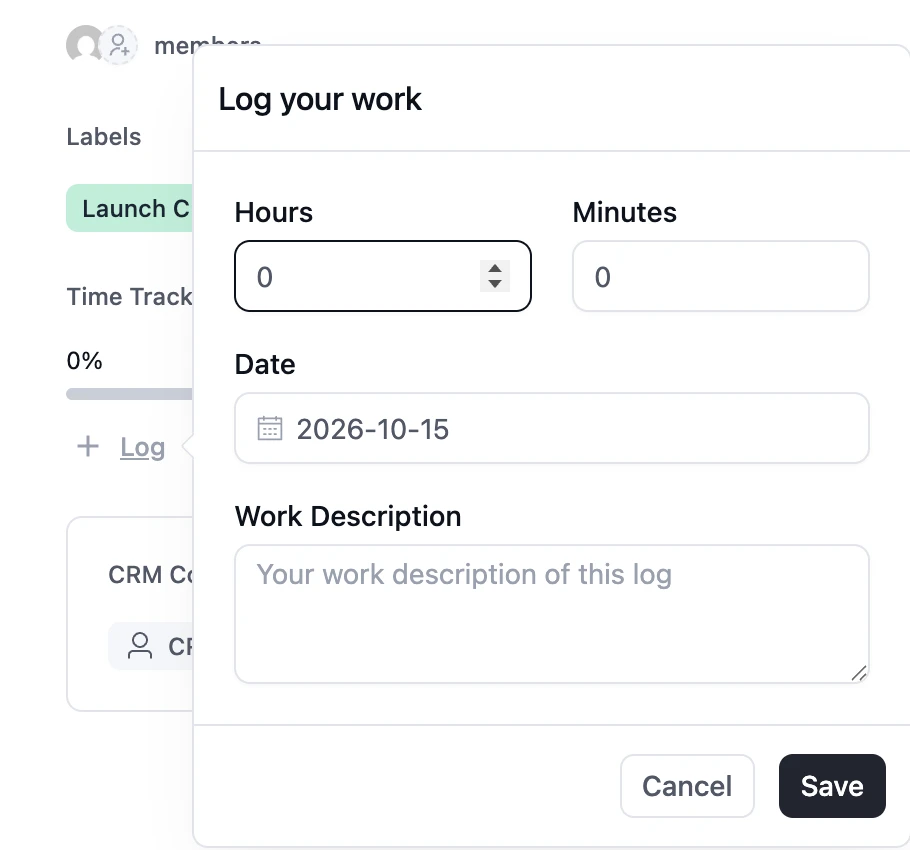
In FluentBoards, time is logged manually in hours and minutes with a date and a note, and the Timesheet report breaks it down by team member or task. There’s no running timer, so build the habit of logging time at the end of each work block.
Stage 5: Launch and Hand Off
A launch is a checklist and a handoff is a packet, and both decide how the client remembers the whole project. You can deliver ten good weeks of work and still lose the client in the last two days.
Northpine schedules Brightwater’s launch for a Friday afternoon. The DNS change goes through, but the contact form still sends to the staging email address, and nobody notices until Monday’s missed appointment requests. A month later, Brightwater’s office manager asks for the admin login, and the only copy is in a former freelancer’s notes.
Two documents prevent both problems!
A website launch checklist covers everything from redirects and form routing to analytics and backups, and it gets signed off before anyone touches DNS.
Then a proper client offboarding process hands over logins, training, documentation, and a clear line between “project finished” and “support starts.”
In FluentBoards, put the launch on the board as its own stage, with one task per checklist item and an owner on each. When every task in that stage is complete, the launch is ready.
What goes in the handoff packet depends on the project.
A WordPress build usually needs the same core: admin and hosting logins stored in the client’s own password manager, a short recorded walkthrough of how to edit pages and posts, a list of installed plugins with their license owners, and a one-page note on what your support covers from here.
Stage 6: Report, Retain and Repeat
After launch, most agency relationships turn into a retainer, and a retainer only survives when the client can see what they’re paying for each month. Silence feels like nothing is happening, even when your team is busy.
Six months after launch, Brightwater pays Northpine a monthly maintenance retainer for updates, backups, and small content changes. The hours have run over in four of those six months; nobody has told the client, and the practice owner is now asking whether they need the retainer at all.
Fixing that starts with client reporting: a short, regular report that shows the client what was done, what’s coming, and what needs their input. Internally, your team runs on a lighter project status report that flags risks before they reach the client.
And the retainer itself needs a defined website maintenance plan, with hours, tasks, and a rule for what happens when a month runs over.
FluentBoards helps on both sides.
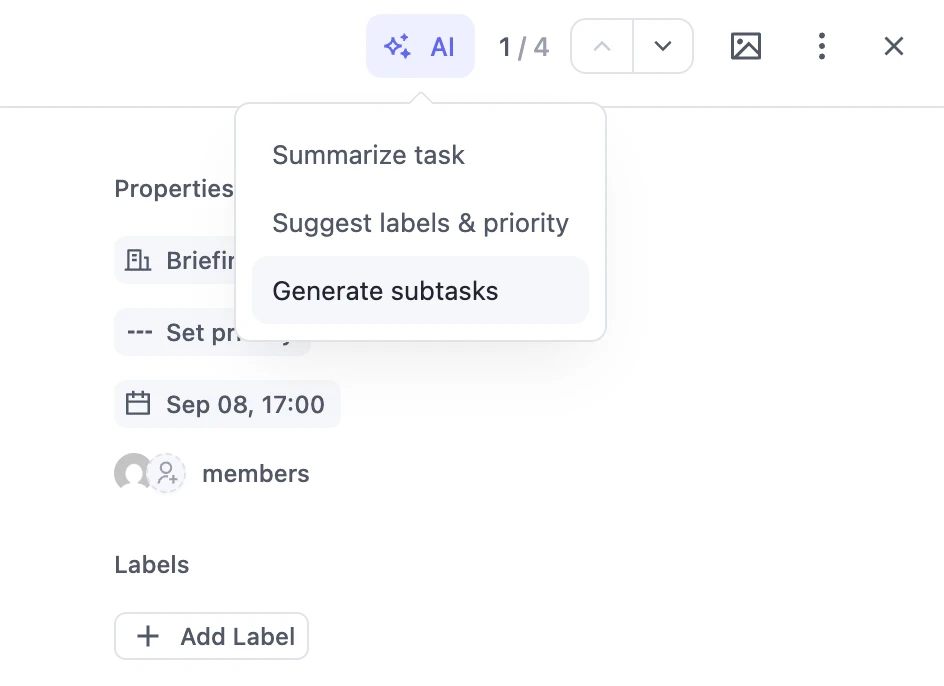
The built-in AI can summarize a task and its comments into a status update, using the AI provider you connect, such as OpenAI, Claude, Gemini, or WordPress AI.
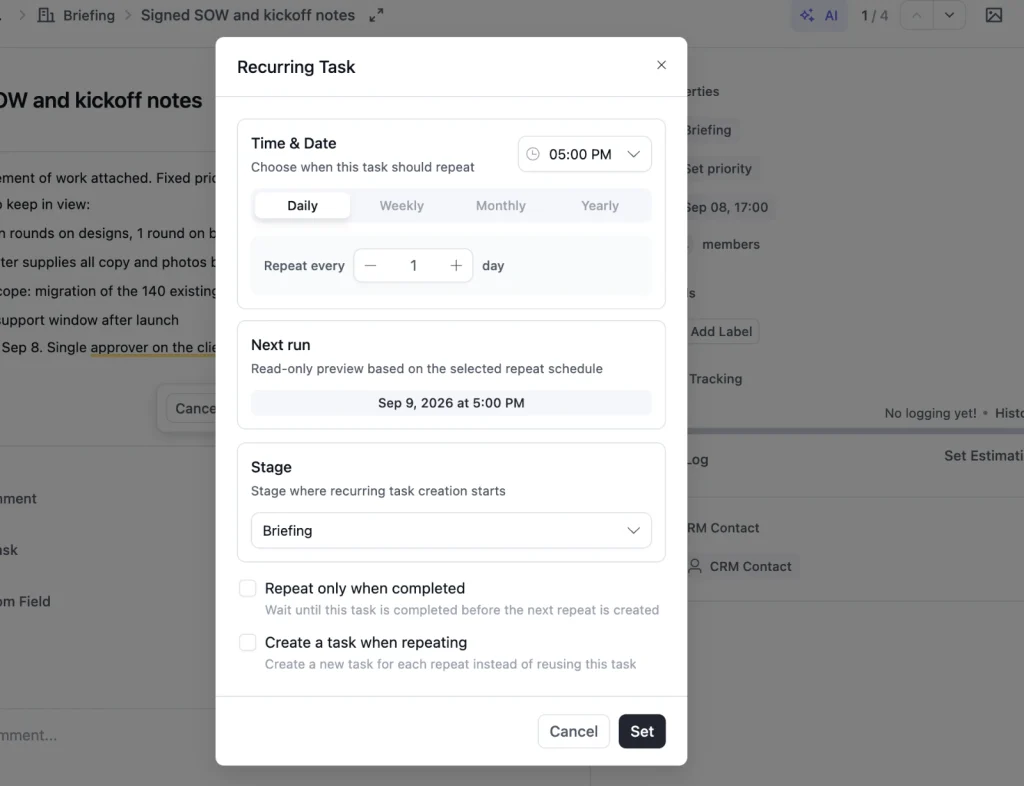
And, for the retainer, FluentBoards offers recurring tasks for daily, weekly, or monthly work, and the template gallery includes a Website Maintenance & Retainer board to start from.
Pro Tip: Send the retainer report on the same day every month, even in a quiet month. A two-line report that says “backups ran, three plugins updated, no issues found” still shows the client their money bought something.
The Five Numbers that Tell You a Project is Going Wrong
Five numbers tell you a project is in trouble before the client does: estimate vs actual hours, overdue tasks, change requests per project, approval turnaround and retainer hours used. Check them once a week across every active project and you’ll catch most problems while they’re still cheap to fix.
None of these needs a business intelligence tool. Each one comes from data your project board already holds, as long as your team logs time and moves tasks honestly.
1. Estimate vs Actual Hours
This is the number that decides your margin. When a task’s logged hours pass its estimate, either the estimate was wrong, or the scope grew, and you want to know which while the project is still running.
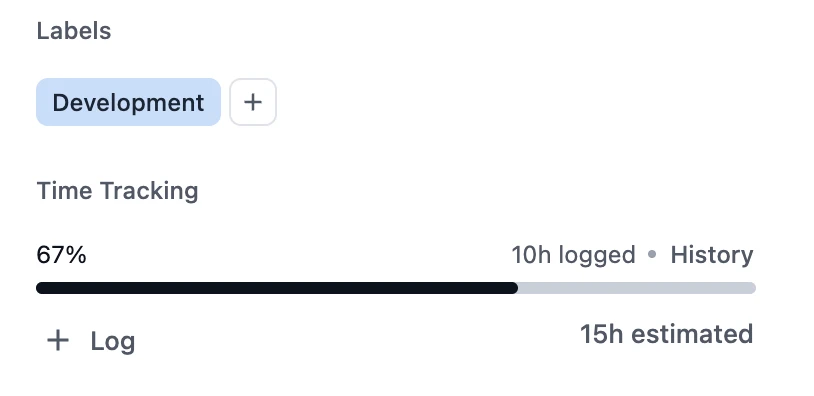
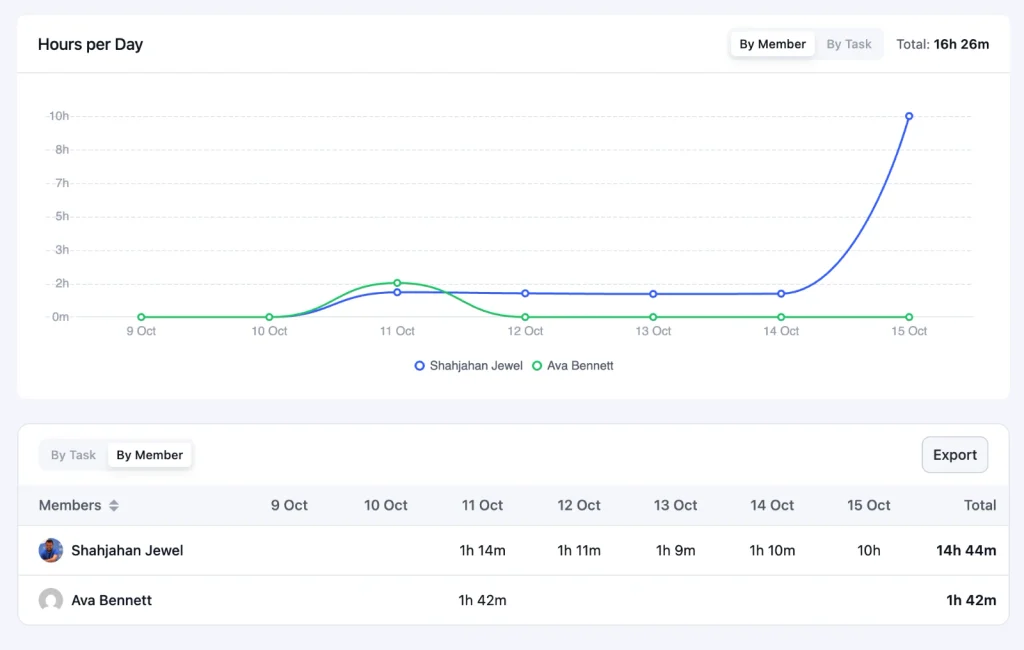
In FluentBoards, each task shows its estimate with a progress bar, and the Timesheet report shows totals by member or task. FluentBoards doesn’t alert you when an estimate is exceeded, so make the weekly check a calendar habit.
2. Overdue Tasks
One overdue task is noise. A growing pile of them on one board is a project slipping. The Reports Overview tab shows overdue work as a stat tile and in the Due Date Distribution chart, and the Assignee Workload table shows open, completed, and overdue tasks per person.
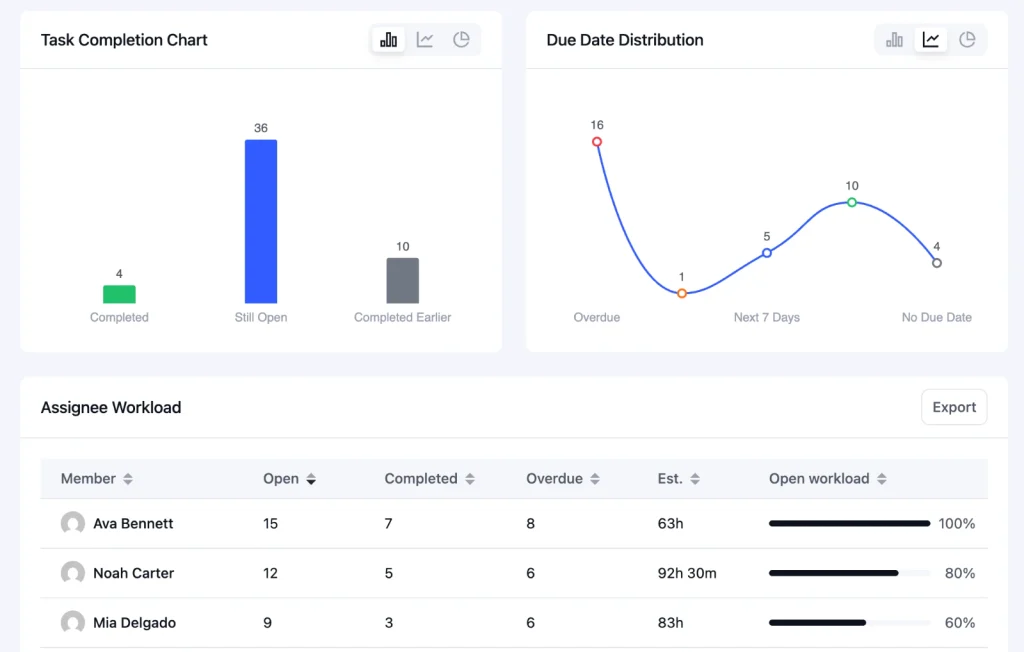
That last one also tells you when one designer is quietly carrying three projects.
3. Change Requests per Project
If you labeled every change request in Stage 2, this number is a quick count of one stage on each board.
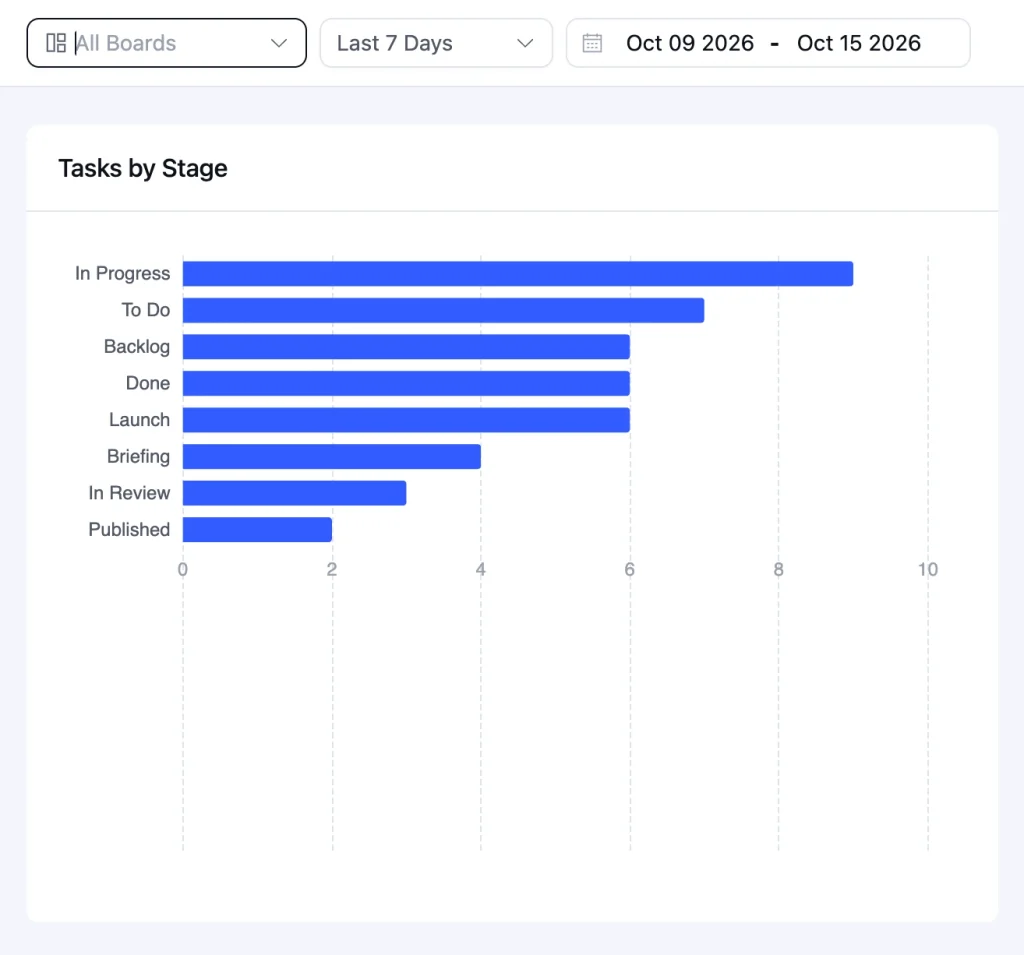
Three change requests on a 12-week build is normal. Twelve means your scope was too vague or your client has more decision-makers than you planned for.
4. Approval Turnaround
Approval turnaround is the number of days a deliverable waits for the client. Give clients their own “Client Review” stage, and the Activity tab in Reports logs every stage change, so you can see when a task entered review and when it came out.
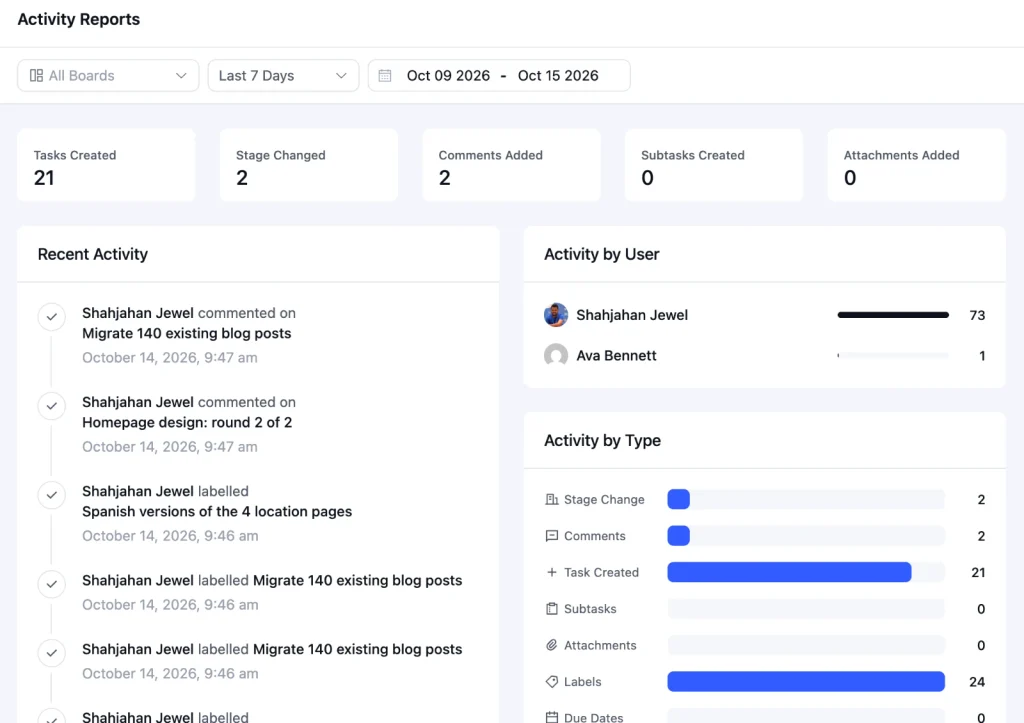
If turnaround keeps passing five working days, raise it with the client before it becomes a missed launch date.
5. Retainer Hours Used
For retainers, compare logged hours with contracted hours every week, not at the end of the month. Filter the Timesheet report by the retainer board and the current month, and export it to CSV when you need the numbers in an invoice or a client report. FluentBoards doesn’t cap hours on a board, so the cap lives in your process.
Put the five checks into one 20-minute slot every week, ideally the same morning. Open the Reports Overview for all boards first, note anything overdue, then open the boards that showed up with problems and look at hours, change requests, and tasks stuck in client review.
You won’t fix everything in that slot. The point is to know which two projects need a conversation this week, so the conversation happens while there’s still room to adjust the plan instead of explaining a missed date.
Why WordPress Agencies Run Projects Inside WordPress
WordPress agencies run projects inside WordPress for three reasons: pricing that doesn’t grow with every new hire, client access on a site you already control, and project data that stays on your own server. You already spend your day in the WordPress dashboard, so keeping projects there removes one more tool from a crowded stack.
None of this makes SaaS tools bad. It just changes the math once your team and client list grow.
Why not just use Asana or Trello?
Both are excellent tools. Trello’s card-based simplicity is the reason FluentBoards looks the way it does, and Asana handles complex portfolios very well. The catch for agencies is that paid plans on both are billed per user, so every hire adds to the monthly bill.
If you’re weighing the two approaches, our FluentBoards vs Trello comparison breaks down where each one fits.
Frequently Asked Questions
These are the questions agency owners and project leads ask most often about running client work, answered briefly so you can come back to them when a new hire asks the same thing.
What is agency project management?
Agency project management is the planning, delivery and billing of client work across many projects running at the same time. Unlike in-house project management, the client takes part in the project, approves key deliverables, and the agency’s profit depends on finishing within the hours it priced.
How is agency project management different from regular project management?
Three things set it apart. The client sits inside the project as an approver and a dependency. An agency runs many projects at once instead of one or two. And profit is tied to hours, so a task that runs over its estimate costs the agency money, not just time.
What does an agency project manager do?
An agency project manager owns the timeline, the scope, the handoffs between stages, and the day-to-day communication with the client about delivery. That’s different from an account manager, who owns the commercial relationship, renewals, and upsells. In smaller agencies, one person often does both, which is why the handoffs suffer first.
How many projects can one agency project manager handle?
There’s no single right number. It depends on project size, how many are active builds rather than retainers, how many approvers each client has, and how standardized your workflow is. A project manager can run far more small retainers than large website builds, and a consistent board structure raises the limit for both.
Pick the Stage That Hurts Most and Fix It This Week
You don’t need to rebuild your whole process to see a difference. Pick the stage that cost you the most this month, whether that was a scope fight, a stalled approval, or a retainer that ran over, and fix that one stage before the next project reaches it.
- If it’s scope, write the change request rule into your next proposal
- If it’s approvals, set a feedback deadline in your next kickoff
- If it’s retainer hours, start the weekly hours check this Friday
Then come back to this guide and pick the next stage.
That’s all for today. Thank you.
Let’s redefine project management with FluentBoards!

Follow:


Get Tips, Tricks, & Updates
We won’t send you spam.


Add your first comment to this post