


How to Avoid Scope Creep for WordPress Agencies Before It Spreads


Imagine a five-person WordPress agency called Wrenfold Studio. The first sign of trouble was an email with the subject line “One small thing.”
The small thing was moving a button on a landing page. The next email asked for a new section to be added. The one after that wanted the whole page restructured.
None of it was unreasonable, but none of it was in scope, and none of it was logged anywhere. By the time the project closed, the team had absorbed fourteen extra hours of work on the original quote.
The truth is, most scope creep works exactly like this. Not one big ask, but a series of small ones, each easy to say yes to in the moment.
So the fix is not becoming stricter with clients. It is making client scope visible, logged, and trackable on the same board where the work happens.
Here is how to set that up.
What Is Scope Creep?
Scope creep is the uncontrolled expansion of a project’s work beyond what was originally agreed, added without approval or any change to the timeline and budget.
It rarely starts as one decision. A client adds a small request here, another one there, and each addition feels too minor to push back on. Over time those additions stack up into real cost:
- Timelines that quietly stretch past the original delivery date
- Budgets absorbing hours nobody billed for
- A team spread across work that was never part of the plan
Learn more about scope creep in our detailed guide
Why Scope Creep Is Hard to Catch in WordPress Projects

Scope creep is a well-documented project management challenge, but WordPress agencies face a version of it with a specific texture. Client requests come through email, Slack, comment threads, phone calls, and design feedback tools.
The usual response is a developer simply opening the file and making the change, with no task created, no scope reviewed, and no word to the client that the request fell outside what was agreed.
By the time anyone looks at the project timeline, the work is done and the conversation about whether it should have been included is both irrelevant and awkward.
The undefined scope problem
Scope creep almost always starts at intake. When the initial brief is vague, or when scope is agreed in a back-and-forth email thread rather than captured in a structured document, the agency and client are already working from different mental models of what the project includes. The first “small thing” email is not a new request. It is the client asking for something they assumed was always part of the agreement.
That is why defining project deliverables clearly at the start of the engagement is the first structural fix. Every deliverable named at intake becomes a task on the board, so the client can see the list. When they send the small-thing email, there is a reference point for whether it was included.
What keeps scope creep invisible
The second problem is memory. When a change request comes in through email and gets handled directly, nothing about it gets written down anywhere the team can see, it just lives in whatever inbox or message thread it arrived in. That gap follows the request all the way to the invoice, quietly eating into agency delivery, since nothing on the timeline shows it was ever added.
What actually solves this is not more documentation overhead. It is one consistent rule: every request becomes a task on the board before anyone acts on it. Whether it is in scope or not is a label, not a separate conversation.
Three Things That Stop Scope Creep Before It Starts
Wrenfold Studio runs a three-part approach inside FluentBoards. Each piece takes a specific point in the project lifecycle where scope tends to slip and replaces informal handling with a visible, logged record. None of it requires a scope meeting or a change order process. It just requires that the board is the place where scope lives.
Capture the full scope at intake, not after
The Fluent Forms integration with FluentBoards maps intake form fields directly to task fields the moment the client submits, so everything the client enters lands in FluentBoards automatically instead of sitting in a thread waiting to be copied over:
- Project name
- Deliverables list
- Revision rounds agreed
- Approval contacts
- Deadline
- Any specific exclusions
That means no copy-paste, no summary email, and no detail that only exists somewhere in an inbox. The deliverables section of the intake form becomes the task list for the project, so what was submitted is what is on the board. When the client later asks for something that was not in the form, there is already a documented baseline to point to.
Log every change request as a task before work starts
Every request that comes in after intake, regardless of how it arrives, becomes a task on the board before any work begins. Wrenfold Studio uses a “Change Request” label in FluentBoards. When a client emails a new request, the account manager creates a task, applies the label, assigns it to the project manager, and replies to the client with a link to the task.
This does three things at once. It creates a paper trail that lives on the board, not in email. It signals to the client that this is being tracked, not just absorbed. And it gives the project manager a moment to assess whether the request is in scope, in budget, or needs a conversation before work proceeds.
A well-structured project management workflow treats change requests as a distinct input type, not just more work. They need somewhere to wait while someone decides what happens to them next, and a dedicated “Change Requests” stage on the board gives them exactly that, holding incoming additions for review before anything moves to In Progress.
Give clients a live view of what is and is not in scope
The third piece is visibility. When the client can see the project board in real time, they can see which tasks are labeled “In Scope,” which are labeled “Change Request,” and which are labeled “On Hold” as they move across the Kanban board. The scope boundary is not something the agency has to defend in a call. It is already visible.
The Frontend Portal shares a live board view with the client on your own site. Clients sign in with their WordPress account and see only the boards they belong to.
Wrenfold Studio shares the portal link in their onboarding welcome email. By the time the first feedback round arrives, the client already knows what they are looking at and what the labels mean. The “small thing” email becomes less frequent, and when it does arrive, the client already has context for why it might need a different conversation.
That said, what clients see is worth thinking about deliberately. Internal notes, estimates, and team back-and-forth stay off the portal, since transparency vs oversharing is really about scope and status only.
Step into the Future of Project Management!
How to Set This Up in FluentBoards Step by Step
These three pieces are independent but work best together. Start with the intake integration. Add the change request label system. Enable the Frontend Portal once the board is structured for client-facing visibility.
Step 1: Connect your intake form to FluentBoards
In Fluent Forms, open your client intake form, go to Settings & Integrations, and add a FluentBoards feed. Configure the feed with:
- Destination board and stage
- Labels, assignee, and priority for incoming submissions
- Task Title and Description mapped to your form fields using smart codes
Wrenfold Studio routes every new submission into a “Scope Review” stage with a Medium priority by default, so nothing starts moving until someone has reviewed it.
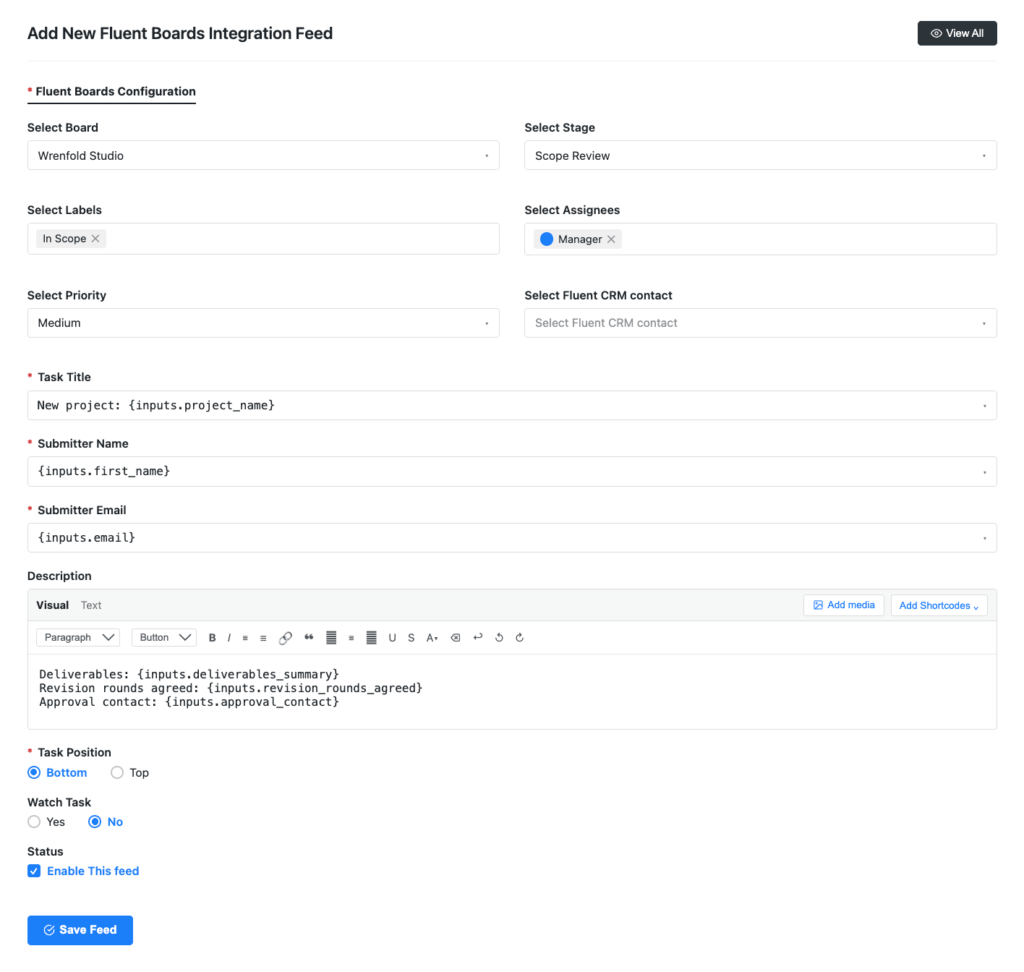
From that point forward, every new client submission creates a task with their project brief already attached. The deliverables they listed in the form are in the task description. Nobody has to summarize a long email thread. The project scope exists on the board the moment the client submits.
Step 2: Create a change request label and stage
In FluentBoards, go to board settings and create:
- A new label: “Change Request”
- A matching board stage: “Change Requests”
- A task template covering what was requested, how it arrived, and whether it’s in scope
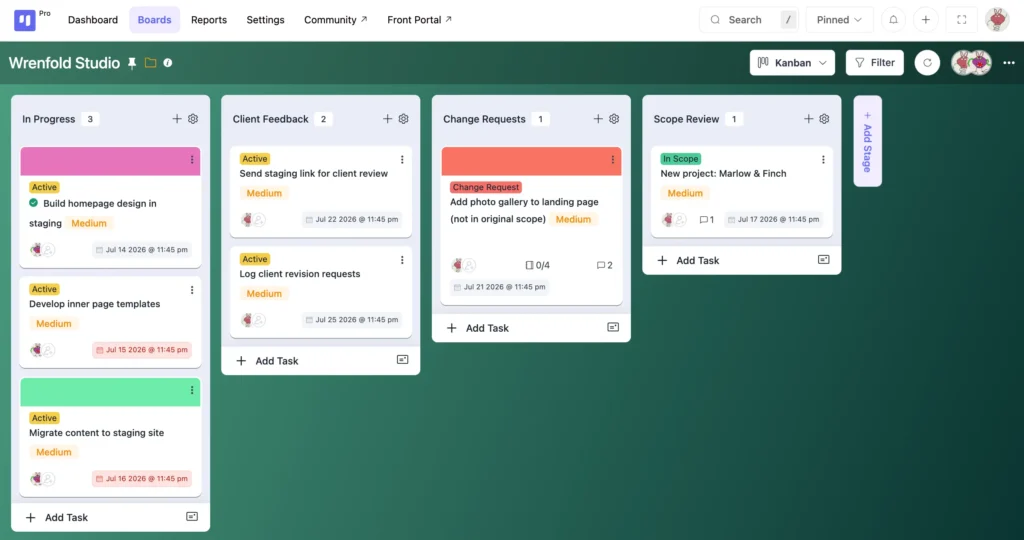
When a new request comes in, create a task from that template, apply the label, move it to the Change Requests stage. The project manager reviews it before anyone acts. In-scope requests get moved to In Progress with a note. Out-of-scope requests stay in Change Requests with a note explaining what the client needs to decide.
Step 3: Share the board via the Front Portal
Go to FluentBoards Settings and open Features & Modules. Click Settings next to Frontend Portal and check Enable Frontend Portal, then choose one access method:
- Standalone Front URL: enter a URL slug and the portal becomes available at that address on your site
- Pre-defined page via shortcode: add
[fluent_boards]to any existing WordPress page instead
Both methods show every board the client has access to, so if they’re only meant to see this one project, keep them a member of that single board only.
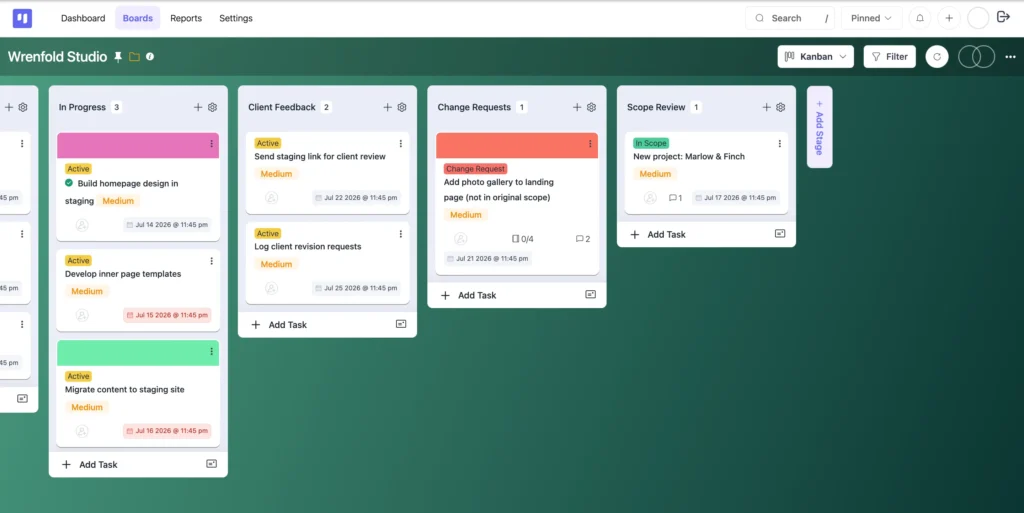
Add the client as a member of their board and send the portal link in the onboarding welcome email, with a short note on what they’ll see: their tasks, their submitted deliverables, and any change requests logged so far.
Frequently Asked Questions About Managing Scope on the Board
Got questions about how this works day to day? Here are the ones that come up most often.
Does this require a formal change order process?
No. The goal is visibility, not bureaucracy. A change request task takes two minutes, and the label signals it’s being tracked. For larger changes affecting budget or timeline, the task is the starting point for that conversation, not a replacement for it.
What if clients ignore the board and keep emailing?
Log the request on the board anyway. The client does not need to use the board for the system to work, because the paper trail exists for the agency regardless. The client visibility layer adds value when clients use it, but the intake and change request workflows function independently.
Can I use this system on the Free plan?
Yes, for the intake integration, task labels, and the change request stage. The task template with custom fields and the Frontend Portal both require FluentBoards Pro. See the full breakdown on the Free vs Pro page.
What Changes When Scope Is Managed on the Board
After Wrenfold Studio implemented all three pieces, the “one small thing” emails kept coming. What changed was what happened next.
Every request landed as a task, and every task had a label. By the end of the quarter, out-of-scope work that used to get absorbed quietly was declined, quoted separately, or approved in writing before anyone opened a file.
The scope did not stop moving. It started being tracked.
For the full picture of how FluentBoards handles the client relationship from intake to handoff, see our guide on how to manage agency projects.
Thanks for reading. The next “one small thing” email can land on a board that’s already ready for it.
Let’s redefine project management with FluentBoards!

Follow:


Get Tips, Tricks, & Updates
We won’t send you spam.





Leave a Reply