

Work Breakdown Structure Explained: How to Break Projects Into Manageable Parts


Managing a complex project with multiple teams and moving parts is already challenging enough.
But when tasks and deadlines are not clearly mapped from the start, things get messier fast:
- Someone picks up a task nobody assigned
- A deliverable gets missed
- Two people build the same thing
By the time you catch it, you are already sitting on a mountain of tasks with no clear way forward.
Well, most of the time this is not a planning issue. It is a structure issue.
A work breakdown structure is exactly where that structure begins.
In this guide, we will cover what a Work Breakdown Structure is, why it matters, how to build one, and how to put it into practice.
So let’s dive in!
What Is a Work Breakdown Structure?
A work breakdown structure (WBS) is a hierarchical breakdown of your entire project into smaller, clearly defined deliverables.
According to PMI’s PMBOK,
A WBS is “a deliverable-oriented hierarchical decomposition of the work to be executed by the project team.”
In simpler terms, it means breaking down a complex project into manageable parts until the work becomes clear, structured, and easier to execute.
It is the blueprint your entire project plan gets built on, organized across levels like this:
- The high-level project goal
- Major deliverables
- Sub-deliverables
- Work packages
Note: The key word is deliverable, not activity. A WBS is organized around what the project produces, not the actions your team performs to produce it. So when you are building one, focus on outputs, not actions.
Why Do Project Managers Use a Work Breakdown Structure?
The purpose of a WBS is simple: give everyone on your project a clear picture of what needs to be delivered, who owns it, and how it connects to everything else.
A well-built WBS does five things no task list can:
Locks scope before work begins: Every deliverable is mapped upfront so your project scope stays protected and new requests become real conversations, not quiet additions.
Sets the framework for planning, execution, and control: The WBS feeds directly into your scheduling, resource planning, and budget estimation.
Makes estimates and deadlines defensible: Each work package details exactly what is involved, how long it takes, and what resources it needs.
Tracks cost and resource allocation: When work is broken down properly, estimating budget per deliverable becomes accurate instead of approximate.
Creates accountability at every level: One owner per work package. Nothing falls through. Progress is always visible.
According to PMI, a missing or poorly developed WBS is one of the leading causes of scope creep, missed deadlines, and budget overruns across projects.
So before your team writes a single task, the WBS makes sure everyone is building the right thing, in the right order, toward the right outcome.
What Are the Core Components of a Work Breakdown Structure?
Every component in a WBS exists for a reason. From the final deliverable at the top to the work packages at the bottom, each layer adds a level of definition your project plan depends on.
Here is what each one does-
| Component | What It Does in Your Project |
|---|---|
| Phases | Groups related work into the major stages of your project lifecycle |
| Deliverables | The tangible outputs your project produces at each phase |
| Sub-deliverables | Smaller outputs that build toward completing a larger deliverable |
| Tasks | The specific activities needed to produce each deliverable |
| Subtasks | Further breakdown of tasks when more precise execution is needed |
| Work Packages | The smallest unit of work, each with one owner, one estimate, and one cost |
| Dependencies | What needs to finish before the next piece of work can begin |
| Milestones | Checkpoints that mark completion of key phases or project deliverables |
| Estimates | Time, resources, and cost attached to each work package |
Bonus Information That Might Help:
The 100% rule: The most important rule in WBS design. The WBS must capture 100% of the project scope, nothing more, nothing less. If a deliverable is not in the WBS, it is not in the project. This is what keeps scope creep out and your scope honest from day one.
WBS dictionary: A supporting document that defines each component in detail: scope, owner, timeline, and cost estimate. Optional for small projects. Essential for large ones with multiple teams.
Level up your project management game inside WordPress – where limitless possibilities come at an unbeatable price!
What Are the Levels of a Work Breakdown Structure?
The WBS is built in levels, each one more specific than the last.
| Level | What It Represents | Example |
|---|---|---|
| Level 1 | The final project deliverable | Website Redesign |
| Level 2 | Major deliverables or phases | Design, Development, Testing |
| Level 3 | Work packages | Homepage mockup, Mobile layout |
| Level 4+ | Sub-tasks for complex packages | Wireframe, Visual design, Export |
Most projects work well with three levels. Going deeper is only necessary when a work package is still too large for one person to own cleanly.
A practical rule to know here is the 8/80 rule. A work package should take no less than 8 hours and no more than 80 hours to complete. If it takes longer than 80 hours, break it down further. If it is shorter than 8 hours, it is probably too granular to track meaningfully at the WBS level.
Note: You do not always need Level 4. For small projects, two levels are enough. Match the depth of your WBS to the complexity of your project, not to a template.
Types of Work Breakdown Structure
There are two main types of WBS and choosing the right one depends on how your project is organized-
Deliverable-based WBS
Organizes work by what the project must produce. Each branch represents a tangible output. This is the most widely used type and the one PMI recommends by default.
It works well when your project has clear, distinct outputs like a product, a website, a campaign, or a report.
Phase-based WBS
Organizes work by project stages like discovery, design, development, testing, and launch. Each phase becomes a branch with deliverables sitting underneath it.
That said, deliverable-based is more practical for most projects. Phases describe time. A WBS is about work, and those are two fundamentally different things.
Work Breakdown Structure Example: A Real Web Project
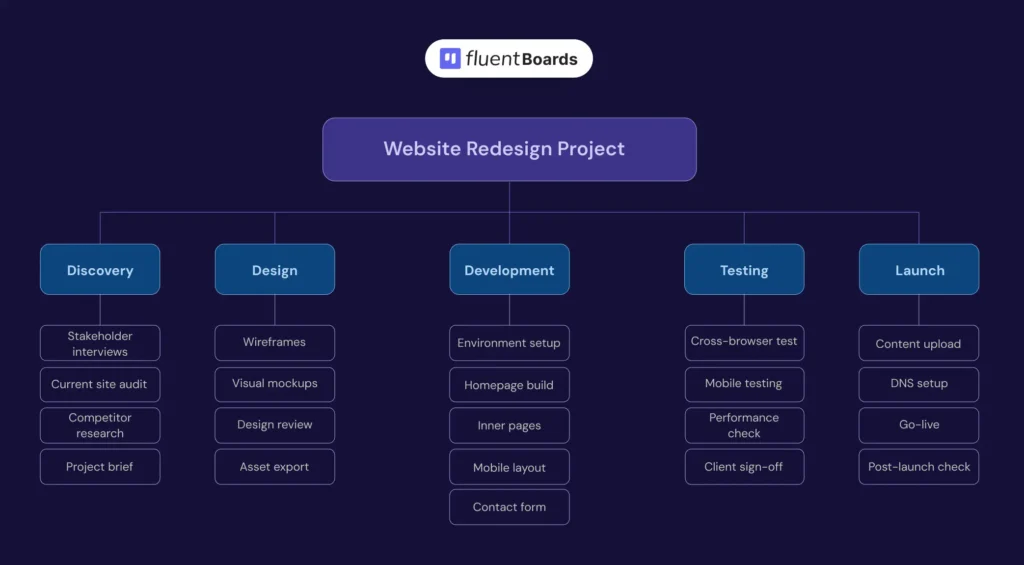
A agency has just been hired to redesign a client website. Before the team assigns a single task, the PM sits down and builds the WBS.
The result is a structure where every deliverable has a name, every work package has one owner, and nothing is left to assumption.
Now the designer knows exactly what they are responsible for. The developer does not need to ask what comes next. And the PM is not spending the first two weeks answering questions the WBS already answered.
That is the difference between starting a project and starting a project with structure.
How to Create a Work Breakdown Structure: Step by Step
Building a WBS does not need to be complicated. Start from the top and work your way down until every piece of work is clear enough to assign, estimate, and execute.
Below is the step-by-step process for building one properly-
Step 1: Define your project scope
Before you break anything down, make sure your project scope is fully confirmed.
Your scope statement should cover:
- What is included in this project
- What is explicitly excluded
- What done looks like for every stakeholder involved
If your scope is still vague at this stage, stop and fix it first. A weak scope produces a weak WBS, and a weak WBS means your team will be asking the same questions throughout execution that should have been answered before anyone started moving.
Step 2: Identify your major deliverables
With scope confirmed, look at your project and ask what the main outputs must be.
Not tasks. Not activities. Outputs. The things that will actually exist when the project is complete. These become the top branches of your WBS and form the backbone everything else gets built on.
Aim for four to seven major deliverables. Go lower and the structure is too thin to guide anyone. Go higher and you lose the big picture before execution even begins.
Pro Tip: If you are struggling to identify deliverables, start from the end. Ask what must exist before this project can be called finished, then work backward from there.
Step 3: Break each deliverable into work packages
Take each major deliverable and keep decomposing it until every piece is small enough to assign, estimate, and track independently.
Not sure when to stop? A work package passes this test:
- One person can own it completely
- You can put a realistic hour estimate on it
- You know with certainty when it is done
And when writing work packages, always use nouns not verbs. “Homepage design” not “Design the homepage.” Your WBS describes what gets delivered, not what your team does to deliver it.
Step into the Future of Project Management!
Also make sure each work package is mutually exclusive. Overlapping packages means duplicate work is quietly waiting to happen.
This is also the point where estimation becomes real. Each work package you define here becomes a direct input for your time, effort, and cost estimates later. The more specific your packages, the more defensible your numbers.
Step 4: Map your dependencies
Once your work packages are defined, look at how they connect to each other.
- Which packages cannot start until another one is finished first?
- Where does sequence matter most?
Getting this wrong does not just delay one task. It creates a chain reaction that shifts deadlines across multiple branches before anyone realizes what happened.
Spending time mapping dependencies now saves you days of firefighting later.
Step 5: Assign one owner to every work package
Every work package needs one owner. Not a team. Not a shared role. One specific person accountable from start to completion.
When assigning ownership, make sure the person has both the skills and the current capacity to take it on. Ownership without capacity is just pressure with a name on it.
When a work package belongs to everyone, it quietly becomes nobody’s responsibility. And that is exactly how deliverables disappear without anyone feeling like they dropped the ball.
Step 6: Validate with your team
Before you finalize the WBS, walk through every branch with the people who will actually be doing the work.
They will catch gaps you cannot see from the planning level. A developer knows there is a review step that never made it onto the WBS. A designer knows there is a client approval round that always gets skipped in planning and shows up as a surprise in execution.
Once everyone is aligned, get stakeholder sign-off. A reviewed and approved WBS is not just a planning document. It is a shared agreement that holds everyone accountable to the same scope.
Also Read: Project planning phase
How FluentBoards Turns Your Work Breakdown Structure into a Working Board
A WBS on paper is a planning tool. In FluentBoards, it becomes the live structure your team executes inside.
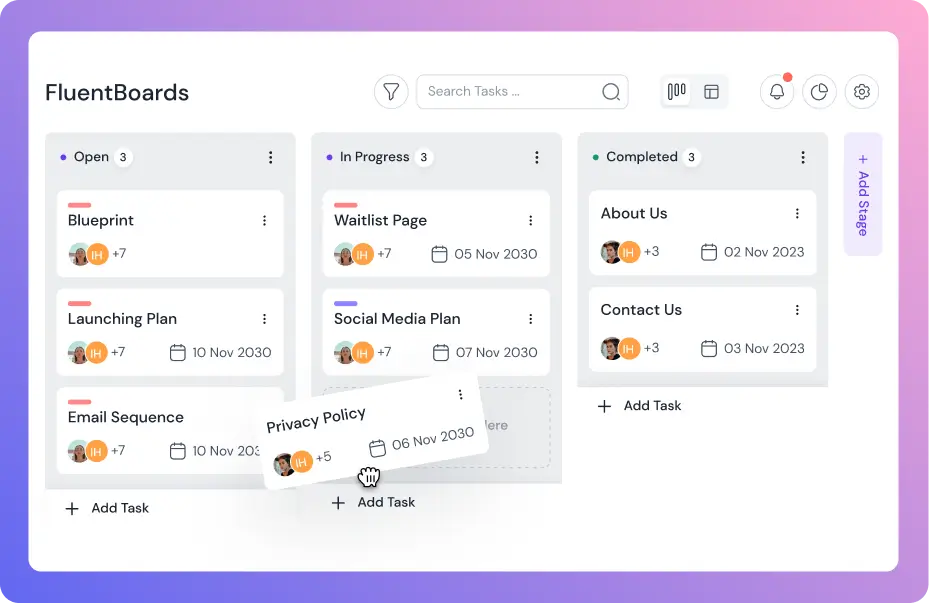
Your WBS phases become board stages
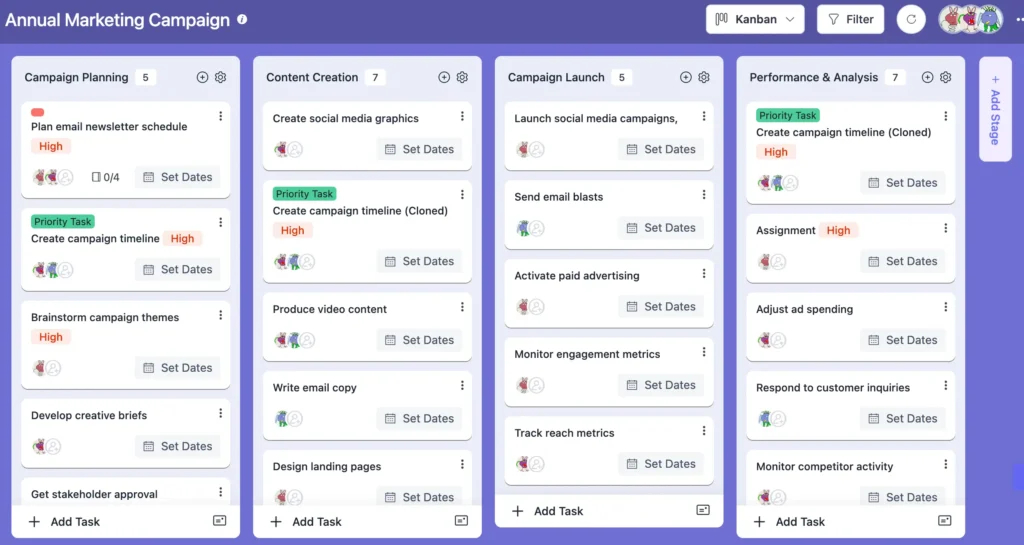
Whatever major groups you defined in your WBS become the stages in your FluentBoards board. Your WBS structure is already your workflow. No rebuilding needed.
Plus, every work package becomes a task in FluentBoards, assigned to the same owner you identified in the WBS. The accountability structure transfers directly.
Setting up tasks and subtasks
In FluentBoards each major deliverable becomes a task. Each work package becomes a subtask nested under it. This maps directly to your WBS hierarchy without any translation layer.
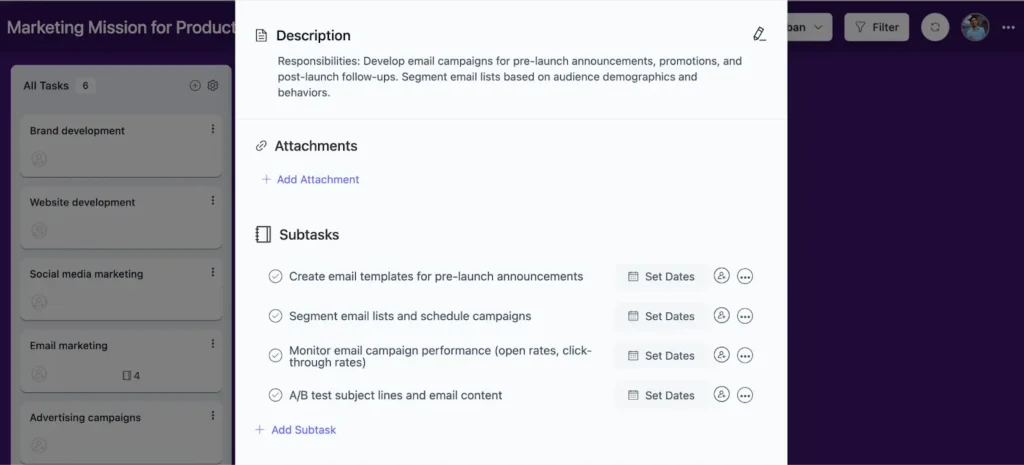
Just as the WBS groups work packages under major deliverables, FluentBoards subtask groups keep related work organized within each stage. The hierarchical logic of your WBS becomes the visual logic of your board.
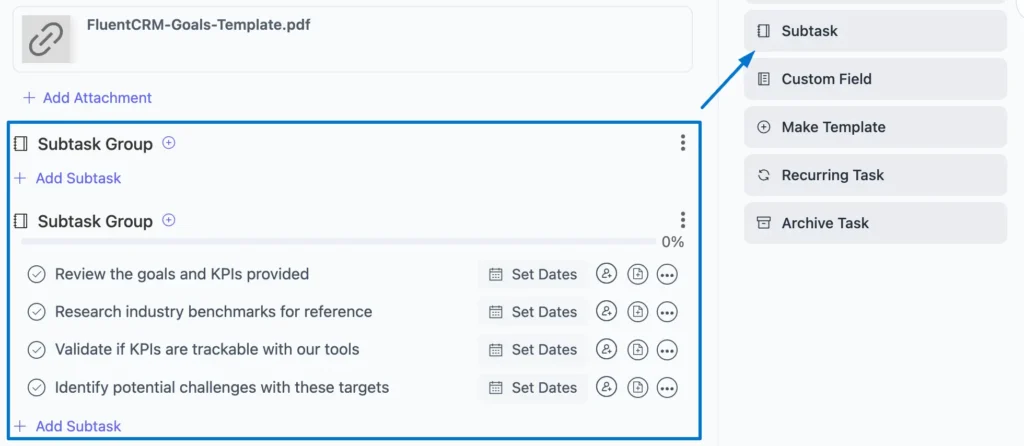
And because subtask groups keep related work organized within each stage, your WBS naturally becomes the visual structure of your board.
So instead of managing a separate WBS document, every deliverable stays visible, assigned, and trackable from day one with clear ownership, due dates, and priorities.
Using table view to read your full Work Breakdown Structure
Once your WBS is set up inside FluentBoards, switch to table view. Instead of scrolling through cards you see every task, subtask, assignee, stage, and due date as a scannable grid.
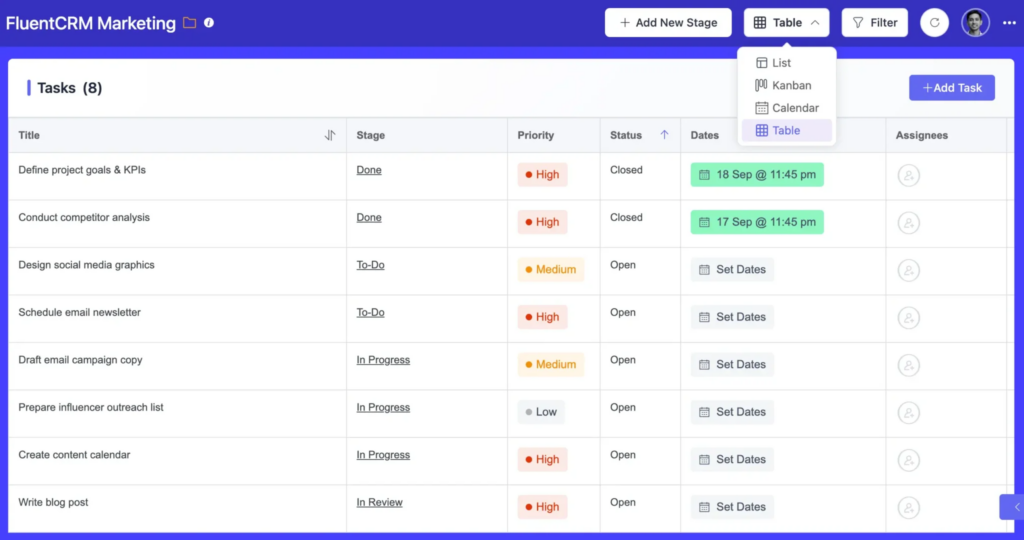
This is the fastest way to verify your WBS is complete, spot unassigned work packages, and track progress across the full scope without clicking through individual cards.
Read: Table view for project management
Filtering to focus on one branch
Use FluentBoards filters to isolate a single branch of your WBS when you need to focus. Filter by assignee to see one team member’s full workload. Filter by stage to see everything currently in progress. Filter by priority to surface what needs attention today.
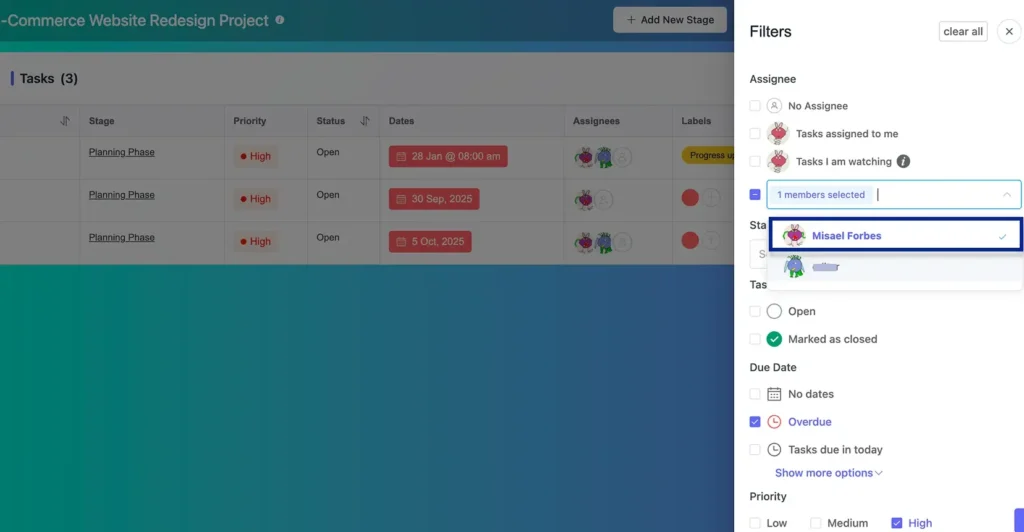
This solves the “project is too big to see” problem that makes complex projects feel unmanageable even when the structure is solid.
Best Practices for a Work Breakdown Structure That Actually Works
Here is what separates a WBS that holds from one that falls apart mid-project.
- Be thorough when building your WBS because missing deliverables almost always become execution problems later
- Apply the 100% rule to every branch so all project work is fully accounted for without gaps or overlaps
- Keep work packages at a manageable size so they stay easy to estimate, assign, and track
- Structure your WBS around deliverables and outputs instead of writing it like a task checklist
- Involve your team early because the people doing the work usually spot missing steps and dependencies faster
- Keep work packages mutually exclusive so duplicate work and ownership confusion do not creep into the project
Break It Down, Build It Right
A project that lives in your head is not a plan. It is a risk.
The WBS is how you get the project out of your head and into a structure your whole team can see, own, and execute from. Not because a methodology says so. Because a team that knows exactly what they are building, who owns each piece, and how it all fits together simply works better.
Break it down before the work starts. Build the structure before the schedule. And let the WBS do what it is designed to do.
Thanks for reading this far. Wishing you well-structured projects and teams that always know exactly what they are building.
Let’s redefine project management with FluentBoards!

Follow:


Get Tips, Tricks, & Updates
We won’t send you spam.





Add your first comment to this post