


Two Years of FluentBoards: What We Built, Where We’re Headed


Two years ago today, FluentBoards shipped its first public release.
The idea was simple: bring serious project management into WordPress, keep it simple, and price it honestly.
Today, more than 6,000 businesses use FluentBoards every day to manage their projects, with an overall user satisfaction score of 99%.
And none of this would have been possible without you.
Your support and trust have shaped where FluentBoards stands today. Your feedback and suggestions have directly influenced how features are built, how the product performs, and the direction it continues to move in.
However, this post is not about how much we appreciate your support (you already know we do).
Instead, we’re here to show you what actually happened in shipping terms, and how far we’ve come in the last year, together.
Yes, together.
Let’s go!
Year One Laid the Foundation
Before diving into the second year, it’s worth recapping where FluentBoards stood at the end of its first year. By June 3, 2025, FluentBoards had shipped the following major capabilities:
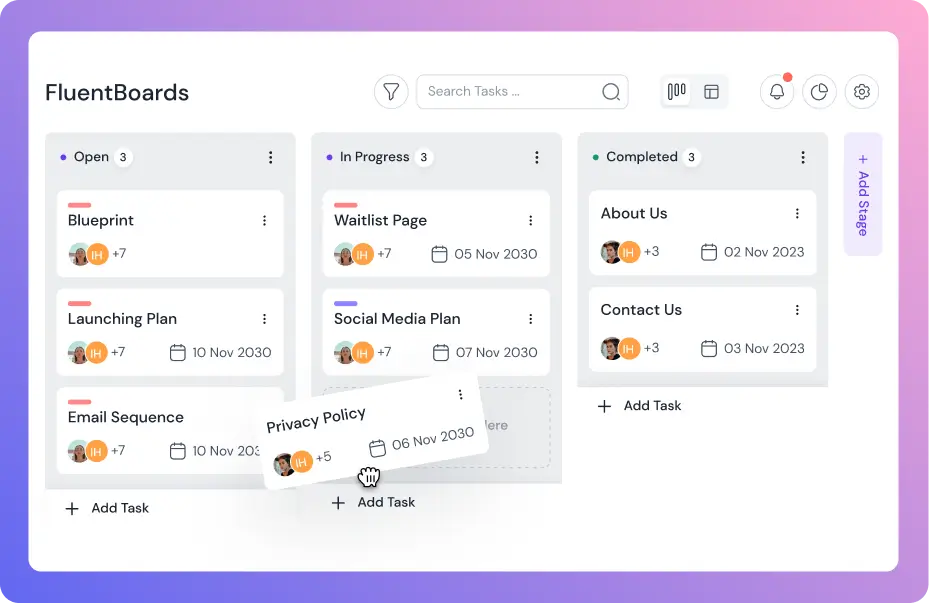
- Kanban boards with full drag-and-drop support, subtasks, custom fields, and labels
- Calendar View for deadline-focused planning
- FluentRoadmap, a public roadmap sharing add-on
- Recurring Tasks to automate routine work
- Board Export/Import and Trello Import to reduce migration friction
- Default Stage Assignees for smarter handoff workflows
- External Storage support for Backblaze, DigitalOcean Spaces, Cloudflare R2, and Amazon S3
- Integrations with FluentCRM, Fluent Forms, and Fluent Support to keep workflows inside the Fluent ecosystem
- Time Tracking with timesheet export
- Frontend Portal to expose boards outside the WordPress admin
- CSV Export/Import, RTL support, and custom color labels
Thirteen updates. A solid foundation. But FluentBoards remained primarily a Kanban-based project management tool with robust integrations.
And the second year changed that significantly.
If you’d like to see how we got here, you can read our complete first-year walkthrough.
Year Two: From Foundation to Expansion
If the first year was about laying the foundation, the second year was about building on that foundation, maintaining steady growth, and preparing FluentBoards for what comes next.
Here are some of the key areas where FluentBoards evolved beyond its first version and moved closer to becoming a complete project management solution for WordPress teams.
More ways to see your work
The biggest gap in year one was views. Kanban is a great default, but teams often need to look at the same work through a different lens.
Table View arrived as a spreadsheet-style layout for tasks within a board, useful when you need to scan, sort, or compare work in bulk rather than manage it card by card. It also became the foundation for the Bulk Actions feature that followed, letting team leads operate on multiple tasks at once instead of one at a time.
Gantt Chart View shipped most recently and is the most-requested view the community had been asking for. It maps tasks across a timeline, surfaces overlaps, and critically supports Task Dependencies, so teams can model real project sequences where one task genuinely can’t start until another is done. For anyone managing multi-stage projects inside WordPress, this is the feature that makes FluentBoards competitive with tools built exclusively for project management.
Organizing work at scale
A single team running a handful of boards doesn’t need much organizational structure. A growing team with dozens of boards, multiple projects, and mixed priorities does.
This year addressed that directly. Board Folderization lets teams group related boards into folders, a straightforward feature that becomes essential once you’re past ten active boards. Alongside it, a new Boards List View provides a structured overview of everything in your workspace without the visual noise of card tiles.
At the task level, Pinned Boards and Pin Tasks give teams a way to surface what’s most important without relying on everyone remembering to check the right places. Task Watchers added a subtler but valuable layer: team members can now follow a task and receive updates without being assigned ownership of it useful for managers, stakeholders, or anyone who needs visibility without responsibility.
Finally, permission-based board creation removed a genuine friction point. Previously, only admins could create new boards. Now any member with the appropriate permission can, which means projects can start faster without waiting on an admin.
Automation and external connectivity
This was the area where FluentBoards grew the most in year two.
Outgoing Webhooks turned FluentBoards from a closed system into a trigger point for external workflows. When tasks are created, updated, moved, or completed, FluentBoards can now fire events to any endpoint, enabling integrations with Zapier, Make, Slack, or custom internal systems without writing a line of plugin code.
The REST API was formally documented and published, opening FluentBoards to developers building custom integrations or pulling project data into reporting tools.
Most notably, MCP (Model Context Protocol) support shipped in the most recent release. It means FluentBoards boards and tasks are now accessible to AI agents, before most WordPress plugins have even begun thinking about that layer. Teams using AI-assisted workflows can now connect those agents directly to their project data.
Collaboration refinements
Several smaller but meaningful updates improved the day-to-day experience of working inside FluentBoards.
Per-task and subtask reminders replaced the blunt daily digest as the primary notification mechanism for deadlines. Teams can now set reminders tied to specific tasks, not just receive a morning email summary. The Mentioned and Assigned filters in the notification sidebar made personal workload management more precise.
Task Clone with Customization made recurring project setups significantly faster: copy a task and choose what comes along with it. Board Folderization and custom field reordering are small touches, but they reflect a theme across this year’s releases: reducing the daily friction that compounds into real productivity loss over time.
Release by Release: What We Actually Shipped (June 2025 – June 2026)
The second year saw ten releases (7 major, 3 minor), each adding capabilities that moved FluentBoards from a capable Kanban tool into a multi-view, automation-ready project management platform.
Here’s the breakdown (release by release):
1.65 (June 2, 2025)
The last release before the second anniversary. None of these features were headline-grabbing additions on their own. But together, they made FluentBoards faster, smoother, and more connected to the way teams actually work.
- Pinned Boards for quick access to your most frequently used boards
- Task Creation from Image Drops/Pastes, allowing users to create tasks directly from dropped or pasted images without leaving the board
- Task Filtering by CRM Contacts and Watchers for tighter integration between project work and customer records
- Background Blur in Task Detail Dialogs, a small but meaningful UX improvement that helps users stay focused
- Fluent Forms Attachment Mapping, enabling form submissions to map uploaded files directly to tasks
1.80 (July 31, 2025)
One of the largest releases of the year. This update fundamentally expanded how boards and tasks are organized. This release added a new layer of organizational depth to FluentBoards. What started as a capable Kanban tool became significantly more flexible for teams managing multiple projects, stakeholders, and workflows at scale.
- Board Folderization to group related boards into folders. It was a long-requested organizational feature for teams managing multiple projects
- Boards List View to see all boards in a structured list rather than card tiles
- Task Clone with Customization to duplicate tasks with control over what gets copied
- Task Watchers to follow a task without being the assignee; get notified on updates without owning the work
- Simple Notes for Subtasks to add brief context directly to subtask items
- Task List View Settings to enable user-configurable display preferences per board
- Custom Field Reordering to drag custom fields into the order that fits your workflow
- Public and Private Comments in Roadmap to control what external stakeholders can see
- Mentioned and Assigned Filters in the notification sidebar
- Board Menu Customization to add and reorder items in the board navigation
1.85 (September 18, 2025)
This is where FluentBoards grew its API surface and reporting backbone. The Outgoing Webhooks release in particular marked a turning point. FluentBoards moved beyond being a closed system and became a trigger point inside larger workflow ecosystems.
- Table View for Tasks a spreadsheet-style view across all tasks in a board, critical for data-heavy reviews and reporting
- Outgoing Webhooks to trigger external systems like Zapier, Make, or custom endpoints from task events inside FluentBoards
- Task and Subtask Reminders for scheduled notifications tied to individual tasks, not just daily digests
- REST API Documentation published and made accessible, opening FluentBoards to custom integrations
- Improved My Tasks section with “Assigned” and “Mentioned” tabs for better personal workload management
- CRM Automation enhancement adding “Create from Template” in task creation actions
1.86 (September 26, 2025)
A focused release tightening the UX around daily task operations. This release was all about reducing friction in the small but frequent actions that shape day-to-day productivity.
- Easy Task Delete removed unnecessary confirmation friction
- Task Reminder Icon visible when a reminder is active on a card
- Improved Webhook Data Payloads for cleaner and more reliable downstream handling
1.90 (November 18, 2025)
A significant release focused on bulk operations and developer-side compliance. This release made FluentBoards more efficient for power users while strengthening its foundation for long-term stability and ecosystem compatibility.
- Bulk Actions in Table View to operate on multiple tasks simultaneously; essential for team leads managing large boards
- Bulk Restore and Delete for Archived Tasks to clean up archives without clicking one task at a time
- Additional Webhook Triggers for expanded event coverage for automation pipelines
- Better Cross-Board Task Movement for improved handling when moving tasks between boards
- WordPress Guidelines and Coding Standards Compliance Update for improved adherence to WordPress development standards
1.90.1 (November 20, 2025) & 1.91 (December 24, 2025)
These updates focused on improving stability, fixing edge-case issues, and refining the overall user experience across the platform.
- Resolved Cloudflare R2 upload issues
- Fixed stage reordering in boards
- Fixed comment edit button behavior
- Security audit improvements
- Global add button repositioned for better UX
1.95 (May 21, 2026)
The most recent release and a significant one heading into the second anniversary. The inclusion of MCP support is especially worth noting. This update sets the groundwork for what comes next, as FluentBoards continues to evolve toward deeper AI integration.
- Gantt Chart View to visualize tasks across a timeline with dependencies; the most-requested view from the community
- MCP Support for AI Agents to make boards and tasks accessible to AI agents via the Model Context Protocol
- Pin Tasks to surface your most critical tasks at the top of a board
- Task Dependencies to define relationships between tasks; block downstream work until upstream work completes
- Anyone with Permission Can Create Boards to remove the admin-only restriction, allowing teams to operate more autonomously
- Highlight Recently Opened Tasks in Kanban view
- Optimized CSV export for large boards
- Clone attachments and cover images when moving boards
The Capability Arc: What Changed in 12 Months
If you look at FluentBoards in June 2025 versus June 2026, the difference isn’t incremental. That’s a material product maturity jump across a single year.
| Capability | Status at Year 1 | Status at Year 2 |
| Views | Kanban, Calendar, List | + Table View, Gantt Chart View |
| Automation | Internal only | Outgoing Webhooks |
| Task Relationships | None | Dependencies |
| Board Organization | Flat | Folders + List View |
| Notifications | Only digest | Per-task reminders + watchers |
| Bulk Operations | None | Bulk actions in Table View |
| Board Access | Admin-only creation | Permission-based creation |
What’s Coming Next?
Well, we’re just getting started, and we’re confident that Year Three will be one to remember.
If there’s one thing the second year accomplished, it’s building the foundation for what comes next. The infrastructure, flexibility, and integrations we’ve added over the past twelve months make it possible to scale FluentBoards in ways the first release simply couldn’t support.
And that journey begins with FluentBoards 2.0.
FluentBoards 2.0 will focus on the workflows teams encounter when they outgrow basic task management, helping them manage projects at scale without adding unnecessary complexity. Some of the planned improvements include:
- Pre-built Board Templates
- Automated Board Creation via FluentCRM
- Improved Trello Import via API
- UI/UX Enhancements
- AI-Powered Project Management Capabilities
Beyond FluentBoards 2.0, we’ll be working on advanced reporting, deeper integrations across the Fluent ecosystem, and many more improvements that are already taking shape behind the scenes.
Year three is going to be an exciting ride. And we’d love to have you with us.
Just as you’ve always been, whether as a supporter, a critic, or someone cheering us on from the sidelines.
Let’s go!
Let’s redefine project management with FluentBoards!

Follow:


Get Tips, Tricks, & Updates
We won’t send you spam.




Add your first comment to this post