

How to Connect MCP in FluentBoards (Step-by-Step Guide)


Running projects on WordPress with FluentBoards usually means starting from scratch every single time: a new board, new stages, new tasks, all built by hand, again and again.
What if that part didn’t need you at all?
FluentBoards now connects through MCP, so you can manage boards and tasks directly from the AI you already use, right from where you already are, without switching tools or context.
This guide walks through exactly how to connect FluentBoards to Claude, and where that same setup applies to OpenAI Codex, Cursor, or any other MCP-compatible tool. We’ll cover what can go wrong along the way, and how to actually use it once it’s live.
Let’s dive in.
What Is MCP, and What It Actually Changes for You
MCP stands for Model Context Protocol. The easiest way to think about it is as a universal adapter between AI assistants and the tools you already use. Instead of every AI needing its own custom-built integration for every app, MCP gives them a shared language.
Once FluentBoards speaks that language, any MCP-compatible AI client, Claude, an OpenAI-based coding tool, Cursor, and others, can connect to it, read your board data, and make changes on your behalf.
Here’s the part that actually matters day to day. It always acts as you, using a connection key that belongs to your account.
Nothing about MCP gives an AI more access than you already have. It’s simply a faster way to use the access you already have.
Everything FluentBoards MCP Can Do
FluentBoards’ MCP connection (powered by an adapter plugin called FluentHub) exposes 29 tools with FluentBoards Pro (21 on the free version) across ten domains. Here’s the full map.
| Tool | What it does |
| Get FluentBoards Context | Discovery call the AI makes once per session: your permissions, site setup, and safety rules. |
| List Boards | Every board you have access to, with search, board type, archived filter, sorting, and pagination. |
| Get Board | Full board details, including stages, labels, members, and optionally task summaries. |
| Create Board | Create a new board with optional custom stages, labels, members, CRM contact, and Pro folder placement. |
| List Tasks | Filter tasks by search, stage, status, priority, assignee, labels, due date, archived state, sorting, and pagination. |
| Get Task | Full task details including stage, labels, assignees, watchers, comments, and recent activity. |
| Create Task | Add a new task to any board stage using native task creation logic. |
| Update Task | Change title, description, status, priority, dates, assignees, CRM contact, and settings. Supports partial updates. |
| Move Task | Move a task to another stage or board with explicit positioning. |
| Archive or Restore Task | Archive a task, or bring it back. |
| Add Comment | Leave a private or public note on a task. |
| List Labels | List board labels, optionally limited to labels already used by tasks. |
| Create or Update Label | Create a board label or update an existing one. |
| Delete Label | Delete a board label and detach it from every task that uses it. |
| Add Task Label | Attach one or more existing board labels to a task by ID or title. |
| Remove Task Label | Remove one or more labels from a task while keeping the board label itself. |
| List My Tasks | List tasks across boards grouped by assigned, mentioned, upcoming, due today, overdue, completed, or no due date. |
| Search Tasks | Search task titles across visible boards, including exact ID lookup and archived term search. |
| Create or Update Stage | Create a stage or update an existing one. |
| Archive Stage | Archive or restore a stage. Archived stages keep their tasks. |
| Assign Task | Add, remove, or sync task assignees. Assignees also become task watchers. |
| Create Subtask Group | Organize subtasks under a task. |
| Create Subtask | Add a subtask inside an existing group. |
| Get Subtasks | List a task’s subtask groups and subtasks, with assignees included. |
| Update Subtask | Edit a subtask’s fields, or move it to another group or position. |
| Delete Subtask | Permanently delete a subtask. Cannot be undone. |
| Assign Subtask | Add, remove, or sync who’s assigned to a subtask. |
| Add Task Assignee | Add one or more people to a task without removing existing assignees. |
| Remove Task Assignee | Remove one or more people from a task. |
Here’s what each domain covers and why it matters:
Discovery
Get FluentBoards Context – the AI calls this first each session. It learns your permissions, site metadata, available enums, safety levels, and usage guidance. This is what stops the AI from guessing about what it can and cannot do.
Boards
List Boards – see every board you have access to, with search, board type, archived filter, sorting, and pagination.
Get Board – pull full board details including stages, labels, members, and optionally task summaries. Useful for grounding the AI before it makes changes.
Create Board – create a new board with optional custom stages, labels, members, CRM contact, and Pro folder placement. Member IDs are validated before creation and roadmap boards get default stages when none are specified.
Tasks
List Tasks – filter tasks in a board by search, stage, status, priority, assignee, labels, due date, archived state, sorting, and pagination.
Get Task – full task details including board, stage, labels, assignees, watchers, comments, and recent activity.
Create Task – create a task in a board stage using the same product-side logic as regular task creation, including default watcher and assignee behavior.
Update Task – update title, description, status, priority, dates, assignees, CRM contact, and settings. Supports partial updates so unchanged fields stay untouched.
Move Task – move a task to another stage or board with explicit positioning by position number or neighboring task IDs. No manual drag-and-drop needed.
Archive or Restore Task – archive a task or bring it back. Reversible.
Comments
Add Comment – add a private or public comment to a task. Fires native comment hooks and notifications, keeping collaboration history inside the task.
Labels
List Labels – list board labels, optionally limited to labels already used by tasks.
Save Label – create a board label or update an existing one. Create and update are consolidated into one tool.
Delete Label – delete a board label and detach it from every task that uses it.
Add Task Label – attach one or more existing board labels to a task by ID or title. Capped at 50 items per batch.
Remove Task Label – remove one or more labels from a task while keeping the board label itself.
Personal Tasks
List My Tasks – list tasks across all boards grouped by dashboard categories: assigned, mentioned, upcoming, due today, overdue, completed, or no due date. The same “my work” view users already know from the dashboard.
Search
Search Tasks – search task titles across visible boards, including exact ID lookup (id:123) and archived term search. Minimum search length enforced for normal text queries.
Stages
Save Stage – create a stage or update an existing one. Create and update are one tool.
Archive Stage – archive or restore a stage. Archived stages keep their tasks, so nothing is lost.
Subtasks
Create Subtask Group – organize subtasks under a task by grouping them, so checklists don’t turn into one long flat list.
Create Subtask – add a subtask inside an existing group.
Get Subtasks – list a task’s subtask groups and subtasks, with assignees included, so the AI can report progress accurately.
Update Subtask – edit a subtask’s fields, or move it to another group or position.
Delete Subtask – permanently delete a subtask. Cannot be undone.
Assignment
Assign Task – add, remove, or sync task assignees. Assignees also become task watchers. Supports sync mode to replace the entire assignee list, including clearing all assignees with an empty list.
Assign Subtask – add, remove, or sync who’s assigned to a subtask, the same way Assign Task works at the task level.
Add Task Assignee – add one or more people to a task without removing anyone already assigned.
Remove Task Assignee – remove one or more people from a task.
Which AI Tools You Can Connect
FluentBoards gives you ready-made setup code for six options:
- Claude Code: for the terminal
- Claude Desktop: the desktop app
- Codex: the CLI, IDE extension and app
- Cursor: the code editor
- VS Code: the code editor
- Other: any MCP client that supports Streamable HTTP
One Thing to Check First: Node.js and npx
Before you touch any FluentBoards settings, there’s one small thing worth checking on your computer: Node.js.
FluentBoards’ MCP connection doesn’t run inside WordPress alone. Your AI client needs a small helper program running in the background to actually talk to your site. That helper is launched by a command called npx, and npx comes bundled with Node.js.
Think of it like this: your AI client has your FluentBoards login and address, but it needs npx to actually place the call. Without it, the connection has all the right information and no way to use it.
How to Check If You Already Have It
Open Terminal (on a Mac, press Cmd+Space, type Terminal, hit Enter). Type node -v and press Enter, then do the same with npx -v. If both print back a version number, you’re already set; skip ahead to Step 1 below.
How to Install It If You Don’t
- Go to nodejs.org and download the LTS version
- Run the installer – it sets up everything automatically
- Restart your computer before continuing
After installing: fully quit and reopen both Terminal and Claude Desktop before trying to connect. A restart is what makes your computer actually recognize the new command.
This is a one-time setup. Once Node.js is installed, you won’t need to think about it again for any future MCP connection, not just this one.
How to Connect FluentBoards to Claude Desktop (Step by Step)
Step 1: Find the Setting
Go to Fluent Boards → Settings → MCP for AI Agents. You’ll see two switches at the top.
Enable MCP for AI Agents turns the feature on for your site.
Allow board members to use MCP decides who can connect an AI tool:
- Off: only administrators can use MCP. This suits sites where one person manages the boards, or where you want to try MCP yourself before rolling it out.
- On: every board member can create their own connection key from their Account page. They only reach the boards they can already access, and their board role still applies, so a Viewer can read but not change anything.
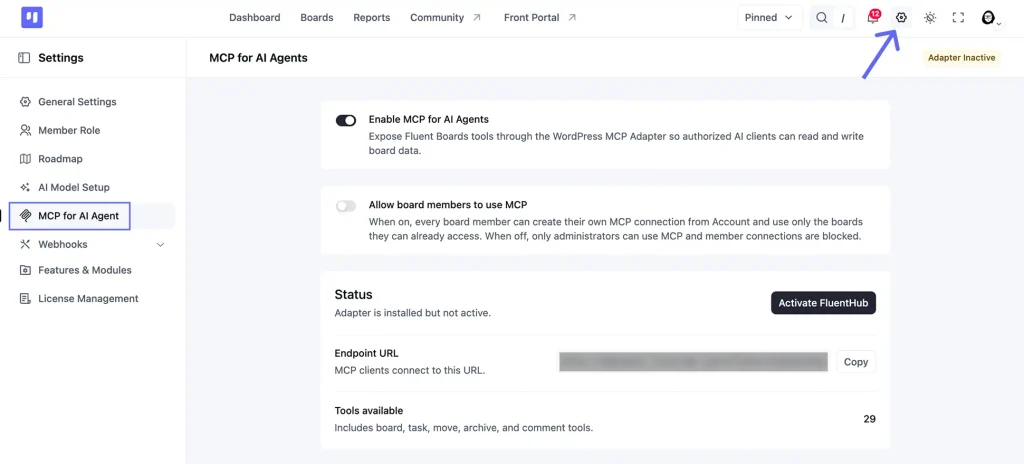
You can change this at any time. Turning it off blocks member connections straight away.
Step 2: Install & Activate the Adapter (FluentHub)
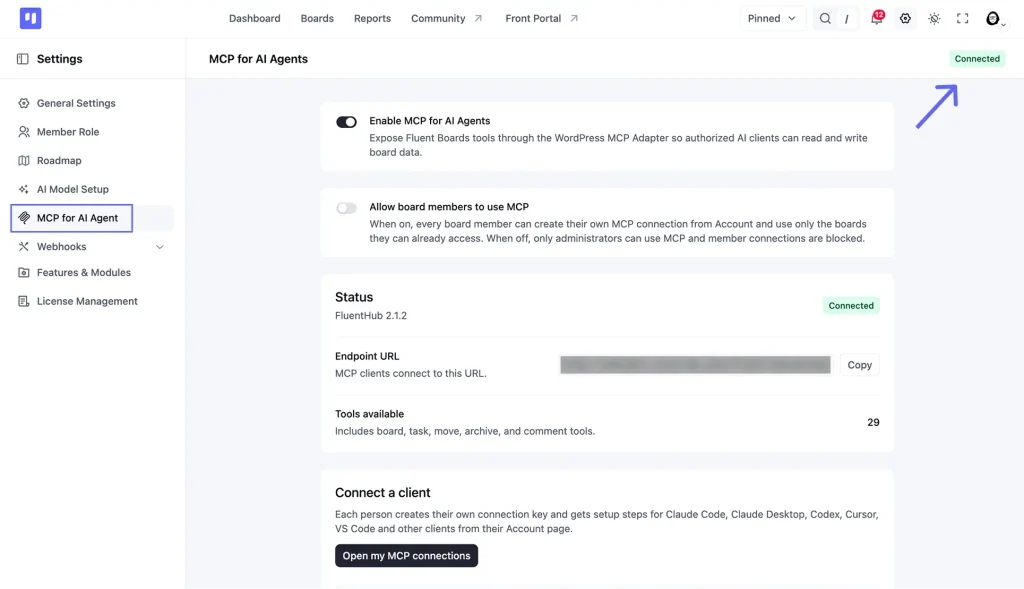
If the settings page already shows “Connected,” skip this step.
FluentHub is the shared adapter that connects FluentBoards (and other Fluent plugins) to your AI tool through a single endpoint. It is not listed in the WordPress plugin directory, so download it directly here: Download FluentHub.

Once downloaded, go to Plugins – Add New – Upload Plugin, upload the zip file, and click Activate.
Note: FluentHub is the bridge that lets AI tools talk to your WordPress site. If your site already uses the official WordPress MCP Adapter plugin (WordPress 6.9 or newer), FluentBoards works with that instead, so you don’t need to install FluentHub as well. You only need one of the two.
Step 3: Confirm It’s Connected
Head back to the same MCP for AI Agents page. The status should now say Connected, with the adapter name, your endpoint URL, and the tool count.
Step 4: Create a connection key
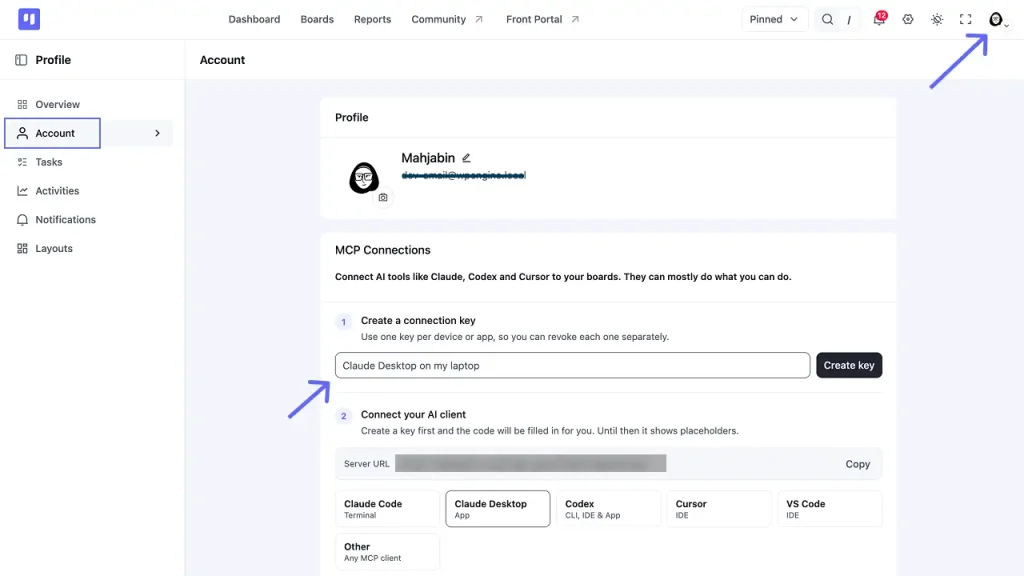
On the same settings page, scroll down to Connect a client and click Open my MCP connections. You can also get there from your avatar: Profile overview → Account. Scroll to MCP Connections.
Under Create a connection key, give the key a name that tells you where it’s used, like “Claude Desktop on my laptop”, and click Create key.
A yellow box appears with your username and a new password. Copy the password now, because it won’t be shown again. You don’t have to paste it anywhere yourself, since the setup code below already includes it. Keep a copy somewhere safe, then click I have saved it.
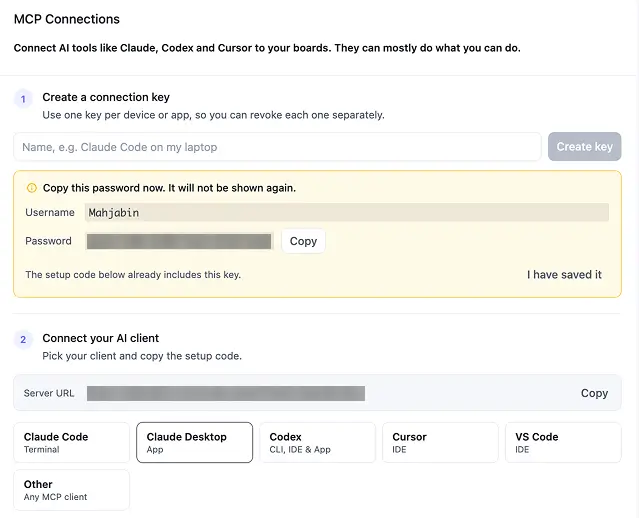
Pro Tip: Use one key per device or app. If you lose a laptop or stop using a tool, you revoke that one key and everything else keeps working.
Step 5: Pick your AI tool and copy the setup code
Right below your key, under Connect your AI client, you’ll see your Server URL and a row of tabs: Claude Code, Claude Desktop, Codex, Cursor, VS Code and Other. Pick Claude Desktop. The setup code already has your key filled in, so just click Copy.
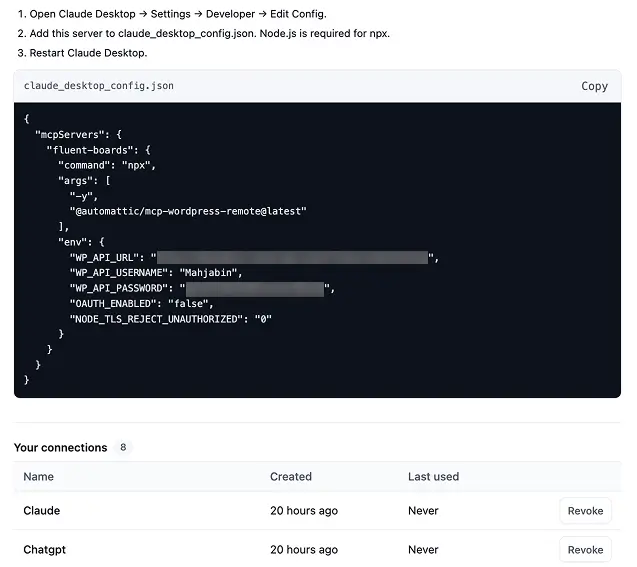
Step 6: Add the Setup Code to Claude Desktop
The easy way (recommended if you’re not a developer):
Open Claude Desktop or Claude Code in any folder and paste this into the chat:
“Add this MCP server to my Claude Desktop config, and install Node.js or npx first if either is missing: [paste your setup code here]“
Your AI assistant will find the right file on your computer, merge the setup code in correctly, and confirm when it’s done. No manual file editing needed.
The manual way:
Go to Settings → Developer → Edit Config.
This opens the file claude_desktop_config.json.
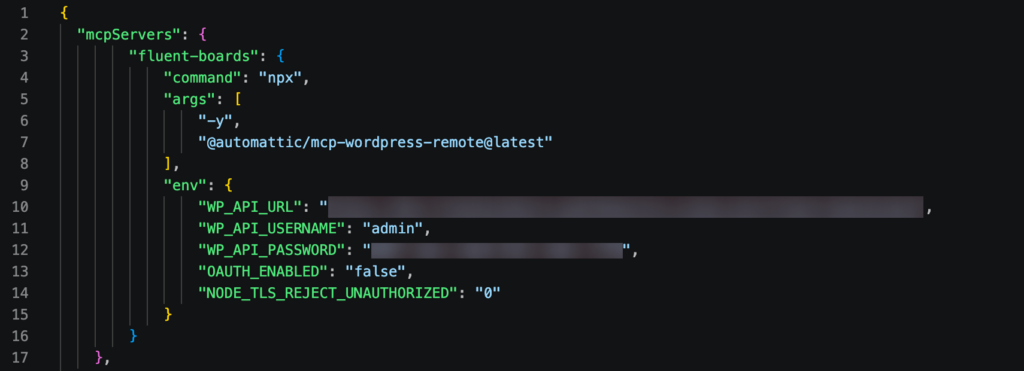
Two things to watch out for:
- Make sure you’re editing claude_desktop_config.json specifically, not some other settings file. It’s an easy mix-up if you have multiple JSON files open at once.
- If the file already has content (say, from another MCP server), don’t replace the whole thing. Your setup code belongs inside the existing “mcpServers” section, alongside whatever’s already listed, not instead of it.
Either way, save the file, fully quit Claude Desktop (not just close the window), and reopen it.
Step 7: Confirm the Connection
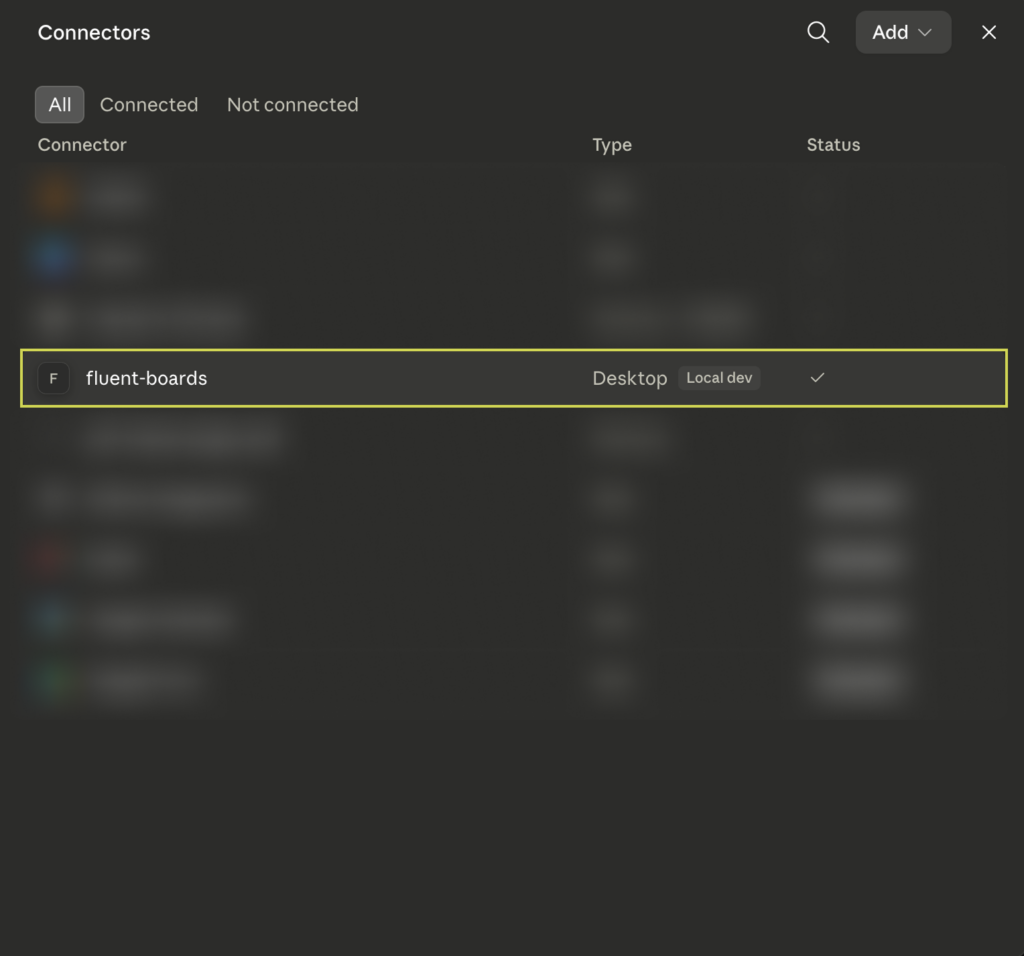
Open your AI tool’s own connector or MCP settings and look for fluent-boards in the list. A checkmark or a Connected status means the two are talking. If it’s missing, check your JSON is valid and that you fully quit and reopened the app. A wrong or revoked key won’t hide it from the list, it only fails once you try to use it.
Step 8: Test it with a Real Prompt
Open a new chat and ask it to do something real. Not just “is this working,” but an actual action, so you can see live data come back.
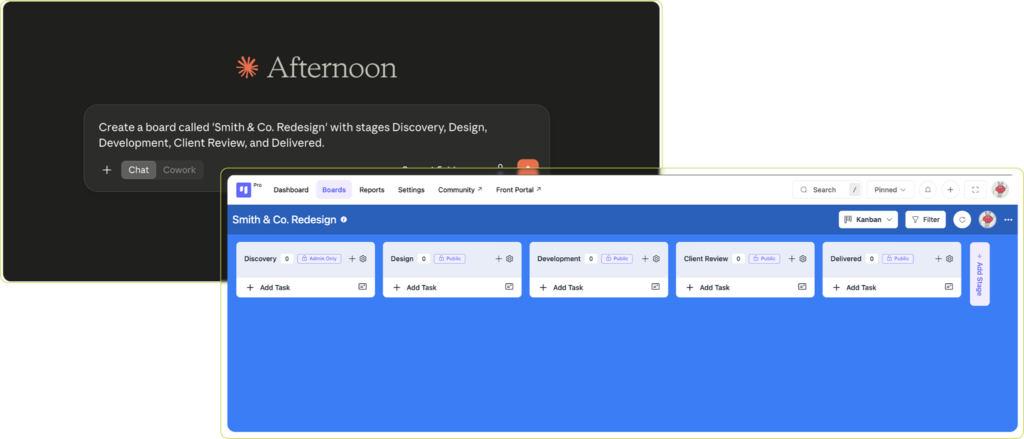
Common gotcha: If the server shows “connected” or “running” but nothing actually happens when you ask it to do something, open Settings → Developer → your server → View Logs and check the environment variables. The single most common cause is copying the setup code before creating a key, so it still has placeholder values instead of your real key. Create the key first, then copy the code again. The process launches fine, but every request then fails silently on authentication.
How to Connect FluentBoards to OpenAI Codex
The steps above are written for Claude Desktop, but Steps 1 to 4 are the same for every tool. Create a key named something like “Codex on my laptop”, then open the Codex tab under Connect your AI client.
The setup code includes everything pre-filled, including your key in the authorization header.
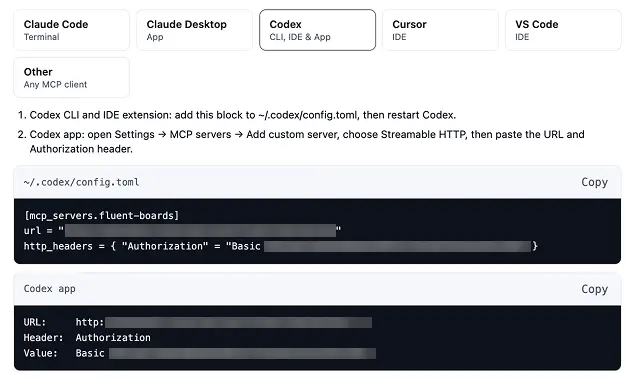
Codex CLI or IDE extension: copy the ~/.codex/config.toml block, add it to that file, then restart Codex.
Codex app: go to Settings → MCP servers → Add custom server, choose Streamable HTTP, and fill in the details from the Codex app box:
- Name: fluent-boards
- URL: your Server URL
- Header Key: Authorization
- Header Value: the Basic … string
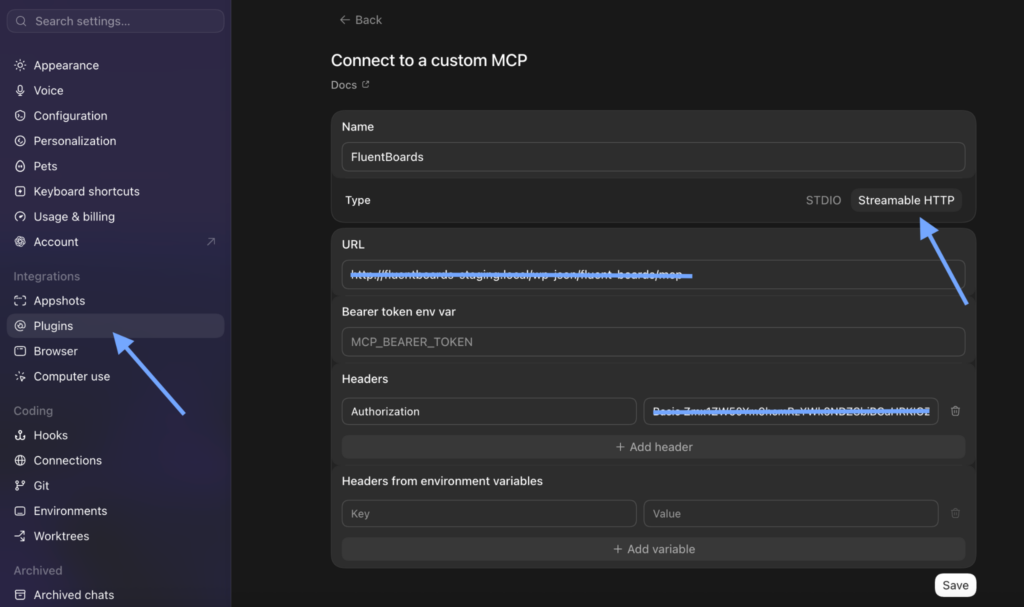
Click Save, and everything will be ready to run from your ChatGPT app!
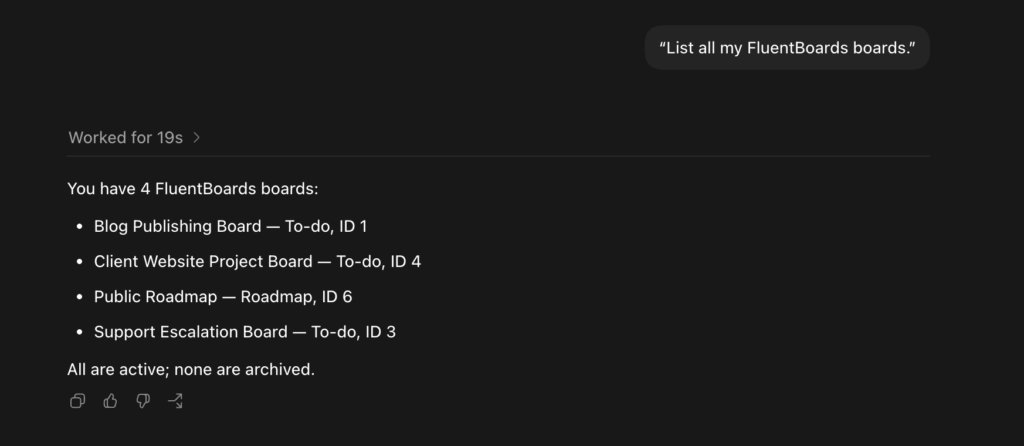
The Node.js and npx requirement from the “One Thing to Check First” section applies to OpenAI Codex too.
What You Can Actually Ask It To Do
Once it’s connected, the real value isn’t the novelty. It’s the boring, repetitive parts of running projects that quietly eat your week. A few concrete examples, framed the way you’d actually think about them:
Catching What’s Overdue
Instead of opening every board to check what’s overdue,
Ask: “What tasks are overdue across all my boards?”
Why it matters: Catching what’s overdue takes one prompt instead of clicking through every board.
Setting Up a New Client Board
Instead of manually rebuilding the same board structure for every new client,
Ask: “Create a board called ‘Retainer Radar’ with stages New Request, In Progress, Client Review, Delivered This Month.”
Why it matters: A setup that used to take twenty minutes of clicking now takes one sentence.
Turning Meeting Notes Into Tasks
Instead of retyping messy meeting notes into individual tasks,
Ask: “Create a task for each of these action items on the Q3 Launch board.”
Why it matters: Action items go straight from the meeting into tasks, instead of sitting in a notes doc nobody reopens.
Writing the Status Update for You
Instead of opening a client’s board to write a status update by hand,
Ask: “Summarize progress on the Smith & Co. Redesign board: what’s done, in progress, and blocked.”
Why it matters: Clients get an answer in seconds instead of you writing one from scratch.
Cleaning Up Finished Work
Instead of leaving completed tasks cluttering a board for weeks,
Ask: “Archive everything marked Done on the E-Commerce Redesign board.”
Why it matters: Boards stay clean without you doing the cleanup yourself.
Standing Up a Team Board From Scratch
Instead of building a fresh internal board for a marketing team from scratch,
Ask: “Create a board called ‘FluentCRM Campaigns’ with stages Planning, Drafting, Ready to Send, Sent.”
Why it matters: A new team gets a working board before their first meeting even starts.
Bottom line: None of these are exotic use cases. The work itself doesn’t change, only how long it takes. Setup and cleanup that used to eat ten or fifteen minutes now takes one sentence and a few seconds of waiting.
Is This Safe? What the AI Can Access, and How to Revoke It
This is not a master key to your site. It’s a key to your boards, and only the boards you can already reach.
Every connection uses the key you created in Step 4, and that key only works with FluentBoards. It can’t log into the rest of your WordPress site, open your settings, or touch anything outside your boards. Nothing runs silently in the background either.
Most AI apps ask for your approval before they use a tool, unless you’ve told them to always allow it.
What the AI can do depends on your board role
The AI never gets more access than the person who connected it. Every action it takes is checked against that person’s role on that specific board, the same way FluentBoards checks it when they click around by hand.
| Role on the board | What their AI can do |
| Viewer | Read only: list tasks, search, summarize. If they ask it to move or edit something, FluentBoards refuses. |
| Member | Use the MCP tools on their boards: create, edit, move, comment on, and archive tasks, and manage labels, stages, and assignees. |
| Manager | The same MCP actions as a Member, on the boards they manage. |
| Admin | The same MCP actions, on every board on the site. |
Note: Creating a new board follows your site setting, not the board role. If Board Creation Permission is turned on in General Settings, everyone who belongs to at least one board can create new boards, including Viewers, and their AI can too.
Letting your team connect
By default, only administrators can use MCP. Team members who open their Account page see a note saying MCP is only available to administrators.
To let them connect their own AI tools, an admin turns on Allow board members to use MCP in Settings. Each person then creates their own key from their Account page. Turning this on doesn’t change anyone’s permissions, and the table above still applies to every person and every board.
How to revoke a key
Go to Account → MCP Connections → Your connections and click Revoke next to the key. The list shows when each key was created and when it was last used, so a key nobody has touched in weeks is easy to spot.
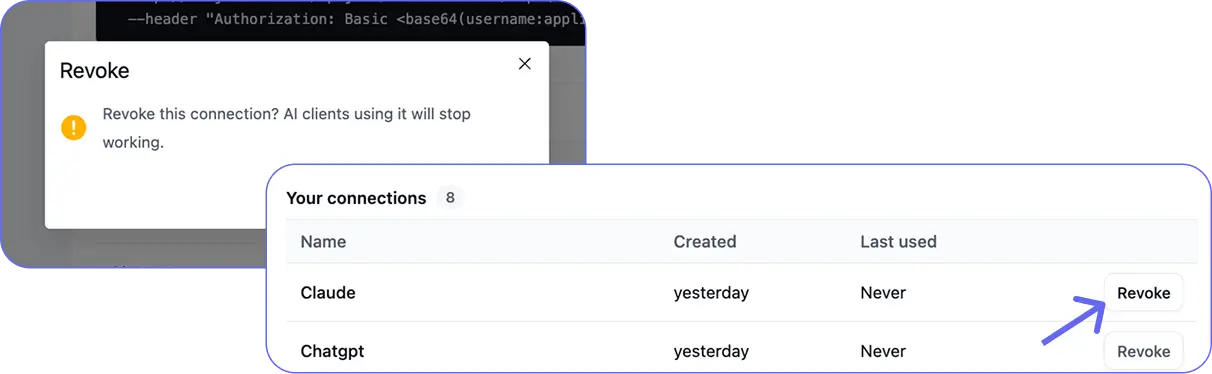
- One key per device or app: if you lose a laptop or stop using a tool, you revoke that one key and everything else keeps working.
- Treat each key like a password: don’t paste it into shared docs or chat threads.
- Clean up regularly: if a key still shows “Never” under Last used, it probably doesn’t need to exist.
FAQ & Troubleshooting
A few quick answers to what people usually ask once they’ve got this connected, or while they’re getting stuck along the way.
Which AI tools work with FluentBoards MCP?
Claude Code, Claude Desktop, Codex, Cursor and VS Code all get ready-made setup code on your Account page. Anything else that supports MCP connects through the Other tab, using your Server URL and connection key.
Do I need coding knowledge to set this up?
No. Every step happens on FluentBoards and WordPress screens, plus some copy and paste. Claude Code and the Codex CLI run in a terminal, but the command is written for you, so you only paste it.
I lost my connection key. What now?
Go to Account → MCP Connections → Your connections, revoke the old key, and create a new one. The setup code updates with the new key automatically.
Will MCP slow down my site?
No. MCP only does work when an AI tool sends a request. If you don’t plan to use it, you can switch off Enable MCP for AI Agents in Settings.
The status says “Adapter Inactive.” How do I fix it?
FluentHub isn’t installed or active yet. On FluentBoards Pro, click Install FluentHub on the settings page and it installs and activates for you. On the free version, download FluentHub, upload it under Plugins → Add New → Upload Plugin, and activate it.
It says connected, but nothing happens. Why?
Check that you copied the setup code after creating your key, and that the key hasn’t been revoked. If your Account page says “MCP is only available to administrators on this site,” ask an admin to turn on Allow board members to use MCP.
Is my data private?
Your board data stays in your WordPress database. When the AI reads a board, that information goes to your AI tool, so privacy depends on that tool and the plan you use it on.
Can I undo something the AI changed?
Usually, yes. Ask the AI to reverse the change in the same conversation. Archiving is never permanent, so archived tasks can always come back. Deleting a label or a subtask can’t be undone, so double-check before approving those.
Can I connect more than one WordPress site?
Yes, but each site needs its own connection key and its own setup code. Connecting one site doesn’t pull in any others, so you always know exactly which boards the AI can reach.
Does it work with ChatGPT?
Yes, through the ChatGPT desktop app, where Codex now lives. Go to Settings → MCP servers → Add server, choose Streamable HTTP, and use the details from the Codex tab.
Can I use it from a browser or my phone?
Not with this setup. The connection lives in the desktop app or code editor on the computer where you set it up.
Can my team members use MCP too?
Yes, once an admin turns on Allow board members to use MCP. Each person creates their own key from their Account page, and their AI can only do what their board role allows.
Can a Viewer’s AI change anything?
Not on existing boards. A Viewer’s AI can read and search, but every edit is refused. The one exception is creating a brand-new board, which follows your Board Creation Permission setting.
Why do I see 21 tools instead of 29?
You’re on the free version. FluentBoards Pro adds 8 more tools for subtasks and for adding or removing individual assignees.
I use WordPress multisite. Why can’t I create a key?
FluentBoards needs to be network-activated before anyone can create MCP keys.
Start Talking to Your Boards Today
That’s the whole path: activate the adapter, confirm the connection, create a connection key, copy the setup code, paste it in, and ask it something real. Once it’s live, the AI isn’t guessing about your projects. It’s reading and acting on the same board data you’d see if you opened it yourself. Go connect it, ask it a real question, and see your own data come back.
Try one of the prompts from earlier on a real board of yours. That’s the fastest way to know whether this actually fits how you work, faster than reading about it.
FluentBoards MCP is still early. Twenty-nine tools today, likely more as the team learns what people actually ask their AI to do.
Let’s redefine project management with FluentBoards!

Follow:


Get Tips, Tricks, & Updates
We won’t send you spam.




Add your first comment to this post