

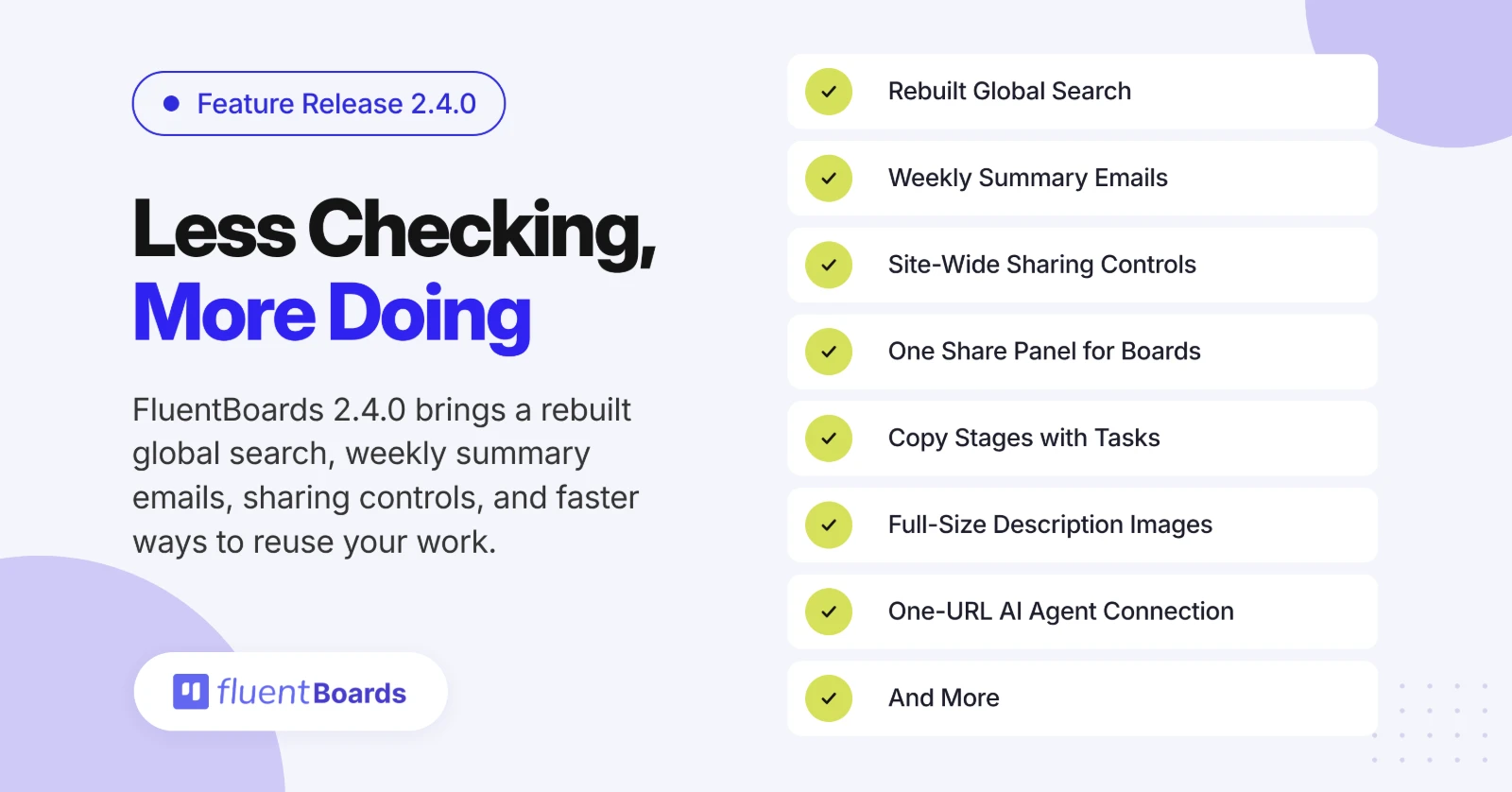
FluentBoards 2.4.0: A New Global Search, Weekly Summary Emails, Sharing Controls, and More!


FluentBoards 2.4.0 builds on what 2.3.0 started.
That release gave you more ways to share work and plan it. This one makes that work easier to review, easier to repeat, and easier to control.
Your team does not open every board every day. Things can slip between check-ins, the task you need can take longer to find than it should, and a stream of single notifications often creates more noise than clarity.
So we focused this release on making that everyday experience easier.
We rebuilt global search from the ground up, so any task, board, or person is now only a few keystrokes away. We added a weekly summary email that shows each member what they finished, what needs attention, and what is coming up next.
And we grouped notifications by task, so several quick changes to the same task arrive as one update instead of many.
There is more.
Site admins now get controls for board and task sharing across the whole site, while every sharing option for a board now lives in one Share panel. You can also duplicate a stage with all its tasks, open description images at full size, and connect AI agents with a single URL.
Let’s take a closer look.
One more thing: there’s an announcement waiting at the end!
Everything New in FluentBoards 2.4.0
FluentBoards 2.4.0 focuses on seeing your week at a glance, keeping sharing under control, and repeating good work faster.
= 2.4.0 (Date: November 23, 2026) =
New
- Global search, rebuilt with ranked results, filters, and keyboard shortcuts
- Weekly task summary emails with a custom schedule
- Site-wide sharing controls and public task links in the board menu
- Copy stages with their tasks and details
- Full-size image previews in task descriptions
- Single-URL connections for AI agents through MCP
Improvements
- Grouped task notifications, simpler preferences, and separate mention emails
- Task emails follow each recipient’s language
- Recent and common emoji suggestions
- Full activity dates and archive-date sorting
- Clearer MCP tool instructions and responses
- Members-only [fluent_board id] shortcode, now shown in the Share panel
- Drop images straight into task comments
- HTML attachments are saved as text files and downloaded safely
Fixed
- Unread counts and dependency badges not updating after viewing tasks
- Inherited notification settings and Table View column preferences
- Missing members in search and lost selections during searches or failed bulk actions
- Timezone differences in Trello and Asana import dates
- Duplicate site initials in email previews
Security
- Security hardening for REST requests, comment links, CSV imports, and CRM contact details
Here are the changes in search, your inbox, your sharing settings, and your boards.
A new global search, built from the ground up
The global search in FluentBoards just got a serious upgrade with FluentBoards 2.4.0.
It is not only cleaner visually, but also much more capable, so finding the right task, board, or person takes fewer clicks and less time.
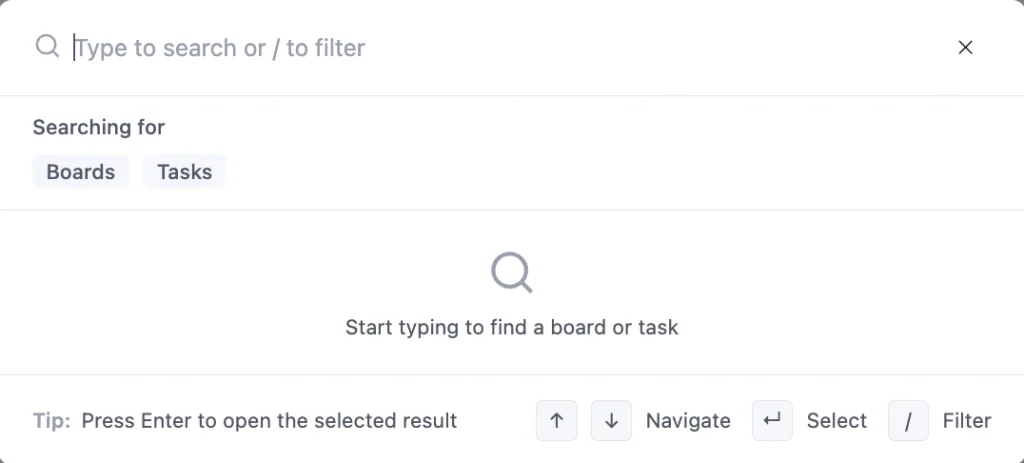
The old search worked well if you remembered the exact words. But on a busy site, the result you wanted could still be buried a few scrolls down, with no easy way to narrow things down by board, person, or status.
That changes in 2.4.0.
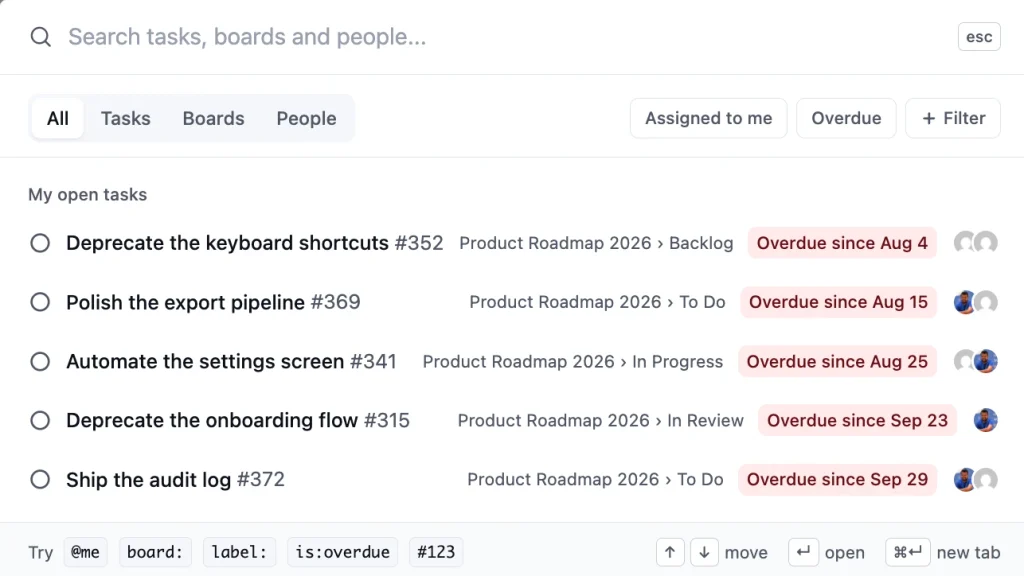
Global search now comes with a new interface and a smarter search engine. Results are ranked by relevance, so the closest match appears first. You can also switch between All, Tasks, Boards, and People, while subtasks now appear in search and open directly inside their parent task.
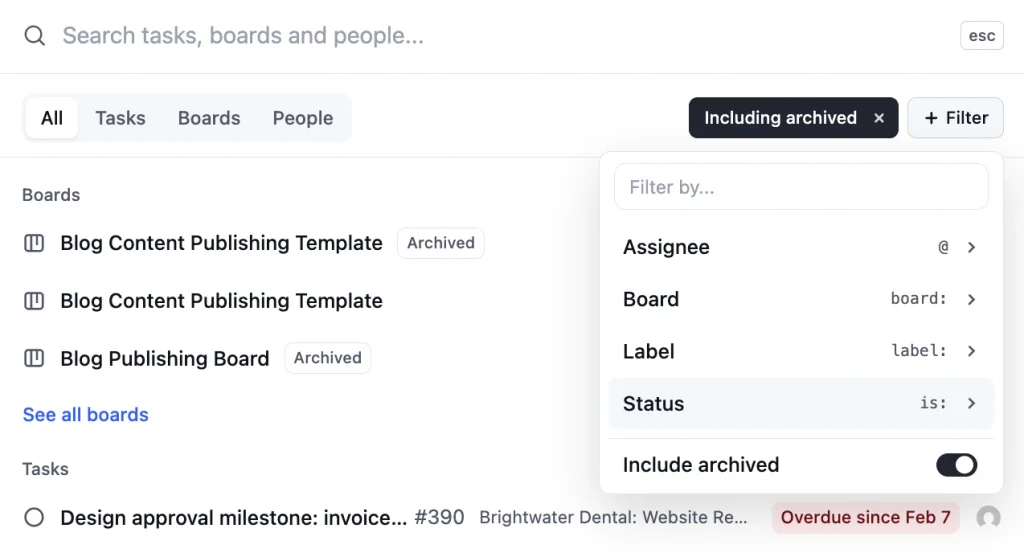
Need to narrow things down further? Use the Filter button or quick chips like Assigned to me and Overdue.
You can also type shortcuts directly into the search box:
- `@name:` to find tasks assigned to a person
- `board:` to search inside a specific board
- `label:` to find tasks with a particular label
- `is:` to filter by status, including archived tasks
There are a few keyboard shortcuts too:
- Cmd/Ctrl + K to open global search where WordPress is not already using that shortcut
- Cmd/Ctrl + Enter to open a result in a new tab
- Esc to step back
- Backspace to remove the last filter
And the whole experience works across dark mode, right-to-left languages, and mobile screens.
Weekly task summary emails
Monday morning usually starts with the same question: where do things stand? Answering it means opening board after board, checking due dates, and scrolling through activity.
Now FluentBoards answers it for you. Once a week, each member gets one email built from the tasks they are assigned to or watching.
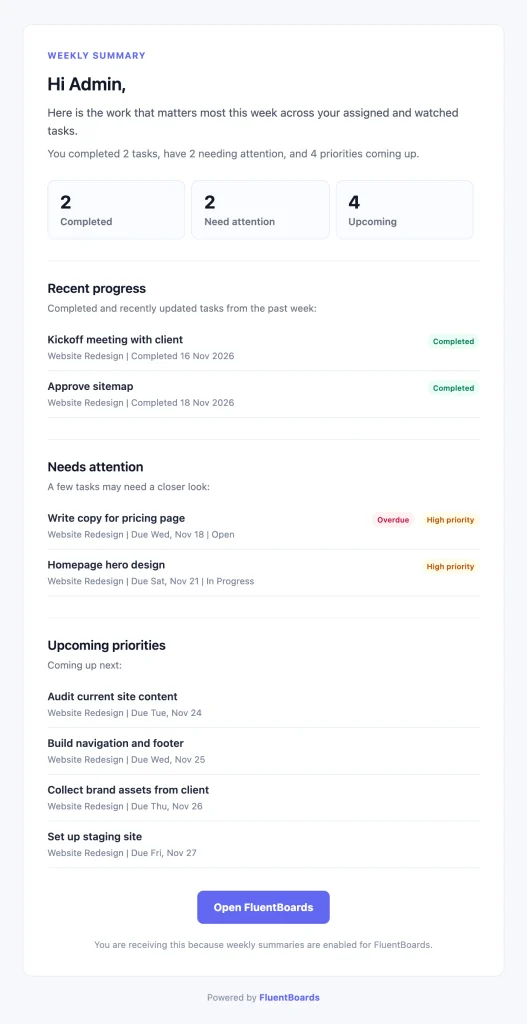
It opens with three quick counts (completed, needs attention, and upcoming), followed by three sections:
- Recent progress: tasks finished or updated in the past week
- Needs attention: open tasks that are overdue, high priority, or due today
- Upcoming priorities: tasks due in the next seven days
Each section shows up to five tasks with a View all link, and every task links straight back to FluentBoards. Archived tasks and boards stay out of it, and so does anyone who has paused their notifications, along with any board they have paused.
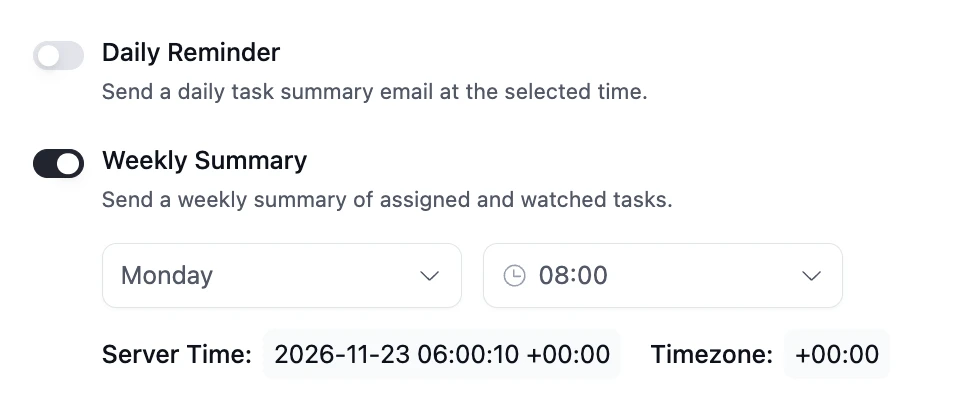
To enable: Settings → General Settings → turn on Weekly Summary, then pick the day and time it is sent.
Note: Weekly summary emails are part of FluentBoards Pro
Site-wide sharing controls
In 2.3.0, we made it easy to share a public board or a single task. Some teams need the opposite too: a way to switch sharing off for the whole site, or to see exactly what has been shared.
General Settings now has two switches: Board Sharing and Task Sharing. Both are on by default.

- Board Sharing off: public board pages stop working, and the option disappears from the board menu.
- Task Sharing off: existing task links stop working but are kept, so they come back when you turn sharing on again. The share option inside tasks is hidden.
Each board also gets a Shared Tasks option in the board menu.
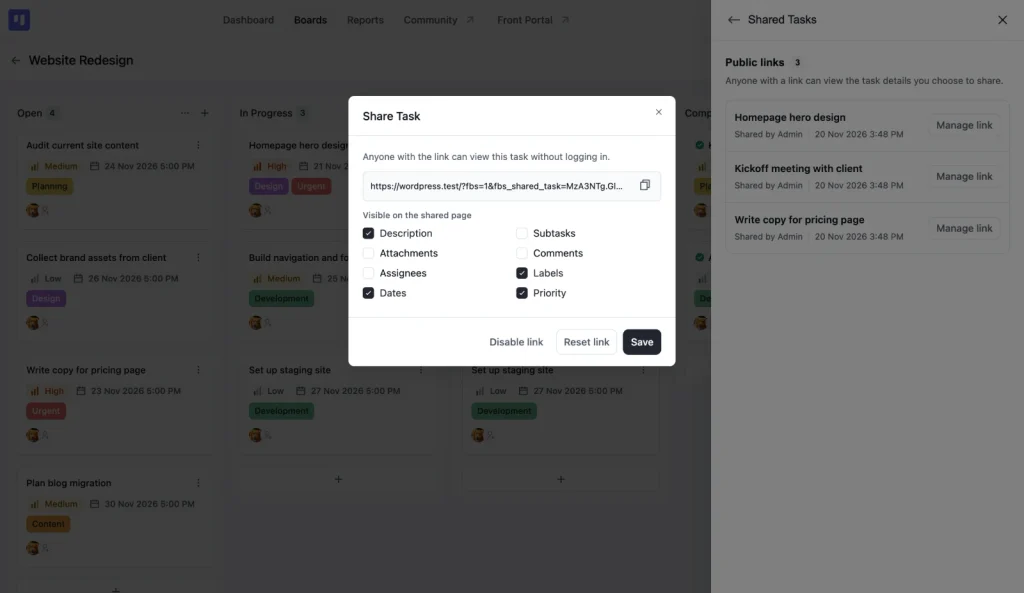
It opens a Public links panel that lists every task on the board with a public link, who shared it, and when. Click Manage link on any task to change what the shared page shows, reset it to a new URL, or disable it.
Note: Board sharing and the site-wide switches are part of FluentBoards Pro
Copy stages with their tasks
Some stages are worth reusing. A QA checklist, an onboarding sequence, a set of recurring deliverables. Rebuilding them task by task wastes time and invites mistakes.
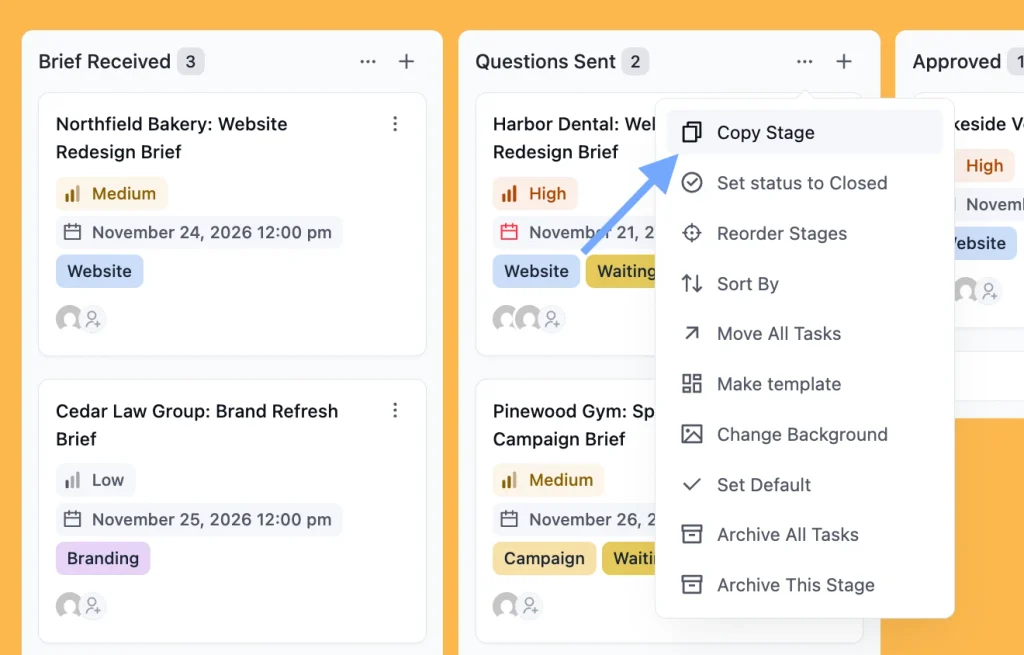
You can now copy a stage together with its tasks. The tasks come with their assignees, labels, attachments, and subtasks, including subtask assignees. The new stage appears right after the original, ready to rename and use. Comments stay with the original tasks, and archived tasks are not copied.
To copy: open the stage menu → Copy Stage → tick “Copy tasks with their details” → confirm. Stages with up to 200 tasks can be copied in one go.
One URL for AI agents
Connecting an AI agent to FluentBoards through MCP used to mean creating and copying a password. Now it can take a single URL.
A new Connect with one URL card appears in Settings → MCP for AI Agents, and in MCP Connections in your account. Pick your AI client, copy its ready-made config, and sign in with your WordPress account.
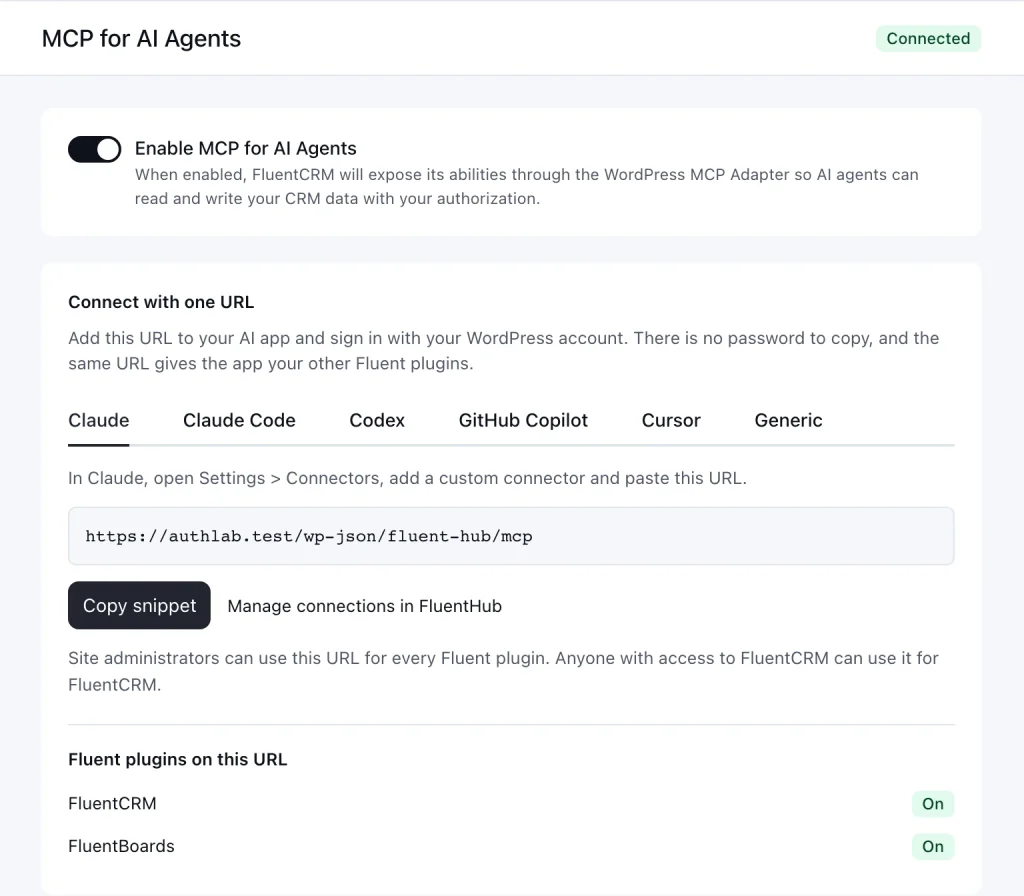
There is no password to copy. Site administrators can use the same URL for every Fluent plugin on the site, and board members can use it too when an admin allows MCP for members.
The card appears when FluentHub is available on your site. Without it, MCP works exactly as before. We also made the MCP tools clearer, with better instructions and responses, including a note that changing a due date reopens a task.
Full-size image previews
Screenshots and mockups in task descriptions are often too small to read. Click any image in a task description to open it full-size, with zoom and rotate. Press Esc to close it. Linked images still work as links.
Smaller Improvements That Add Up
This release also smooths out the parts of FluentBoards you use every day:
- Grouped notifications: several quick updates to one task by the same person now arrive as one in-app notification and one email.
- Simpler notification preferences: fewer choices to sort through, with mention emails as their own option.
- Emails in your language: task digests and scheduled emails now use each recipient’s WordPress language, not the site default.
- Emoji suggestions: type a colon in a comment to see your recent and most common emoji first.
- Full activity dates: hover over a relative time like “3 days ago” on the dashboard or a member profile to see the exact date and time.
- Archive sorting: sort archived tasks by archive date, newest first.
Plenty of Fixes Under the Hood
Opening a task now marks its notifications as read, and dependency badges update as soon as you close task details. Board and profile preferences show inherited notification settings correctly, and Table View respects your Subtasks and Activity column choices. Member search keeps people already on the board visible and holds your selection while you type. Failed bulk actions on archived tasks keep those tasks selected so you can retry. Trello and Asana imports now store dates in your site timezone, and email previews no longer show the site initial twice.
We also hardened security for REST requests, comment links, CSV import titles, and CRM contact details. We recommend updating soon.
In Case You Missed FluentBoards 2.3.0
FluentBoards 2.3.0 focused on sharing and planning. Here is a quick recap:
- Read-only task share links, no login required
- Share Board controls for public boards
- Task dependencies in task details on Kanban and List views
- Notification pause for every board or a single board
- Emoji reactions and emoji in comments
- Save and create another task in one go
Get Ready for FluentBoards 3.0: Built-in Automation and a Lot More on the Way
With 2.4.0, your week arrives in one email, sharing stays exactly as open as you want it, and good work is one copy away from happening again. But we are not slowing down.
Built-in automation is coming to FluentBoards.
Soon you will be able to tell your boards what to do when something happens: when a task moves to a stage, gets a label, or is completed, FluentBoards will take the next step for you. Assign the right person, move the task along, leave a comment, or send an email, without anyone having to remember to do it.
Automation is the biggest piece of what is coming with FluentBoards 3.0, but it is not the only one.
There is a lot more on the way, and we cannot wait to show you.
Until then, update both FluentBoards and FluentBoards Pro to 2.4.0, turn on your weekly summary, and tell us what you would like to automate first. Your answers will shape what we ship.
Let’s redefine project management with FluentBoards!
Let’s redefine project management with FluentBoards!

Follow:


Get Tips, Tricks, & Updates
We won’t send you spam.


Add your first comment to this post