


How to Connect Your Client Onboarding Workflow and Project Handoffs


The project was complete, and the work was good. But when Rowhaven Digital, a three-person WordPress agency, went to hand off the finished site, nobody could find the client’s approval contact.
Here’s the thing: that contact name had been sitting in a Google Form since week one. The form was in an email, and the email was buried in a thread nobody had opened since the project started.
So after that handoff went wrong, the team made one decision: everything captured during onboarding now lives on the same board where the project gets delivered.
That’s the system, and here’s how to build it in FluentBoards.
Note: In this article, we use “Rowhaven Digital” as a fictional example to walk through the onboarding-to-handoff workflow.
Why Onboarding and Handoffs Break Down in Separate Systems
Most agencies run onboarding and delivery as two separate workflows. Onboarding lives in intake forms, email threads, or a kick-off doc, while delivery happens in the project management tool.
So when handoff arrives weeks later, someone has to go hunting for that context. The two phases were never actually connected. They just happen to belong to the same client.
The tool-switching problem
When onboarding data lives in a different system from the project work, information decays fast. The intake form gets submitted, a summary gets copy-pasted into a message, and the original responses stop being referenced.
At Rowhaven Digital, the first handoff failure came down to one missing detail: the client had listed a secondary approval contact in the intake form “for handoff and delivery only.” That note never made it into the project tool. So the handoff went to the wrong person, and the approval was delayed by four days. The client noticed.
The problem wasn’t carelessness. It was architecture. Onboarding and delivery were on different systems, which meant context that existed at the start of the project was invisible at the end of it.
What gets lost between the two phases
The gap shows up in the same four places across most agencies.
The agreed project scope disappears: What was confirmed in the project scope during onboarding versus what was actually built should be an easy question to answer. But when the scope lives in a separate document, nobody references it during the build. By handoff, both sides are working from memory, and that is exactly where scope creep takes hold.
The approval contact is forgotten: The person who fills out the intake form on day one is often not the person who signs off on delivery. That handoff contact gets mentioned once, somewhere in the onboarding paperwork, and never captured anywhere the team will find it six weeks later.
The project deliverables get fragmented: File formats, staging URLs, access credentials, and DNS details for the project deliverables all get discussed during onboarding and assumed to be remembered. They rarely are. By the time delivery arrives, the project manager is sending a follow-up email asking for information the client already provided.
Open questions go unresolved: Almost every onboarding surfaces at least one item that needs a decision before work begins, like “Do we match the existing brand color scheme or redesign from scratch?” But when those questions live in a separate system, they get noted, acknowledged, and then forgotten. Nobody can see them once the project is underway.
A single board that connects both phases keeps all of this alive throughout the project.
What a Connected Onboarding-to-Handoff Board Looks Like
Now, what does this look like in practice? One FluentBoards board, one client, all stages from day one through final delivery.
Onboarding stages sit on the left side of the board, active project stages run through the middle, and handoff stages close it on the right. A task created during onboarding is still on the same board the day you deliver. This is a project management workflow where every phase lives in one place instead of being scattered across tools.
The board as the single thread
FluentBoards organizes work into sequential Kanban board stages that your team moves tasks through as the project progresses. When onboarding stages and handoff stages live on the same board as the active project stages, the context captured at the start of the relationship travels with the work.
This way, you don’t have to check a separate system, copy-paste a summary, or search an inbox. The task for “Confirm handoff approval contact” that was completed in week one is still on the board and visible in week six when you need it.
A stage structure that works
The layout below is one proven structure for a client project board. Adapt the stage names to match how your agency actually works.
Onboarding stages:
- Discovery: capture initial requirements as individual tasks, like “Confirm the number of pages and site structure before design begins” or “Agree on the number of revision rounds included in the fixed fee”
- Assets Received: one task per deliverable the client owes you before work starts, like “Receive all logo files and brand guidelines by Thursday” or “Client confirms access to current hosting account by end of week”
- Scope Approved: the client confirms the agreed scope in writing, documented as a comment on the task or an attached sign-off document. Treating this stage gate as a formal project milestone keeps the whole team aligned before development begins.
Active project stages:
- In Progress
- Internal Review
- Client Feedback
Handoff stages:
- Staging Review: the client checks deliverables against the original scope tasks still visible on the same board
- Final Approval: client sign-off documented as a task comment or attachment
- Delivered: project complete, board archived. The Delivered stage connects directly into your project closure phase checklist, where you confirm outstanding payments, send final files, and offboard access.
The onboarding tasks in the first three stages are never deleted. They stay on the board as a live reference for every decision made in the middle stages and every approval requested at the end.
How to Build a Client Onboarding Workflow Board in FluentBoard
Setting up the connected board takes about fifteen minutes the first time. After that, the board template feature lets every new client start from the same structure in under two minutes. Work through these steps once, save the template, and you’re done building it.
If you are starting from scratch, the guide on how to create an agency project board covers the foundational board setup you can build this workflow on top of
Step 1: Create the board and set up the onboarding stages
Create a new board in FluentBoards and rename the default stages to match the onboarding phase. Start with Discovery, Assets Received, and Scope Approved.
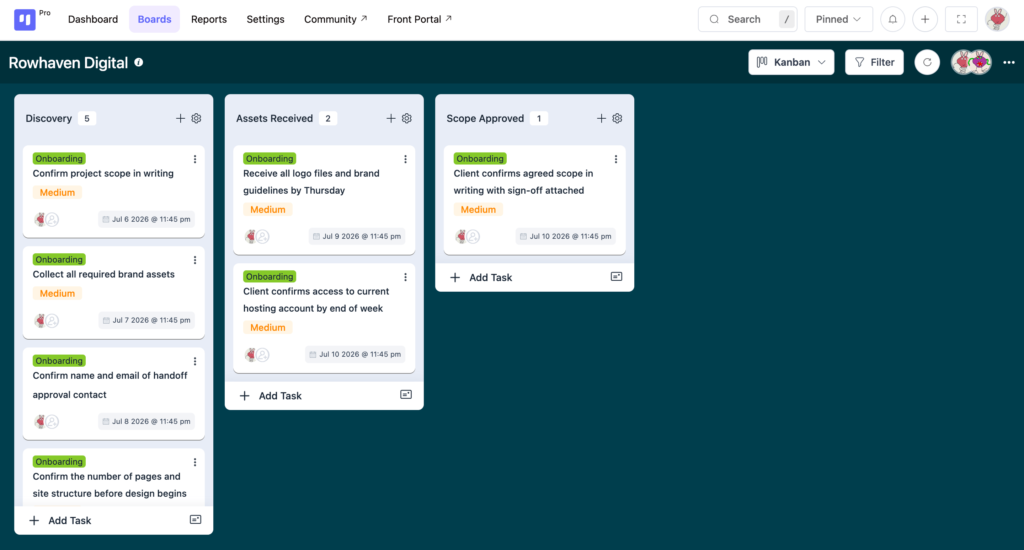
Add a task for each onboarding item as soon as the client project is confirmed, and assign a due date to every one of them. “Collect brand assets” is not a task. “Receive all brand assets by end of day Friday before kick-off” is a task.
Most of these tasks come straight out of your project kickoff meeting. Capture them on the board while the call is still fresh.
Rowhaven Digital keeps three standing tasks in Discovery on every client board:
- “Confirm project scope in writing”
- “Collect all required brand assets”
- “Confirm name and email of handoff approval contact”
That last task is there because of that first handoff failure. It lives in Discovery to keep the approval contact on record from day one, not tracked down in week six.
Step 2: Add the active project and handoff stages
After the onboarding stages, add In Progress, Internal Review, and Client Feedback for the active work. Then add Staging Review, Final Approval, and Delivered for the handoff.
The original scope tasks remain on the board throughout. During Staging Review, your team checks delivery directly against the Scope Approved tasks that have been on the board since week one. The client’s confirmed requirements are not in an email thread, they are on the same board where the delivery is being reviewed.
Step 3: Save it as a board template
Once the stage structure and standing tasks are set, save the board as a template. Go to board settings and select “Save as template.” Name it something specific, like “Client Project Standard” or “Agency Onboarding to Delivery,” so it is easy to find when a new engagement starts.
Every new client project now starts from this template. The stages and standing tasks are already there.
You can also set default assignees per stage, which automatically adds the right team member when a task moves into their stage. Your developer is assigned the moment a task enters In Progress, and your account manager takes over at Staging Review.
Free vs Pro: Board templates and default assignees are FluentBoards Pro features. On the Free plan, duplicate an existing board manually to reuse the stage structure for new clients.
See the full feature breakdown on the FluentBoards Free vs Pro page
Step 4: Give the client access via the front portal
During the handoff stages, your client needs to see what they are reviewing and approving. The FluentBoards frontend portal handles this by letting board members log in directly from the frontend of your WordPress site. Add your client as a member of their board and they get a clean portal view of the project without ever stepping into your WordPress dashboard. They see the boards they belong to, nothing else.
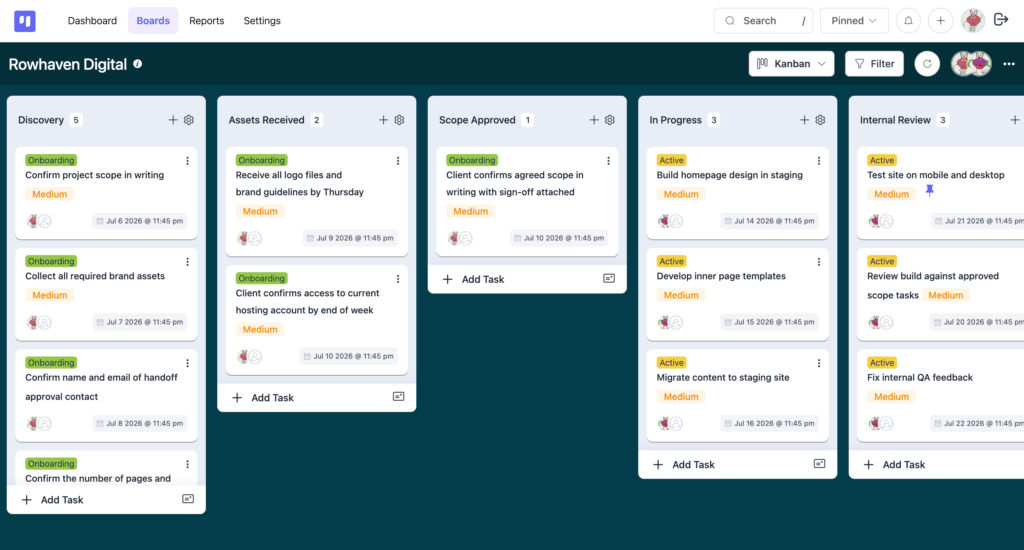
For Staging Review, this means your client can check deliverables against the Scope Approved tasks while looking at the same board your team works in. You do not need to compile a summary email explaining what is ready for review. The board shows it.
For the complete setup from kickoff to delivery, see how FluentBoards helps agencies
Start Every Client Project With Everything You Will Need at the End
Handoffs break down not because agencies forget things, but because the things they need at handoff were captured in a system they stopped using the moment the active project started.
One connected board changes that. Your onboarding tasks from week one are still alive in week six when Staging Review begins.
The approval contact is a task, not a memory. The delivery specs sit as comments and attachments right where the delivery is being finalized. Nothing has to be recovered, re-asked, or pieced together from an email thread.
For Rowhaven Digital, setting up a new client board from the template now takes under two minutes, and they have not had a handoff delay tied to missing onboarding information since.
If missed deadlines are a recurring issue alongside the context gap, find out why projects miss deadlines even when the team is fine.
Thanks for reading. Your first template is only fifteen minutes away.
Let’s redefine project management with FluentBoards!

Follow:


Get Tips, Tricks, & Updates
We won’t send you spam.




Leave a Reply