

Introducing FluentPlayer: A New Way to Showcase, Manage, and Track Videos on WordPress


For years, WordPress users have been uploading videos, embedding YouTube or Vimeo links, and hoping viewers take action afterward. Maybe they click a button below the video. Maybe they fill out a form on another page. Maybe they watch until the end.
Most of the time, you’re left guessing!
You see the outcome, but rarely know exactly what happened or which moment led to it.
Hey folks, the wait is over!
WPManageNinja’s newest product, FluentPlayer, has finally landed to fix that gap!
And, in this post, we’ll walk you through what it is, what sets it apart, which features matter most, how it integrates with the Fluent ecosystem, and whether it deserves a place on your WordPress site.
Let’s go.
What is FluentPlayer?
FluentPlayer is a next-generation video player plugin for WordPress built by WPManageNinja, the team behind Fluent Forms, FluentCRM, FluentSMTP, FluentBoards, FluentSupport, FluentCart, FluentCommunity, and more.
At its core, FluentPlayer helps you embed, manage, customize, track, and interact with videos directly inside WordPress. It supports multiple media sources, including:
- Self-hosted videos
- YouTube
- Vimeo
- BunnyCDN
- Mux
- External URLs
- HLS streaming
- Audio files
That means you are not locked into one video source. You can keep using the platforms or hosting options you already prefer and still deliver them through one consistent player experience.
But the real value of FluentPlayer goes beyond playback.
FluentPlayer is designed for users who want videos to do more than sit on a page. It helps course creators structure lessons, marketers capture leads, agencies deliver branded video experiences, and businesses understand how viewers actually engage with their videos.
FluentPlayer Exclusive Early-Bird LTD Awaits!
Why FluentPlayer Matters
Let’s be honest. Most video players solve the basic problem. They help you show a video on your website.
That is useful, but it is no longer enough.
Video is now used everywhere: product demos, course lessons, sales pages, onboarding tutorials, community content, support videos, webinars, podcasts, testimonials, you name it!
But most WordPress site owners still struggle to answer simple questions like:
- How long are people watching?
- Where do viewers drop off?
- Which videos keep people engaged?
- Which videos drive leads or conversions?
- Are course students actually finishing lessons?
- Are product videos helping people take action?
And, this is the visibility gap FluentPlayer is trying to solve!
Here’s what WPManageNinja CEO Shahjahan Jewel had to say about why FluentPlayer was built
Features That Make FluentPlayer Special
FluentPlayer brings a fresh approach to video engagement. While every feature has its role, these are the standout capabilities that make the biggest difference.
The Biggest Difference: Interactive Layers
If there is one feature that defines FluentPlayer, it is Interactive Layers. This is where FluentPlayer moves from being a video player to becoming an engagement and conversion tool.
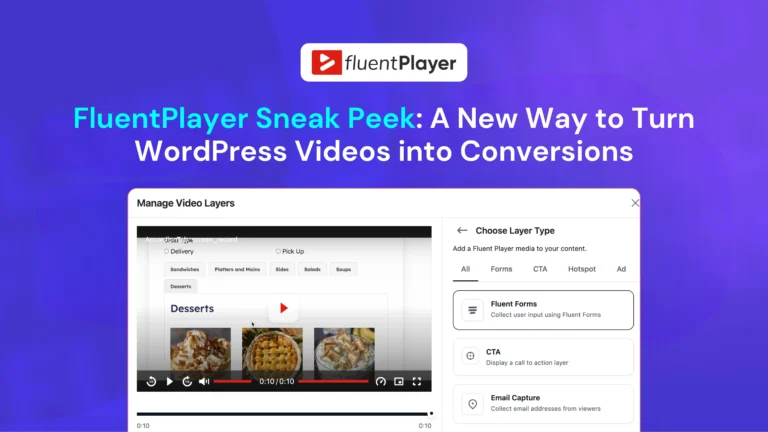
FluentPlayer supports different types of interactive layers, including: Forms, Email capture, CTA banners, Hotspots, Ads, Shortcodes. It lets you place actions directly inside your videos at specific timestamps. Instead of asking viewers to leave the video, scroll below the player, or visit another page, you can show the right action at the exact moment they are most engaged.
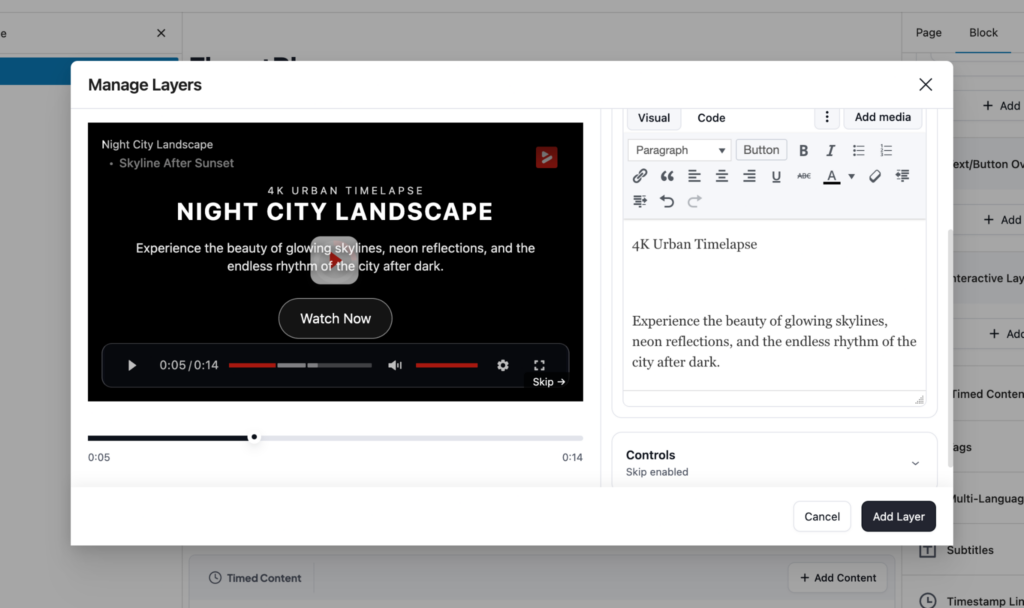
Imagine you are running a product demo video. Right after you show the strongest feature, a CTA button appears inside the video asking viewers to try the product. Or imagine you are running a course lesson. Halfway through the video, a Fluent Forms form appears asking learners to share feedback or answer a quick question.
Video Analytics That Go Beyond Views
Basic views are not enough if you care about performance. You need to understand what happens while people are watching. And FluentPlayer includes analytics that help you track video performance from different angles.
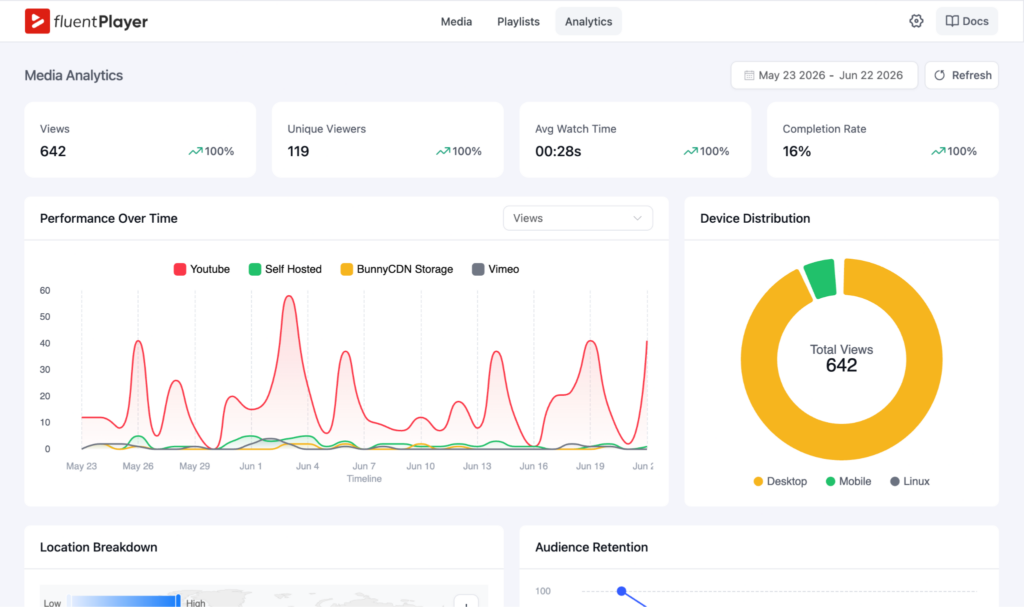
You can track metrics like:
- Total views
- Unique viewers
- Average watch time
- Completion rate
- Audience retention
- Top videos
- Top viewers
- New vs returning viewers
- Device distribution
- Location breakdown
- Performance over time
This makes FluentPlayer useful for more than publishing videos!
Video Playlists for Better Structure
If you publish more than one video, playlists matter. A playlist helps viewers move from one video to the next without confusion. It also makes your video library feel more polished and intentional. And, FluentPlayer lets you create video playlists.
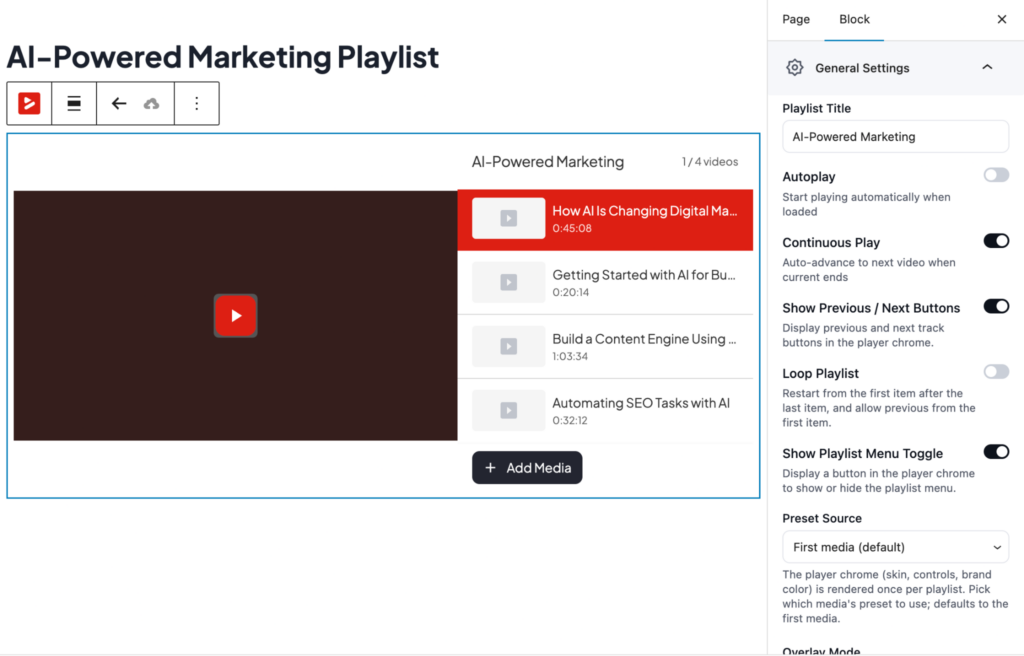
FluentPlayer also gives you playlist layout and appearance controls, so your playlists do not have to look like a default plugin block. You can create a player experience that feels consistent with your website and brand.
Chapters and Timestamps
Long videos can be difficult to follow. Even if the video is valuable, viewers do not always want to scrub through a 30-minute recording to find one section.FluentPlayer solves this with chapters and timestamps.
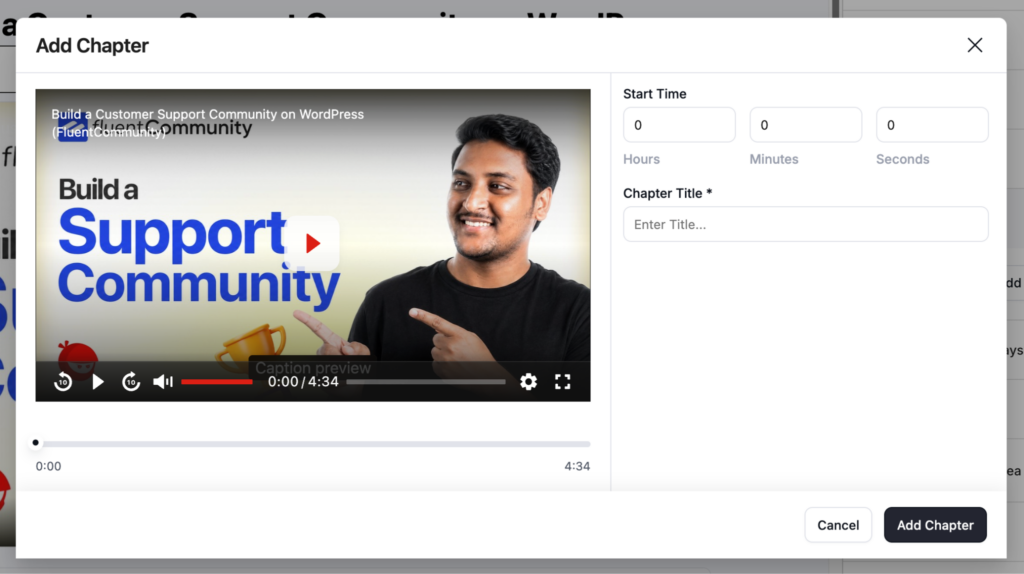
Instead of forcing people to watch from start to finish, you can split long videos into clear sections so viewers can jump directly to the part they need. For tutorials, courses, product walkthroughs, and webinars, this makes the viewing experience much smoother.
Resume Playback
Resume Playback is one of those features that sounds small until you need it. A viewer may start a video today and come back tomorrow. Without resume playback, they have to find their place again.
With FluentPlayer, videos can remember where viewers stopped and allow them to continue from the same point later. For learning content, this can directly improve completion and engagement.
Multiple Media Sources
Not every website uses the same video source. Some prefer self-hosted videos. Some use YouTube. Some use Vimeo. Some need BunnyCDN or Mux. Some use HLS streaming.
And, one of the best parts of FluentPlayer is flexibility. FluentPlayer supports different media sources while keeping the player experience consistent. That means your videos can come from different places, but your viewers still get one branded and controlled experience on your website.
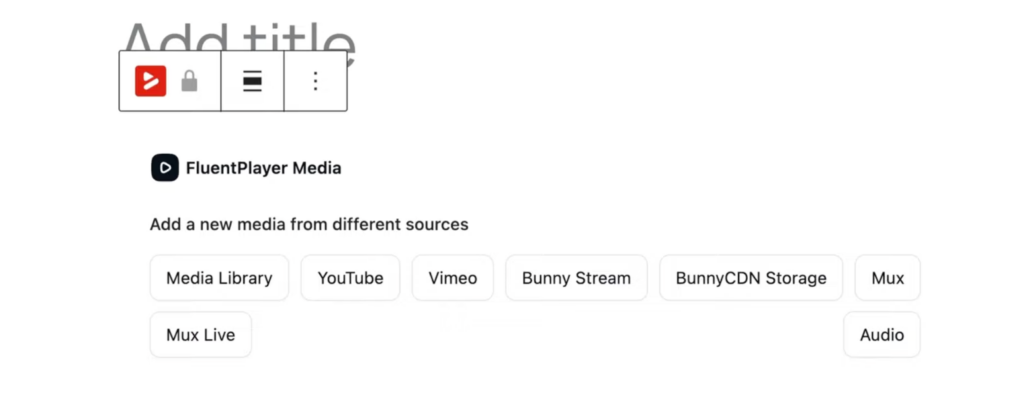
You may have older videos on YouTube, premium lessons hosted privately, product demos on Vimeo, and newer content delivered through BunnyCDN or Mux. FluentPlayer helps bring those experiences together under one player.
Custom Branding
Branding is another area where FluentPlayer shines. Instead of a generic player, you can shape the player to match your site.
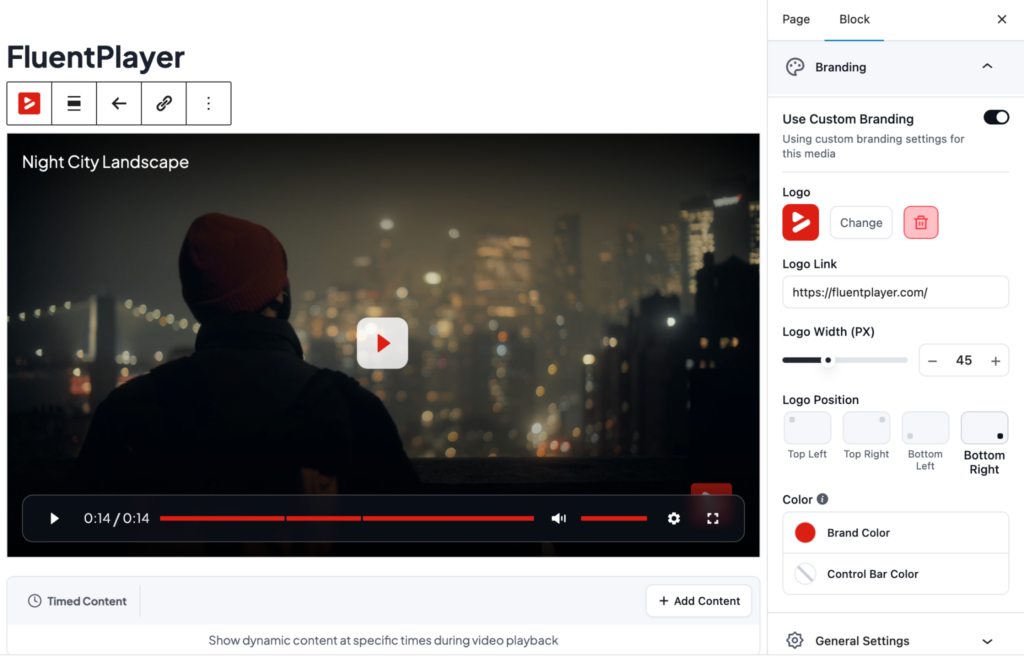
FluentPlayer supports branding options like: Logo, Brand colours, Control bar colour.
You can also create and save your own presets, then reuse them across pages and videos. For a large site or multiple client sites, that removes a lot of repetitive setup.
Playback Controls for Better Viewing
FluentPlayer also gives you control over how videos behave on the page. Some of the key playback features include:
- Autoplay
- Muted autoplay
- Play inline on mobile
- Picture-in-picture
- Speed control
- Progress bar
- Poster image
- Aspect ratio control
- Load strategy
- AJAX compatibility
These features matter because video behavior can affect the entire page experience. For example, inline mobile playback keeps videos playing on the page instead of forcing full-screen mode. Speed control lets viewers watch at their own pace. Picture-in-picture lets them continue watching while browsing.
Multi-Language Subtitles and Language Switching
FluentPlayer supports multiple subtitle files and lets viewers switch languages directly inside the player.
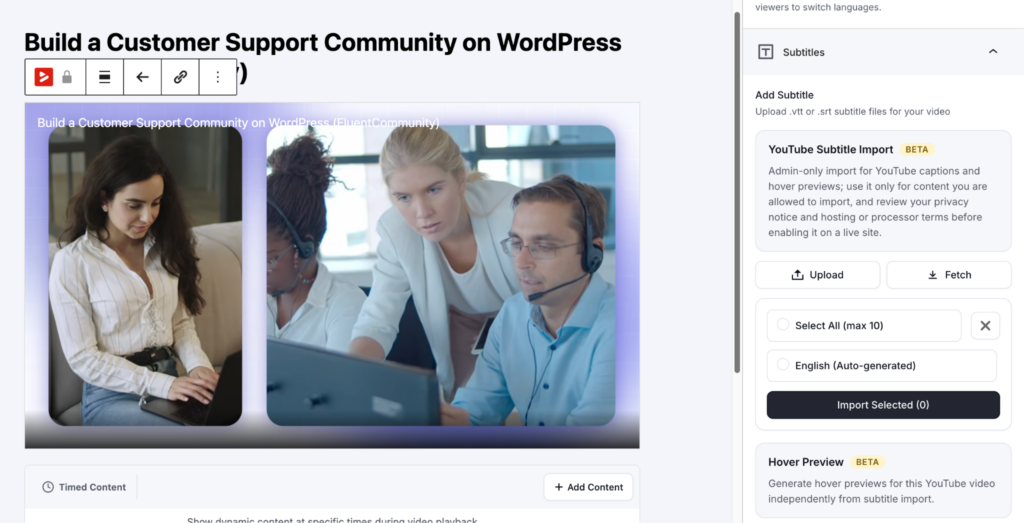
This is useful for:
- Course creators with international students
- SaaS companies with global users
- Communities with multilingual members
- Agencies serving clients in different regions
- Brands that want more accessible video content
To get the full picture of what FluentPlayer is capable of, explore all FluentPlayer Features
FluentPlayer Integrations: Connecting Video With Your Existing Workflow
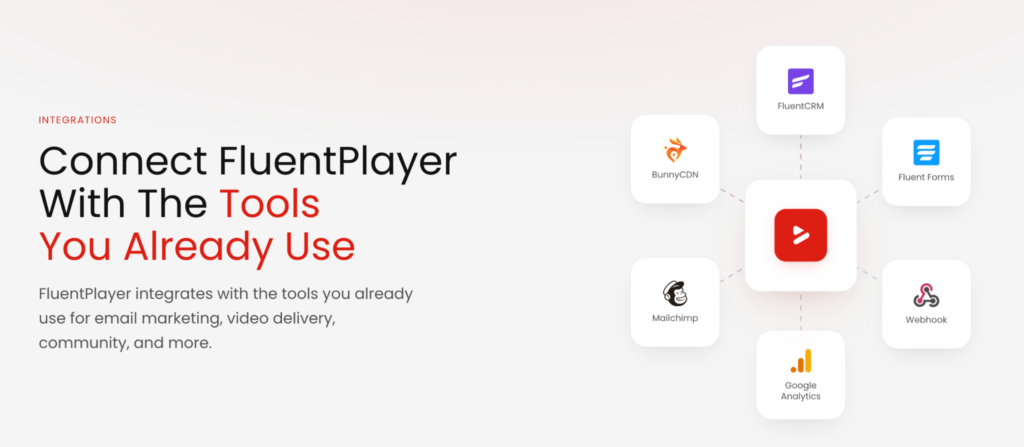
One of the biggest strengths of FluentPlayer is how well it connects with the tools many WordPress businesses already use. It does not force you to rebuild your workflow around video. Instead, it brings video into your existing workflow, whether you are capturing leads, running campaigns, managing courses, or tracking performance.
FluentPlayer and the Fluent Ecosystem
FluentPlayer is part of the Fluent ecosystem. That means it can work with tools many WordPress businesses already use.
Fluent Forms Integration: Form Inside Videos
FluentPlayer naturally connects with Fluent Forms. Instead of embedding a form below a video, FluentPlayer lets you place a form directly inside the video experience.
You can collect leads when viewers are most engaged. You can ask a quick question after explaining a topic. You can collect registration details inside a training video. You can gather feedback without breaking the viewing flow. And once the form is submitted, the data can move into your existing workflow.
FluentCRM Integration: From Viewers to Contacts
FluentPlayer works with FluentCRM, which means leads collected from videos can go straight into your CRM. You can capture an email from a video overlay and send the lead to FluentCRM. From there, you can tag the contact, segment them, or trigger follow-up automations.
For example:
- A viewer watches a product demo and submits their email
- FluentCRM adds them to a specific list
- A tag is applied based on the video or campaign
- A follow-up email sequence starts automatically
This turns video into an actual marketing channel. Instead of treating video engagement as something separate from your CRM, FluentPlayer brings both together.
FluentCommunity Integration: Better Video Experiences for Courses and Communities
FluentCommunity and FluentPlayer are built under the same WPManageNinja ecosystem, so the connection feels more native and intentional than a regular plugin integration. You can bring videos directly into your community spaces and still keep the full FluentPlayer experience available for members.
That means learners can watch lessons, move through learning materials, access restricted videos, and stay inside the same community environment from start to finish.
Other Integrations
FluentPlayer also supports several non-Fluent integrations that make it more flexible for different workflows.
- Mailchimp and Webhooks: FluentPlayer supports Mailchimp and webhooks, giving users more options outside the Fluent ecosystem. This is helpful if your email marketing or automation setup depends on external tools.
- Google Analytics: For deeper reporting, FluentPlayer can connect video performance with Google Analytics. This helps teams understand how video engagement fits into their broader website performance.
- BunnyCDN, Mux, Cloudflare, and Gumlet: For video hosting, streaming, and delivery, FluentPlayer supports BunnyCDN, Mux, Cloudflare R2, Cloudflare Stream, Gumlet Video, and Gumlet Stream.
- LearnDash: FluentPlayer also supports LearnDash, making it useful for course creators who want a better video experience inside their learning platform.
To explore more, visit the FluentPlayer Integrations page
FluentPlayer Free vs Pro
FluentPlayer offers a strong free version and a more advanced Pro version for users who want deeper engagement, analytics, playlists, integrations, and customization.
The free version covers essentials like:
- Custom branding
- Player presets
- Forms and email capture layers
- Multiple media sources like self-hosted videos, YouTube, Vimeo, and audio
- Video chapters
- Play inline on mobile
- Autoplay
- Picture-in-picture
- Language switcher
- Speed control
- Load strategy
- Poster image
- Aspect ratio
- Title overlay
- FluentCRM integration
- Fluent Forms integration
- FluentCommunity Integration
That is already a strong foundation for users who need a clean and capable WordPress video player. The Pro version unlocks more advanced tools, including:
- Video analytics
- Customizable player presets
- Advanced interactive layers with CTA banners, hotspots, ads, and shortcodes
- External URLs
- HLS streaming
- Mux
- Video playlists
- Playlist layout and appearance customization
- Remember playback position
- Text and button overlays
- Timed content
- Subtitles
- AJAX compatibility
- BunnyCDN integration
- Mailchimp integration
- Webhook integration
- Google Analytics integration
- Mux video integration
- Media tagging
- Conditional visibility rules for layers
- Copy URL at the current time
So, the free version is a great starting point for clean playback, branding, chapters, and simple lead capture. But if you want the full power of FluentPlayer, Pro is where the real magic appears.
Want the full comparison? Visit the FluentPlayer Free vs. Pro
How FluentPlayer Compares with Other Video Players
FluentPlayer enters a space where users already know tools like Presto Player, Vimeo, Wistia, Easy Video Player, HTML5 embeds, and other video gallery plugins.
But FluentPlayer is not trying to win by saying, “We also play videos.” That would not be enough. Its advantage comes from three areas:
- More interactive video experiences
- Native WordPress and Fluent ecosystem connections
- Stronger focus on analytics and business outcomes
Compared to Basic Embeds
Basic YouTube or Vimeo embeds are fine if all you need is playback. But they are limited when it comes to branding, lead capture, in-video actions, analytics, and native WordPress workflows.
With FluentPlayer, you can keep using YouTube or Vimeo as a source while adding branding, overlays, forms, analytics, and CRM connections on top. And that’s a big upgrade for marketers, educators, and creators.
Compared to Presto Player
Presto Player is a popular WordPress video player and has served many users well. It already offers email capture, CTAs, an action bar, video analytics, chapters, playlists, and even a native FluentCRM connection for opt-ins. So this is not a case of one tool having engagement features and the other going without.
The real difference is narrower and more specific. FluentPlayer offers six interactive layer types against Presto’s three, adding clickable hotspots, an ads layer for monetisation, a shortcode layer, and full Fluent Forms embeds rather than email-only opt-ins. It also supports Mux alongside BunnyCDN, and reaches deeper into the wider Fluent stack with native links to Fluent Forms and FluentCommunity, not just FluentCRM.
For teams already building on Fluent tools, that broader native connection is the main reason to choose FluentPlayer. For everyone else, the right pick often comes down to which ecosystem you are already in.
Compared to Wistia
Wistia is a strong video platform, especially for businesses that want a dedicated SaaS video marketing platform. But Wistia lives outside WordPress.
FluentPlayer takes a different route. It keeps the video workflow inside WordPress and connects with tools already running on your site. For WordPress-first teams, that can feel simpler and more natural.
For a detailed comparison, visit the FluentPlayer comparison
Who Should Use FluentPlayer?
FluentPlayer is not only for one type of user. It can be useful for several different audiences.
- Course Creators: If you create courses, FluentPlayer gives you chapters, playlists, resume playback, subtitles, access control, and analytics. That means you can structure lessons better and understand where students struggle.
- Marketers: If you use video for lead generation, FluentPlayer’s Interactive Layers and FluentCRM integration are the stars. You can capture leads, show CTAs, trigger automations, and connect video engagement to your funnel.
- SaaS Companies: If you publish product demos, tutorials, feature walkthroughs, and onboarding videos, FluentPlayer helps you make those videos more actionable. You can track engagement, add CTAs, and guide viewers toward the next step.
- Agencies: Agencies will likely love the branding controls, reusable player presets, multiple sources, and playlist customization. It helps deliver professional video experiences for clients without relying on messy embed setups.
- Community Builders: For communities and membership sites, FluentPlayer can support lessons, gated videos, onboarding, and structured member content. With FluentCommunity integration, this becomes even more interesting.
- Content Creators: If you create a lot of videos, FluentPlayer gives you better organization, cleaner presentation, and more control over the viewing experience. Playlists, chapters, subtitles, and analytics make it easier to turn a growing video library into a polished experience.
What We Like Most About FluentPlayer
There is a lot to like here, but a few things stand out clearly.
1. Interactive layers feel fresh
This is FluentPlayer’s strongest differentiator. Being able to place forms, CTAs, hotspots, ads, email capture, and shortcodes directly inside videos changes how users can think about video. It makes the video feel active instead of passive.
2. Analytics make video measurable
FluentPlayer’s analytics focus solves a real pain point. Views alone do not tell you enough. Watch time, retention, completion rate, top videos, device data, and location breakdown give users more useful insight.
3. The fluent ecosystem advantage is real
If you already use FluentCRM, Fluent Forms, FluentBooking, or FluentCommunity, FluentPlayer becomes much more valuable. The product feels like it belongs inside that ecosystem instead of sitting beside it.
4. It supports real-world video workflows
Self-hosted videos, YouTube, Vimeo, BunnyCDN, Mux, HLS, audio, external URLs, playlists, subtitles, and branding controls give users a lot of flexibility. This makes FluentPlayer suitable for different types of websites.
5. It keeps WordPress at the center
Many video tools force you into another dashboard or platform. FluentPlayer keeps the experience inside WordPress, which will matter a lot to WordPress-first businesses.
FluentPlayer Pricing
FluentPlayer is currently offering exclusive Lifetime Deals. These offers won’t be around forever. Once it’s gone, there’s no coming back.
| License Type | Pricing |
| Personal (1 Site) | $199 /one-time lifetime license |
| Freelancer (5 Sites) | $399 /one-time lifetime license |
| Studio (25 Sites) | $599 /one-time lifetime license |
| Agency 50 Sites | * One-time payment – $799 /one-time * Pay Monthly – $89x 9months |
FluentPlayer Exclusive Early-Bird LTD Awaits!
Final Verdict: Is FluentPlayer Worth It?
So, is FluentPlayer worth your attention?
Yes, especially if video plays a meaningful role in your website, marketing, courses, community, or sales workflow.
If all you need is a basic embed, FluentPlayer may feel like more than you need. But if you want your videos to capture leads, trigger actions, show CTAs, track engagement, support courses, match your brand, and connect with your WordPress tools, FluentPlayer becomes much more interesting.
FluentPlayer is now available. Explore FluentPlayer today, check the launch offer, and see how it can help you turn your videos into a more engaging, measurable, and action-driven experience on WordPress.
Let’s redefine project management with FluentBoards!

Follow:


Get Tips, Tricks, & Updates
We won’t send you spam.




Leave a Reply