
How to Use a Kanban Board for Project Management: From Scattered Tasks to Organized Projects [Step by Step]


It was just another Monday morning.
The project was supposed to be on track but nobody really knew where things stood.
One person was waiting on a task that was never assigned. Another was working on something that was already done. And the manager was sending follow up messages just to find out what was happening.
Sound familiar?
Well, this is not a productivity problem and it is not a people problem either.
It is a visibility problem.
And that is exactly what a Kanban board fixes.
It gives your entire project one clear view so every task has a place, every person knows what to do next, and nothing falls through the cracks again.
So let us walk through exactly how to use a Kanban board for project management, step by step.
What is a Kanban Board in Project Management?
A Kanban board is a visual project management tool that shows every task your team is working on, what stage it is in, and who owns it, all in one shared view.
The word “Kanban” comes from Japanese and means “visual signal.”
It started on Toyota’s factory floors in the 1940s using physical cards to control production flow.
By the mid-2000s, software and project teams began adapting the same logic for knowledge work.
And it stuck, because the core idea is that simple.
According to the Project Management Institute, a Kanban board is:
“A visualization tool that shows work in progress to help identify bottlenecks and overcommitments, thereby allowing the team to optimize the workflow.”
Well, that is exactly what happens when work is invisible. Bottlenecks build up quietly and nobody sees the problem until it is already a delay.
Kanban shows you that problem before it becomes a crisis.
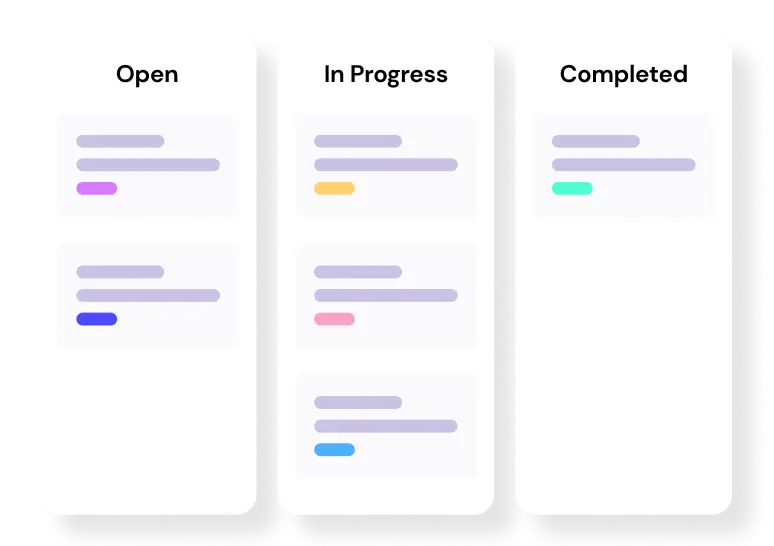
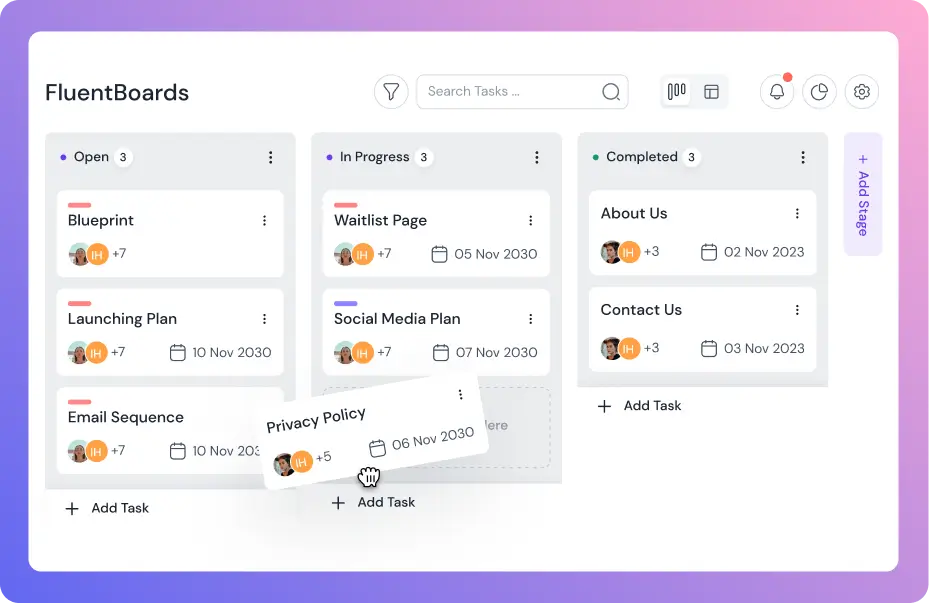
The simplest setup has three stages:
- To Do
- In Progress
- Done
But real projects need more than three stages. And that is exactly where the board earns its place.
Level up your WordPress project management game with this Trello equivalent solution – where limitless possibilities come at an unbeatable price!
Who Uses a Kanban Board and What Problems Does It Solve?
Kanban is not built for one type of team. It works wherever work has stages, people, and the risk of things falling through the cracks.
Here is who uses it and what it fixes for each of them:
Project managers running multiple projects simultaneously, the board gives a single view of everything moving at once. No more switching between spreadsheets, emails, and chat threads to understand where things stand.
Agencies handling client work, it makes client-facing delays visible. When a task is waiting on client approval, it sits in its own column. The team is not blocked and blamed. The bottleneck has a name and a location.
Content and marketing teams, it maps out the full production cycle. Brief, writing, editing, design, approval, published. Each stage is a column. Every piece of content has a home and an owner.
Cross-functional teams where design, development, and marketing all depend on each other, Kanban surfaces task dependencies before they cause delays. If development cannot start until design finishes, that relationship is visible on the board.
Solopreneurs and individual contributors, it stops the feeling of being buried. Personal Kanban runs on two rules: visualize your work, and limit what you are working on at one time. That is all it takes to regain control.
Read: How project boards improve visibility
Key Principles of a Kanban Board and What They Actually Fix
A Kanban board is not just a visual to do list. Every element of it is designed to solve a specific problem your team is probably already facing.
Visual signals: You cannot fix what you cannot see
Every task lives as a card on the board. The moment work becomes visible your team stops operating from memory and starts operating from reality.
What this fixes:
- Tasks getting lost in chat threads and email
- Nobody knowing what anyone else is working on
- Priorities that exist only in someone’s head
Workflow stages: Tasks need a home at every step
Most teams only think in two modes. Either something is being worked on or it is done. But real work has stages and each one matters.
What this fixes:
- Work that is technically in progress but actually waiting
- Tasks that skip steps and come back broken
- No clarity on where something actually stands
WIP limits: The reason nothing finishes is too much starts
This is the most important principle and the most ignored one.
WIP stands for work in progress. A WIP limit caps how many tasks can sit in any one stage at the same time.
What this fixes:
- Team members juggling ten things and finishing none
- Everything feeling urgent because nothing has a clear priority
- Projects that are always almost done but never actually done
Continuous flow: Work pulls forward instead of getting pushed
In most teams work gets pushed onto people whether they have capacity or not. In a Kanban system work gets pulled. A team member picks up the next task only when they have actual space to handle it.
What this fixes:
- Overloaded team members and missed deadlines
- Unpredictable delivery and constant fire fighting
- Burnout from too much starting and not enough finishing
Commitment point: When does work actually begin
Not every idea needs to become a task immediately. The commitment point is the moment a task officially enters your active workflow. Before that it lives in a backlog.
What this fixes:
- Boards cluttered with half baked ideas
- Team focus split across too many active priorities
- No clear signal for when work actually starts
How to Use a Kanban Board for Project Management: A Step-by-Step Guide
Setting up a Kanban board is straightforward. Using it well is where most teams fall short.
So here is both. The setup and the daily habit, together.
Step 1: Create your board and map your real workflow stages
Before you touch any tool, write down how your work actually moves today.
Not the ideal process. The real one.
A content team might have: Brief Assigned, Writing, Editor Review, Revisions, Scheduled, Published. An agency managing client projects might have: Briefing, In Progress, Client Review, Revisions, Delivered.
A dev team might have: Backlog, Ready for Dev, In Development, Code Review, Testing, Done.
Whatever stages your work actually goes through, those become your columns. Build the board around reality, not aspiration.
Note: Resist the urge to create a column for every edge case. Five to seven stages is the practical range for most teams. Start lean. Add columns only when the work genuinely demands it.
Now open your project management tool and create a new board.
In FluentBoards, navigate to Add Board, give it a clear name, and write the project goal in the description. This matters more than it sounds. When you add new members later, they open the board and immediately know what they are working toward.
Then set up your columns from the workflow you mapped. You can drag and reorder stages any time, so do not overthink the sequence. Start with what is real and adjust as you go.
Pro Tip: FluentBoards lets you set a Default Stage Assignee for each column. When a card moves into a stage, it automatically assigns to the right person. Handoffs happen without anyone saying a word.
Step 2: Add your tasks as cards
Now break the project into tasks. One card per task.
Each card needs four things: a clear title, one owner, a due date, and a priority level. That is the minimum for a card to actually move through the board without confusion.
Keep the card title action-oriented. “Write homepage copy” beats “Content.” “Fix checkout bug” beats “Bug.” The person who picks it up should know exactly what to do without opening the card first.
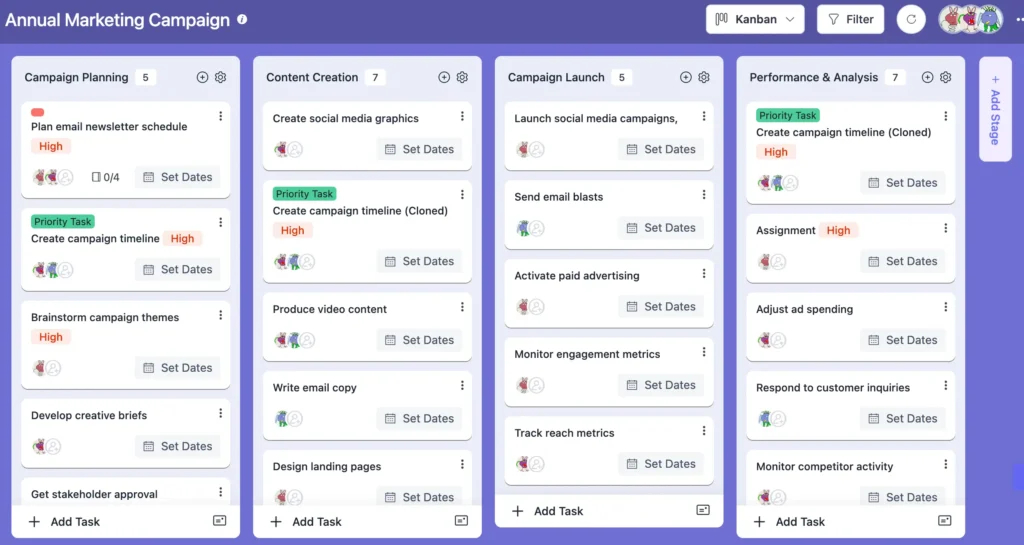
If a task has multiple moving parts, add subtasks inside the card. Do not create five separate cards for one deliverable that one person owns from start to finish. That creates noise, not clarity.
Also add labels to categorize work by type. Design tasks, development tasks, client deliverables. When the board gets busy, filtering by label cuts through the noise in seconds.
Heads Up: Every card needs one owner. Not a team. Not “everyone.” One person. When ownership is shared, accountability disappears. Shared responsibility is the fastest way to turn a card into a card nobody moves.
Step 3: Set WIP limits before anyone starts working
This is the step most teams skip. And it is the reason most Kanban boards turn into glorified to-do lists.
WIP stands for work in progress. A WIP limit is the maximum number of cards allowed in a single column at one time. When a column hits its limit, the team must finish existing work before starting anything new.
That discipline is the whole point.
According to research, teams that enforce WIP limits improve delivery times by up to 37%.
A practical starting point: no more than two active tasks per person at one time. Team of four means no more than eight cards in the active column at once.
Adjust as you learn your team’s rhythm, but set the limit now. It is much harder to enforce after habits form around having none.
Note: If a genuine emergency arrives, use an Expedite lane with a WIP limit of one. That is how you handle urgent work without blowing up the whole system.
Step 4: Run your daily board review
Here is where most guides stop. They show you the setup and leave you there.
But the setup is the easy part. The daily habit is what makes the difference between a board that runs your project and a board that collects dust.
Open the board before you open anything else.
Before email. Before chat. Before the first meeting. Ask three questions:
What is stuck? Any card sitting in the same column it was in yesterday?
What is almost done? What can be pushed across the finish line today?
Is any column overloaded? Someone buried while another person has nothing active?
That review takes five minutes. It replaces a thirty-minute status meeting.
In FluentBoards, every card has an Activity Log that timestamps every move, comment, and change. If a card goes quiet for two days, you see it without asking anyone. And if something needs attention, use @mentions inside the card comment. The right person gets notified immediately.
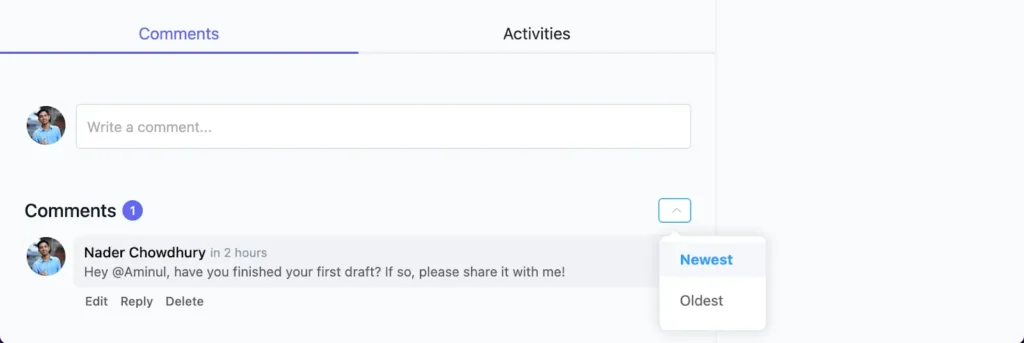
The board answers status questions before anyone has to ask them. That is the whole point of visual management.
Step 5: Use the board to manage dependencies and cross-team handoffs
This is where Kanban goes beyond basic task tracking.
In real projects, tasks depend on each other. Design has to finish before development can start. Copy has to be approved before a designer touches the layout. The report cannot go to the client until the data team signs off.
On a Kanban board, you make those dependencies visible through labels, blocked flags, or a dedicated “Waiting On” stage.
When a card is blocked because something upstream is not ready, it gets flagged. The bottleneck has a name. The team can act on it instead of discovering it on the day of the deadline.
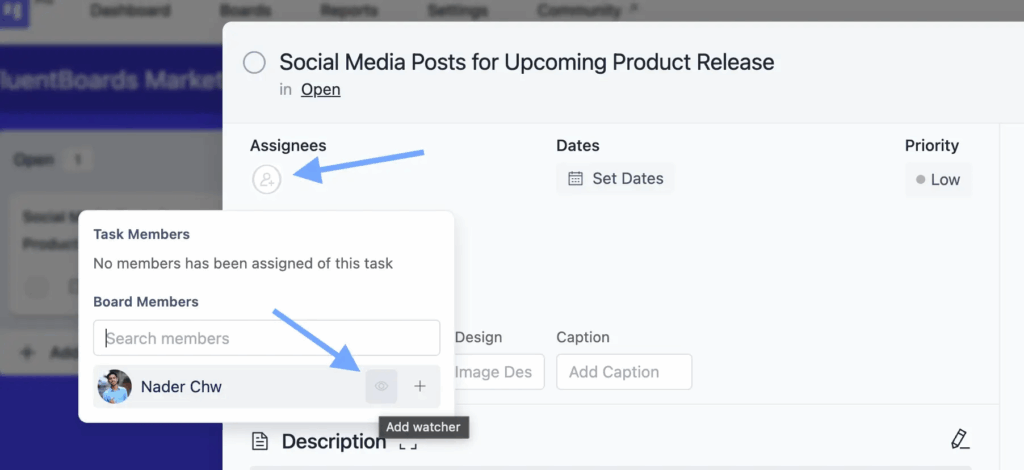
For stakeholders who need visibility without getting involved in the daily work, FluentBoards has Task Watchers. Add them to a card and they receive every update without being the assignee. They see what matters without interrupting the team.
Read: How to organize a project from start to finish
Common Mistakes That Kill Kanban Boards
Here is what actually kills it and how to stop it before it happens:
Too many stages: Your board becomes a maze nobody wants to navigate. Start with three to five and add only when your process genuinely needs it
No WIP limits: Everything piles up in progress and nothing reaches done. Set a number and treat it as a rule not a suggestion
Cards that never move: Zombie tasks sitting in one stage for weeks are a signal not a failure. Review them weekly and either move them forward or remove them completely
Nobody owns the card: A task with two owners has no owner. Every card needs one name or it will wait forever
Board abandoned after week one: Kanban only works if the team uses it daily. Moving cards is part of the work not a separate admin task
Updating the board in meetings: The board should reflect reality in real time. Not get updated when someone finally remembers to do it
Stages that do not match real work: If your team never actually uses a stage it should not be on the board. Every stage should represent something that genuinely happens
Your Projects Do Not Need More Tools, They Need More Visibility
“In production, we need to manage the flow, not just the people.” — Taiichi Ohno
Remember that Monday morning from the intro?
None of that was a people problem. It was a visibility problem.
Teams that made their work visible improved delivery predictability by 40 percent within six months.
Three things you can do today:
- Start with three stages, not eight
- Put your most chaotic project on the board first
- Run one fifteen minute board review this week
So open a board today.
Put your messiest project on it.
And watch what happens when your team can finally see the work.
Let’s redefine project management with FluentBoards!

Follow:


Get Tips, Tricks, & Updates
We won’t send you spam.




Leave a Reply