
![how to create a project management workflow [x steps] (2)](https://fluentboards.com/wp-content/uploads/2025/11/How-to-create-a-project-management-workflow-x-steps-2-scaled.webp)
How to Collaborate with Project Team Members for Seamless Execution


You’ve already crossed the first hurdle
- Figuring out what needs to be done
- Who’s doing it
- When it’s due
Then execution begins, and suddenly you’re herding cats.
Well, that’s when you need proper team collaboration. Without it, the wheels fall off, deliverables never get delivered, and the project stalls before the finish line.
So how do you keep everyone moving together instead of running in circles?
Let’s walk through it.
Understanding the Core: Project Execution and Team Collaboration
Before we dive deep into the steps, let’s quickly recap what execution and team collaboration actually mean in practice-
What is the Execution Phase?
The execution phase is the third and usually the longest in the project management lifecycle, where your project plan comes to life. Here, your team actually builds, develops, and delivers the project outputs.
In this phase:
- Resources get allocated
- Tasks get completed
- Deliverables take shape
- Progress gets tracked continuously
And, as the project lead, you ensure that team members understand their tasks, stay aligned with the plan, and work together toward the finish line.
What is Team Collaboration During Execution?
Team collaboration during execution means when skilled individuals coordinate actively, share expertise, and work together to deliver project outcomes successfully.
Essentially, it involves:
- Assembling the right people for each role
- Breaking down work into manageable tasks
- Distributing responsibilities clearly
- Communicating continuously as work progresses
- Moving together toward the final goal
Simply put, in execution, your project team works as one unit where communication flows naturally, and everyone shares ownership of the outcome.
Also Read: Proven tips for project management
How to Collaborate with Your Team During Execution: 9 Steps That Ensure a Strong Project Finish
Execution is where most projects either succeed or fall apart.
According to PMI-
Only 60% of projects meet their goals. Worse, 70% of projects fail outright during execution.
The gap between planning and doing is real, and without strong team collaboration, your project risks joining that majority.
Let’s close that gap. Here are 9 steps that make it happen:
Step 1: Align your team for organized execution
You’ve charted the course in the planning phase. The strategy is set.
Well, the battle is about to begin, and before your team can charge forward, everyone needs to know their position on the field.
That’s why execution starts with alignment.
So hold a kickoff meeting where-
- Review the project plan together so there’s no confusion
- Confirm each team member’s role and responsibilities
- Establish how the team will communicate throughout execution
- Answer any questions before work begins
Now, lock hands in unity and let the real work begin!
Why this matters: Studies show that employees working in a collaborative environment are 50% more effective at completing tasks, and clear alignment makes that momentum possible.
Step 2: Onboard your team into the workflow
Alright, let’s start putting that hard work into action.
As your team begins working on project deliverables and tasks, first things first: make sure they have everything they need to execute smoothly.
Well, you wouldn’t send soldiers into battle without weapons, right?
Same principle here.
So get everyone onboarded into a collaborative project management tool.
Now, which one will actually take the weight off your shoulders?
The answer comes down to finding one that:
- Fits your budget without surprise fees down the road
- Supports real-time collaboration and keeps everyone on the same page
- Monitors team workload so no one gets overloaded as execution progresses
- Is intuitive enough that your team actually wants to use it
Why this matters: 77% of high-performing projects use project management software because it keeps teams aligned, eliminates time wastage, and helps deliver projects on time, within budget, and to quality standards.
Level up your WordPress project management game with this Trello equivalent solution – where limitless possibilities come at an unbeatable price!
Note: From here, FluentBoards screenshots will guide you through each action so you can see exactly how to execute each action.
Step 3: Break down work using WBS
Your team is onboarded and armed for action. The real battle begins now: executing those deliverables.
This is exactly where your planning pays off.
Let’s break your project into clear, specific tasks using a Work Breakdown Structure (WBS) and design a simple to-do list for you and your team to execute.
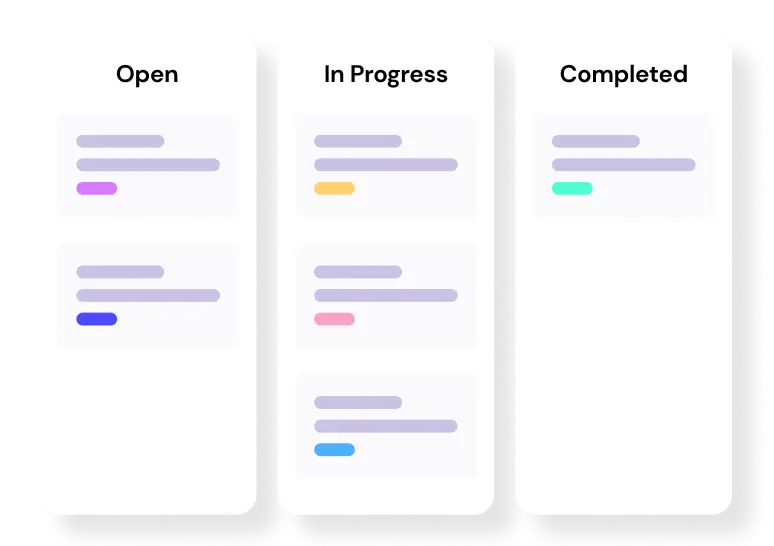
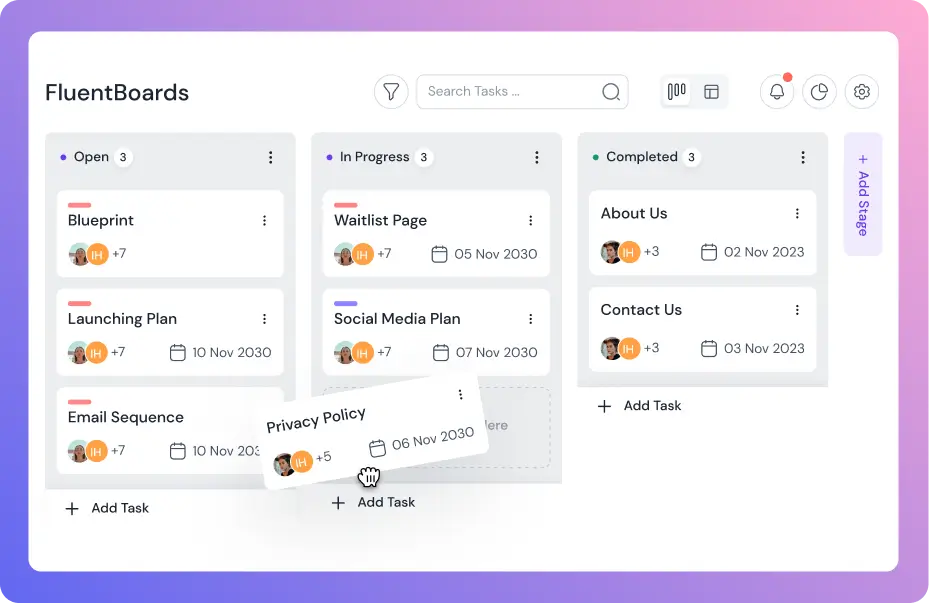
To keep everything organized, set up a Kanban board with stages like-
- Open
- In Progress, and
- Completed
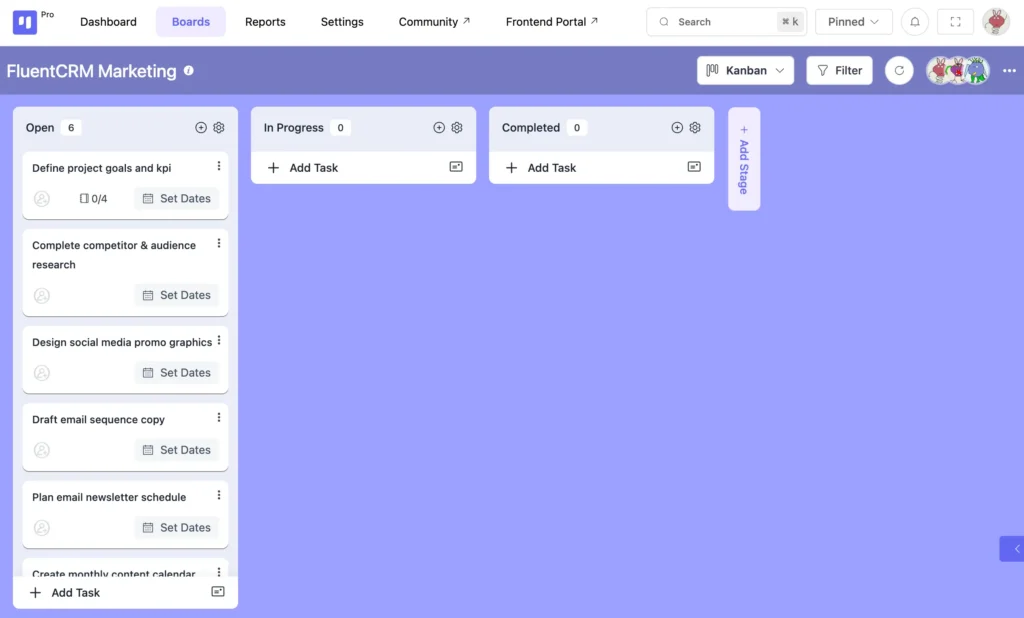
Now, everyone can see what’s happening, who’s tackling what, and how milestones are moving forward as the team collaborates toward victory.
Well, let’s make the work actually easy to execute.
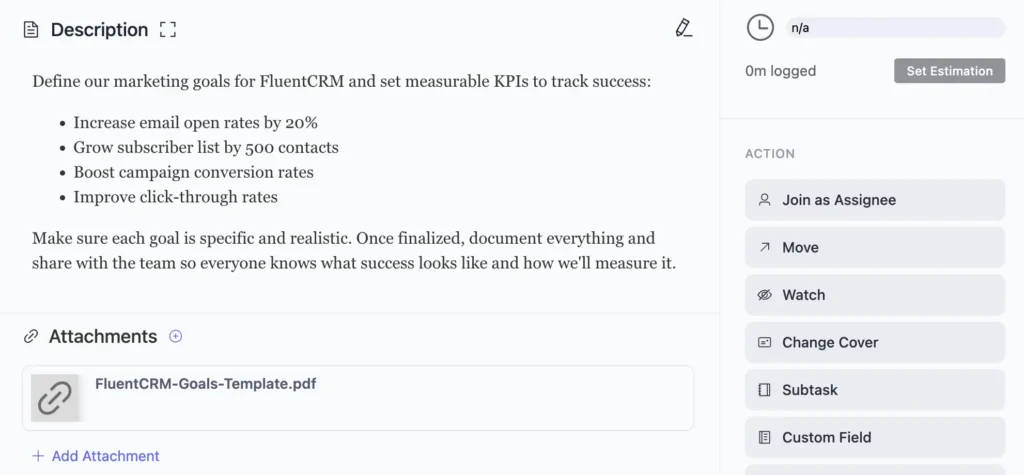
Add clear descriptions to every task so no one has to ask, “What does this mean?” or “What exactly am I supposed to do here?”
And don’t forget the important files.
Attach them right inside the task so everyone has what they need in one place and no one ends up chasing files around.
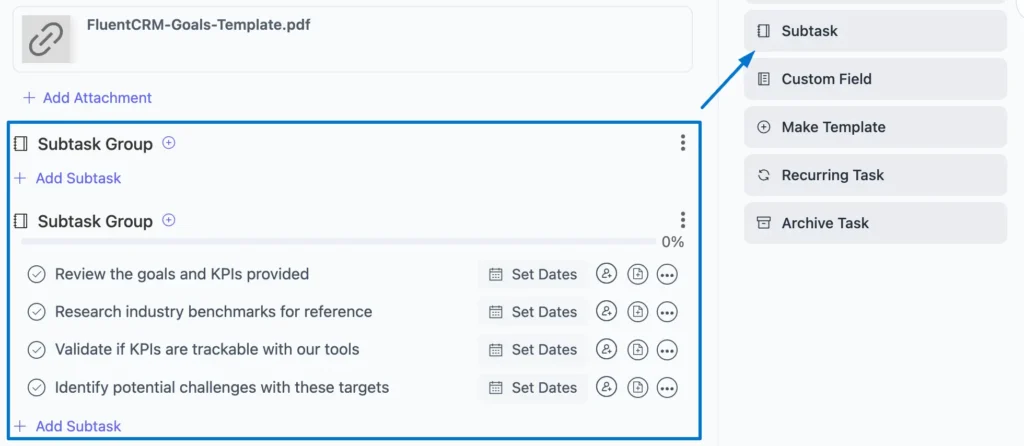
Then, break your larger tasks into subtasks or group them for more granular control.
This makes each piece more manageable and keeps cross-team work flowing without stepping on each other’s toes.
Bonus: Once your project workflow is up and running, take a smart step: set up recurring tasks once and let automation take care of the rest.
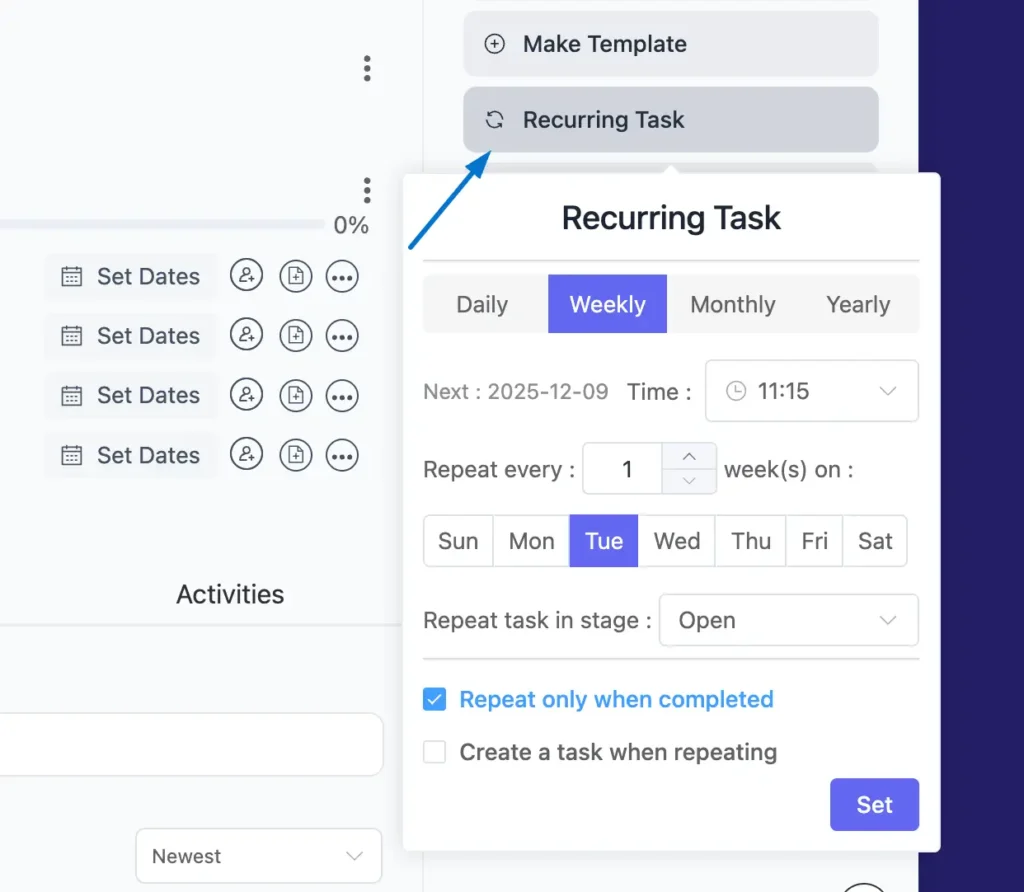
Why this matters: Teams lose nearly 30% of their workday when information is scattered. A clear WBS centralizes everything, so your team spends less time searching and more time actually executing.
Step 4: Assign the right work to the right hands
We’ve turned the big work into clear tasks. Simple, organized, easy to act on.
See how the workload looks clearer already?
So, it’s time to assign them to the right warriors!
Well, in execution, collaboration moves faster when every task sits with the person who can deliver it best.
This isn’t just “distributing work.” It’s what boosts efficiency and keeps execution from dragging.
Often, we plan as if the project lives in a bubble. But execution never does. Your team members carry other responsibilities in the background, and that is exactly why workload balance matters.
And don’t forget tasks have dependencies!
For example, redesigning your site means the design depends on the copy being ready first.
So before assigning, make sure you check all the boxes:
• Each person’s expertise and strengths
• Current workload
• What depends on what
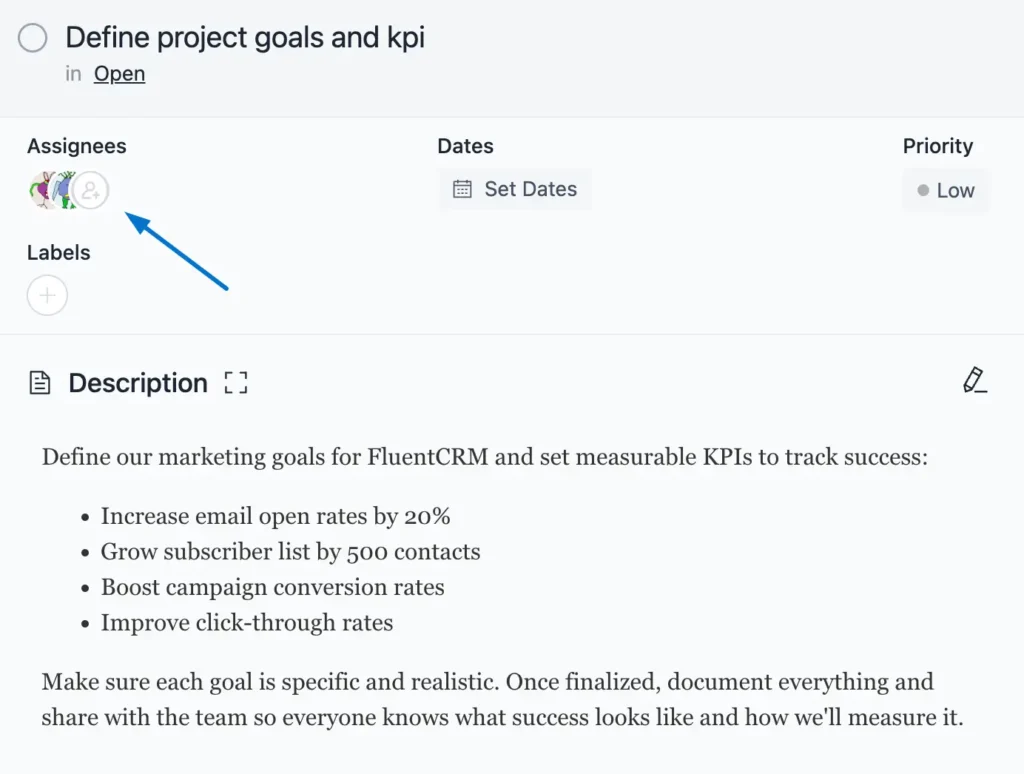
Why this matters: when tasks match expertise, teams work faster and avoid overlap. Poor assignment alone can drain up to 40 percent of productivity.
Step 5: Stay Practical to Keep Your Team on Schedule
Execution only works when time is on your side, so let’s set it up wisely because most projects fail right here at this stage.
First things first: estimate how long each task actually takes. Don’t guess wildly, sit down and think it through.
Otherwise, you’ll start pushing deadlines like dominoes, one after another, and lose momentum in the middle of execution.
So, stay realistic.
Add due dates based on each task’s weight and impact.
Need to get specific? Add the exact time too!
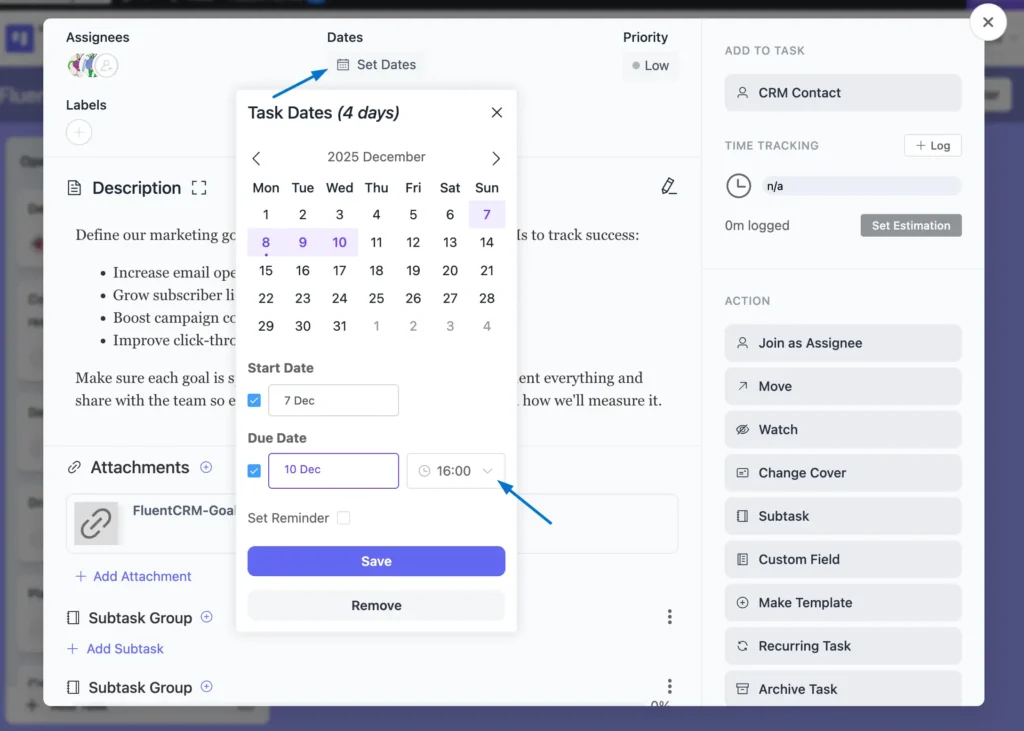
Besides deadlines, enable time tracking for each task. This shows whether your team is on track or heading for trouble during execution.
Pro tip: Set deadlines so your team knows what needs finishing without getting blindsided at the last minute.
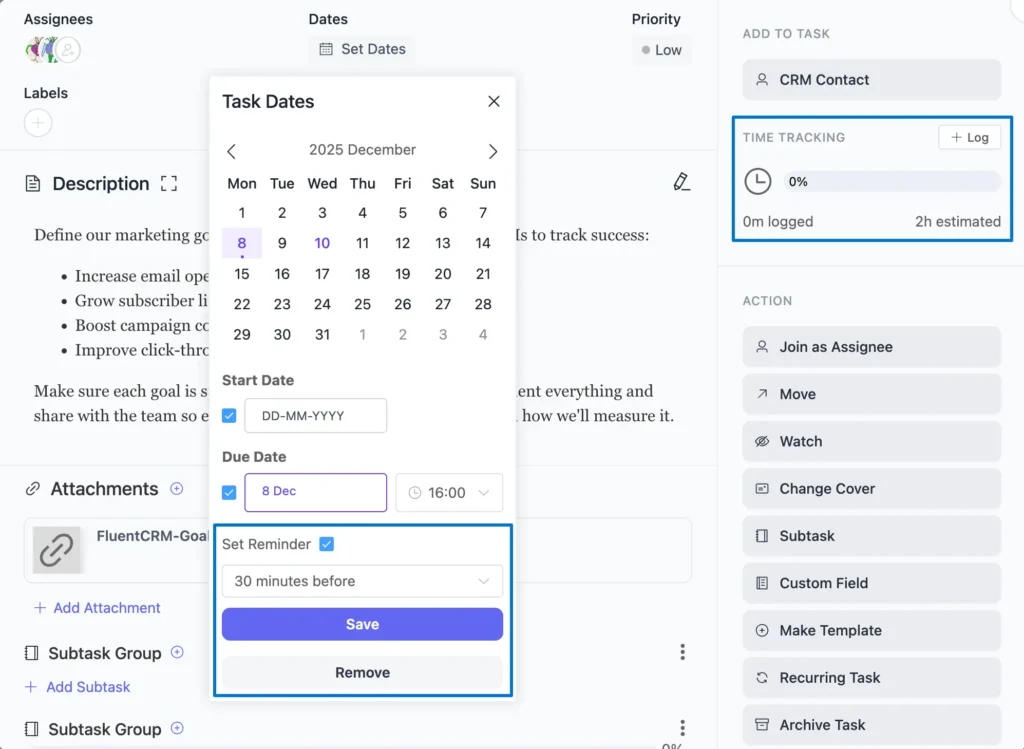
One more thing: not all tasks carry equal weight during execution. Label them as:
- High
- Medium
- Low
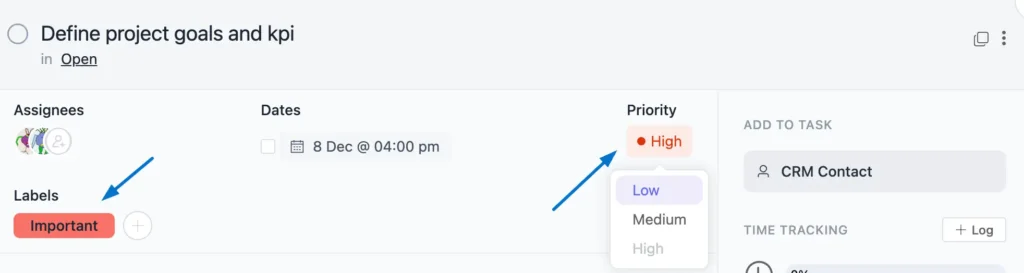
Add color codes to make priorities pop at a glance (red for urgent works every time).
When priorities are visible, your team tackles the right work at the right time without going back and forth.
Why this matters: Studies show that 70% of projects fail because of unrealistic timelines. Achievable deadlines keep your team collaborating smoothly instead of crashing under pressure during execution.
Step 6: Enable real-time collaboration
Execution moves fast. Your team needs to communicate without waiting for scheduled meetings.
That’s where task-level collaboration comes in. Team members can leave comments directly on tasks, ask questions, share updates, and tag each other for quick responses.
Every task can have a comment section where discussions happen in context. No more scattered emails or lost Slack threads.
Why this works: When communication flows naturally within tasks, teams solve problems faster and stay aligned without extra effort.
Step 7: Use multiple views to track progress
Project management isn’t just about stacking tasks. It’s about viewing them from every angle.
Use Kanban View and List View so you can see progress visually or dive into details. Plus, basic reporting shows you task completion rates, overdue items, and workload distribution.
Switch views based on what you need. Planning a sprint? Use Kanban. Reviewing deadlines? Switch to List View.
Why multiple views matter: Different situations require different perspectives. Flexibility keeps you in control.
Step 8: Collaborate with stakeholders
Execution doesn’t happen in isolation. Stakeholders need updates, and sometimes they need to weigh in on decisions.
CRM integration lets you attach contacts directly to tasks. This way, your team knows exactly who the client or stakeholder is for each deliverable.
Additionally, a frontend portal allows stakeholders to view task progress, leave feedback, and stay updated without accessing your full project dashboard.
And here’s where watchers come back into play: add stakeholders as watchers so they get notified about key updates without being buried in every task detail.
Bottom line: Transparent stakeholder collaboration builds trust and prevents last-minute surprises.
Step 9: Monitor progress and adjust
Execution rarely goes exactly as planned. The key is spotting issues early and adjusting quickly.
Use reporting and filtering features to monitor what’s on track and what’s falling behind. Check task statuses, review time logs, and identify bottlenecks before they become blockers.
Then, adjust. Reassign tasks if someone’s overloaded. Extend deadlines if scope changed. Move priorities if urgency shifted.
Why this matters: Project management is crucial for delivering projects on time, within budget, and to quality standards. Real-time adjustments make that possible.
Turn Collaboration Into Execution Success
Execution is where projects either succeed or fall apart, and collaboration is what makes the difference.
By applying these strategies, you empower your team to navigate challenges, stay aligned, and deliver results smoothly. Consistently developing these collaboration practices is the root of sustained project success.
As Sue Grafton said, “Ideas are easy. It’s the execution of ideas that really separates the sheep from the goats.”
So take the next step. Implement these strategies, strengthen your team’s execution, and achieve outstanding results together.
Thank you for reading. Here’s to building stronger, more collaborative projects!
Let’s redefine project management with FluentBoards!

Follow:


Get Tips, Tricks, & Updates
We won’t send you spam.




Leave a Reply