
Building Trust Through Transparency: How Project Boards Can Improve Visibility


When’s the last time you knew your project status without switching screens first?
Probably too long.
Your team’s working hard, but they’re all moving in different directions.
Nobody’s actually aligned on what matters first.
Then your stakeholder pings. “Quick update?”
So you start switching tabs, piecing together your answer while deadlines stack up behind you.
Meanwhile, collaboration has become just meetings in disguise.
If one project has you fighting to keep up, imagine managing multiple where tasks depend on each other.
That’s war.
In this guide, we’ll show you how project boards bring visibility back and make collaboration manageable.
Let’s solve it before your coffee goes cold.
Project Visibility Challenges Every Manager Faces
As a project manager, you face this chaos every single day.
Managing one project is already challenging. But when your project management lifecycle starts scaling across multiple teams and stakeholders?
Well, that’s when the visibility crisis begins.
What is project visibility?
Project visibility means everyone sees the same truth about what’s happening, what’s stuck, and what’s next.
No hunting. No guessing. No translating.
Simply put, it’s having accurate, timely information about goals, progress, and responsibilities accessible to everyone who needs it.
Why different people need visibility (And why it’s critical for project success)
Visibility works differently for different people.
Your project team needs one view. Stakeholders need another.
And you?
You need both, plus your own lens on everything.
Because everyone needs to know where they’re going to get there. That’s project success. Project visibility delivers that knowledge to everyone who needs it.
So what does each level actually need?
| Who | Needs Visibility Into | To Achieve |
| Project Team | Which steps to tackle, in what order, whether preceding tasks are complete, clear ownership, priorities across projects, latest files, goal connection | Clear execution without guessing or waiting |
| Sponsors/Stakeholders | How well the team is progressing toward goals, accomplishing objectives, real-time status, early risk warnings, resource allocation, and decision-ready data | Informed oversight without interrupting |
| You (Manager) | Cross-project progress, planning adjustments, early risk signals, workload balance, and external coordination | Proactive management without firefighting |
What happens when visibility dies
And when those visibility needs go unmet, guess who fills the gap?
You do. You become the sandwich, holding everything together.
This is what managing looks like:
- You answer the same status question three times because information lives everywhere
- Teams waste hours hunting files and work from outdated versions
- Updates get trapped in emails, chats, and spreadsheets with no communication framework
- You can’t see who’s available, so people get overloaded while others sit idle
- Micromanagement creeps in because tracking progress means constantly asking
- Deadlines slip because work gets stuck waiting for information nobody can find
- Scope creep sneaks in since there’s no shared view of what’s in progress
- Priority work sits untouched while you chase urgent interruptions
- Cross-functional work becomes a complete mess without coordinated visibility
- Team members doubt priorities when they can’t see the full picture
- Bottlenecks stay hidden until they trigger chain reactions of delays
- Departments operate in silos, duplicating work and burning time in alignment meetings
Well, what does this create?
You translate, you firefight, you schedule meetings, and actual work waits.
Plus underneath it all, trust erodes.
According to research, poor collaboration limits productivity for 70% of employees.
When work stays invisible, collaboration dies. It’s that simple.
Project Boards: The Solution to Invisible Work
Alright, all that chaos needs to be solved. And this is exactly where project boards come in.
If you’re wondering what that actually is:
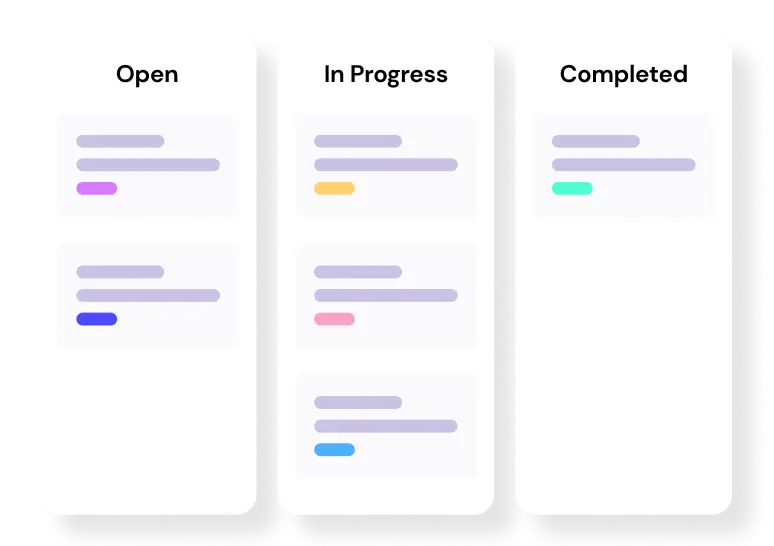
Project boards are visual workspaces where tasks, progress, and updates live in one centralized place.
So, what do project boards actually bring to your workflow?
They answer the questions that invisibility keeps hiding-
- What’s the goal?
- What are you responsible for?
- What are team memeber working on, and how does it affect your tasks?
- Where does the project stand right now?
- Are we on track or sliding behind?
- What’s shifted since we started?
- What updates do stakeholders actually need?
- Where’s everything you need to actually deliver?
- Can every single individual on your project collaborate in real time?
- What’s coming next?
When these questions get answered automatically, the platform switching stops and clarity replaces chaos across your project lifecycle.
That’s transparency in action.
Level up your WordPress project management game with this Trello equivalent solution – where limitless possibilities come at an unbeatable price!
How to Improve Project Visibility Using Project Boards (Step-by-Step)
Well, now that you know what boards solve, let’s improve your visibility.
Improving transparency isn’t complicated. It just needs the right setup.
The steps below show you exactly how to create visibility using project boards so your team, stakeholders, and you finally work from the same truth.
Let’s start.
Step 1: Use a project management tool
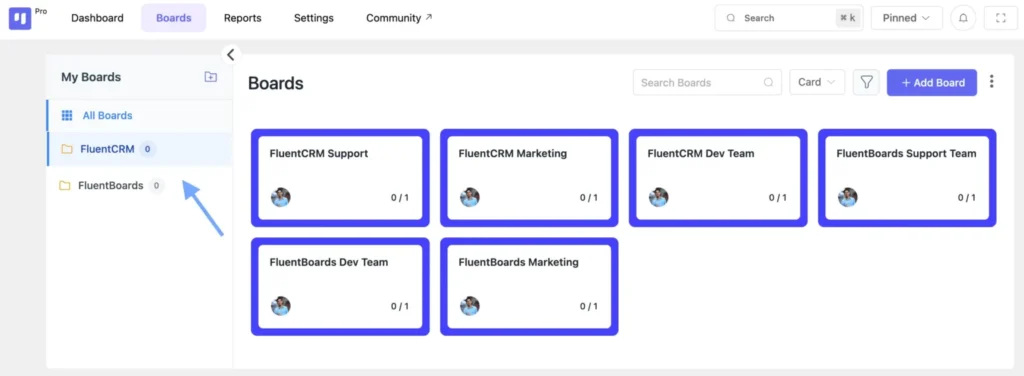
Before anything else, you need one centralized tool where all project work lives.
Why?
Because visibility dies when work scatters across platforms.The right tool should:
- Make work visible in real time
- Enable team collaboration where work happens
- Track progress automatically
- Centralize documentation and context
When work lives in one place, visibility becomes automatic.
Note: Throughout these steps, we use FluentBoards to show you what this looks like in practice.
Step 2: Choose your board view
Once your tool is set, it’s time to choose how you want to visualize work.
Project boards typically offer multiple views:
Kanban View – Visual workflow where tasks move through stages. Perfect for seeing work in progress.
List View – Simple task list format. Great for straightforward tracking.
Calendar View – Deadline-focused view. Ideal for time-sensitive projects.
Table View – Data-focused overview. Best for detailed analysis.
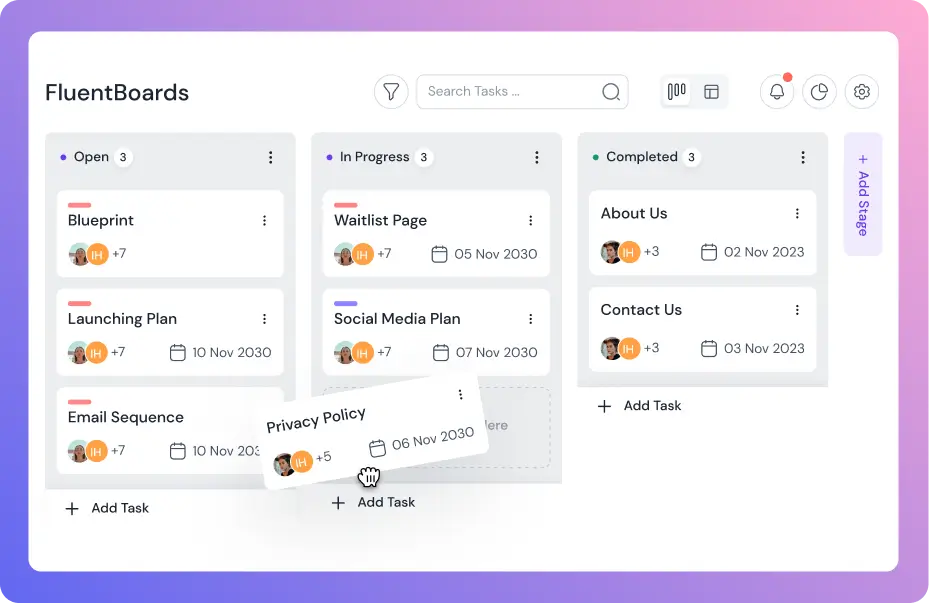
Start with Kanban if you want visual clarity. Tasks move from left to right as work progresses, making status instantly obvious.
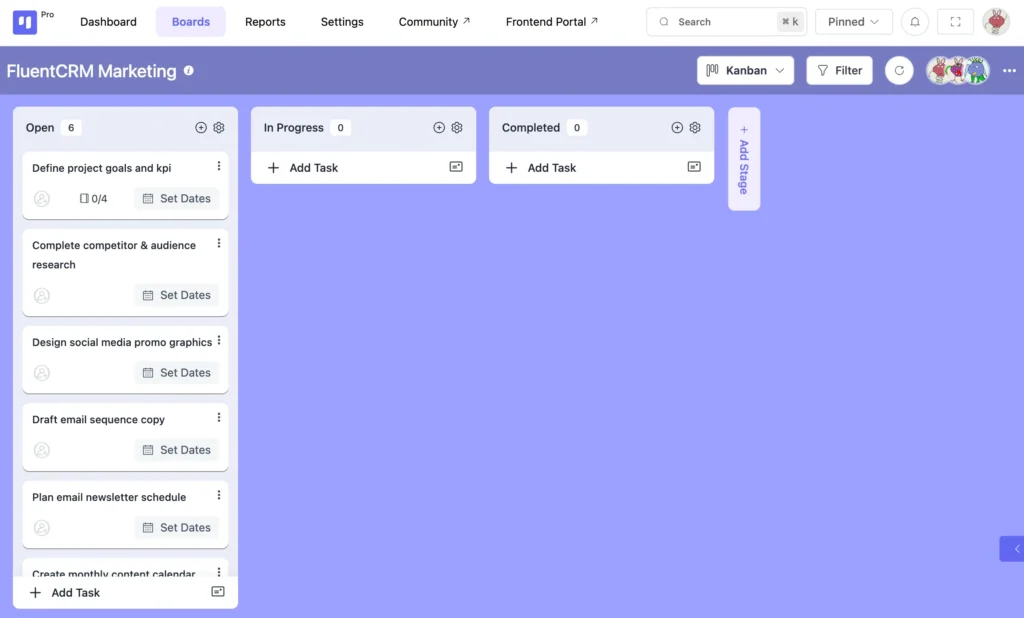
Plus, you can switch between views anytime based on what you need to see.
Step 3: Make every task visible
Now, let’s break your project into visible pieces.
Create tasks for every deliverable. Add subtasks to break complex work into manageable steps.
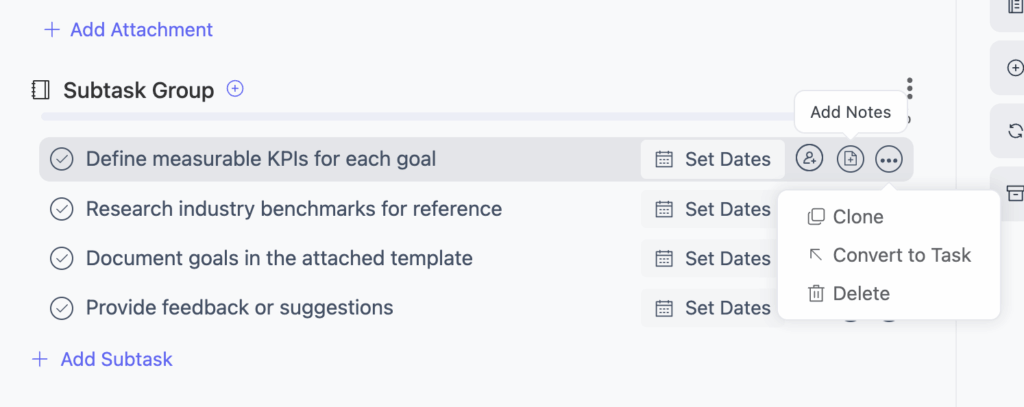
Then, add details that eliminate confusion:
Task descriptions – Explain what needs to be done
File attachments – Include briefs, mockups, or references
Priority levels – Mark tasks as High, Medium, or Low
Custom labels – Add tags for categories, departments, or project phases
When tasks have context attached, your team knows exactly what to do without asking.
Step 4: Assign clear ownership
With tasks created, it’s time to assign ownership.
Click on a task and assign it to the right team member. Set member roles so everyone knows their responsibilities.
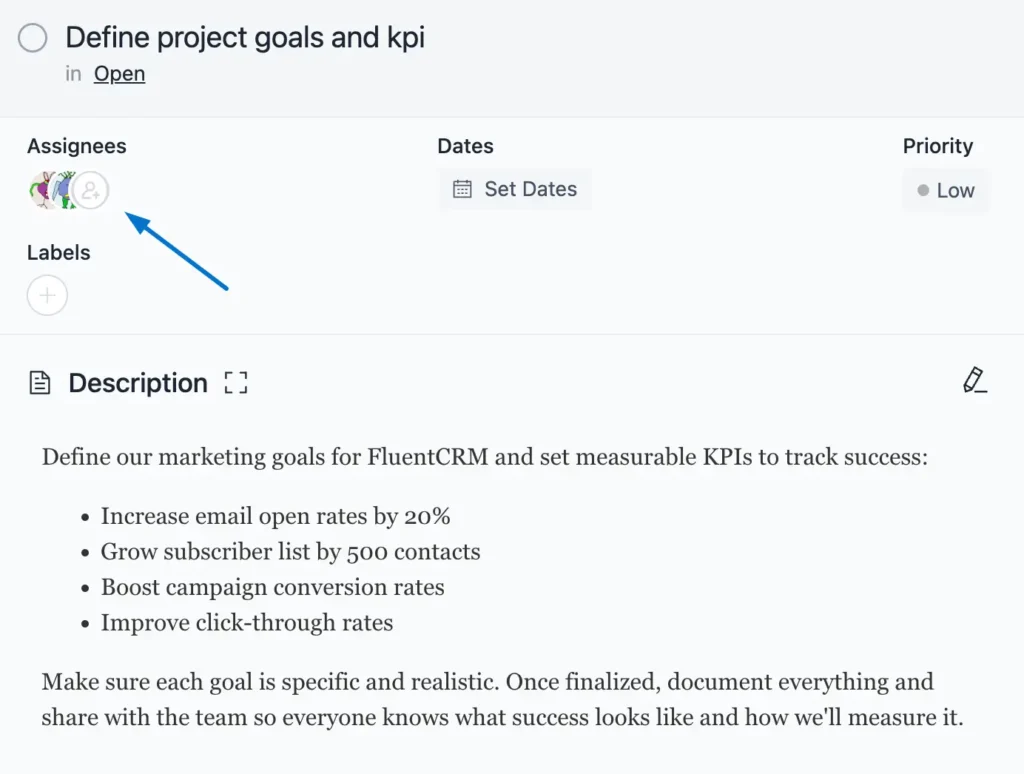
Why does this matter?
Because when ownership is clear, accountability follows. Nobody wonders “Who’s handling this?” Everyone sees who’s responsible at a glance.
Additionally, you can check who’s working on what from your dashboard to avoid overloading anyone.
Step 5: Set deadlines and track time
Now that team members are assigned, set deadlines.
Open each task and add a due date. For greater precision, add the time as well.
Here’s why deadlines come after assignments: your team needs to weigh in. Unrealistic deadlines cause chaos. Collaborative deadline-setting builds trust.
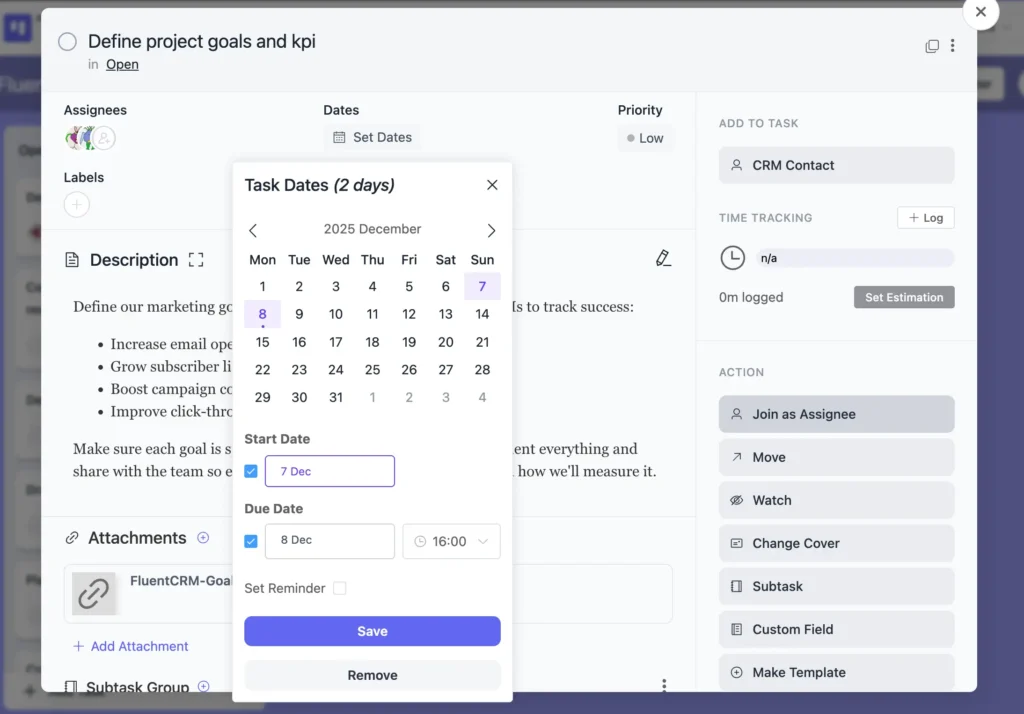
Plus, you can set estimated time for task completion, so you can track if work is on schedule.
Step 6: Enable real-time communication
Visibility isn’t just about seeing tasks. It’s about keeping conversations where work happens.
Make this simple with:
Task comments – Team members discuss work directly on task cards
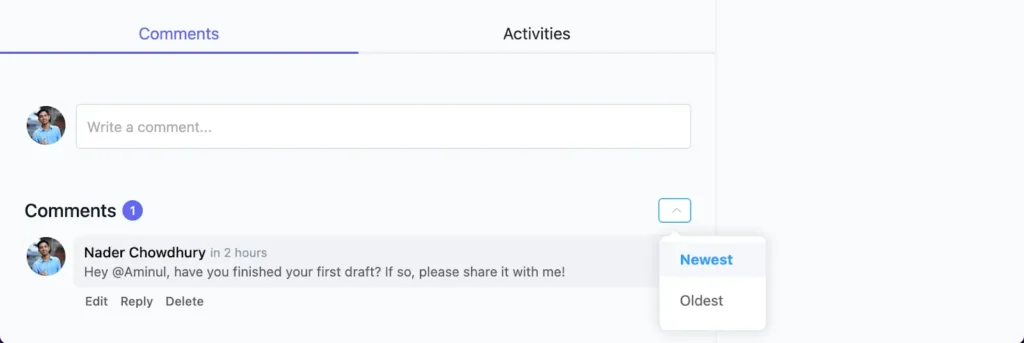
@Mentions – Tag specific people to notify them instantly
Email notifications – Stay updated on task changes without checking the board constantly
When communication happens on the task, nothing gets lost in email threads. Everyone sees the same conversation. Context stays attached to work.
Step 7: Give stakeholders visibility without interruptions
Your team needs detailed visibility. Project stakeholders need high-level clarity.
Here’s how to handle both:
Task Watchers – Stakeholders can follow specific tasks without editing access. They see updates without getting in the way.
High-Level Roadmap – Timeline view showing key milestones. Perfect for executives who need strategic oversight.
Frontend Portal – Share your board so clients can check project status without backend access.
This way, stakeholders stay informed without constant meetings. Updates happen automatically. Questions get answered before they’re asked.
Step 8: Track progress and project health
Finally, make progress visible to everyone.
Update task status in real time – Drag tasks between stages as work progresses. From “To Do” to “In Progress” to “Completed.”
Use the Reports Dashboard – Get a comprehensive view of project health, task completion rates, and team workload.
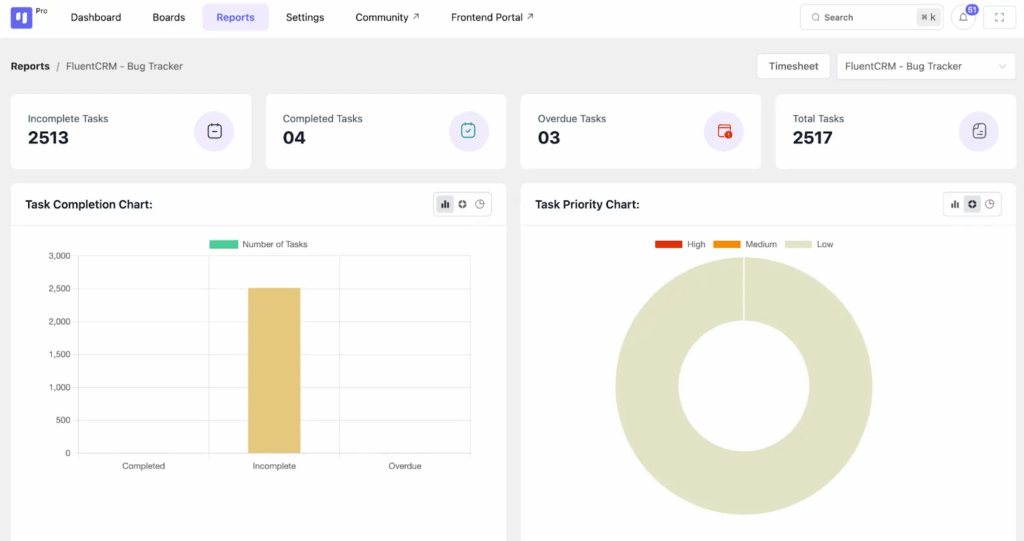
Check the Activity Feed – See what changed, when, and by whom. Full transparency on project movement.
Leverage Timeline Views – Show stakeholders where the project stands against key milestones.
When progress updates automatically, transparency becomes effortless. Everyone sees the same truth without manual reporting.
Turn Visibility Into Your Competitive Advantage
So there you have it.
Eight steps to transform how your team works. No more switching platforms. No more hunting for updates. No more meetings disguised as collaboration.
When you build visibility with project boards, something shifts. Questions get answered before they’re asked. Teams coordinate without constant check-ins. Stakeholders stay informed without interrupting.
And underneath it all? Trust grows.
Because transparency isn’t just about seeing work. It’s about creating the conditions where collaboration actually works.
Your team stops guessing. Your stakeholders stop asking. You stop firefighting.
Work becomes visible. Progress becomes automatic. Chaos becomes clarity.
That’s what project boards do when you set them up right.
So start small. Pick one project. Apply these steps. Build the visibility your team’s been missing.
Then watch what happens when everyone finally works from the same truth.
Let’s redefine project management with FluentBoards!

Follow:


Get Tips, Tricks, & Updates
We won’t send you spam.




Leave a Reply