

Internal Stakeholders in a Project: Who They Are, Why They Matter, and How to Keep Them Aligned


Some projects don’t fail loudly.
No missed deadline. No blown budget. No single moment where everything collapsed.
They just drag.
Decisions take longer than they should. Updates get misread. People who should be supporting the project quietly become obstacles.
And the source of that drag?
Almost always the same.
The internal stakeholders, the people inside your own organization, weren’t identified, understood, or aligned from the start.
So in this blog, we’re breaking down exactly who they are, what each one needs, and how to keep them working with you and not around you.
Let’s dive in.
What Are Internal Stakeholders in a Project?
Internal stakeholders are the individuals or groups inside your organization who have a direct interest in your project’s progress and outcomes.
They are not outsiders waiting for a deliverable. Instead, they sit within your org chart, your meetings, and your daily workflow, directly influencing how the project moves.
In practice, internal stakeholders are the ones who:
- Fund and approve the project
- Plan and execute the work
- Control the resources the project depends on
- Are directly affected by the project’s outcome
At a broader level, project stakeholders fall into two core categories: internal and external stakeholders.
External stakeholders are outside your organization. Clients, vendors, regulatory bodies. They influence outcomes but don’t sit inside your processes.
Internal stakeholders do. They are closer to the work, closer to the decisions, and closer to the pressure.
And that is exactly what makes them the ones you need to understand first.
For a full breakdown of every stakeholder type, read our guide on different types of stakeholders
Why Internal Stakeholders Matter More Than You Think
According to PMI, only 35% of projects worldwide finish successfully, meeting all goals and timelines. (Source: PMI Pulse of the Profession 2024)
That means more than half fall short. And when you trace back why, it rarely starts with the timeline or the budget. Instead, it often begins with misalignment inside the project.
More specifically, internal stakeholders not being aligned at the right time.
To see how this plays out, let’s break it down in a real project:
- A sponsor isn’t looped in before the scope expands
- A department head finds out their team was pulled in without notice
- A developer ships work that finance never approved
- A project stalls waiting for an approval no one tracked
At first, everything looks like normal progress. But in reality, each gap adds up. Same project. Same organization. Work is happening, just not in the same direction.
Now, here’s what changes that. PMI research also shows that actively engaged executive sponsors are the top driver of project success.
When internal stakeholders are aligned at every stage of the project lifecycle, decisions move faster, resources stay stable, and priorities remain clear.
On the other hand, when alignment is missing, delays and confusion follow quickly.
Level up your project management game inside WordPress – where limitless possibilities come at an unbeatable price!
Who Are Your Internal Stakeholders and What Do They Need From You?
Internal stakeholders are not just the people executing tasks.
They are several, each with a different relationship to your project and different expectations from you. And each comes with a completely different set of expectations.
So let’s break them down.
The project sponsor
The project sponsor is your project’s most powerful internal ally.
“The single biggest predictor of project success is active executive sponsorship.” — PMI, Pulse of the Profession
They championed this project into existence. They secured the budget. They cleared the blockers that would have killed it before it started.
And when things go wrong at the leadership level, they have the authority to fix it.
What they actually need: The right level of visibility at the right time.
Not every task update. Not daily check-ins. But when a milestone is reached, when a high priority deliverable moves, when the budget shifts, or when a change threatens the project scope, they need to know immediately.
Give them that clarity and they’ll trust you to run the show. Flood them with granular detail and they’ll quietly stop reading.
The project manager
In larger organizations, you are both the driver and a stakeholder in your own right.
Every decision, every delay, every scope change lands directly on you. You are accountable for all of it.
What they actually need: Full visibility. Every task, every person, every timeline. No blind spots, because a surprise for the project manager is a surprise for the whole project.
And ultimately, everything you track, every decision you make, and every stakeholder you manage comes back to one thing. Keeping the project moving toward its project goals.
The project analyst
A project analyst is the project’s navigator. While the team builds and the manager leads, the analyst is tracking requirements, turning data into decisions, and making sure nothing important gets lost between planning and execution.
Plus, they are often the first to catch the gap between what was agreed and what is actually being built, before it becomes a problem at delivery
What they actually need: To be brought into conversations early. Not after the plan is finalized.
When analysts have access to requirements discussions and decision threads as they happen, they can document clearly and flag misalignments before they compound.
The resource manager
The resource manager controls who gets allocated to your project, when, and for how long.
When they are not aligned early, you end up with a developer split across four projects and a timeline that never had the capacity to work.
What they actually need: Advance notice on resource requirements. Not a Monday morning message saying you need three developers starting today.
A clear picture of what’s needed, when, and for how long with enough lead time to actually plan around it.
Project team members
These are the people moving the project forward every single day.
Developers, designers, writers, marketers. And the analysts tracking requirements and keeping decisions documented along the way.
Together, their performance directly determines whether the project hits its goals. No other internal stakeholder group has that level of daily impact on what actually gets delivered.
What they actually need: Clear ownership, realistic deadlines, and the “why” behind their tasks. Not just a card in a board, but context.
People who understand how their work connects to the bigger picture tend to care about it more, and deliver better because of it.
To see how each of these roles works together in practice, read: Project Team Roles and Responsibilities
Executive leadership and senior management
Beyond the sponsor, there’s a layer of leadership keeping one eye on how this project connects to the bigger organizational picture.
They’re not in the weeds. They don’t want to be. But when they don’t have visibility, they ask questions at exactly the wrong moment, usually right before a critical deadline.
What they actually need: Strategic context. Show them how the project connects to organizational goals. A clear, bird’s-eye view, not a weekly update of everything that moved two columns to the right on the board.
Strong team collaboration skills help teams stay aligned without constant interruptions. But those skills only work when roles are clear from day one.
Department heads
Department heads manage the people doing the work. And one thing frustrates them more than almost anything else.
Being surprised.
What they actually need: Early notice. When are their people needed? For how long? Give them lead time and you have a collaborator. Surprise them and you have a blocker.
Step into the Future of Project Management!
Your Internal Stakeholders at a Glance
Here’s a summary of all seven internal stakeholders, who they are and what they need, so you can map your own project in minutes.
| Stakeholder | Their Role | What They Need |
| Project Sponsor | Champions the project, secures budget | Milestone visibility, no surprises |
| Project Manager | Drives day to day delivery | Full task and timeline visibility |
| Project Analyst | Tracks requirements, documents decisions | Early access to discussions and decisions |
| Resource Manager | Controls resource allocation | Advance notice, clear timeline |
| Project Team Members | Execute the work daily | Clear ownership, deadlines, context |
| Executive leadership and senior management | Sets strategic direction | Clear connection to business goals |
| Department Heads | Manage involved teams | Early notice, resource transparency |
How to Build Alignment Into Your Internal Stakeholder System
Now that you know your internal stakeholders, one question remains.
How do you keep all of them moving in the same direction without your week turning into back to back check-ins?
Here is the answer, step by step.
Note: We use FluentBoards screenshots throughout these steps so you can follow along practically.
Step 1: Map your stakeholders by power and interest
Before you set up anything, you need one thing. Clarity on who actually needs what.
Not all internal stakeholders carry the same weight. Some can stop your project cold. Others just need a periodic update.
Well, PMI’s Power/Interest framework gives you a simple map for this:
- Manage closely: High power, high interest. Direct involvement and regular visibility.
- Keep satisfied: High power, lower interest. Milestone updates, not daily details.
- Keep informed: Lower power, high interest. Task-level communication and clear context.
- Monitor: Low power, low interest. Keep them in the loop but do not overload them.

That map is your foundation. Every access decision, every notification setting, every communication choice you make next flows directly from it.
Step 2: Define what each stakeholder needs to see and how often
Once you know where each stakeholder sits on that map, the next question is simple.
What do they need to see, and how often?
As a manager your job is to make sure each person gets exactly what is relevant to them. Not everything. Not nothing. Just the right information at the right time.
- Sponsor: milestone visibility
- Team members: task-level detail
- Finance team: budget checkpoints
- Department heads: resource load
- Internal customers: deliverable progress
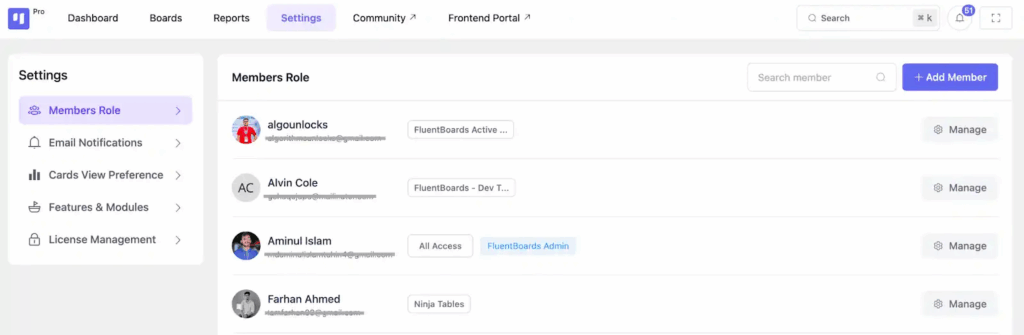
That list becomes the structure behind everything you build next. Get this right and every access decision, every update, every notification falls into place naturally.
Step 3: Name your board stages after stakeholder checkpoints
When your sponsor looks at your project stages right now, do they know where things stand?
Or do they see “In Progress” and still have no idea what that actually means?
Most stage names are written for the team. Not for the people waiting on the outcome.
Rename them after the real checkpoints that matter:
Campaign Planning> Content Creation > Campaign Launch > Performance and Analysis
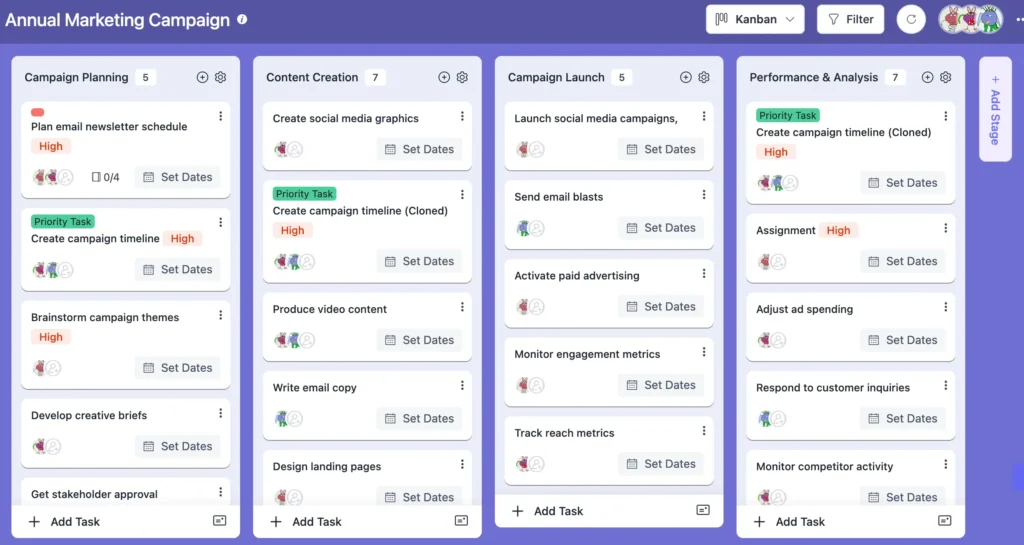
Now anyone can instantly understand where something stands and who needs to act next.
No explanation needed.
Step 4: Make the right update reach the right person automatically
Every internal stakeholder has a different relationship with your project.
Your team members need the full picture. Their tasks, subtasks, deadlines, and priorities all matter to them daily. That is their workspace where everything lives.
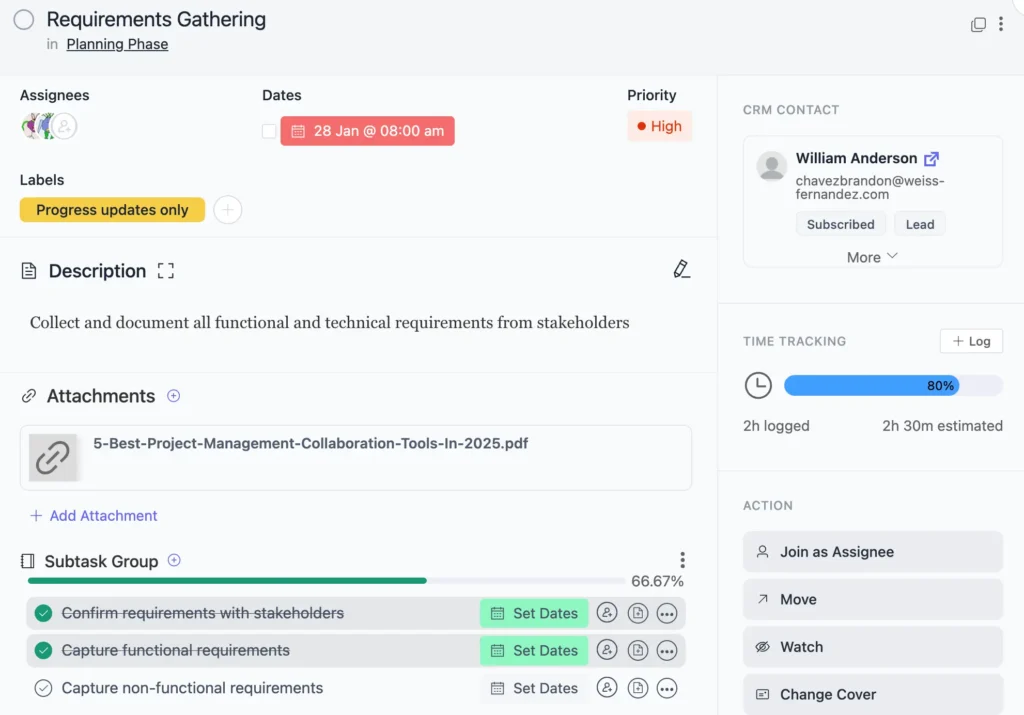
Your sponsor does not need all of that. But they do need to stay close to the tasks that matter most. For high priority tasks that need their attention, the update comes to them the moment something moves.
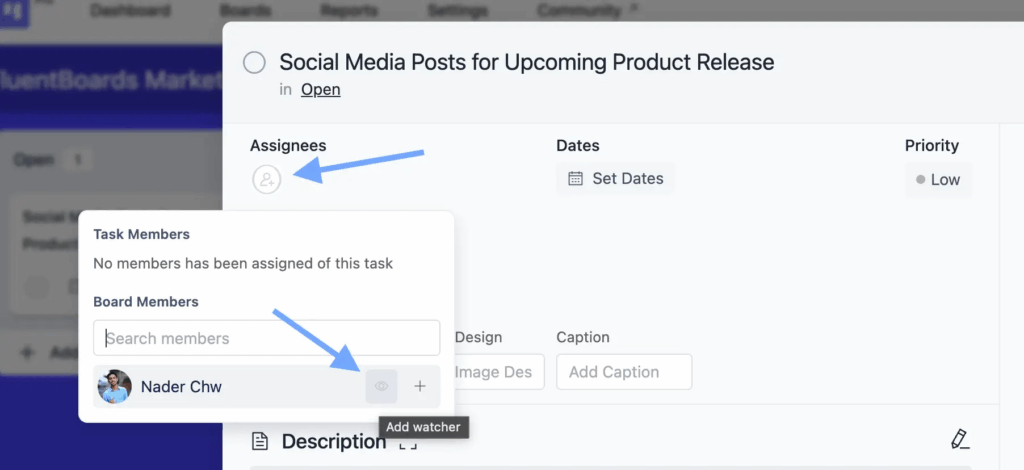
Same goes for your finance manager, legal contact, and department head. They only need to know when a specific task relevant to their role moves. Not everything else.
That way everyone gets exactly what they need. No more. No less.
The right person. The right view. The right moment.
Step 5: Keep all decisions attached to the work
Most alignment problems do not start with a wrong decision.
They start with a lost one.
A direction gets agreed on but lives in someone’s inbox. Three weeks later nobody can find it and the same conversation starts again from scratch.
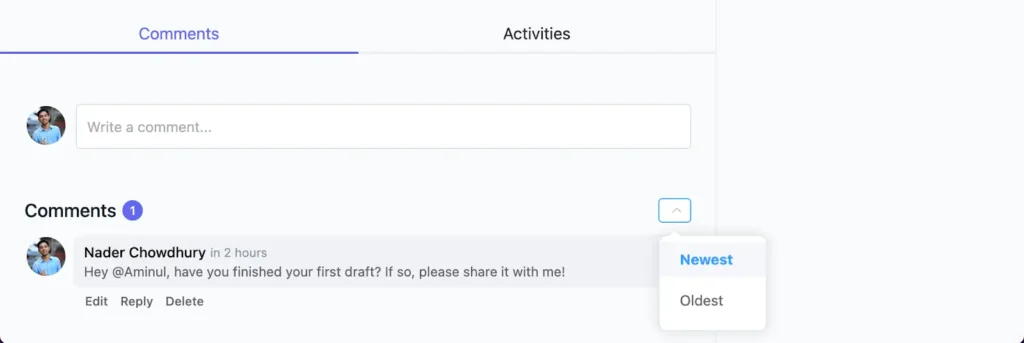
The simplest fix: Every time a decision needs to be made, bring it back to the task it belongs to. Tag the person who needs to respond and let them reply in context.
That way nothing gets lost. Every decision lives exactly where the work lives.
Step 6: Check in on progress without chasing anyone
Most managers find out something is off when it is already too late to fix it easily.
Well, the good news is you do not have to wait for someone to tell you.
A project report gives you a live view of where things stand. Completed tasks, overdue items, where things are moving and where they are stuck.
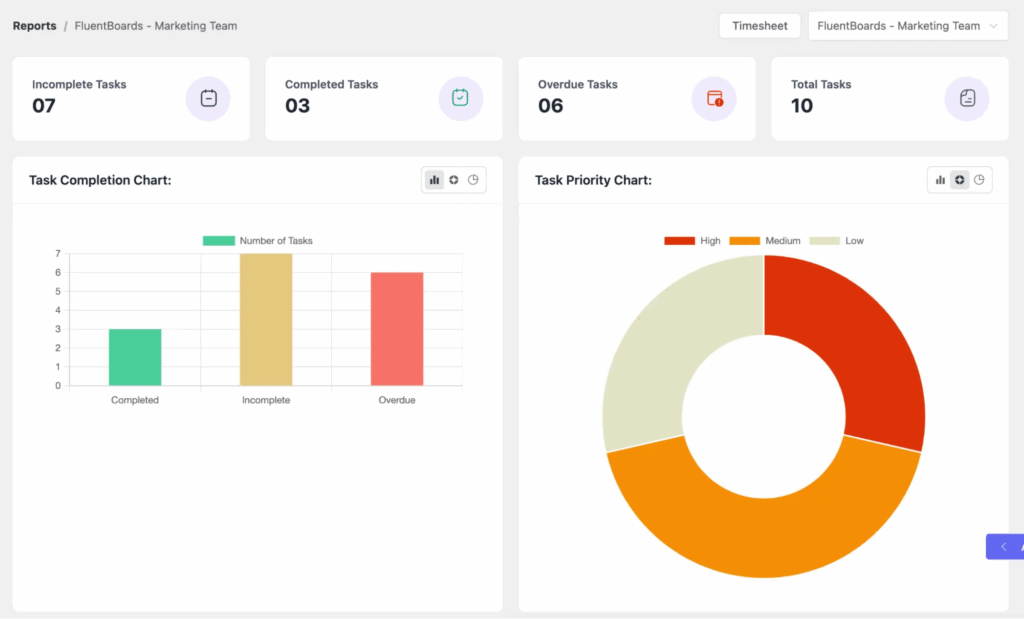
So instead of scheduling a call just to get a status update, check the report. Your sponsor can do the same.
That way everyone stays informed and nobody has to chase anyone for an answer.
Bonus: Project Team Collaboration Tips
Before the First Task, Get Your Stakeholders Right
Every great plan needs the right people behind it.
And those people need to understand how their work connects to the bigger picture.
Plans, timelines, and deliverables matter. But none of them move without the right people aligned behind them.
Your internal stakeholders are not a checkbox. They are the engine.
When they are identified early, communicated with correctly, and kept in the loop throughout the project lifecycle, execution stops being a struggle and starts being a system.
So start there. Map them. Align them. And build from a foundation that actually holds.
Good luck on your next project.
Let’s redefine project management with FluentBoards!

Follow:


Get Tips, Tricks, & Updates
We won’t send you spam.




Add your first comment to this post