

FluentBoards vs ClickUp: Why WordPress Teams Are Making the Switch


Running your business on WordPress means your day already has a center. Your site is there. Your clients land there. Your forms, your CRM, all there.
But project management is usually the one exception. It lives in that one extra tab, on a separate bill. And for plenty of teams, it quietly becomes the most expensive thing in the stack.
ClickUp is the major player in that tab. Powerful, popular, and genuinely capable of running an entire company’s operations.
None of that is in question here. The real question is simpler: is all of that what your team actually needs?
That question is exactly where this comparison starts. WordPress agencies, freelancers, and remote teams are increasingly bringing project management home, into WordPress itself, instead of paying per seat for power they do not use.
This article is about that switch. And it comes down to one question. Do you need everything, or do you need the right things?
FluentBoards vs ClickUp at a Glance
Well, before we get into the weeds, here is the short version of each.
ClickUp launched in 2017 with a single goal: replace every productivity tool a team uses. Project management, docs, whiteboards, chat, goals, and AI, all under one subscription. It now serves millions of users across industries, accessible via browser or native mobile app from ClickUp’s cloud servers.
FluentBoards is a WordPress plugin built by WPManageNinja, the team behind FluentCRM, Fluent Forms, Fluent Support, and FluentCart. It lives inside wp-admin, uses your existing WordPress users as team members, and focuses entirely on one job: giving WordPress-based teams a capable project management layer without adding a second platform to manage.
Self-hosted. No per-user fees. Usable on day one.
| Category | FluentBoards | ClickUp |
| Platform | WordPress plugin, self-hosted | Cloud-based platform |
| Pricing model | Flat, per site, unlimited users | Per user, per month |
| Learning curve | Lighter, simpler to start for WordPress users | Steeper, setup required |
| Starting paid price | $149/year per site | $7/user/month, billed annually |
| Free plan | Unlimited projects, tasks, assignees | Unlimited users and tasks, 100MB total storage |
| Views | Kanban, List, Table, Calendar, Gantt | Multiple views, including Kanban, List, Table, Calendar, and Gantt, in the current versions |
| AI | MCP support for AI agents | Built-in Brain, paid add-on |
| Mobile | Responsive in your dashboard | Native iOS and Android apps |
| Where your data lives | Your own server | ClickUp’s cloud |
| Best for | WordPress teams, agencies, and solopreneurs | Large cross-platform organizations |
Two philosophies, then. One wants to be everything. The other wants to be exactly enough, right where you already work. Which one fits your team is the whole question, so let us get into it.
What You Are Actually Comparing
This is not a comparison between a small tool and a large one. The real question is what kind of tool you need, and whether complexity is an asset or a cost for your team.
ClickUp is built to be a platform. It organizes work in a six-level hierarchy: Workspace, Spaces, Folders, Lists, Tasks, and Subtasks. Each level is independently configurable. Done right, it can run an entire company’s operations. Done wrong, or skipped, it becomes a mess that takes longer to untangle than it would have taken to set up properly.
FluentBoards is a project management plugin for WordPress, not another platform. There is no hierarchy to configure, no onboarding sessions to run, and no separate platform to learn. If your team already uses WordPress, you can assign your first task the same day you install it.
For a solopreneur, an agency running client projects, or a remote team that wants to manage work this week rather than after a month of setup, that difference shapes the whole comparison before the feature list even starts.
Also read: 7 Reasons Why You Should Manage Projects Within WordPress
How FluentBoards and ClickUp Compare, Feature by Feature
Now the comparison, organized around the work you do most, with a straight verdict on each and the catch wherever there is one.
Projects and Boards
ClickUp puts your work inside that six-level hierarchy from earlier. A board is just one way to view a List within it, and the structure can scale to a whole company.
The cost is that the structure is yours to design and maintain before anyone gets value from it. An empty hierarchy does nothing on its own.
So, how fast can your team actually use it?
That is where the two part ways. ClickUp asks you to build the structure first. FluentBoards hands you a working board the day you install it.
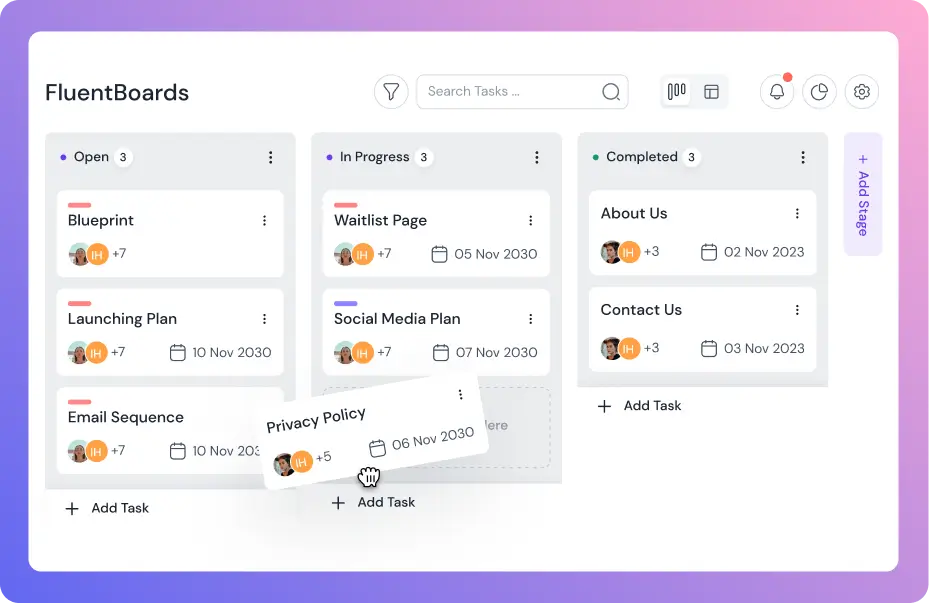
It starts from the board, not the hierarchy. You get unlimited projects and boards on every plan, including Free, on a drag-and-drop layout you can read the first time you open it.
On Pro you can group boards into folders, start from templates, and duplicate a whole board with its stages in one click. For agencies running the same project structure across clients, that one click replaces rebuilding from scratch.
Verdict: ClickUp goes deeper, and for a big org building from scratch that depth is real. But you assemble it before it pays off. For client work that repeats, FluentBoards’ one-click duplication does more by Tuesday than a hierarchy you are still configuring. Depth for complex orgs, ClickUp. Speed for everyone else, FluentBoards.
Tasks and Ownership
Both tools run deep here. ClickUp tasks carry subtasks, custom fields, dependencies, priorities, custom statuses, and recurring schedules. That configurability is a real draw if you like to design your own system down to the field.
FluentBoards covers the same core and adds a few things growing teams care about. Subtasks grouped into sets. Custom fields and recurring tasks. Task dependencies that hold downstream work until upstream is done. Watchers who follow a task without being assigned, and stage default assignees that route work on their own.
Most of this sits on Pro. The standout is unlimited assignees on every plan, including Free, with no per-seat charge.
Tip: If a client or stakeholder only needs to follow progress, add them as a task watcher in FluentBoards instead of an assignee. They stay informed, your task list stays clean, and nobody pays for an extra seat.
Verdict: On raw configurability, ClickUp goes deeper, and power users will feel it. But the two cover the same essentials, and FluentBoards throws in unlimited assignees on every plan without charging by the head. ClickUp asks you to design the system. FluentBoards just hands you one that works.
Collaboration and Communication
ClickUp crams a wide collaboration surface into one place: comments, mentions, assigned comments, docs, chat, proofing, and even screen recording. If you want to pull all your communication into one tool, that breadth is appealing.
FluentBoards keeps the talking next to the work. You get real-time comments, mentions, comment navigation straight from a notification, unlimited file sharing, and email notifications.
On Pro it adds a frontend portal that shares boards with clients right on your WordPress site, no extra accounts needed. Run FluentCRM? Client contact details pull onto the task too.
Tip: Those “what’s the status?” emails from clients? The frontend portal is the cure. Give clients a live view of their board on your own site and the question answers itself before it gets asked.
Verdict: ClickUp packs more into one window, which suits teams that want chat and docs in the same place. FluentBoards keeps the talk next to the work and adds a client portal that does not cost you a guest seat. For client-facing WordPress teams, FluentBoards fits like a glove.
Views and Visualization
Here is where ClickUp flexes. It gives you more than fifteen ways to see a project: list, board, calendar, Gantt, timeline, mind maps, whiteboards, workload, and on it goes. As a canvas, nothing in the category is more flexible.
FluentBoards keeps it shorter. You get five: Kanban and List on the free plan, then Table, Calendar, and Gantt on Pro. The Gantt Chart View is the new arrival, dependencies and all, and the team has been clear it is an early release still getting its polish.
So which matters more? Be honest with yourself for a second. When did you last open a mind map to push a project forward?
For most teams, the answer is never. The five views FluentBoards gives you are the five teams live in, day after day.
Note: The Gantt Chart View shipped because the FluentBoards community kept asking for it. More on that later in this article, because it says a lot about where each tool is headed.
Verdict: On sheer range, ClickUp pulls ahead, no argument there. But range you never touch is just another menu to scroll past. If your week really runs on timelines and mind maps, ClickUp earns it. If it runs on a board, a list, and the odd calendar, FluentBoards has you covered, minus the clutter.
Reporting and Insights
ClickUp’s dashboards are a real strength. You can build custom dashboards from a big library of widgets, run detailed reports, and track goals. Native time tracking is there too, on the paid plans, and timesheets are a paid feature.
If your team lives in numbers, the depth is genuine.
FluentBoards includes detailed reporting, with the basics on Free. On Pro you get a time tracker with date selection, a personal My Tasks dashboard that pulls everything assigned to or mentioning you across all projects, a dynamic admin dashboard for the whole workspace, advanced filtering, and global quick search.
Verdict: ClickUp’s dashboards are more customizable and its reporting digs deeper, a real edge for metrics-heavy teams. The catch is the tiering, since the richer reporting sits on the paid plans. FluentBoards puts time tracking and both dashboards into one Pro license with no per-seat math. For a clear view of who is doing what, FluentBoards is plenty.
Automation and Workflows
ClickUp has a mature automation engine, with run limits that climb from a small monthly allowance on Free to thousands on paid plans, plus a big template library. It also offers ClickUp Brain, an AI layer sold as a paid add-on on top of any paid plan.
FluentBoards takes a connect-it approach. Recurring tasks, templates for boards, tasks, and stages, stage default assignees, incoming and outgoing webhooks, a documented REST API, and direct triggers with FluentCRM.
It also supports MCP, which lets you connect an AI assistant you already use, like Claude or ChatGPT, and let it act inside your boards. That comes included, not charged per seat.
Heads up: ClickUp Brain is not part of any plan price. It is a separate add-on at $9 per user per month, billed on top of your plan for every paid member (as of June 2026). For a ten-person team, that is an extra $1,080 a year before you have paid for ClickUp itself.
Verdict: For no-code automation inside one app, ClickUp’s engine is the more turnkey option, and that counts. FluentBoards lets you bring the AI you already pay for instead of renting another one per seat. Two different bets: ClickUp’s automation is broader in one place, FluentBoards plugs into the rest of your stack.
Security, Privacy and Control
ClickUp is cloud-only, so all your project data lives on its servers. It is SOC 2 and GDPR compliant, and single sign-on shows up on its business and enterprise tiers. It is managed for you, with nothing to maintain on your end.
FluentBoards is fully self-hosted. Your data lives on your own WordPress server, the one you already control.
It is GDPR compliant, role and access management run from the WordPress admin, and you can park project files externally on Amazon S3, Cloudflare R2, DigitalOcean Spaces, or Backblaze B2. In the team’s own words, even they cannot lock you out.
Tip: Working with data-sensitive clients, say in legal, health, or finance? Self-hosting is more than a preference, it is often the requirement that decides the tool. With FluentBoards, client project data never leaves infrastructure you control.
Verdict: ClickUp’s managed cloud means nothing to maintain and recognized certifications, a real plus if you would rather not think about hosting. FluentBoards keeps everything on hardware you own, where nobody can lock you out, not even them. Hands-off hosting, ClickUp. Full ownership, FluentBoards.
Want the quick rundown of what is free and what is Pro? It is all laid out on FluentBoards Free vs Pro
What FluentBoards and ClickUp Actually Cost
Now for the part that usually settles it.
Two tools, two very different pricing models. ClickUp charges per user, every single month. FluentBoards charges per site, once a year or once for life, with unlimited users on every plan.
That difference is easier to feel than to read about, so go ahead and drag the slider.
What you’ll actually pay, per year
Note: ClickUp is billed per user; FluentBoards is billed per site with unlimited users. List prices as of June 2026, before any discounts. ClickUp Brain AI is an optional add-on.
And here is the cost the calculator cannot show you: time.
ClickUp wants two to three weeks of setup and team adoption before it hums. FluentBoards wants an afternoon. For a small team, those lost hours are real money, and they get spent before the tool has earned a cent.
On its own, FluentBoards is just a project management tool with one price you can predict. It is only when you stand it next to a per-seat plan, an AI add-on, and a three-week setup that the real cost comes into focus.
Heads up: FluentBoards also offers lifetime licenses at $399, $799, and $1,599 (as of June 2026). Pay once, keep every future update. If you plan to use the tool for years, the lifetime plan usually beats two to three years of any per-seat subscription.
Where ClickUp Is the Stronger Choice
Let us keep this honest. There are places where ClickUp is simply the better tool, and you deserve to know them before you decide.
- Breadth. Tasks, docs, chat, whiteboards, and dashboards under one login. If your real goal is to retire five tools and run everything in one place, few things reach this wide. If your goal is just to run projects, most of that reach is surface you will scroll past.
- Customization. Custom statuses, fields, automations, and a deep hierarchy let big teams model almost any process. That same depth is what takes weeks to set up and longer to explain.
- View range. Fifteen-plus views is more than FluentBoards offers, and if you truly use timelines, mind maps, and workload charts, that matters. Most teams use two or three.
- Mature apps and stack freedom. Polished native apps, and no WordPress required, so it fits teams on any platform. If you are not on WordPress, FluentBoards is not for you, and we will say that plainly.
Add it up and a pattern shows. ClickUp is the stronger pick when the work is big, complex, and spread across a whole company on a non-WordPress stack.
Where FluentBoards Is the Better Fit
And for the teams this comparison was written for, the case is just as clear.
- It lives in WordPress. No new platform, no extra login, no separate account to babysit. You run projects where your site already lives.
- No per-user pricing. Go from five people to fifty and the bill stays put.
- Ready on day one. Familiar Kanban, no three-week setup, which matters most when you do not have three weeks to spare.
- Your data stays yours. Self-hosted, with nobody able to lock you out.
- Bring your own AI. Plug in Claude or ChatGPT through MCP instead of renting an AI seat.
- One price you can plan around. Annual or lifetime, every Pro feature in the box.
If you are a WordPress agency, a solopreneur, a project manager, or the person keeping a remote team in sync, this is a tool built for the way you already work. As a ClickUp alternative for WordPress, that is the whole pitch.
See it for yourself. FluentBoards Free installs in minutes from the WordPress plugin directory, unlimited projects, tasks, and assignees included. Compare the plans and start where it makes sense.
The Part That Doesn’t Fit in a Feature Table
There is one more difference, and it does not fit in any table. When you pick a tool, you are also betting on where it goes next.
With a platform the size of ClickUp, that direction is decided for you. Features land on the company’s schedule, and lately a lot of that energy has gone into AI sold as a paid add-on. Your one request is a drop in a very large ocean.
FluentBoards plays it differently.
There is a public FluentBoards community where users post and vote on feature requests, jump into beta testing, and watch the roadmap shift in response. It is not a suggestion box that echoes back nothing.
The Gantt Chart View, the single most requested feature the community kept asking for, shipped for exactly that reason. So if FluentBoards is missing something your workflow needs, you have a real place to ask, and a track record that says someone is listening.
That is the quiet part. You are not just buying the features that exist today. You get a say in the ones that come next.
Moving Over From ClickUp
Made up your mind to switch? Good news, it is gentler than it looks, partly because you are leaving the complexity behind instead of dragging it along.
FluentBoards supports CSV import, so you can export your ClickUp tasks and bring them straight in, then sort them into boards and stages. It also offers direct migration from Trello and Asana if either is in your stack.
What you will not carry over is mostly the part you were overusing anyway: the deep custom automations, the exotic views, the nested hierarchies. Most teams rebuild a clean board in an afternoon and end up with something far simpler than what they left.
FluentBoards vs ClickUp: Which One Should You Choose?
Think back to that one other tab from the top of this article, the tool that promised everything and quietly became the most expensive thing in the stack. Do not let that be your story for another year.
Instead, answer three quick questions, honestly, and the choice almost makes itself.
- Will you actually use more than a handful of views, automations, and dashboards, or do you mostly need boards, tasks, and deadlines that move?
- Is your site, your business, or your clients’ work already running on WordPress?
- Would you rather pay per person every month, or one flat price no matter how big the team gets?
If your answers lean toward “I need it all,” your company is large, and WordPress is not in the picture, ClickUp is a fair and capable choice, and it has earned its name.
But if you answered the way most agencies, solo operators, project managers, and remote leads do, then the math, the time, and the workflow all point the same direction.
FluentBoards gives you the right things, inside the WordPress you already run, at one price you can plan around, with your data on your own server and a community that actually shapes what ships next. That is not a compromise. For this kind of team, it is simply the stronger choice.
You can line the plans up on the FluentBoards pricing page, or start on the free version today and upgrade the day you outgrow it.
Whichever way you go, here is to fewer tabs, lighter tools, and projects that finally move. Thanks for reading all the way through, and good luck out there.
Let’s redefine project management with FluentBoards!

Follow:


Get Tips, Tricks, & Updates
We won’t send you spam.





Leave a Reply